Installation Strange colours in DG

GodAtum

Active member
Joined
Jun 1, 2014
Messages
170
Reaction score
48
Points
28
Website
godatum.blogspot.com
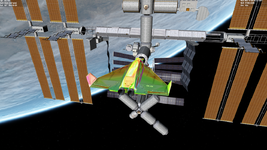
Have a fresh install of Orbiter 2024 with no addons. I get this when starting the DG docked at ISS scenario. I am using an Intel NUC with the onboard Intel iris Plus 640. Running D3D9Client.

Please help.

Untitled.png
 
Easter Egg!:cool:
Whats the cockpit look like?
 
Try disabling reflections or other graphic options 1 by 1 and see if you can narrow down the problem. You can also post your Orbiter.log, it never hurts.
 
If it lasts more than a couple of days then it's not an Easter Egg, also the cockpit should look funky too. Mine looks normal currently.
It's not, per se, a gfx problem, everything else renders fine, note the engines are normal, it's only the "skin". I take it all other vessels render without problems, the Dg skin has some specialities, you could try some extra skin addons (low-poly res?) and see if that makes a difference?
 
Last edited:
If it lasts more than a couple of days then it's not an Easter Egg, also the cockpit should look funky too. Mine looks normal currently.
It's not, per se, a gfx problem, everything else renders fine, note the engines are normal, it's only the "skin". I take it all other vessels render without problems, the Dg skin has some specialities, you could try some extra skin addons (low-poly?) and see if that makes a difference?
Try deleting Config\GC\DeltaGlider.cfg and DG-S.cfg and see if that makes a difference.
 
I have the same issue with a stock Orbiter and DG setup (my Graphics is a Intel(R) Iris(TM) Graphics 550 however).
This behavior appeared quite a long time ago (October 2022! See this post) on my machine and I could not find out what exactly is the issue.

I had to completely re-install my OS due to an SSD crash (yes that happens! o_O controller chip bricked) but still the issue is present.
I've then tried some "older" drivers, but still.

I think disabling one of the "enhanced" shaders (Metallness, I believe) was the only "fix", but it's more of a work-around than a fix.

@jarmonik might be the best one to get a grip on this, but since he can not reproduce the issue on his machine this might be very very hard. Maybe a remote session (on my machine) might be necessary, if time permits.

 
Last edited:
I have the same issue with a stock Orbiter and DG setup (my Graphics is a Intel(R) Iris(TM) Graphics 550 however).
This behavior appeared quite a long time ago (October 2022! See this post) on my machine and I could not find out what exactly is the issue.

I had to completely re-install my OS due to an SSD crash (yes that happens! o_O controller chip bricked) but still the issue is present.
I've then tried some "older" drivers, but still.

I think disabling one of the "enhanced" shaders (Metallness, I believe) was the only "fix", but it's more of a work-around than a fix.

@jarmonik might be the best one to get a grip on this, but since he can not reproduce the issue on his machine this might be very very hard. Maybe a remote session (on my machine) might be necessary, if time permits.

Were is that metallness option, I cant find it?
 
Back
Top