
You are using an out of date browser. It may not display this or other websites correctly.
You should upgrade or use an alternative browser.
You should upgrade or use an alternative browser.
Project SSV virtual cockpit textures and mesh upgrade
- Thread starter Aztronut66
- Start date


.But I'm not integrating any graphics changes into the official version, for reasons explained before in the project thread.

misha.physics
Well-known member
- Joined
- Dec 22, 2021
- Messages
- 1,535
- Reaction score
- 2,327
- Points
- 128
- Location
- Lviv
- Preferred Pronouns
- he/him
By the way, maybe I could help you somehow with applying your textures to the default Atlantis, although I'm not very familiar with texture mapping.It would take some resizing of the mesh and an update of the texture mapping. If I get time, I will look in to it.
chevelle505
Member
- Joined
- May 14, 2018
- Messages
- 90
- Reaction score
- 6
- Points
- 8
Is there ANY chance this will work in SSV For 2016? If it’s just textures it “should” work shouldn’t it?
Also, if I may just throw out a small request (if possible at some point) is there a way to maybe add another view in the middle of the mid deck so we can see/explore the entire mid deck?
Also, if I may just throw out a small request (if possible at some point) is there a way to maybe add another view in the middle of the mid deck so we can see/explore the entire mid deck?

Aztronut66
Active member
- Joined
- Sep 20, 2009
- Messages
- 51
- Reaction score
- 128
- Points
- 33
I created this add-on to work with the 2016 SSV versions. I have not tested it in 2024. Also not just textures, but adds some mesh to the original SSV VC.msh file.Is there ANY chance this will work in SSV For 2016? If it’s just textures it “should” work shouldn’t it?
There was never any plan to incorporate these changes into the official releases. This is simply a stand-alone add-on which can be installed after the SSV installation if desired.
The authors of SSV will implement changes to their model as they see fit and in order of priority. The quality of mesh and textures for the SSV is amazing and better than I could ever muster.
I began this project with the goal of improving the original smeared out panel textures (which were not a product of the SSV team). From there, I decided to make a few more changes to the original cockpit mesh.
This is just something that I enjoy messing around with in my spare time, and if the community is interested and I can contribute, that makes it all the more worth while.
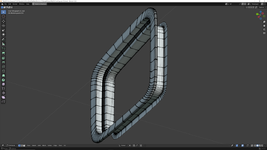
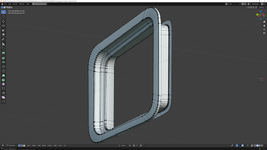
I am currently working on streamlining the mesh (eliminating any unnecessary geometry) as time allows. Any suggestions for further additions are still welcome at this point. Any release is pending the approval of the creators of SSV whom I have communicated with.

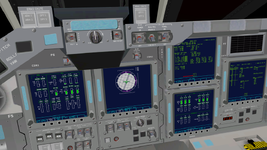
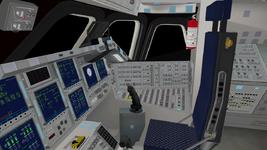
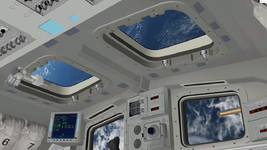
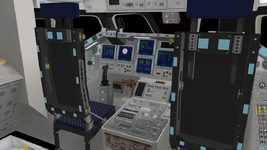
Here are a couple of before and after images of mesh cleanup, and below, the current state of the VC.
chevelle505
Member
- Joined
- May 14, 2018
- Messages
- 90
- Reaction score
- 6
- Points
- 8
All I can say is wow!!! Keep up the good work, hopefully this will be out soon, the VTX looks amazing! It’s crazy how much difference a few details make to the overall cockpit!
Will there be any additions or adjustments on the mid deck? Even maybe just a camera view or a way to “move around” the mid deck? The only view right now is just by the main hatch..would be nice to get to the middle/other side of it ..
Will there be any additions or adjustments on the mid deck? Even maybe just a camera view or a way to “move around” the mid deck? The only view right now is just by the main hatch..would be nice to get to the middle/other side of it ..


MarkWatney2015
The Desktop Orbinaut
- Joined
- Oct 14, 2016
- Messages
- 1,276
- Reaction score
- 1,632
- Points
- 128
- Location
- San Jose Del Monte, Bulacan
- Preferred Pronouns
- He/him
I wonder if the shuttle middeck is possible to include here
Aztronut66
Active member
- Joined
- Sep 20, 2009
- Messages
- 51
- Reaction score
- 128
- Points
- 33
I'm wondering in which category I should post this addon. Spacecraft, scenery, miscellaneous?
misha.physics
Well-known member
- Joined
- Dec 22, 2021
- Messages
- 1,535
- Reaction score
- 2,327
- Points
- 128
- Location
- Lviv
- Preferred Pronouns
- he/him
Maybe "Repaints".
Aztronut66
Active member
- Joined
- Sep 20, 2009
- Messages
- 51
- Reaction score
- 128
- Points
- 33
Space Shuttle Vessel Virtual Cockpit
Textures and Mesh Add-on v1.0
Released
Orbiter version: 2016
SSV versions: Tested in versions 1.3 and 1.9
Add-on Version: 1.0
Author: AztroNut66
Requirements: Space Shuttle Vessel ( https://github.com/GLS-SSV/SSV/releases )
This add-on slightly modifies two of the original virtual cockpit textures and overwrites the original mesh file (VC.msh) which now includes:
- New front panel plates and labels
- Panel vents
- Glare shield lights
- Windows (forward and aft flight deck)
- CDR and PLT seats
- F1 utility power panel
- Fire extinguisher
- Touch-ups to 2 of the original SSV texture files
Installation:
- Unzip to your Orbiter 2016 root folder
- Overwrite existing files
Addon Link https://www.orbiter-forum.com/resources/space-shuttle-vessel-virtual-cockpit-v_1-0.5678/
Enjoy!
All suggestions and comments welcome
Textures and Mesh Add-on v1.0
Released
Orbiter version: 2016
SSV versions: Tested in versions 1.3 and 1.9
Add-on Version: 1.0
Author: AztroNut66
Requirements: Space Shuttle Vessel ( https://github.com/GLS-SSV/SSV/releases )
This add-on slightly modifies two of the original virtual cockpit textures and overwrites the original mesh file (VC.msh) which now includes:
- New front panel plates and labels
- Panel vents
- Glare shield lights
- Windows (forward and aft flight deck)
- CDR and PLT seats
- F1 utility power panel
- Fire extinguisher
- Touch-ups to 2 of the original SSV texture files
Installation:
- Unzip to your Orbiter 2016 root folder
- Overwrite existing files
Addon Link https://www.orbiter-forum.com/resources/space-shuttle-vessel-virtual-cockpit-v_1-0.5678/
Enjoy!
All suggestions and comments welcome

Hey there,Is it possible to have this for Orbiter 2024 SSV?
I am running O2024 and installed this modification over the SSV install and it appears to work without any issues.
You should be good to do the same.
Cheers
Thanks, I even did not try it in Orbiter 2024 (I usually try such thingsHey there,
I am running O2024 and installed this modification over the SSV install and it appears to work without any issues.
You should be good to do the same.
Cheers
).Similar threads

- Replies
- 0
- Views
- 2K

- Replies
- 71
- Views
- 11K
- Replies
- 64
- Views
- 15K

General Question
Hey all, back into orbiter and have a question
- Replies
- 14
- Views
- 4K

