
-
ORBITER-FORUM will be temporarily closed at 2026-07-23 18:00 UTC while we complete some OF maintenance tasks. The amount of downtime is expected to take up to one hour, but probably less.
You are using an out of date browser. It may not display this or other websites correctly.
You should upgrade or use an alternative browser.
You should upgrade or use an alternative browser.
SSU Questions thread
- Thread starter Gingin
- Start date
- Status
- Not open for further replies.

So finally I got my new PC and while checking Orbiter 2016 with Windows 10 I noticed the font on the PFD and systems MFD are not quite right
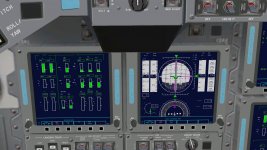
I don't remeber having this issue with Windows 7.
Any idea of what I might be missing?
I don't remeber having this issue with Windows 7.
Any idea of what I might be missing?
- Joined
- Feb 4, 2008
- Messages
- 9,758
- Reaction score
- 1,028
- Points
- 203
Did you remember to install the two SSU specific fonts?So finally I got my new PC and while checking Orbiter 2016 with Windows 10 I noticed the font on the PFD and systems MFD are not quite right
View attachment 16609
I don't remeber having this issue with Windows 7.
Any idea of what I might be missing?
Did you remember to install the two SSU specific fonts?
Totally forgot...
Can you direct me to where I can download them amd where am I supposed to put them? Tks
Another question: I ve copied and pasted my SSU install into an external drive now connected to the new PC. I ve downloaded TORTOISE SVN and Visual Studio Community 2019 but they don’t seem to recognize SSU. What am I suposed to do to be able to recompile?
Thanks

They should be in the Orbiter root folder.Totally forgot...
Can you direct me to where I can download them amd where am I supposed to put them? Tks
VS should open the solution, and probably ask you to upgrade it.Another question: I ve copied and pasted my SSU install into an external drive now connected to the new PC. I ve downloaded TORTOISE SVN and Visual Studio Community 2019 but they don’t seem to recognize SSU. What am I suposed to do to be able to recompile?
Thanks
For TortoiseSVN I'm not sure... but you probably have to create a new repository. Not sure it will like the external drive scenario... :shifty:
They should be in the Orbiter root folder.
VS should open the solution, and probably ask you to upgrade it.
For TortoiseSVN I'm not sure... but you probably have to create a new repository. Not sure it will like the external drive scenario... :shifty:
I think I made a mess: I opened “Atlantis2017.sln” in visual studio and hit “recompile”. Now when I launch a scenario SSU is invisible...
Did it compile without errors?I think I made a mess: I opened “Atlantis2017.sln” in visual studio and hit “recompile”. Now when I launch a scenario SSU is invisible...
If so, do the dlls show up in the Modules folder?
It tells me the recompile has failed. The message at the bottom says: 14 completed, 1 failed, 1 ignored
I am using Atlantis2017.sln, is that the correct one?
The dll files are there but their icon are plain (empty) while all tre others have the dll icon right
I am using Atlantis2017.sln, is that the correct one?
The dll files are there but their icon are plain (empty) while all tre others have the dll icon right
Last edited:
It tells me the recompile has failed. The message at the bottom says: 14 completed, 1 failed, 1 ignored
I am using Atlantis2017.sln, is that the correct one?
The dll files are there but their icon are plain (empty) while all tre others have the dll icon right
Which one failed?
After that do a Clean and then a Build, so compile all from scratch (if you have a new computer it shouldn't take much :lol
 , and then check if the dlls are in the Modules folder.
Did a new clean install but compiling failed. I have a bunch of errors messages (21 in total) most of them reporting "logic error"...
The SSU scenarios go CTD.
Totally lost here :shrug:
Can you post the contents of the Output window?
Can you post the contents of the Output window?
I can, but unfortunately it’s all in italian..
I can, but unfortunately it’s all in italian..
Better than nothing... :shrug:
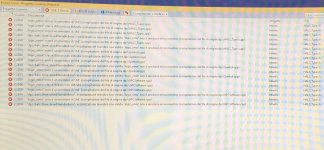

It probably would have been easier to copy the text... :shrug: :lol:
Anyway, that is Urwumpe's old/new/unused GPC code. That particular logic_error class that it can't find, either was removed from the latest C++ standard or changed location. As that code isn't used* you can delete the UnresolvedVariableError class, and its usages in the HALS_Types.cpp file. Or you can install VS2017, and use it for SSU (AFAIK you can keep both versions).
*) I'm tempted to branch the current trunk to save all those half-finished DPS files, and then removed them from the trunk.
It probably would have been easier to copy the text... :shrug: :lol:
Anyway, that is Urwumpe's old/new/unused GPC code. That particular logic_error class that it can't find, either was removed from the latest C++ standard or changed location. As that code isn't used* you can delete the UnresolvedVariableError class, and its usages in the HALS_Types.cpp file. Or you can install VS2017, and use it for SSU (AFAIK you can keep both versions).
*) I'm tempted to branch the current trunk to save all those half-finished DPS files, and then removed them from the trunk.
Thanks GLS
I'll try with VS2017
- Joined
- Feb 4, 2008
- Messages
- 9,758
- Reaction score
- 1,028
- Points
- 203
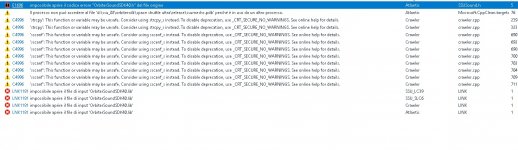
Looking at the errors, it seems like it can't find the OrbiterSound SDK files? Did you copy them over from their original locations to the Orbiter SDK folders, Lib and Include respectively? The .h file goes into Include and the .lib goes into Lib.
Looking at the errors, it seems like it can't find the OrbiterSound SDK files? Did you copy them over from their original locations to the Orbiter SDK folders, Lib and Include respectively? The .h file goes into Include and the .lib goes into Lib.
I see "OrbiterSoundSDK40.h" and "OrbiterSoundSDK40.lib" in the include folder and "Orbitersdk.lib" in the lib folder.
Is there any other file I am missing in those 2 folders?
---------- Post added at 10:29 AM ---------- Previous post was at 10:10 AM ----------
Ok, I moved the OrbiterSoundSDK40.lib file from the include to the lib folder and this seems to have resolved the issue.
Thank you guys!
PS Dave are you checking in the new Orbiter mesh soon?
GLS , in another scenario of SSU the keypad on panel C3 is can be press it's just only STS1 in orbit scenario can't be press
Yes, it is somewhat random....
- Status
- Not open for further replies.
Similar threads


- Replies
- 5
- Views
- 4K


