Project Space Shuttle Vessel

Confused? Which version should I use. I am using 1.12. but trying to get see my payloads in the shuttle?
v1.10 is the last version for Orbiter 2010, later versions are for Orbiter 2024.
v1.12 is the latest version, which contains the "payload preview" feature.
 
Hi, in which nasa documents for the space shuttle will I find the operation for the CCTV?
 
Hi, in which nasa documents for the space shuttle will I find the operation for the CCTV?
The Photo/TV checklists should have some mission-specific info, but probably more focused on the wireless cameras and the (at the time) new HDTV, none of which is implemented. Usually the camera configuration for an activity was listed in the checklist of that activity (rendezvous/docking, or payload ops). Initial powerup (I think) is listed in the Post Insertion checklist. General information is available in the SCOM (Shuttle Crew Operations Manual).
 
Thanks. I got it to work in 2024.

Any suggestions on this? I don't want to built payloads for 2016 and 2024. Basically the same. But for me I have a lot of addon that are taking up space. I wonder if there is a way to link the 2 payloads together? or do I just have to have 2016 payloads in one folder and the 2024 payloads in another?
 
Thanks. I got it to work in 2024.

Any suggestions on this? I don't want to built payloads for 2016 and 2024. Basically the same. But for me I have a lot of addon that are taking up space. I wonder if there is a way to link the 2 payloads together? or do I just have to have 2016 payloads in one folder and the 2024 payloads in another?
As far as I remember, nothing changed in the payload interface in the last few SSV versions....
Also, thread for payloads: https://www.orbiter-forum.com/threads/space-shuttle-vessel-payload-development-thread.42248/
 
Thanks. I guess my question is there a way to say if my payloads were built for 2016 orbiter and I want them to be used in 2024. A way so that I don't have 2 separate payload folders.
 
Thanks. I guess my question is there a way to say if my payloads were built for 2016 orbiter and I want them to be used in 2024. A way so that I don't have 2 separate payload folders.
You should probably look up "symbolic links".
 
Are there plans for a NASSP Style Checklist for SSV?
Hmm, not at the moment... still too many subsystems and GPC software missing.
Ideally, the (original) checklists would be shown in 3D checklists in the virtual cockpit, that one could flip with a click, but AFAIK there is no good way of showing pdfs in there. 😒
 
A quick update:

Still working the GPC/IDP branch, cleaning up some I-loads and moving some displays forward, but mostly just reading and thinking about how the displays where handled in the GPC, and in particular about "control segments". It seems I'll have to introduce this concept to provide a better handling of the displays and the processes that supported them, and as an extension, of the Major Modes and OPS, as it seems like the "user interface" was the base of the "applications software". Still need to read (and understand) more to be sure I'll not be replacing one set of problems with another, and end up in the same place or worst.

Another active work area, this one for the near future, is an improvement of the Mission Editor, to have it follow the MVVM concept a bit closer, hopefully allowing a separation of the actual mission data from the presentation of such data. Most of the work has been done, but the Payloads part is giving me a few headaches... it seems I sorted it out by improving the design: did away with all the controls in that tab, and now there's just have a big table with all the payloads, with each type having its parameters in its own window. A 2-for-the-price-of-1 solution, which will allow in the future the addition of mass information to the payloads (and the vehicle), and display it all, and the total, in the same place!

 
Another quick update!
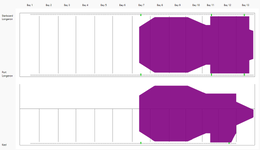
The "Payload tab issue" in Mission Editor is mostly solved now, with maybe some steps back, followed by some steps forward. The existing PLB diagram shown, in the Active and Passive payload window is (very likely) going away, and instead a general PLB view window is added, showing top and side (port) views of the PLB and all the current payloads, plus upper stages/Airlock/EDO pallet/etc...
Proof of concept, showing the Centaur G' + CISS:
me_plb_view_cgp.PNG

The "known parts" (upper stages, etc) will be shown via simple polygons, positioned +/- in the correct location (IMO there is no point in going subatomic accurate here). The "unknown parts" (payloads) will be shown as rectangles bounded by their PLIDs, as I don't know what their size and shape is. Maybe in the future the user could provide a list of points with the actual shape...
There are still many decisions to be made to have this work with all payload types, plus making the polygons for the rest of the "know parts", but it seems the end result will be more useful than what existed before, as it provides a more complete picture of the PLB, even if it is not super accurate.
 
Im having trouble getting OMS-2 to put me in a circular orbit. How do you people set up and execute OMS-2?
When you setup a mission in Mission Editor, in the Launch tab there is a frame called "Ascent Target" with controls to define the target orbit, which sets the MECO and OMS-1/2 targets.
For the OMS-1/2 burns, when you get into the MM104 and MM105 displays, the calculated parameters will be pre-loaded, so you just have to execute them.
In the end, if all goes well, you should end up very close to the intended orbit (a 1 or 2 NM error is inside the expected tolerance).
 
  • Like
Reactions: GLS
How do I go about learning how to do the rendezvous operations in shuttle?
Also, the "Shuttle FDO MFD" https://www.orbiter-forum.com/threads/shuttle-fdo-mfd.36912/ implements the logic needed to calculate the early burns during a rendezvous (it can do all the calculations, but usually the last burns were calculated onboard).

Just take your time, read, learn and expect to fail in the first tries, because pretty much everybody else did too.
 
Do you know in general how to rendezvous with other vessels? Its not mandatory, but makes it easier to understand the rendezvous operations.

Also, can this report help you?


(I'd bookmark it)
Thanks for the link, I will definitely give it a read! I am familiar with rendezvous in general, im mainly just confused about the (many) burns needed and how to set them up.
 
Thanks for the link, I will definitely give it a read! I am familiar with rendezvous in general, im mainly just confused about the (many) burns needed and how to set them up.

The introduction might be a bit math heavy sometimes, but it sure explains a lot about the principles of the different kinds of rendezvous with the Shuttle. And yes, the number of burns is mostly for not wasting propellant while not having precise knowledge about position and speed of yourself and the target. Instead of few big burns, it breaks the rendezvous down into smaller steps, that each allows more precise navigation for the next step.
 
Back
Top