Project Space Shuttle Vessel

Nice. Will this feature work at other pads? I will help visually place payloads

 
Getting rid of the obsolete PanelA7A3 files and mentions fixed the C2065 errors mentioned in the issue. The one other thing is that SSV_VAB complains that it can't find lua.lib, can I remove it from the Additional Dependencies of the project?
 
The one other thing is that SSV_VAB complains that it can't find lua.lib, can I remove it from the Additional Dependencies of the project?
That vessel currently does nothing, so any errors (I get none) are irrelevant.
 
That vessel currently does nothing, so any errors (I get none) are irrelevant.
OK, so I'll just ignore it (it just fails that particular build for me).
 
Release Tuesday!!! :hailprobe:

Space Shuttle Vessel v1.12 is out! https://github.com/GLS-SSV/SSV/releases/tag/v1.12

It adds the Payload Bay preview feature, so users checkout the payload bay while setting up payloads in Mission Editor. Also new is the IUS propellant load calculator, making up much easier to setup the IUS so it delivers a payload to a target orbit. Smaller changes include improved launch pad meshes, a fix for the scenario start time, and small corrections and improvements.
 
Noticed that the MPS isn't following the throttle profile set in the ILOADS. It's a problem with the low throttle setting, it won't go to whatever you set it to and is only throttling down to 72, rather than 67 or 65. This can be most easily seen with STS-1 where the bottom of the 1st stage throttle bucket should 65, but it it only goes to 72 which wasn't a thing until STS-88 and the introduction of the Block IIA SSME which is missing as an engine selection in the Mission Editor.
 
Noticed that the MPS isn't following the throttle profile set in the ILOADS. It's a problem with the low throttle setting, it won't go to whatever you set it to and is only throttling down to 72, rather than 67 or 65. This can be most easily seen with STS-1 where the bottom of the 1st stage throttle bucket should 65, but it it only goes to 72 which wasn't a thing until STS-88 and the introduction of the Block IIA SSME which is missing as an engine selection in the Mission Editor.
The THROT table is not fixed. The 2º and 3º (or 3º and 4º?) entries are modified at ~20s by the Adaptive Guidance Throttling (AGT) function, which checks the performance of the SRBs by seeing how much time it took to reach a certain velocity.
Too soon means the SRBs are hot, and the SSMEs will be throttled down more (by shifting down the values in the table) to keep the vehicle intact, too late and the SSMEs will not throttle down as much (by shifting up the values in the table), to avoid a performance loss. The current controls for AGT are the VREF_ADJUST and TREF_ADJUST I-loads, but I'm pretty sure more are missing, to then calculate what the throttle offset is. AFAIK, those I-loads were changed from flight to flight (with the THROT table), to handle vehicle mass, ascent profile (another 5 or 6 missing tables), SRB bulk temperature and atmospheric conditions. Currently, those two have generic values.

There are too many things missing in the ascent guidance (and also in the FCS) to expect the throttles to behave exactly be as in real life. The 72% is just what the AGT ended up calculating, and not influenced by the SSME version.

Also, only Block II engines are available.
 
Small update: I've been working on improving the logic to decide which DPS display is to be shown, and especially on how to switch the command of a DK bus from the GNC GPC to/from the SM GPC, as a response to the MF switch being moved.
The previous implementation had both GPCs polling the DEU/IDP and only the one with the selected MF would then react to keystrokes and display requests (<- this was backwards). The correct way is to use the ICC bus to communicate the MF change to the other GPC.
It took a while to figure things out, but I think I got it: when the MF change is detected, it actually isn't processed right away, but instead it is placed in the ICC buffer to be sent to the other GPCs. Eventually the communication happens, and then the received buffer is processed, (and here is the trick) a well as the own buffer, so all GPCs will process the same MF request at the same time. They all determine that a certain GPC should take over, and it will, and the one losing control will let go, with both sending a fake keystroke to the display side of things to terminate/initiate the display.

As show this in action, and also to test a screen recording of Orbiter (it took 10 attempts to get a good result), I made a small video:
https://streamin.me/v/f510d316
It starts with GPC-1 (GNC) commanding DK-1, MF switch goes to SM and GPC-2 (SM) takes over, sends the static part of the display and then starts updating the dynamic part, and GPC-1 stops polling and sending display updates. I then switch between GNC and SM a few times, finally end up in PL, which neither GPCs likes so both stop talking to the IDP, which then announces a "Big X" (no display updates) and "Poll Fail" (no polling). This is an "oops" situation, as it should have switched to OPS 0, but I'm not sure how much trouble that will be. Anyway, it is a hole that will have to be covered somehow, as it currently would mean permanent loss of that DK bus.

So I now have 2 GPCs in a makeshift "Common Set"! I'm not sure how much I'll push this concept right now, as there are only 2 GPCs, with fixed MFs, so reconfiguration options are limited, but this ICC door being now open means the GPCs can talk to each other about the Ku-band antenna. I'm not worrying about that now, but that is a nice thing that eventually will happen.

Next I have to figure out how to launch and terminate the "SPEC modules", that run when a SPEC display is up, gathering data for display and processing user commands. This was one of the reasons I started reworking the display logic.

Also, the clock and timer at the top right of the display is now constantly being set by the GPC, and the IDP actually keeps it running even without GPC updates, which is visible at the end of the video. To control the time features on the GPC side, I still need to make the time processor module and SPEC 2.
 
Well, flight software-wise, all GPCs assigned to that IDP are polling it. But only one is sending commands to the IDP, while all receive the same data. So, its only one IO operation shared by multiple GPCs. That is why synchronization is so important - otherwise the passive GPCs could get data for the wrong request, since the wait-for-index instruction (WIX) of the I/O processor alone does not know for which reply with data from the subsystem they react.

The shuttle DPS made pretty good use of its limited resources, especially for that time. A more recent CAN bus is slightly more efficient, but less flexible.
 
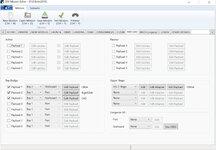
I get this error:

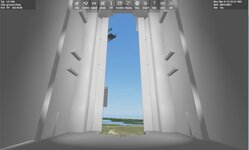
But going to the preview screen I get this. No shuttle there? I tried on a preset one and the same.
 

Attachments

  • ssvlink.jpg
    ssvlink.jpg
    41 KB · Views: 5
  • ssvsetup.jpg
    ssvsetup.jpg
    76.9 KB · Views: 5
  • ssvview1.jpg
    ssvview1.jpg
    42 KB · Views: 5
Well, flight software-wise, all GPCs assigned to that IDP are polling it. But only one is sending commands to the IDP, while all receive the same data. So, its only one IO operation shared by multiple GPCs. That is why synchronization is so important - otherwise the passive GPCs could get data for the wrong request, since the wait-for-index instruction (WIX) of the I/O processor alone does not know for which reply with data from the subsystem they react.
I'm pretty sure that only GPCs in a Redundant Set have those "protected transactions" (one commanding, all listening), but I'm not doing that now, as I just barely have a Common Set. Probably a good test on synchronization before implementing a RS, is to add the BFS and its pre-engage bus "spying" to collect data. Different concept of course, but the structural changes needed would probably be similar. Anyway, all in the future as right now I need to limit the scope to have something usable, otherwise I'll never finish v2.0.


I get this error:

But going to the preview screen I get this. No shuttle there? I tried on a preset one and the same.
The last SSV for Orbiter 2016 is v1.10, so the latest v1.12 will probably not work.
 
I'm pretty sure that only GPCs in a Redundant Set have those "protected transactions" (one commanding, all listening), but I'm not doing that now, as I just barely have a Common Set. Probably a good test on synchronization before implementing a RS, is to add the BFS and its pre-engage bus "spying" to collect data. Different concept of course, but the structural changes needed would probably be similar. Anyway, all in the future as right now I need to limit the scope to have something usable, otherwise I'll never finish v2.0.


The last SSV for Orbiter 2016 is v1.10, so the latest v1.12 will probably not work.
Oh. It was 1.12. Oh so the preview does not work for 1.12?
 
Last edited:
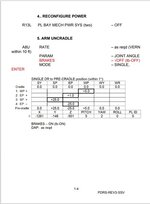
Hi its been awhile since I used the SSV. I'm stuck on releasing the RMS. So, from RMS PWRUP I have switched to Single joint mode, and tried to move each joint individually after the uncradle of the RMS. Following the PDRS checklist, SECTION 2: RMS PWRUP, step 7: ARM UNCRADLE. Still following everything I still seems to get nowhere. The table with the values? Must I enter that values in SM SPEC 94?
 

Attachments

  • Screenshot_20250626_115004_OneDrive.jpg
    Screenshot_20250626_115004_OneDrive.jpg
    28.9 KB · Views: 7
Hi its been awhile since I used the SSV. I'm stuck on releasing the RMS. So, from RMS PWRUP I have switched to Single joint mode, and tried to move each joint individually after the uncradle of the RMS. Following the PDRS checklist, SECTION 2: RMS PWRUP, step 7: ARM UNCRADLE. Still following everything I still seems to get nowhere. The table with the values? Must I enter that values in SM SPEC 94?
Are you switching keyboard control from RCS to RMS? (Ctrl+A)
Did you release the Shoulder Brace?

BTW: there is still no GPC in RMS operations, so it is still totally controlled from panel A8U.
 
Are you switching keyboard control from RCS to RMS? (Ctrl+A)
Did you release the Shoulder Brace?

BTW: there is still no GPC in RMS operations, so it is still totally controlled from panel A8U.
Oops forgot to switch keyboard control from RCS to RMS 🤦‍♂️ it's working now thank you (y)
 
Confused? Which version should I use. I am using 1.12. but trying to get see my payloads in the shuttle?
 
Back
Top