Project Space Shuttle Vessel

So final question…what’s the difference between MECO Altitude and MECO Target altitude? One says 52nm and the other is 160 along with pm’s 2 at 160…
"MECO Altitude" is the altitude at MECO, lowered during the program for performance, and also as MECO happened further North with the high inclination missions.
"MECO Target Altitude" is the (targeted) apogee at MECO. For a Direct Insertion ascent, that wants a 160NM circular orbit, that value would be 160NM. For a Standard Insertion ascent, the MECO target altitude is fixed (due to the fixed MECO target), and instead there is the "OMS-1 Target Altitude", which is the target apogee post OMS-1 burn.


what do I need to change to get the proper altitude to match the ISS?
That is not how rendezvous works (at least in the shuttle). In those rendezvous missions, that "altitude match" is done by the rendezvous burns. The initial target orbit comes from the rendezvous profile, which can be determined using the FDO MFD.


Putting all this together:
  • if you want a circular orbit, both "MECO/OMS-1 Target Alt" and "OMS-2 Target Alt" boxes should have the same value;
  • if you want an eliptical orbit, one box should have the perigee altitude, and the other the apogee altitude, usually the apogee is set by the MECO/OMS-1, and the perigee with the OMS-2.
 
If your MECO altitude was less than your OMS2 altitude wouldn’t you have an eccentric orbit instead of a circular orbit?

In any case, so I would set target altitude for the same as the ISS (whatever that is) ?
No. The MECO altitude is always less than your OMS-2 altitude as OMS-2 is meant to circularize the orbit, to lift the perigee out of the atmosphere and prevent an early entry. Remember, initial ascent trajectory is sub-orbital to ensure that the massive ET doesn't fall in populated areas. Hence the need to lift the perigee out of the atmosphere and properly enter a stable orbit. Initially OMS-1 was used to lift both perigee and apogee and OMS-2 was the later circularization burn to raise the perigee.

The OMS-2 altitude should be whatever sets up a good initial rendezvous trajectory as it is the first rendezvous maneuver which is followed by the NC-1 burn a few hours into the mission.
 
I also see orbit targeting on the next orbit tab…now I’m real confused lol..in short what needs to be set for a mission to the ISS?
The "Orbit Targeting" set is used for the onboard calculations of the final rendezvous burns, and they depend in the altitude of the target, thus there are several options. Just pick the one closest to the altitude of your target. They are not related to the ascent targets.


BTW: you can take a screenshot directly in Windows, which will have much better results.
 
BTW: you can take a screenshot directly in Windows, which will have much better results.

Recommendation for @chevelle505 there: Try Windows key + Shift + S for opening the snipping tool. On the top of the screen, you have then the choice to select which part of the screen you want to save as screenshot : a rectangle, the selected window, the full screen or any closed shape you can draw with your mouse. The image is copied into the clipboard, you can directly paste it into an Orbiter post (in the editor field, which you use for writing or editing your posts).

 
Ok so, as far as the “screen shots” I know lol, I was just being lazy rushing out the door to work and snapped that from my phone just to illustrate what I was talking about, but yeah it’s crap, sorry, I’ll post actual screen shot’s from now on.

So in short, if I understand this right..MECO Target altitude and OMS2 target is what actually determines my altitude. For example 160x160 would be circular and something like 200x180 would be elliptical? And what I put in those two boxes is the actual orbit in sim that I will end up at..right?

So, MECO Alt is where the engines actually shut down…where as MECO Target altitude is the final apogee I will “coast” up to, correct?

I’m still foggy on the relationship between MECO altitude and target altitude, in other words….for a 160x160 nm orbit..what’s the difference in MECO altitude being 52nm vs 60nm? Why would I want to shut them down at one altitude vs the other?
 
So in short, if I understand this right..MECO Target altitude and OMS2 target is what actually determines my altitude. For example 160x160 would be circular and something like 200x180 would be elliptical? And what I put in those two boxes is the actual orbit in sim that I will end up at..right?
Yes, if you do the OMS burns correctly. You might get 1 or 2 NM difference, but that should be no problem.


So, MECO Alt is where the engines actually shut down…where as MECO Target altitude is the final apogee I will “coast” up to, correct?
Yes.


I’m still foggy on the relationship between MECO altitude and target altitude, in other words….for a 160x160 nm orbit..what’s the difference in MECO altitude being 52nm vs 60nm? Why would I want to shut them down at one altitude vs the other?
Performance. Lower = better, but too low and the tank would rupture before MECO due to the aerodynamic heating.
Not a problem in Orbiter, but in real life they could only use the 52NM in a high-inclination ascent, because the radius of the Earth decreases as the latitude increases, and those ascents would have MECO happening further North than a lower-inclination ascent.
For ISS missions it was 52NM.
 
THANK YOU GLS!!! That clears it up, got it nailed down now! Trying to get the hang of what all I can change/customize with the mission editor..absolutely awsome, just launched this morning to the ISS in Endeavour.

BTW, couple more questions, is there any chance of making the scenario editor capable of starting beyond the 9 minute hold? (Like T-20 or 30 minutes?)
And two, and I used to know this but can’t remember, it’s either in ops 201 or 202 I think but you could do the flight controls test before reentry..it’s was like spec 20 or something?
 
Last edited:
THANK YOU GLS!!! That clears it up, got it nailed down now! Trying to get the hang of what all I can change/customize with the mission editor..absolutely awsome, just launched this morning to the ISS in Endeavour.

BTW, couple more questions, is there any chance of making the scenario editor capable of starting beyond the 9 minute hold? (Like T-20 or 30 minutes?)
And two, and I used to know this but can’t remember, it’s either in ops 201 or 202 I think but you could do the flight controls test before reentry..it’s was like spec 20 or something?
OPS8 has all of the pre-entry checkout stuff. Just execute the FCS CHECKOUT steps in the generic Orbit Ops FDF (page 7-13), just skip the SECONDARY ACTUATOR CHECK (APU) on 7-17 and go directly to step 6, APU SHUTDOWN and then head back to OPS2 to regain the DAP.
 
BTW, couple more questions, is there any chance of making the scenario editor capable of starting beyond the 9 minute hold? (Like T-20 or 30 minutes?)
Like I mentioned previously, the LPS would need an update to handle holds (and setting them up), plus the GPCs need to propely talk to the ground... all a bit in the future for now.
 
Ok so I tried to enter “ops 8” and nothing, says illegal entry. What exactly do I need to enter into the keypad?
 
Only from GNC 201.
 
So I have to go in OPS 201 PRO, then OPS 801 PRO? Pretty sure I was in 201 and tried 801 pro….ill try it again to make sure
 
Can someone try this to see you can grapple it. It is a IECM. We need to come up with a new texture for her.
Thanks
I rebuilt the grapple fixture
 

Attachments

  • ssviecm.zip
    ssviecm.zip
    133.1 KB · Views: 2
  • iecmssvnew.jpg
    iecmssvnew.jpg
    27.9 KB · Views: 6
I also have a setting to directly use the shuttle's payload retention system to attach the IECM
P -0.02 -0.06 -3.96 0 0 -1 0 -1 0 XS


I did not you could do that. Fyi that is not the new mesh. Also the iecm attached to the top of the dfi?
 
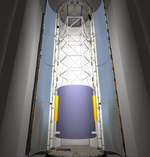
Finally got the PCR view in SLC-6, so we can see our spy sats before launch!
slc6pcr.PNG

21 January:
What would be nice to have is a "pre-launch view" of the payload, maybe in the OPF, or better, at the pad in the PCR...
Hmm, this might not be that time consuming: a button in ME for this feature, it creates a temporary scenario and launches it automatically. The scenario would be +/- the launch scenario but with a dormant vehicle, all tanks empty and PLBDs open, and the user would be in the PCR and have the capability to "fly around" to check out the payload bay.
Famous last words 😒

I now have to play with this for a few days to tie-up loose ends and make sure it works well, and then a new version will be released.


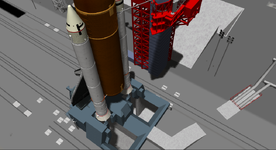
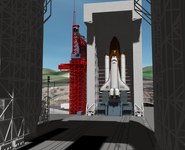
Bonus: a few glamour shots of SLC-6:
slc6a.PNG
slc6b.PNG
slc6c.PNG
 
Back
Top