Space Shuttle Ultra development thread

Perhaps CameraMFD by computerex (?) would be useful? :)
That would be Vanguard, not computerx. And I have this problem that it freezes Orbiter whenever I bring it up in VC mode. Normal "glass-cockpit" mode works fine, but instant freeze when I enter VC mode.
 
I can't bring up OPS 101 on the launch pad, even after pressing resume.
 
Donamy: OPS 101 doesn't have a display associated with it yet.
DaveS: FSS strut animation should be fixed now. I've also added the RSS sounds.


-----Post Added-----


The FSS OWP panel is now in front of the shuttle wing. I'm working on fixing this.


-----Post Added-----


Should be fixed now.
 
Donamy: OPS 101 doesn't have a display associated with it yet.
DaveS: FSS strut animation should be fixed now. I've also added the RSS sounds.


-----Post Added-----


The FSS OWP panel is now in front of the shuttle wing. I'm working on fixing this.


-----Post Added-----


Should be fixed now.

It's all good! The only outstanding animation stuff on the pad is now the following:
  • RSS upper +Y OWP
  • RSS "triple flips"
  • FSS GH2 vent arm
Not much at all. Then I'm going to sign off pad A as "release-ready". For now we could make the "triple flips" and +Y OWP sections part of the same animation. We could polish them at a later, more convieniet time.


-----Post Added-----


Checked in: Added the upper RSS OWP animation. Timings of the animations:
Upper OWP: 2 min, 20 sec
Lower OWP: 4 min, 07 sec


-----Post Added-----


Now it would be a good time for someone to take a look on how to best implement the RSS "garage door" animation and the GH2 vent arm. The Gh2 vent arm is a rather simple animation, it just falls straight down to a vertical position(it rotates) at T0.

Currently it is just static attached to the ET.
 
I would suggest scaling the door. This may work

RANGE=(0.,1.)
TYPE=SCALE
SCALE=(1,0.1,1)
REF=(-7.32,68.38,-1.82)


-----Post Added-----


How are the OPS pages made? I would be willing to help make them.
 
How are the OPS pages made? I would be willing to help make them.

Actually, I think OPS 101 has a display associated... it should be the same as OPS 102 & 103.


My idea for the next version of the DPS displays was to split them into maximal three parts: The GPC software which provides the data, the IDP software which verifies and formats inputs and the MDU software, which displays the critical format data/drawings, which gets used for most important displays.

I just did still not find time finishing the basic GPC functions for implementing it, so I/O and task scheduling are simulated.
 
I would suggest scaling the door. This may work

RANGE=(0.,1.)
TYPE=SCALE
SCALE=(1,0.1,1)
REF=(-7.32,68.38,-1.82)
Thanks for the data. Works nicely. Now just to find the best way to implement it.
 
I think just before RSS Roll back would be a good time.
 
I think just before RSS Roll back would be a good time.
And this is now fully implemented. The "garage door" animation is now part of the RSS Rotation animation sequence which now before actual RSS Rotation opens the "garage door" and after the Rotation is complete it lowers it again for launch.

Now to implement the final RSS animation, the "triple flips".


-----Post Added-----


OK, the upper "triple flip" is now animated now to move on to the lower one. Once this is complete, I'll check in the new stuff.


-----Post Added-----


All the RSS animations are now done and checked in! The "triple flips" are part of the main RSS OWP animation sequence while the "garage door" is part of the main RSS Rotation animation sequence.
 
I'll start on the RSS/FSS animation dialog.
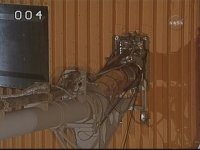
Great! Will you also be adding the FSS GH2 vent arm animation? I have included two screengrabs of the GH2 vent arm attached to the ET.
 

Attachments

  • LH2 vent arm, Pad A, STS-122 attempt 1.jpg
    LH2 vent arm, Pad A, STS-122 attempt 1.jpg
    21.7 KB · Views: 620
  • LH2VA_STS122_00026.jpg
    LH2VA_STS122_00026.jpg
    29 KB · Views: 539
I'll add the vent arm animation once I finish the dialog.
Great! Feel free to tune the animations if you want. I just did them in the fastest way I could think of.
 
I've checked in the dialog for the pad animations. I've also adjusted the animation timings.
 
Hmmm, not compiling for me for some reason. First I got an error about it being able to find "afxres.h", so I added the correct include path. Now I'm getting this error message:

1>..\..\Modules\SSUPad.dll : fatal error LNK1169: one or more multiply defined symbols found
 
Hmmm, not compiling for me for some reason. First I got an error about it being able to find "afxres.h", so I added the correct include path. Now I'm getting this error message:

1>....ModulesSSUPad.dll : fatal error LNK1169: one or more multiply defined symbols found

Post the rest of the error message, but I think I saw something like this as well yesterday. The MLP project file needs to have some ignores added to it. I copied the linker settings from Atlantis, and then played with them until it worked. I have:

SSU_Pad->Properties->Linker->Input
Input: orbiter.lib orbitersdk.lib DlgCtrl.lib
Ignore All Default Libraries: No
Ignore: msvcirt.lib;MSVCRTD.lib;msvcrt.lib

And for that afxres.h thing (for those who haven't fixed it themselves yet):
SSU_Pad->Properties->Resources
Additional Include Directories: "c:\Program Files\Microsoft SDK\include\Win64\mfc";"c:\Program Files\Microsoft SDK\Include\mfc";"c:\Program Files\Microsoft SDK\Include"

You might have to change the beginnings of these to compile for you.

Is anyone official keeper of the project files, and willing to check these fixes in? I would, but my setup may not match others.

Also, I have an idea for a GLS/LCC display, effectively a virtual cockpit for LCC. For now, it's the famous countdown clock, along with a billboard showing the current GLS status
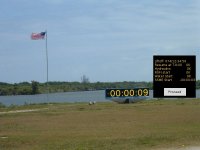
LCC Cockpit.JPG

So, each line is a system being monitored, and its current status if OK or the time by which it needs to be made OK in order to launch on time. For instance, the APU/hydraulics. Checklist says to turn them on at T-6:00. At T-4:00 (let's say), GLS checks if the APUs are all running and hydraulic pressure is set to normal. If not, it holds the count.

For the T-9:00 hold, we have a "Proceed" button which is pressed during the hold which changes the "Cleared to pick up count at T-9:00" status to OK. Then the system automatically picks up the count to eliminate manual timing errors. I presume the real launch system does something like this.

Also some systems aren't monitored, just display time until the system activates. Things like GOX hood, white room, water, ROFI, etc.

I imagine that this will eventually be put inside the firing room as a true virtual cockpit for LCC.

I'll try to work some of this out and post a prototype soon.

 
Would it be pssoible to have single RAD DEPLOYs/STOWs? Procedures are in the generic ORBIT OPS checklist, 5-15, 5-16, 5-17 and 5-18.
 
Would it be pssoible to have single RAD DEPLOYs/STOWs? Procedures are in the generic ORBIT OPS checklist, 5-15, 5-16, 5-17 and 5-18.

Should be possible, but would require some small changes to the animation code first.
 
Great! Seems like the only major thing to support is pulling a few MCA CBs. Also, could you restore proper animations of the A7L switches and buttons? Donamy checked in updated meshes for it and A6L which unfortunately broke the A7L animations.
 
Back
Top