- Joined
- Feb 4, 2008
- Messages
- 9,761
- Reaction score
- 1,030
- Points
- 203
Tried that and not much change for the better.Looks like the Offset in Y direction is too extreme, it is 20 cm higher as the yaw/pitch joins.

Tried that and not much change for the better.Looks like the Offset in Y direction is too extreme, it is 20 cm higher as the yaw/pitch joins.

Tried that and not much change for the better.
It's this one right:Did you correct the right animation?
[SIZE=2][COLOR=#0000ff]
static[/COLOR][/SIZE][SIZE=2] UINT RMSEndEffectorGrp[1] = {GRP_endeffecter_RMS};
rms_anim[5] = [/SIZE][SIZE=2][COLOR=#0000ff]new[/COLOR][/SIZE][SIZE=2] MGROUP_ROTATE (ridx, RMSEndEffectorGrp, 1,
_V(-2.86, 2.133, -5.055), _V(0, 0, 1), ([/SIZE][SIZE=2][COLOR=#0000ff]float[/COLOR][/SIZE][SIZE=2])(894*RAD)); [/SIZE][SIZE=2][COLOR=#008000]// -447 .. +447
[/COLOR][/SIZE][SIZE=2]anim_arm_wr = CreateAnimation (0.5);
parent = AddAnimationComponent (anim_arm_wr, 0, 1, rms_anim[5], parent);
[/SIZE]Thanks Donamy! Did you read my earlier message about the Canada logos?Urwumpe,
The wrist does roll !!!
The endeffector with camera to line up on grapple target.
I will redo the animations exact in a .ini file and send them to you Dave.
It's this one right:
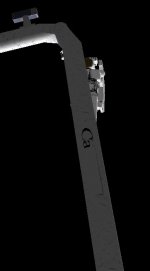
There should be 2 rectangles that are the logo's, Did they get deleted ??Thanks Donamy! Did you read my earlier message about the Canada logos?
OK, thanks. I'll be standing by for that one and the ini file with the new coordiantes.Your using an old RMs.dds I'll send you the newer one.
Well, it would be nice to have it as another RMS view.Question : Should I break up the mesh and have an elbow camera usable ??
I'm sure if you add it, someone would be inclined to add the code to make it work.Can it be used ??
Maybe SetClipRadius could be used?I wish the chopping could be fixed with the wrist camera.
The wrist VECTOR3 list has a separate animation because combining it with the wrist roll animation causes the attachment point and the wrist to roll at different rates.Also I think we could make the animation code a bit less complex by making the tip vector calculations a child of the yaw actuator, instead of adding a unused rotation...
Thanks, got the files but the Canada logo problem still remains.I doubt you're still awake, but I finished it. The camera works nicely.
;Elbowcam pan
[ANIM_SEQ_8]
KEY=3
DURATION=10.
INIT_POS=0.5
PAUSE=1

;Elbowcam tilt
[ANIM_SEQ_9]
KEY=7
DURATION=18.
INIT_POS=0.2
PAUSE=1

; elbowcam pan left
[ANIM_COMP_8]
SEQ=8
RANGE=(0,1)
GROUPS=6
TYPE=ROTATE
ROT_AXIS=(0, 1, 0)
ROT_PNT=(-2.77,2.38,2.07)
ANGLE=360.
PARENT=2

; elbowcam tilt up
[ANIM_COMP_9]
SEQ=9
RANGE=(0,1)
GROUPS=5
TYPE=ROTATE
ROT_AXIS=(1, 0, 0)
ROT_PNT=(-2.77,2.66,2.07)
ANGLE=290.
PARENT=8