
You are using an out of date browser. It may not display this or other websites correctly.
You should upgrade or use an alternative browser.
You should upgrade or use an alternative browser.
Space Shuttle Ultra 1.25 Revision B development
- Thread starter Urwumpe
- Start date
Haven't looked at it too closely yet, but it might be helpful when we work on properly berthing/unberthing payloads.SiameseCat: Is this official ICD of any use to you: http://www.unitedspacealliance.com/icd/core/cor14A.pdf. It deals with the Payload Deployment and Retrieval System(PDRS).
- Joined
- Feb 4, 2008
- Messages
- 9,753
- Reaction score
- 1,024
- Points
- 203
Urwumpe: Do you think you could check in the fixed loading of the ODS ring state? I have noted some discrepancies with the ODS ring animation and not having to extend the ring all the time would be of great help!

- Joined
- Feb 6, 2008
- Messages
- 38,965
- Reaction score
- 3,937
- Points
- 203
- Location
- Wolfsburg
- Preferred Pronouns
- Sire
Urwumpe: Do you think you could check in the fixed loading of the ODS ring state? I have noted some discrepancies with the ODS ring animation and not having to extend the ring all the time would be of great help!
Not too soon. I think I fixed it already some time back but I can't commit this file yet.
- Joined
- Feb 4, 2008
- Messages
- 9,753
- Reaction score
- 1,024
- Points
- 203
Just an update on the VAB:
Discovered quite a few mistakes with it. The only way to fix it was to remove almost every parts of it and start from scratch with the main structure beams and sections.
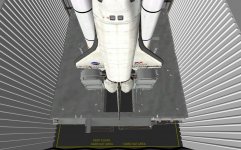
But the rebuilding effort is progressing nicely so it should be rebuilt in no time. Attached to this post is a screenshot of Discovery on MLP-2 in High Bay 1 taken in Orbiter. This was done as a fit check and everything is good on the fit checks.
Discovered quite a few mistakes with it. The only way to fix it was to remove almost every parts of it and start from scratch with the main structure beams and sections.
But the rebuilding effort is progressing nicely so it should be rebuilt in no time. Attached to this post is a screenshot of Discovery on MLP-2 in High Bay 1 taken in Orbiter. This was done as a fit check and everything is good on the fit checks.
Attachments

Pilot7893
Epik spaec mishun!
Oh wow, the next version is coming with a VAB?
- Joined
- Feb 4, 2008
- Messages
- 9,753
- Reaction score
- 1,024
- Points
- 203
Well, that's my hope. Along with a Crawler Transporter with accurate driver cab operations, along with realistic and accurate Laser Docking System operation and behavior.Oh wow, the next version is coming with a VAB?
---------- Post added at 01:06 AM ---------- Previous post was at 12:47 AM ----------
SiameseCat: Just compiled the rev 711 sources and they do not work. They produce CTDs. All was fine with the 710 sources, not CTDs or anything.
I undid one of the changes; try it now.
- Joined
- Feb 4, 2008
- Messages
- 9,753
- Reaction score
- 1,024
- Points
- 203
No CTDs.I undid one of the changes; try it now.
- Joined
- Feb 4, 2008
- Messages
- 9,753
- Reaction score
- 1,024
- Points
- 203
I have been thinking a bit on the orbiter choice. This is my solution which is fairly elegant and simple from an end user POV.
If you ever used the Shuttle Fleet you know that you can specify which orbiter and which variant of it in the scenario file through these two lines:
How about we do the same but in the mission files? We already have the line Orbiter= but it appears to do nothing. How about we activate it and add a variant line.
I'm thinking it could work this way:
The line Orbiter=Discovery would tell the code to begin parsing the Textures\SSU\ folder for a texture that starts with Discovery_
Then we have the second line which would complete the parsing:
Variant=Mod3. This line would tell the code to complete the texture parsing by looking for a file with the name of Discovery_Mod3.dds.
This way we could have several textures as the orbiters have never been truly identical to each other. Each other has had it's own nuances and markings on the exterior.
Just take a look on the orbiter references here: http://www.axmpaperspacescalemodels.com/REFERENCE.html
So, how does that sound? Too complicated?
If you ever used the Shuttle Fleet you know that you can specify which orbiter and which variant of it in the scenario file through these two lines:
Code:
  OV- 105
  ORIGINAL
How about we do the same but in the mission files? We already have the line Orbiter= but it appears to do nothing. How about we activate it and add a variant line.
I'm thinking it could work this way:
The line Orbiter=Discovery would tell the code to begin parsing the Textures\SSU\ folder for a texture that starts with Discovery_
Then we have the second line which would complete the parsing:
Variant=Mod3. This line would tell the code to complete the texture parsing by looking for a file with the name of Discovery_Mod3.dds.
This way we could have several textures as the orbiters have never been truly identical to each other. Each other has had it's own nuances and markings on the exterior.
Just take a look on the orbiter references here: http://www.axmpaperspacescalemodels.com/REFERENCE.html
So, how does that sound? Too complicated?
The Orbiter line in the mission file is meant to be used to specify the name drawn on the textures. IMHO, the best thing would be to add a Texture line that would specify the full name of the texture to be used; the Orbiter name would then be drawn on the texture (as it is currently).I have been thinking a bit on the orbiter choice. This is my solution which is fairly elegant and simple from an end user POV.
If you ever used the Shuttle Fleet you know that you can specify which orbiter and which variant of it in the scenario file through these two lines:
Code:OV- 105 ORIGINAL
How about we do the same but in the mission files? We already have the line Orbiter= but it appears to do nothing. How about we activate it and add a variant line.
I'm thinking it could work this way:
The line Orbiter=Discovery would tell the code to begin parsing the Textures\SSU\ folder for a texture that starts with Discovery_
Then we have the second line which would complete the parsing:
Variant=Mod3. This line would tell the code to complete the texture parsing by looking for a file with the name of Discovery_Mod3.dds.
This way we could have several textures as the orbiters have never been truly identical to each other. Each other has had it's own nuances and markings on the exterior.
Just take a look on the orbiter references here: http://www.axmpaperspacescalemodels.com/REFERENCE.html
So, how does that sound? Too complicated?
- Joined
- Feb 4, 2008
- Messages
- 9,753
- Reaction score
- 1,024
- Points
- 203
Wouldn't work with early and mid variants of the orbiter. The name was painted in different locations than where it is now, especially on Columbia.The Orbiter line in the mission file is meant to be used to specify the name drawn on the textures. IMHO, the best thing would be to add a Texture line that would specify the full name of the texture to be used; the Orbiter name would then be drawn on the texture (as it is currently).
For flights STS-1 through STS-9, Columbia had her name painted only on the forward segments of the payload bay doors, no where else.
Challenger introduced the concept of painting the name on both the starboard wing and forward fuselage below window 1 and window 6.
For flights STS-61C through STS-93(20 flights and 14 years), Columbia only had hear name painted below window 1 and window 6 on the forward fuselage and not on the starboard wing.
The wings remained in the same configuration they had been ever since STS-1, which was US flag on the port wing and the lettering "USA" on the starboard wing.
---------- Post added at 09:51 AM ---------- Previous post was at 09:09 AM ----------
Agreed. It would be a merger between the Orbiter and Variant lines. That way we could get rid of the in-elegant dynamic name painting and have the name painted directly in the texture as currently by both the Shuttle Fleet and default Atlantis.IMHO, the best thing would be to add a Texture line that would specify the full name of the texture to be used
- Joined
- Feb 6, 2008
- Messages
- 38,965
- Reaction score
- 3,937
- Points
- 203
- Location
- Wolfsburg
- Preferred Pronouns
- Sire
I don't know if replacing the textures does already work. If it could work, we could do it easily over the mission files. I would suggest using verbose formats, with allowing setting textures and other stuff for each mission instead of relying on hard-coded presets.
- Joined
- Feb 4, 2008
- Messages
- 9,753
- Reaction score
- 1,024
- Points
- 203
That something I could do. Just need an orbiter mesh that has two different textures for the forward OMS pod sections as Atlantis only had one OMS pod that has the now familiar black HRSI tiles on it: http://www.axmpaperspacescalemodels.com/images/atlan1.gifThat would be a nice project, for someone to put the right textures to the missions.
Discovery got the same OMS pod treatment for missions STS-51G and STS-51I: http://www.axmpaperspacescalemodels.com/images/disco3.gif
- Joined
- Feb 4, 2008
- Messages
- 9,753
- Reaction score
- 1,024
- Points
- 203
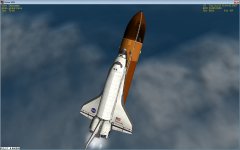
It does! We already do this for the ET scorching post-SRB sep. And it works for every skinnable add-on available(DG-IV, the XR series and the default DG)I don't know if replacing the textures does already work.
Attachments
- Joined
- Feb 4, 2008
- Messages
- 9,753
- Reaction score
- 1,024
- Points
- 203
Huge problem! OMS engines won't fire! I tried both automatically with MM105 and MM202 manually with the Numpad+ key but no joy on getting any thrust out of the OMS engines. Panel C3 OMS Engine switches both in in ARM/PRESS, EXEC pressed 15 sec prior to TIG. All burn data entered correctly but still no joy.
This bug needs attention immediately!
This bug needs attention immediately!
Should be fixed soon; I think I forgot to check in a few files.
---------- Post added at 08:24 PM ---------- Previous post was at 07:39 PM ----------
OMS should be working again.
---------- Post added at 08:24 PM ---------- Previous post was at 07:39 PM ----------
OMS should be working again.
Similar threads

- Replies
- 143
- Views
- 35K


- Replies
- 21
- Views
- 18K


- Replies
- 7
- Views
- 4K