Project Sailing a Brig

LadyCroussette

Quebec City's Resident Base Builder
Addon Developer
Donator
Joined
Jan 26, 2013
Messages
346
Reaction score
1,155
Points
108
Location
Quebec City
Preferred Pronouns
She/Her
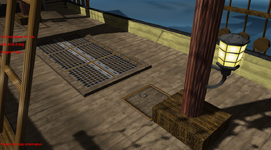
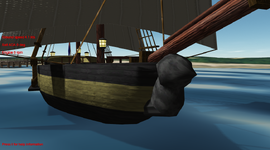
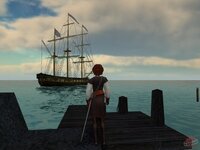
So, me Holly made brig! It's called the Puffin.
Since we were crowding the Screenshot thread, I decided to create this thread instead to continue discussing the ship. If you don't know what I'm talking about, here is a recap:
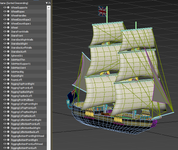
Made a brig mesh for Orbiter, then realized I have no idea how to program a brig for Orbiter :ROFLMAO:
View attachment 42611
View attachment 42612
So, you know, if someone wanted to try something with it, here is the mesh and textures.

Thanks; you did a nice job with this. It sails into low Earth orbit fine, but reentry is a challenge.

View attachment 42623

View attachment 42624


Peace,

cs

Amazing xD

Also, you know what I just realised? I didn't even give the Puffin a figurehead smh

@Thunder Chicken can make it float and sail in Orbiter.
By the way, great mesh and textures!

I could make the flag flutter too.

I claim this space program in the name of the King!

View attachment 42659
View attachment 42660
It floats. 300 long tons seems to be a good displacement.

Animating the mesh vertices is rather expensive, and there is a lot of sail. I think I can take sails up/down, but animating them will need to be considered carefully.

Yes, I agree, and sail animation may look strange, since the sail should be tense.

This look amazing! Though looking at the first screen it look like the ship may be a bit too high on the water? Like the waterline should be a bit higher. Then again, maybe its just fine and the position of the ship is what give the illusion it's floating a bit too well.

Btw, I can edit the mesh if you need some sort of modification for animations and such. So don't hesitate to ask ;) (I was thinking myself of adding some kind of lamps so some light sources could be added to see the ship in the dark. At bit like in Assassin's Creed, so I may wind up modifying the mesh anyway.
View attachment 42661

Also I think I'll make a few tiny bases in the Caribbean to sail to and from. Nothing fancy, just for the sake of having destinations for the ship.

I basically just looked online for typical displacements and vessel lengths and picked something that looked right. It does bob around a lot like it is riding high. I can add some more weight and see if I can get something more agreeable. It's easy to adjust.

When I started tinkering with sailing vessels I was thinking of something like the Black Pearl. Something with some bling and character. This is very much in line with that.

What I can do is run meshc.exe and that gives me a connectivity listing between the meshgroup names and their number order in the mesh file. I can parse that in Orbiter so adjusting to mesh changes shouldn't be too bad. If you can give the groups sensible group labels that are human-readable that would help.

I have only ever sailed my skiff. It will be interesting to see how this brig handles.
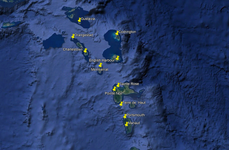
Sailing a ship can be fun, but it would be even better if we had destinations for this thing, like ports and what not. So I decided to work on adding a few to Orbiter as bases. These are the locations I had in mind. They are located at the east of the Caribbean. I don't know if I'll do all of them, but at least four or five for a bit of diversity. These bases will be very small though, I only intend to model the ports/harbours.
1741282784895.png
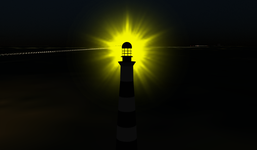
But first, a ship doesn't sail only in the day. It sail during the night as well. And we need something to help us navigate so we don't run ashore when its dark. So, I decided adding lighthouses would be perfect!

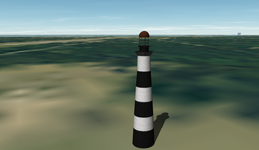
I did a first test with the Cape Canaveral lighthouse. I modelled it and used a beacon for the light. And it works!
1741282715661.png
1741282721876.png

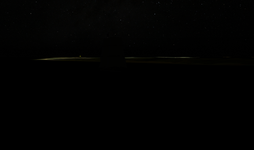
It can be seen from very far away. Here, a screenshot from the Puffin near LC-41 during the night. Observe the yellow light in the distance.
1741282894552.png
Now that's done, the next step is to add some more details to the ship (like lanterns for light sources) and model a pier/dock for the ship to place at Cape Canaveral. Then I think I can begin working on these ports.
 
So, update:

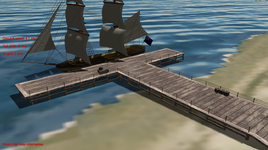
I modelled a dock for the ship, and added it to Cape Canaveral. I'm quite proud of the result - I hope so, seeing as I spent way too much time on it, it was supposed to be a testing mesh!
1741297878878.png
1741297884954.png
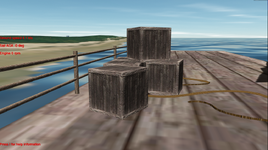
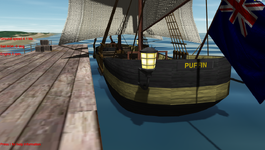
I then made some modifications to the Puffin. I added lanterns, some crew and cargo hatches, and finally, a figurehead at the front (that one doesn't look very good I'm afraid :( )
1741297969762.png
1741297949848.png
1741297962483.png
And yes, as you can see from the screenshots, I edited a copy of Thunder Chicken's skiff for the sake of testing until I have access to the final thing. Hope you don't mind Thunder Chicken :P

Oh yeah, and I also named every object/group so now it should be clearer to find out what is what (I have the disgusting habit of never giving names to objects/layers in 3DS Max or Photoshop lol)

1741299029986.png

So here is what I worked on today attached. The ship (meshes), textures, the dock and the lighthouse:
 

Attachments

Last edited:
You have the fore and back stays, maybe add the shrouds sometime.
 
Maybe I should program a Lua equivent to meshc (You find it in "OrbiterSDK/Utils"). I had programmed a more capable and robust version of meshc already for the SSU project, should be easy to take the code and add a Lua output. Any interest?
 
Maybe I should program a Lua equivent to meshc (You find it in "OrbiterSDK/Utils"). I had programmed a more capable and robust version of meshc already for the SSU project, should be easy to take the code and add a Lua output. Any interest?
What is meshc? I didn't even know it existed. What does it do?
 
What is meshc? I didn't even know it existed. What does it do?

It takes the LABEL entries in a mesh file, and creates a header file for C++ with constant definitions that map these labels to their groups position in the mesh, so you just need to know the name of the mesh group and changes in the meshgroup orders can no longer affect your code, especially for animations. In case of ssumeshc (or ssvmeshc), it also translates texture names to constants and can be fully operated by CLI, so you can include it as pre-build step easier.

It does not support Lua yet, but that would be a small change. Also the more advanced version is currently not distributed separate from SSU or SSV. But that would be no major problem and a rather simple feature request.
 
Could it be possible to use directly meshgroup labels (names) in Lua script instead of meshgroup index (0, 1, 2, ...) in the future Lua development? It would be very useful, although I'm not sure if it could be implemented. Maybe @Gondos knows?
 
Could it be possible to use directly meshgroups labels (names) in Lua script instead of meshgroup index (0, 1, 3, ...)? It would be very useful, although I'm not sure if it could be implemented. Maybe @Gondos knows?

I am sure, @Gondos could also provide a function to create a Lua object for a loaded mesh with such data. But usually, the labels are not loaded into Orbiter, it would require either an extra data path or compatibility breaking changes to the SDK.
 
You mean like in C++ and the mesh compiler that produces a meshres.h file ?
In that case, it's already possible. This is from the Lua implementation of the default Atlantis:

Code:
function define_animations()
    local midx = 1 -- mesh index for all external animations
    local vidx = 2 -- mesh index for all VC animations
    -- ***** 1. Cargo door and radiator animations *****
    local RCargoDoorGrp = {GRP.cargodooroutR, GRP.cargodoorinR, GRP.radiatorFR, GRP.radiatorBR}
    local RCargoDoor = MGROUP_ROTATE(midx, RCargoDoorGrp, _V(2.88, 1.3, 0), _V(0, 0, 1), -175.5*RAD)

    local LCargoDoorGrp = {GRP.cargodooroutL, GRP.cargodoorinL, GRP.radiatorFL, GRP.radiatorBL}
    local LCargoDoor = MGROUP_ROTATE(midx, LCargoDoorGrp, _V(-2.88, 1.3, 0), _V(0, 0, 1), 175.5*RAD)

    anim_door = vi:create_animation(0)
    vi:add_animationcomponent(anim_door, 0.0, 0.4632, RCargoDoor)
    vi:add_animationcomponent(anim_door, 0.5368, 1.0, LCargoDoor)

    local RRadiator = MGROUP_ROTATE(midx, GRP.radiatorFR, _V( 2.88, 1.3, 0), _V(0, 0, 1),  35.5*RAD)
    local LRadiator = MGROUP_ROTATE(midx, GRP.radiatorFL, _V(-2.88, 1.3, 0), _V(0, 0, 1), -35.5*RAD)

    anim_rad = vi:create_animation(0)
    vi:add_animationcomponent(anim_rad, 0, 1, RRadiator)
    vi:add_animationcomponent(anim_rad, 0, 1, LRadiator)

    -- ***** 2. Landing gear animation *****

    local LNosewheelDoor = MGROUP_ROTATE(midx, GRP.nosedoorL, _V(-0.78, -2.15, 17), _V(0, 0.195, 0.981), -60*RAD)
    local RNosewheelDoor = MGROUP_ROTATE(midx, GRP.nosedoorR, _V( 0.78, -2.15, 17), _V(0, 0.195, 0.981),  60*RAD)

    local NosewheelGrp = {GRP.nosewheel, GRP.nosegear}
    local Nosewheel = MGROUP_ROTATE(midx, NosewheelGrp, _V(0.0, -1.95, 17.45), _V(1, 0, 0), 109*RAD)

    local RGearDoor = MGROUP_ROTATE(midx, GRP.geardoorR, _V( 4.35, -2.64, -1.69), _V(0, 0.02, 0.9),  96.2*RAD)
    local LGearDoor = MGROUP_ROTATE(midx, GRP.geardoorL, _V(-4.35, -2.64, -1.69), _V(0, 0.02, 0.9), -96.2*RAD)

    local MainGearGrp = {GRP.wheelR, GRP.gearR, GRP.wheelL, GRP.gearL}
    local MainGear = MGROUP_ROTATE(midx, MainGearGrp, _V(0, -2.66, -3.68), _V(1, 0, 0), 94.5*RAD)

    anim_gear = vi:create_animation(0)
    vi:add_animationcomponent(anim_gear, 0,   0.5, LNosewheelDoor)
    vi:add_animationcomponent(anim_gear, 0,   0.5, RNosewheelDoor)
    vi:add_animationcomponent(anim_gear, 0.4, 1.0, Nosewheel)
    vi:add_animationcomponent(anim_gear, 0,   0.5, RGearDoor)
    vi:add_animationcomponent(anim_gear, 0,   0.5, LGearDoor)
    vi:add_animationcomponent(anim_gear, 0.4, 1.0, MainGear)

    -- ***** 3. Ku-band antenna animation *****

    local KuBand1Grp = {GRP.startrackers, GRP.KUband1, GRP.KUband2}
    local KuBand1 = MGROUP_ROTATE(midx, KuBand1Grp, _V(2.85, 0.85, 0), _V(0, 0, 1), -18*RAD)

    local KuBand2 = MGROUP_ROTATE(midx, GRP.KUband2,  _V(2.78, 1.7, 0), _V(0, 0, 1), -90*RAD)

    local KuBand3Grp = {GRP.KUband1, GRP.KUband2}
    local KuBand3 = MGROUP_ROTATE(midx, KuBand3Grp, _V(2.75, 2.05, 11.47), _V(0, 1, 0), -113*RAD)

    anim_kubd = vi:create_animation(0)
    vi:add_animationcomponent(anim_kubd, 0,     0.333, KuBand1)
    vi:add_animationcomponent(anim_kubd, 0.333, 0.667, KuBand2)
    vi:add_animationcomponent(anim_kubd, 0.667, 0.999, KuBand3)

    -- ***** 4. Elevator animation of elevons *****

    local ElevGrp = {GRP.flapR, GRP.flapL, GRP.aileronL, GRP.aileronR}
    local Elevator = MGROUP_ROTATE(midx, ElevGrp, _V(0, -2.173, -8.84), _V(1, 0, 0), 30*RAD)

    anim_elev = vi:create_animation(0.5)
    vi:add_animationcomponent(anim_elev, 0, 1, Elevator)

    -- ***** 5. Aileron animation of elevons *****

    local LAileronGrp = {GRP.flapL, GRP.aileronL}
    local LAileron = MGROUP_ROTATE(midx, LAileronGrp, _V(0, -2.173, -8.84), _V(-1, 0, 0), 10*RAD)

    local RAileronGrp = {GRP.flapR, GRP.aileronR}
    local RAileron = MGROUP_ROTATE(midx, RAileronGrp, _V(0, -2.173, -8.84), _V(1, 0, 0), 10*RAD)

    anim_laileron = vi:create_animation(0.5)
    vi:add_animationcomponent(anim_laileron, 0, 1, LAileron)
    anim_raileron = vi:create_animation(0.5)
    vi:add_animationcomponent(anim_raileron, 0, 1, RAileron)

    -- ***** 6. Rudder animation *****

    local RudderGrp = {GRP.rudderR, GRP.rudderL}
    local Rudder = MGROUP_ROTATE(midx, RudderGrp, _V(0, 5.77, -12.17), _V(-0.037, 0.833, -0.552), -54.2*RAD)

    anim_rudder = vi:create_animation(0.5)
    vi:add_animationcomponent(anim_rudder, 0, 1, Rudder)

    -- ***** 7. Speedbrake animation *****

    local SB1 = MGROUP_ROTATE(midx, GRP.rudderR, _V( 0.32, 5.77, -12.17), _V(-0.037, 0.833, -0.552), -49.3*RAD)
    local SB2 = MGROUP_ROTATE(midx, GRP.rudderL, _V(-0.32, 5.77, -12.17), _V( 0.037, 0.833, -0.552),  49.3*RAD)

    anim_spdb = vi:create_animation(0)
    vi:add_animationcomponent(anim_spdb, 0, 1, SB1)
    vi:add_animationcomponent(anim_spdb, 0, 1, SB2)

    -- ***** 8. RMS arm animation *****
    -- Note that the animation components can't be declared static here, since
    -- their rotation parameters are modified by the respective parent transforms

    local parent

    rms_anim[0] = MGROUP_ROTATE(midx, GRP.Shoulder, _V(-2.26, 1.70, 9.65), _V(0, 1, 0), -360*RAD) -- -180 .. +180

    anim_arm_sy = vi:create_animation(0.5)
    parent = vi:add_animationcomponent(anim_arm_sy, 0, 1, rms_anim[0])

    rms_anim[1] = MGROUP_ROTATE(midx, GRP.Humerus, _V(-2.26, 1.70, 9.65), _V(1, 0, 0), 147*RAD) -- -2 .. +145

    anim_arm_sp = vi:create_animation(0.0136)
    parent = vi:add_animationcomponent(anim_arm_sp, 0, 1, rms_anim[1], parent)

    local RMSElbowPitchGrp = {GRP.radii, GRP.RMScamera, GRP.RMScamera_pivot}
    rms_anim[2] = MGROUP_ROTATE(midx, RMSElbowPitchGrp, _V(-2.26, 1.55, 3.10), _V(1, 0, 0), -162*RAD) -- -160 .. +2

    anim_arm_ep = vi:create_animation(0.0123)
    parent = vi:add_animationcomponent(anim_arm_ep, 0, 1, rms_anim[2], parent)

    rms_anim[3] = MGROUP_ROTATE(midx, GRP.wrist, _V(-2.26, 1.7, -3.55), _V(1, 0, 0), 240*RAD) -- -120 .. +120

    anim_arm_wp = vi:create_animation(0.5)
    parent = vi:add_animationcomponent(anim_arm_wp, 0, 1, rms_anim[3], parent)

    rms_anim[4] = MGROUP_ROTATE(midx, GRP.endeffecter, _V(-2.26, 1.7, -4.9), _V(0, 1, 0), -240*RAD) -- -120 .. +120

    anim_arm_wy = vi:create_animation(0.5)
    parent = vi:add_animationcomponent(anim_arm_wy, 0, 1, rms_anim[4], parent)

    local armtip = {arm_tip[0], arm_tip[1], arm_tip[2]}
    rms_anim[5] = MGROUP_ROTATE(LOCALVERTEXLIST, armtip, _V(-2.26, 1.7, -6.5), _V(0, 1, 0), -894*RAD) -- -447 .. +447

    anim_arm_wr = vi:create_animation(0.5)
    hAC_arm = vi:add_animationcomponent(anim_arm_wr, 0, 1, rms_anim[5], parent)

    -- ***** 9. SSME pitch gimbal animations
    local init_gimbal = -10*RAD
    local max_gimbal = -0.2*PI
    anim_ssme = vi:create_animation(init_gimbal/max_gimbal)

    ssme_anim[0] = MGROUP_ROTATE(midx, GRP.SSMEL, _V(-1.55, -0.37, -12.5), _V(1, 0, 0), max_gimbal)
    vi:add_animationcomponent(anim_ssme, 0, 1, ssme_anim[0])

    ssme_anim[1] = MGROUP_ROTATE(midx, GRP.SSMER, _V(1.55, -0.37, -12.5), _V(1, 0, 0), max_gimbal)
    vi:add_animationcomponent(anim_ssme, 0, 1, ssme_anim[1])

    ssme_anim[2] = MGROUP_ROTATE(midx, GRP.SSMET, _V(0, 2.7, -12.5), _V(-1, 0, 0), max_gimbal)
    vi:add_animationcomponent(anim_ssme, 0, 1, ssme_anim[2])

    -- ======================================================
    -- VC animation definitions
    -- ======================================================
    plop.define_animations(vidx)
end
The meshgroups are defined in Vessels\Atlantis\meshres.lua:

Code:
-----------------------------------------------------------
-- Mesh resource file for Meshes/Atlantis/Atlantis.msh
-- Generated with meshc on Sun Feb 18 16:58:26 2024
-- example usage:
-- local mesh_grp = require 'mesh_grp.lua'
-- print(mesh_grp.NTEX)
-----------------------------------------------------------
local module={GRP={}}

-- Number of mesh groups:
module.NGRP = 59

-- Number of materials:
module.NMAT = 4

-- Number of textures:
module.NTEX = 2

-- Named mesh groups:
module.GRP.cargodooroutR = 2
module.GRP.cargodooroutL = 3
module.GRP.flapR = 4
module.GRP.flapL = 5
module.GRP.aileronR = 6
module.GRP.aileronL = 7
module.GRP.SSMER = 12
module.GRP.SSMEL = 13
module.GRP.SSMET = 14
module.GRP.nosedoorL = 15
module.GRP.geardoorL = 16
module.GRP.geardoorR = 17
module.GRP.nosedoorR = 18
module.GRP.nosewheel = 19
module.GRP.nosegear = 20
module.GRP.wheelR = 21
module.GRP.gearR = 22
module.GRP.wheelL = 23
module.GRP.gearL = 24
module.GRP.startrackers = 25
module.GRP.rudderR = 26
module.GRP.rudderL = 27
module.GRP.cargodoorinR = 31
module.GRP.cargodoorinL = 32
module.GRP.KUband1 = 33
module.GRP.KUband2 = 34
module.GRP.Shoulder = 35
module.GRP.Humerus = 36
module.GRP.radii = 37
module.GRP.wrist = 38
module.GRP.endeffecter = 39
module.GRP.RMScamera = 40
module.GRP.RMScamera_pivot = 41
module.GRP.radiatorFL = 50
module.GRP.radiatorFR = 51
module.GRP.radiatorBR = 52
module.GRP.radiatorBL = 53

return module

And these are the definition requirements in Atlantis.lua:
Code:
animstate = require("AnimState")
ascap = require("AscentAP")
plop = require("PayloadBay")
local meshres = require("meshres")
local GRP = meshres.GRP
local meshres_vc = require("meshres_vc")
local GRP_VC = meshres_vc.GRP
APMFD = require("APMFD")
local CameraMFD = require("CameraMFD")
 
@Gondos, just in case I'd like to explain what I meant in the message above. I mean using something like "grp = {Wheel, WheelDisk}" instead of "grp = {2, 4}" in animation definition, so if new meshgroups will be added into a mesh and meshogrup order will change, then we don't have to change group indices for animation in a Lua script. Here "Wheel" and "WheelDisk" are labels of meshgroups. Sorry for my off topic.
 
Maybe I should program a Lua equivent to meshc (You find it in "OrbiterSDK/Utils"). I had programmed a more capable and robust version of meshc already for the SSU project, should be easy to take the code and add a Lua output. Any interest?
Yes please. I was running meshc and parsing the output into Lua. If you could just get it to spit out Lua syntax directly that would be great.
 
Add /L to meshc :
Code:
C:\github\openorbiter\out\install\x64-Debug\Orbiter\Orbitersdk\Utils>meshc /H
+-----------------------------------------------------------------------+
|                   meshc: Mesh compiler for ORBITER                    |
|        Build: Feb 16 2025      (c) 2001-2018 Martin Schweiger         |
+-----------------------------------------------------------------------+

Scans a mesh file and generates a header file containing mesh group
identifiers.

Usage: meshc /I <meshfile> /O <header file> /P <suffix> [/L]
  <meshfile>:    Orbiter mesh file to be scanned
  <header file>: Output header file name
  <suffix>:      Variable name suffix
  /L:            Optional argument, output a Lua file when provided

Any mandatory parameters not provided on the command line are queried interactively.
 
Back
Top