Problem Runway Centerline Lights at Cape Canaveral?

Wedge313

Well-known member
Joined
Apr 18, 2020
Messages
493
Reaction score
122
Points
58
Location
Boston
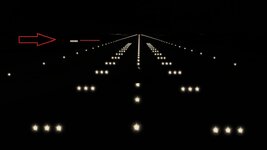
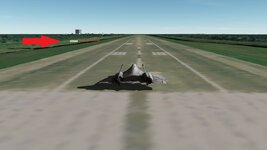
Hello, I recently installed Orbiter 2024, everything seems to be working well. But at Cape Canaveral with the ship positioned for takeoff at nighttime there are no centerline lights on the runway. I tried re-installing Orbiter but I still don't see the lights. Any suggestions? Thanks

Edit: Something I just noticed. I closed my scenario with the DG ready for takeoff at night, no centerline lights visible. When I launch Orbiter again using the "current state", for a very brief instant the lights show up, but then it goes back to a dark runway.
 
Last edited:
People will need more info in order to pinpoint this.. try making a small video with it, it could be a ton of things.

Check the runway lights on other bases. Check Habana or/and Edwards, they both have runway lights. See if the problem is the same there.

It also could be the GPU drivers.
Especially if you have a new generation GPU. They sometimes just hate older games and dx9 stuff.
You could try to run orbiter through your onboard GPU if you have one on your motherboard and see if you get the same thing. (not sure if orbiter will let you do that though .. but it's an easy try so..)
OR in the most extreme case possible you could of course try to change the drivers but i wouldn't do that only for a small bug like this.

Still .. at this point ..it could be anything.
 
Last edited:
OK yes Habana and Edwards RCLs are both working. And if I zoom way out the Canaveral RCLs show up. They just aren't there when I want to take off.
 
You may provide two screenshots for the Canaveral when lights are visible and aren't.
 
OK yes Habana and Edwards RCLs are both working. And if I zoom way out the Canaveral RCLs show up. They just aren't there when I want to take off.
Hmm could it be that the ship sits in some odd position on the ground?
Try to add a new ship through scenario editor and place it on the runway. Check both ends just in case.
 
I experimented with positioning the ship on either end of 33/15, same issue. Also tried loading a DG scenario (I was using the XR-2), same issue. I also made sure I had the latest driver for my GPU.

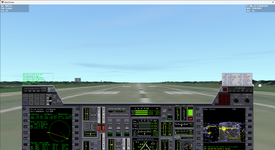
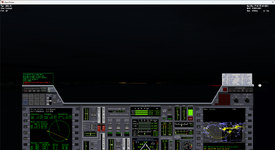
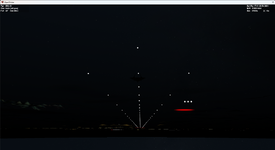
If I go to an external view, and then change the POV so that I'm "below" the ground looking up at the ship, the lights show up. It's like the lights are there, but they're below the surface. Here's three screenshots, one with the ship positioned on the runway, one after warping into darkness, and the third is the view from below the runway.
 

Attachments

  • OpenOrbiter 6_29_2025 5_39_22 AM.png
    OpenOrbiter 6_29_2025 5_39_22 AM.png
    623 KB · Views: 8
  • OpenOrbiter 6_29_2025 5_40_04 AM.png
    OpenOrbiter 6_29_2025 5_40_04 AM.png
    472.6 KB · Views: 8
  • OpenOrbiter 6_29_2025 5_40_41 AM.png
    OpenOrbiter 6_29_2025 5_40_41 AM.png
    363.8 KB · Views: 8
I experimented with positioning the ship on either end of 33/15, same issue. Also tried loading a DG scenario (I was using the XR-2), same issue. I also made sure I had the latest driver for my GPU.

If I go to an external view, and then change the POV so that I'm "below" the ground looking up at the ship, the lights show up. It's like the lights are there, but they're below the surface. Here's three screenshots, one with the ship positioned on the runway, one after warping into darkness, and the third is the view from below the runway.
It could be an elevation issue also. Maybe post your settings for the d3d9 and the rest here, i could take a look if i have the same settings.

What i find interesting is that compared to mine, your lights seem to be in the wrong position. Take a look at the vasi and papi lights, yours are on your right, mine are on my left. It's almost like your lights are inverted somehow.
m1.jpgm2.jpg

go into Orbiter-2024\Config\Earth\Base\ and open the Canaveral.cfgScroll down to Runways and see if you have the same values as me:

RUNWAY
END1 -1150 0 -2880
END2 -5600 0 -5435
WIDTH 100
ILS1 134.2
ILS2 134.2
RWTEX Runway2
NRWSEG 0
; NRWSEG 15
; RWSEG1 1 0.025 0.5 0.75 1 0.852
; RWSEG2 1 0.025 0.5 0.75 1 0.852
; RWSEG3 1 0.007 0.5 0.75 0.852 0.7305
; RWSEG4 1 0.06 0.5 0.75 0.5 0.03125
; RWSEG5 1 0.007 0.5 0.75 0.7305 0.6133
; RWSEG6 1 0.1 0.5 0.75 0.5 0.03125
; RWSEG7 1 0.007 0.5 0.75 0.6133 0.5
; RWSEG8 6 0.538 0.5 0.75 0.5 0.03125
; RWSEG9 1 0.007 0.5 0.75 0.5 0.6133
; RWSEG10 1 0.1 0.5 0.75 0.03125 0.5
; RWSEG11 1 0.007 0.5 0.75 0.6133 0.7305
; RWSEG12 1 0.06 0.5 0.75 0.03125 0.5
; RWSEG13 1 0.007 0.5 0.75 0.7305 0.852
; RWSEG14 1 0.025 0.5 0.75 0.852 1
; RWSEG15 1 0.025 0.5 0.75 0.852 1
END
RUNWAYLIGHTS
END1 -1150 -5 -2880
END2 -5600 -5 -5435
WIDTH 100
PAPI 20.0 3.0 -2000
VASI 1.5 152 671
END
RUNWAY
END1 13930 0 9525
END2 12048 0 7118
WIDTH 100
ILS1 132.6
ILS2 132.6
RWTEX Runway2
NRWSEG 0
; NRWSEG 9
; RWSEG1 1 0.018 0.25 0.5 1 0.875
; RWSEG2 1 0.088 0 0.25 0.5 0
; RWSEG3 1 0.018 0.25 0.5 0.75 0.625
; RWSEG4 1 0.088 0 0.25 0.5 0
; RWSEG5 5 0.576 0 0.25 1 0.5
; RWSEG6 1 0.088 0 0.25 0.5 0
; RWSEG7 1 0.02 0.25 0.5 0.625 0.75
; RWSEG8 1 0.088 0 0.25 0 0.5
; RWSEG9 1 0.02 0.25 0.5 0.875 1
END
RUNWAYLIGHTS
END1 13930 -5 9525
END2 12048 -5 7118
WIDTH 100
END
END_OBJECTLIST

 
Last edited:
Yes, my file looks the same as yours. But just as an experiment, under the "RUNWAYLIGHTS" section I changed all the "-5"s to -0, and I can see the lights again.
 
Yes, my file looks the same as yours. But just as an experiment, under the "RUNWAYLIGHTS" section I changed all the "-5"s to -0, and I can see the lights again.
So it has something to do with the elevation then.
Just remember the setting if you ever change the elevation to HD Earth elevation you might have to change the number again.
 
Back
Top