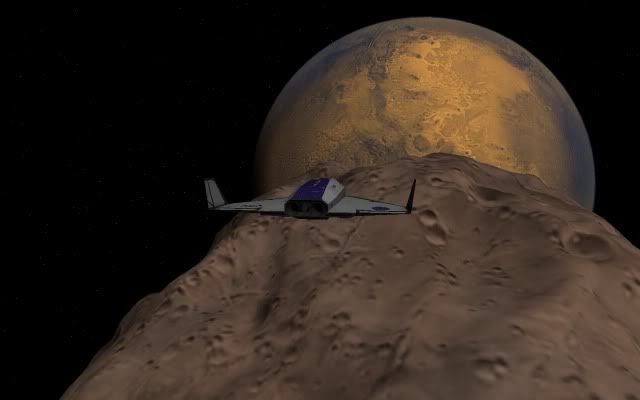
OHM Phobos Hi-Res

OrbitHangar

Addon Comments
Joined
Apr 9, 2008
Messages
3,832
Reaction score
18
Points
0
phobos_hir.jpg

Author: brianj.

Hi-Res mesh and surface texture for Mars' moon Phobos.
51246 poly, 4096 x 2048 pixel texture.

Adapted from the model and surface texture for Celestia by John Van Vliet.

See readme.txt for installation instructions, credits, etc.


DOWNLOAD
 
phobosmarsrise.jpg


Sure looks good, however the mesh seems to be quite a bit bigger than Orbiter actually defines Phobos as being.
 
Looks beautiful but are they really that color?
I think the textures were hand coloured, so probably not. Does look nice, though.

Sure looks good, however the mesh seems to be quite a bit bigger than Orbiter actually defines Phobos as being.
The mesh should be about the same size as the default Orbiter mesh. Parts of the mesh will be above the 11km radius collision-sphere surface, and some parts below.
 
I had a similar problem, but I never discovered the cause, just a work-around... And yes, it'll work in Orbiter '10 (not sure about latest beta, but I don't know why it wouldn't...).

Anyway. Open the Phobos.msh file with notepad (or whatever) and nearly at the end of the file you'll see the .tex file that the mesh should be 'painted' with. Change it to read phobos.dds instead of phobos_hires.dds.

What this will do is give you the new mesh with the old texture. You can download a hi-res texture from the Orbiter site, and it looks great... Hang on. Picture to follow... That blurry smudge in the middle is an Arrow freighter looking for a landing spot...

 
Last edited:
I had a similar problem, but I never discovered the cause, just a work-around... And yes, it'll work in Orbiter '10 (not sure about latest beta, but I don't know why it wouldn't...).

Anyway. Open the Phobos.msh file with notepad (or whatever) and nearly at the end of the file you'll see the .tex file that the mesh should be 'painted' with. Change it to read phobos.dds instead of phobos_hires.dds.

What this will do is give you the new mesh with the old texture. You can download a hi-res texture from the Orbiter site, and it looks great... Hang on. Picture to follow... That blurry smudge in the middle is an Arrow freighter looking for a landing spot...


The Hires texture is 4096x2048, and some GFX-cards don't like that. You could try making a 2048x2048 or even a 4096x4096 version. It's worth a try.
 
Thanks for your suggestions guys...
The results are in, and they're odd... (In order of trying...)

:thumbup: = works
:thumbsdown: = invisible


Old mesh, old tex = :thumbup:

New mesh, new tex = :thumbsdown:

Old mesh, new tex = :thumbsdown:

New mesh, old tex = :thumbsdown: Sorry Phantom Cruiser!

Old mesh, new tex converted to 2048 square = :thumbup: Thanks C3PO!

New mesh, new tex converted to 2048 square = :thumbsdown: What?!


Makes you wonder why this is on the "recommended addons" list... :lol:

EDIT: Sorry, that was a bit harsh, thinking about it. It's just maybe the "recommended addons" list should only have teething-troubleless addons...


The new texture is awesome! Shame II can't get the mesh working...
 
Last edited:
I downloaded it a week ago, followed readme, and it works like a charm for me :thumbup:
 
Oh! I forgot to mention that 4096x2048 works fine on my rig. (Windows 7)
 
Sorry, I can't answer your question as I haven't used Hall Base add-on. Just thought I'd point out that if you're using Orbiter2016 you have a "landable" surface at Deimos/Phobos, which you won't have if you use this add-on.
 
Wow! This Phobos texture looks really nice! Much better than the vanilla texture. And I got Hall Base to look right with it! Just change this line in the Hall Base configuration file, Location = +160 +31.20, to Location = +160 +35.20 . Again nice mod! :thumbup:
 
Back
Top