Orulex 1.0 Alpha testing

Status
Not open for further replies.

Artlav

Aperiodic traveller
Addon Developer
Beta Tester
Joined
Jan 7, 2008
Messages
5,814
Reaction score
869
Points
203
Location
Earth
Website
orbides.org
Preferred Pronouns
she/her
Orulex 1.0 Alpha testing (La 080328)

Orulex is the dynamic scenery generator for Orbiter i am developing for some time already.
As the development progresses, some changes needs some testing.
Main forum is gone down, so i decided to give the new one a try.

Last version - 080328, in post 126
Alpha version from 080316:
http://orbides.1gb.ru/orbf/orulex-0.9.99-080316.zip (1.3Mb)
-------------------------
Heightmaps:
http://orbides.1gb.ru/orbf/earth-hmap-lv8.zip (84Mb)
http://orbides.1gb.ru/orbf/mars-hmap-lv8.zip (82Mb)
http://orbides.1gb.ru/orbf/moon-hmap-lv8.zip (81Mb)
http://orbides.1gb.ru/orbf/everest_lv11.zip (5.3Mb)
http://orbides.1gb.ru/orbf/grand_canyon_lv13.zip (9Mb)
-------------------------

Improvements since 0.9.4:
* Memory management was significantly improved, the textures are no longer resides fully in RAM, so even Lv11 textures only needs 100Mb on average instead of ~1Gb. Consequently,
* Lv 9-11 textures supported.
* Theoretically, significant performance improvements.
* Visual improvements by recalibrating the LOD algorithm - the textures are generated from the camera point, and the high resolution should be more closer to the camera.
* Landscape configurator was split in 2 programs - Landscape_config for settings and World_studio for planet editing, configuring and texture downloading.

If you want to test it, i wanted to know, if performance is acceptable, and if the terrain looks better than before/acceptable?

Performance.
As always, it should work fast, but the past shows it always work too slow.
Performance in both world studio and Orbiter is interesting, both single and multi-threaded modes (change in orulex.cfg or config program).

What is to be expected: (Pentium D 3.4Ghz)
world studio: From the end of loading, 7 seconds for geometry, 8 seconds for equilibrium, Average 64FPS.
Orbiter: Average 16 seconds till equilibrium, preprocessing included, multithread mode. 50-60 FPS.
What i hope to get - loading time, generation time, FPS, feel, system specs.

Visuals.
Some people complained that the textures are not hi-res enough near the camera, or that they are not generated too fast. It should be better now.

Also, any comments and suggestions for both orulex and emerging world studio planet configurator are welcome.

Global Lv 11 support:
oru-080316-1.jpg

World Studio:
oru-080316-2.jpg

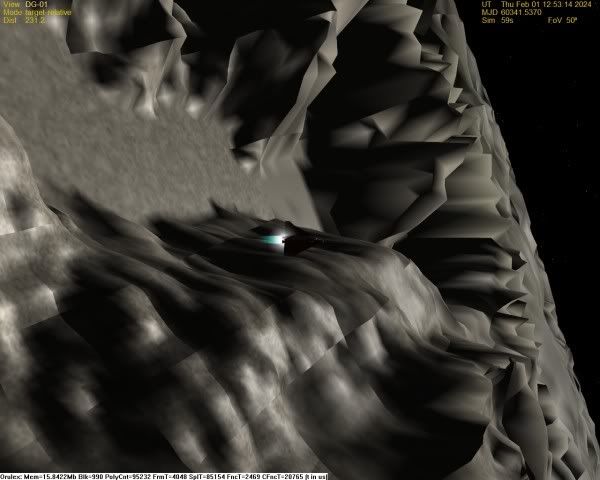
Lv 10 in Orbiter:
oru-080316-3.jpg
 
Last edited:
It looks amazing, Artlav! I'm glad you've joined orbiter-forum here -- M6 service is so poor that it's becoming useless.

BTW Tex, Artlav is an Orbiter Beta Tester (and of course an add-on developer), so can you please give him username tags to match? :)
 
When I've got the time, I'm looking forward to using this one. Someone's got to make the Malapert Mountains and the polar craters.

If no one else tackles it first, I guess it'll be me!

Orulex is really looking good!
 
WOW! I would really give this alpha version a try, however I don't think my numbers (FPS,...) would be representative with my Pentium III 900 MHz, 128MB graphics card system. :(
 
Looks like I'll have to be the representative tester. My comp is 4 years old now, but can still hold a candle to many newer ones.
BTW-Does the resolution decrease the farther the camera gets from the rendered ground?

[EDIT]Just tried out the newest release minus all extra heightmaps. I got pretty decent performance, loaded up in about 20 seconds and kept frame rates at around 35 FPS on the low end. This was at 1024X768 orbiter and screen resolution and 32 bit color.
Comp Specs:
Pentium 4 3.0 ghz
512Mb RAM
GeForce 5200 @ 256 MB video memory

Next test: earth lvl8 heightmap.

[EDIT2]Seems to work all right except for a somewhat large graphical bug:
orulexerror.jpg

Just to be sure it wasn't a loading thing, I let it sit for several minutes. It didn't move. Also, and this may be unrelated, but maybe not. I lost all keyboard control in orbiter. I haven't done much troublshooting on that, but I can't rule Orulex out as causing that. It happened right after I had used the scenario editor to move the shuttle PB to the Grand Canyon, so I'm guessing that's it.
 
Last edited:
It looks amazing, Artlav! I'm glad you've joined orbiter-forum here -- M6 service is so poor that it's becoming useless.

BTW Tex, Artlav is an Orbiter Beta Tester (and of course an add-on developer), so can you please give him username tags to match? :)

o ok, good deal, will do it now. :)
 
The module runs ok without lvl 8 heightmap. When I unpack lvl 8 earth texture I get CTD with this log:

Code:
2008/03/17-12:15:48:[init ]:Started orulex. [orulex.cfg]
2008/03/17-12:16:16:[init ]:Started orulex. [orulex.cfg]
2008/03/17-12:16:34:[getheihmap]:Error: File "Heightmaps\earth-lv11-425-97-5-4.hei" not found or not loadable.
2008/03/17-12:16:34:[getheihmap]:Error: File "Heightmaps\earth-lv13-429-340-9-8.hei" not found or not loadable.
2008/03/17-12:16:34:[getheihmap]:Error: File "Heightmaps\earth-lv12-594-130-32-14.hei" not found or not loadable.
2008/03/17-12:16:34:[getcmap ]:Error: File "Textures\earth-lv7-236-54-3-2.bmp" not found or not loadable.
2008/03/17-12:16:34:[getcmap ]:Error: File "Textures\earth-lv8-119-94-3-3.bmp" not found or not loadable.
2008/03/17-12:16:34:[getcmap ]:Error: File "Textures\earth-lv7-165-36-9-4.bmp" not found or not loadable.
2008/03/17-12:16:34:[getcmap ]:Error: File "Textures\earth-lv6-31-24-1-1.bmp" not found or not loadable.
2008/03/17-12:16:34:[getcmap ]:Error: File "Textures\earth-lv7-85-52-5-7.bmp" not found or not loadable.
2008/03/17-12:16:34:[getcmap ]:Error: File "Textures\earth-lv10-484-382-2-2.bmp" not found or not loadable.
2008/03/17-12:16:34:[getcmap ]:Error: File "Textures\earth-lv7-239-54-2-2.bmp" not found or not loadable.
2008/03/17-12:16:34:[getcmap ]:Error: File "Textures\earth-lv7-241-54-2-2.bmp" not found or not loadable.
2008/03/17-12:16:34:[getcmap ]:Error: File "Textures\earth-lv10-1166-439-6-6.bmp" not found or not loadable.
2008/03/17-12:16:34:[getcmap ]:Error: File "Textures\earth-lv8-355-75-2-2.bmp" not found or not loadable.
2008/03/17-12:16:34:[getcmap ]:Error: File "Textures\earth-lv6-105-19-2-2.bmp" not found or not loadable.
2008/03/17-12:16:34:[getcmap ]:Error: File "Textures\earth-lv8-577-232-7-6.bmp" not found or not loadable.
2008/03/17-12:16:34:[getcmap ]:Error: File "Textures\earth-lv10-2320-936-4-4.bmp" not found or not loadable.
2008/03/17-12:16:34:[getcmap ]:Error: File "Textures\Earth-lv7-17-60-6-4.bmp" not found or not loadable.
 
WOW! I would really give this alpha version a try, however I don't think my numbers (FPS,...) would be representative with my Pentium III 900 MHz, 128MB graphics card system. :(
On the contrary, testing performance on low-grade systems is one of the main points.

BTW-Does the resolution decrease the farther the camera gets from the rendered ground?
It certainly does, as always, otherwise the whole idea will be quite useless.
Unless you can prove otherwise.

512Mb RAM
Seems to work all right except for a somewhat large graphical bug:
{IMG}
Any certain way to reproduce it?
Orulex already takes 350+Mb of RAM, and if you have some hi-res textures loaded in Orbiter, 512MB could just be not enough, and that picture looks quite like the lack of RAM.
Is there anything similar in world_studio?

Also, and this may be unrelated, but maybe not. I lost all keyboard control in orbiter. I haven't done much troublshooting on that, but I can't rule Orulex out as causing that. It happened right after I had used the scenario editor to move the shuttle PB to the Grand Canyon, so I'm guessing that's it.
It happens a lot when running Orbiter in windowed mode, can be unrelated.

The module runs ok without lvl 8 heightmap. When I unpack lvl 8 earth texture I get CTD with this log:
{Errors}
The errors listed are not fatal, just showing that not all heightmaps defined in cfg are present.
Is lv 8 Earth heightmap the thing that makes the CTD?
Does other planets w and w/o heightmaps work?
When does it CTD?
Is there a CTD in World_studio?
What are your system specs?
 
I'm sorry I can't recreate the CTD consistently. In fact, it is now occuring less often.

My Orbiter log had 334k of these errors.:

Code:
.
.
.
ERROR: DDraw error DDERR_INVALIDPARAMS
       [C:\Source\Orbiter\Texture.cpp / 224]
ERROR: TextureManager::LoadTexture|ReadDDSSurface (code: -2147024809)
>>> ERROR: Missing texture: orulex\orulex.dds
>>>        [C:\Source\Orbiter\Texture.cpp / 781]
ERROR: DDraw error DDERR_INVALIDPARAMS
       [C:\Source\Orbiter\Texture.cpp / 224]
ERROR: TextureManager::LoadTexture|ReadDDSSurface (code: -2147024809)
>>> ERROR: Missing texture: orulex\orulex.dds
>>>        [C:\Source\Orbiter\Texture.cpp / 781]
ERROR: DDraw error DDERR_INVALIDPARAMS
       [C:\Source\Orbiter\Texture.cpp / 224]
ERROR: TextureManager::LoadTexture|ReadDDSSurface (code: -2147024809)
>>> ERROR: Missing texture: orulex\orulex.dds
>>>        [C:\Source\Orbiter\Texture.cpp / 781]
.
.
.
The CTD occurs at the splash screen immediately before rendering 3d.
I've only opened World Studio once and it did not CTD.
I have not CTD yet at planets other than earth.
I'm running an AMD 64 3600+ with Nvidia 7600GS 1mb ram.

Just some observations:
-FPS are much better for me now than 0.9.2. ( now 70 FPS at grand canyon)
-The Grand Canyon, however, now seems more like hills. 0.9.2 looked more canyon-like.

If you want the full 334k orbiter log file I will gladly email it to you.
 
My Orbiter log had 334k of these errors.:
Code:
ERROR: DDraw error DDERR_INVALIDPARAMS
       [C:\Source\Orbiter\Texture.cpp / 224]
ERROR: TextureManager::LoadTexture|ReadDDSSurface (code: -2147024809)
>>> ERROR: Missing texture: orulex\orulex.dds
>>>        [C:\Source\Orbiter\Texture.cpp / 781]
Thank you for testing.
There should be around 1200 blocks like that in the log, they are quite harmless.

The CTD occurs at the splash screen immediately before rendering 3d.
I've only opened World Studio once and it did not CTD.
I have not CTD yet at planets other than earth.
I'm running an AMD 64 3600+
Sounds like a lack of main RAM, 512Mb+ is recommended.

-The Grand Canyon, however, now seems more like hills. 0.9.2 looked more canyon-like.
Hm... Could you provide a clearer definition? Maybe screenshots?
That is, it looks better now in my opinion.
 
Hello Artlav,

I'm testing now your latest Alpha version. I should be able to give you some numbers soon. BTW, where or how do I configure the height/terrain rendering cut-off/blending altitude? I tested a lunar orbit scenario and I would love to see the terrain rendered from a typical Apollo orbit altitude (115 km). Is that possible? Already tried increasing the values

AltLimit=30000
BlendLimit=10000

in the orulex.cfg to:

AltLimit=500000
BlendLimit=400000

but no change.

In the Orulex config / Planets tab I have shown N/A, no matter which SOL I'm selecting.

Ideas? Thanks :)
 
BTW, where or how do I configure the height/terrain rendering cut-off/blending altitude? I tested a lunar orbit scenario and I would love to see the terrain rendered from a typical Apollo orbit altitude (115 km). Is that possible? Already tried increasing the values

AltLimit=30000
BlendLimit=10000

in the orulex.cfg to:

AltLimit=500000
BlendLimit=400000

but no change.
Certainly there isn't, since orulex.cfg contains default values.
You should go to config\terrain directory and change the same values in the moon.cfg.
Also try inserting "microtex_lev=20e3"
line in it and tweaking it to get a better view.

In the Orulex config / Planets tab I have shown N/A, no matter which SOL I'm selecting.
Landscape_config is no longer a planet configurator, only editor.
Now world_studio should house all the functions and parameters.
But both programs are incomplete now.
 
Hi Artlav!! How can I download level 11 maps using world studio??

Regards!!
 
I wanted to thank you Artlav as soon as i could: it seems that the Windows Vista CTD problem is gone (hopefully for good). But I also wanted to ask about this:

seko.jpg


This is Europa and I get these boxed textures at all altitudes. The next one is Ganymede:

seko2.jpg


Same thing. I have not tested this fully, but it seems to occur with different planets and with different settings. I have 2 Gb of RAM, but I don't know if this is the same problem Zatnikitelman reported. I used a clean Orbiter installation.
 
I ran Orulex a bit on my machine.

It's rather old (my computer, that is...), so I was rather astonished to see Orulex running without any performance-problems at all, at least with a lvl8 heightmap. Loss of FPS is virtually nonexistent.

Ince my personal machine does not have internet access I guess I won't get the oportunity to test anything better... :sorry:

I run an Athlon something, it's about equivalent to a pentium 4 1.9 ghz, 512 Megs of ram and a rather ancient NVidia card (Geforce FX 5400 if I'm not mistaken. it's still AGP, I bought it about... like... 5 years ago at least. it was top notch back then... :rofl:)

I encountered only one thing I could call a bug: KSC got covered by a grey rectangle when I zoomed the camera out a certain distance.

Apart from that, It's known issues like invisible landing pads, no groundlock on the Meshes (but it's nice Meshland2 works formidably otherwise), i.e. minor nuisances.

I like the microtexturing, allthough it would be nice that the borders of texture tiles would not be so visible at a close distance as they are.

Also, I wasn't able to increase the texturing radius around the camera position, which most probably is simply because I haeven't figured out how it's done yet.

A logical but none the less a bit anoying problem is that you can see the textures allmost up to the horizon behind the ship, but only a few hundred meters in front... maybe you can tell me how to get that radius up?

another one is quite logical also, and I'm not sure wheather to call it an actual problem. Since Orulex initializes at runtime you're screwed up when you leave your ship parked somewhere in the landscape, because you're not having any floor beneath your wheels on reload. If things go very bad, you end up caught between the Landscape and the "ground" presented by the orbiter core. It's not the end of the world, but it would be nice if you would be able to park yourself and other things (I'm thinking about building an outpost on the moon, similiar to the orbital station building) on the landscape and still find them there when you run orbiter for the next time.

Oh yeah, loading times on my machine where in the range from 5 to 10 seconds, which is quite satisfying.

all in all, great work! I'm looking forward to seeing it finished!
 
Small update - alpha version from 080319:
http://orbides.1gb.ru/orbf/orulex-0.9.991-080319.zip (1.3Mb)

Changes are mostly in the world studio,
* Planet changing support.
* Hi-res textures/heightmaps download support, like in the old versions.
* Block and map view saving support in case you want to get special merging of downloaded stuff and what was below it.

How can I download level 11 maps using world studio?
Full-world - no way yet.
Local - possible in today's update.

it seems that the Windows Vista CTD problem is gone (hopefully for good).
I hope too.

But I also wanted to ask about this:
{MG}
This is Europa and I get these boxed textures at all altitudes. The next one is Ganymede:
{IMG}
Same thing. I have not tested this fully, but it seems to occur with different planets and with different settings.
Right, some anomalies on the edges due to normal smoothing problems (just lack of it actually).
To be fixed.

I was rather astonished to see Orulex running without any performance-problems at all, at least with a lvl8 heightmap. Loss of FPS is virtually nonexistent.
For comparative purposes, how fast did 0.9.4 version run on the same machine?

I encountered only one thing I could call a bug: KSC got covered by a grey rectangle when I zoomed the camera out a certain distance.
Have they stayed gray?
Maybe just not generated fast enough.
Any certain way to reproduce it (Orbiter or WS)?

I like the microtexturing, allthough it would be nice that the borders of texture tiles would not be so visible at a close distance as they are.
Lighting anomalies (like in Tholin's imgs) or microtexture/no microtexture border?

Also, I wasn't able to increase the texturing radius around the camera position, which most probably is simply because I haeven't figured out how it's done yet.
Hm. There is neither a parameter with that name nor a parameter with similar purpose.
Could you clarify what exactly do you mean by "texturing radius"?

A logical but none the less a bit anoying problem is that you can see the textures allmost up to the horizon behind the ship, but only a few hundred meters in front...
No motion prediction... Planned for a while.

another one is quite logical also, and I'm not sure wheather to call it an actual problem. Since Orulex initializes at runtime you're screwed up when you leave your ship parked somewhere in the landscape, because you're not having any floor beneath your wheels on reload. If things go very bad, you end up caught between the Landscape and the "ground" presented by the orbiter core. It's not the end of the world, but it would be nice if you would be able to park yourself and other things (I'm thinking about building an outpost on the moon, similiar to the orbital station building) on the landscape and still find them there when you run orbiter for the next time.
Mostly a MeshLand problem. That one is a few years old, and there are hardly a nice solution for it.
 
Hi Artlav. What is the probability that this will someday be usable by 'student computers' like mine?
AMD 3100+ 512 MB RAM with 128 MB being shared with nVidia GeForce 6100 1 ghz
 
the probability is 100% i'd say... if you look at the system specs I posted above, I would say yours overmatch mine in quite every way... ;)

Lighting anomalies (like in Tholin's imgs) or microtexture/no microtexture border?

I wouldn't say it's a lighting problem. I assume the textures are calculated in rectangular tiles. it's the seems of these tiles that are clearly visible, but only on lower altitudes. not as white lines or anything, you just see that one tile ends and another one begins. now that I think about it, it's most prominent on the moon...

Could you clarify what exactly do you mean by "texturing radius"?

How far around position x/y the textures are rendered. Kind of like viewing distance.

I wanted to say that I finally found an issue, but I see you allready fixed it :lol:

I had ctds when switching to a craft on another planet, but if I interpreted your post right, that's fixed in the new version.

I'll post later about framerate difference and the KSC problem tomorrow. it's getting night in switzerland, and I'll have to do some experimenting for that :cheers:
 
Update - Alpha version from 080320:
http://orbides.1gb.ru/orbf/orulex-0.9.992-080320.zip (650 Kb)
If it crashes right off start, delete orulex.log file.

Changes:
*Forward precognition of terrain - texture generation is now significantly biased in the direction camera looks and moves, improving the visuals a lot.
*Ocean reflections, somewhat crude for now.
*Surface base pads visibility fix, the old "hole" method.

The motion prediction/forward bias changes the balance of the algorithm a lot, so please look for relevant bugs.

What is the probability that this will someday be usable by 'student computers' like mine?
AMD 3100+ 512 MB RAM with 128 MB being shared with nVidia GeForce 6100 1 ghz
I'd say pretty high. You can help defining it by testing the current alpha.

How far around position x/y the textures are rendered. Kind of like viewing distance.
Well, i've added the forward bias and some more tricks that should improve it.
It's not like there is a value to define it, more like changing orbit radius by only modifying the law of gravity.

I wanted to say that I finally found an issue, but I see you allready fixed it :lol:

I had ctds when switching to a craft on another planet, but if I interpreted your post right, that's fixed in the new version.
No, that was not that one. Any details on this CTD? Consistency?
 
Last edited:
Status
Not open for further replies.
Back
Top