Orbiter 2024 Release

Status
Not open for further replies.
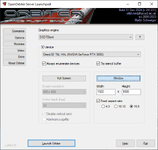
Sorry if this question may seem trivial, but in order to use the D3D9 client in Orbiter 2024 with Windows 10 what do you need to install of DirectX in addition to the default ones on the system?

... to the default what ? DirectX installation ? If you have 9.0 or later (which is probably the case), you're good to go, that's the beauty of it.
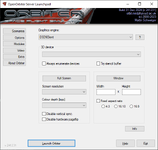
 
I currently have DirectX 12 installed, but I cannot activate the D3D9 client.

From DXDiag:
DirectX Version: DirectX 12
Chip type: NVIDIA GeForce RTX 3050
Driver Version: 32.0.15.7652
DDI Version: 12
Feature Levels: 12_1,12_0,11_1,11_0,10_1,10_0,9_3,9_2,9_1
Driver Model: WDDM 2.7


1748500132444.png

While D3D7 works without any problems

1748500204559.png

All DirectX benchmarks (9, 10, 11, 12) from Passmark PerformanceTest are performed without problems.
 
Last edited:
Solved, but I had to install DirectX End-User Runtime (June 2010).
Microsoft DirectX End-User Runtime installs a set of runtime libraries from the legacy DirectX SDK for some games that use D3DX9, D3DX10, D3DX11, XAudio 2.7, XInput 1.3, XACT, and/or Managed DirectX 1.1.
Actually everything works even if you just copy the d3dx9_43.dll (x86 version) library to the Modules\Server folder.
 
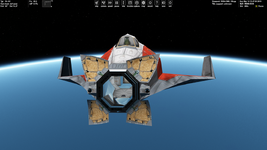
Probably I just haven't noticed this before (I just checked and it occurs with Orbiter 2016 too): I opened both outer and inner airlock and I'm noticing strong reflections inside the interior:

Без імені.png
 
I was pleasantly surprised that the Universal Autopilots 0.3.1 by @Artlav seems to be usable with Orbiter 2024. At least I tried the docking, lift-off and aerial state hold autopilots and they worked, alhtough once I got CTD. It's interesting how difficult it is to update this add-on to Orbiter 2024, and maybe update interface.
 
I've been testing the VesselM family addons, a lot of the .scn file folders have names like "1. abc, 2. abc, etc...". Orbiter2024 launcher doesn't seem to recognise text after the dot! Also loading the .scn files within results in a CTD, file not found. Otherwise it seems to work ok, maybe there's a setting for the launcher?
 
I was pleasantly surprised that the Universal Autopilots 0.3.1 by @Artlav seems to be usable with Orbiter 2024. At least I tried the docking, lift-off and aerial state hold autopilots and they worked, alhtough once I got CTD. It's interesting how difficult it is to update this add-on to Orbiter 2024, and maybe update interface.
I released the code for that a while ago - https://github.com/artlav/uap , so maybe someone can take a crack at it?
Sorry, not something i can help with these days, as i have long since moved on in both interests and career choices.
 
Strange thing I noticed only now. When I am in ground camera mode, when I scroll to go down (camera view lower), I goes much slower down, than going up. Speed (sensitivity) , when going up is consistent with moving camera sideways (rotating). but going down is noticably slower.
How can I switch the camera to ground mode? I am new to Orbiter. I don't like the camera rotation, when I drag the mouse to the right, I want to move to the right (or left) and not start rolling. Could be a problem with Euler rotation instead of using quarternions, technically speaking.
 
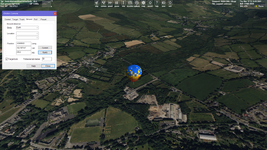
How can I switch the camera to ground mode?
You can press Ctrl+F1, choose the "Ground" tab and click "Apply". It will change your camera mode to the ground mode. Also, you can check the "Target lock" box:

t.png
 
Last edited:
Thank you !
Ah, where can I set the mouse wheel to zoom ? So switch mouse wheel and mouse up.
You can press Ctrl+F1, choose the "Ground" tab and click "Apply". It will change your camera mode to the ground mode. Also, you can check the "Target lock" box:

View attachment 43901
Ah, and where can I set the mouse wheel to zoom ? So switch mouse wheel and mouse right click and up/down.
 
The option "Max. resolution level (1-21)" on the launchpad seems to be broken. I have tiles up to level 21 and tried to set the option to be 19, 20, 21, and I always saw tiles of the maximum available level, namely 21. Then I deleted tiles of levels 19, 20, and saw the difference (lower resolution). So, it seems the option doesn't work properly. But I saw the difference (lower resolution) when I set the option to be 16, although I'm not sure the tiles of the level 16 were displayed.

Also, I posted it on GitHub issues.
 
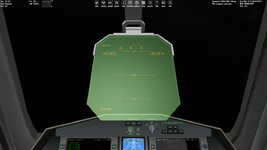
Just wanted to ask if there's an option that disables the glow of DG HUD, namely makes it more transparent?:

Без імені.png
 
Just wanted to ask if there's an option that disables the glow of DG HUD, namely makes it more transparent?:

View attachment 44461
I think that glow is not part of the "symbols drawn HUD", but is instead part of the "glass mesh HUD", so the material of that mesh would need to be changed.
The glass would produce a reflection in real life. IMO the root issue is the vc not having shadows, and so having the Sun from behind causes that reflection.
 
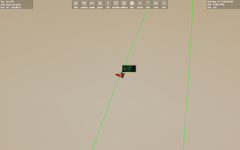
Sorry guys first of all great job! Can i remove a green line over ship? Thx
 
What the "green line over ship" do you mean?
 
Attach screenshot
 

Attachments

  • Server Screenshot 2025.08.10 - 13.27.11.56.png
    Server Screenshot 2025.08.10 - 13.27.11.56.png
    128 KB · Views: 18
That is the Draw Orbits plugin, which you can enable/disable completely at Launchpad > Modules > Draw Orbits.
If enabled, it will draw the orbit (green line) when the "Planetarium mode" is on.
 
Status
Not open for further replies.
Back
Top