Orbiter 2024 Release

Status
Not open for further replies.
Use Auto level.
If you mean the default HORZ LVL autopilot, then I activate it before burning hover engine, but a vessel turns out anyway, but then it reaches horizontal position. Maybe it's caused by powerful DG hover engines. I reduced their thrust by 10 times, but some strange happens: it turns out or doesnt take off at all.
Yes it's very slippery and impossible to brake, this does seem to be more of an issue with Orb24?
By the way, I just found a way how to brake on a body with low gravity. I press the key 8 on Numpad during braking (LIN RSC). This presses a vessel to the surface and it brakes more efficient. The difference in noticeable on Heyperion surface.
(also noticed a wierd G spike every 500s?)
No, I didn't fly it so long.
Auto selection will choose the main body of influence. You can manually select the Ref. in the Orbit MFD and press HUD for it to be displayed.
I choose Mimas as a refernce in Orbit MFD and press HUD, so Mimas is displayed on the HUD, but the PRO GRADE autopilot orients it relative to Saturn (I checked it).
You may need another MFD in some cases, or even have to eyeball it!
Do you mean some custom MFD, not the default Orbit MFD?
Yes, the 0.05G indicator shows that you cannot trust Orbit MFD or velocity pointer in the HUD.
That's sad. If I orient the vessel manually relative to Mimas, then it reaches an orbit correctly, although this orbit is unstable.

Well, I found a good body for my tests with textures. It's Hyperion - small moon of Saturn, but everything (hover take off, orbit navigation, orbit stability) seems to work corectly with it.

ONE MORE QUESTION:

Why do some body configuration files have commented module string, although the body has corresponding DLL module in /Modules/Celbody directory? For example:
Code:
; === Configuration file for moon Hyperion(Saturn) ===
Name = Hyperion
;Module = Hyperion
EllipticOrbit = TRUE           ; assume unperturbed orbit
HasElements = TRUE             ; orbital elements follow
 
If you mean the default HORZ LVL autopilot, then I activate it before burning hover engine, but a vessel turns out anyway, but then it reaches horizontal position. Maybe it's caused by powerful DG hover engines. I reduced their thrust by 10 times, but some strange happens: it turns out or doesnt take off at all.
Had no problems with the stock DG, have to take off very carefully though, minimal thrust.
By the way, I just found a way how to brake on a body with low gravity. I press the key 8 on Numpad during braking (LIN RSC). This presses a vessel to the surface and it brakes more efficient. The difference in noticeable on Heyperion surface.
Did already try that, didn't seem to help much.
No, I didn't fly it so long.
Sorry, monty python typo, I meant every 50s, monitoring with LoadMFD.
I choose Mimas as a refernce in Orbit MFD and press HUD, so Mimas is displayed on the HUD, but the PRO GRADE autopilot orients it relative to Saturn (I checked it).
Do you mean some custom MFD, not the default Orbit MFD?
Yes there are many, try PursuitMFD it might do the trick.
Well, I found a good body for my tests with textures. It's Hyperion - small moon of Saturn, but everything (hover take off, orbit navigation, orbit stability) seems to work corectly with it.
(y)
Why do some body configuration files have commented module string, although the body has corresponding DLL module in /Modules/Celbody directory?
I think this is just legacy?
 
Well, this is a blast from the past ! Haven't used this in like 15 years.
Getting a "Initialising 3D environments using a hardware device failed. Try again with a software device" failure on Orbiter 2024. What can I do to solve this ?
System is a Alienware R16 with i7 chip and GEforce RTX 4060 Ti
 
Last edited:
Well, this is a blast from the past ! Haven't used this in like 15 years.
Getting a "Initialising 3D environments using a hardware device failed. Try again with a software device" failure on Orbiter 2024. What can I do to solve this ?
System is a Alienware R16 with i7 chip and GEforce RTX 4060 Ti
Hi!
Are you using orbiter.exe or Orbiter_ng.exe? The 2º one, with D3D9, is the better option for more recent hardware.
 
Thanks that fixed it.
Are Earth and Moon Hi-Res textures still around these days ?
 
I have two separate installations of Orbiter 2024, but the help window displays informations only in the one of them:

Без імені.pngБез імені2.png

What could be the reason?
 
Last edited:
I have two separate installations of Orbiter 2024, but the help window displays informations only in the one of them:

Hi :cheers:

May be I have the solution...

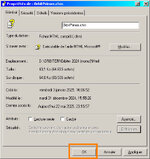
1) Using the Windows Explorer, go to the .../Html folder of your Orbiter (the one with the "Help" file that isn't displayed).

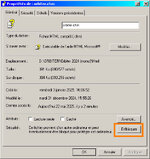
2) Select the Orbiter.chm file, then right-click and select Properties.

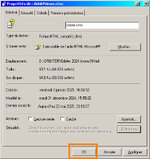
The following window will open : (mine is in French ;) )

chm.jpg THEN chm2 copie.jpg

3) Click "Unblock" and then OK.

Restart your Orbiter and it should work... 🤔 tell me if it works...
 

Attachments

  • chm2.jpg
    chm2.jpg
    82.9 KB · Views: 5
Last edited:
Yes, it solved the issue. Thank you!
:cheers: your welcome.

If anyone can answer my question :

I've been trying to associate sounds with XRSound for animations of a "vessel" (it's a mobile assembly tower).
I should point out that this vessel (the tower) is a "vesselbuilder" vessel.
Vesselbuilder can provide sound for animations itself. But I wanted to use XRSound. 🤔

Has anyone ever tried using XRSound to add sounds to a vesselbuilder vessel?
Because I'm wondering if that might be the problem... XRSound and vesselbuider do not work together ? 😵‍💫
 
Hi everyone, I want to ask about the D3D9Client between Orbiter 2016 and Orbiter 2024.
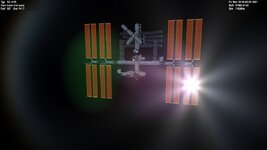
The two images below were taken in different versions of Orbiter using D3D9Client, the one on the left is 2016 and the one on the right is 2024.
Why are the sun flares and the way the ISS solar panels interact with the light look so different between versions?
Also, I don't see any lens effects on the 2024 version. Does the graphics difference have something to do with the D3D9Client version, how do I check what version I have?
Is there any way to make Orbiter 2024 look like 2016?
0005.jpgOpenOrbiter [D3D9Client] 24_05_2025 10_32_43 AM.png
 
Why are the sun flares and the way the ISS solar panels interact with the light look so different between versions?
The difference in the ISS solar panels could be caused by one or more reasons.

1. Maybe the translucency shader code didn't make it into the D3D9 client included with Orbiter 2024.
2. Maybe the code was included but there is a code problem that breaks the feature.
3. Maybe the required textures are missing. Translucent textures require two extra texture maps that end in "_transm" and "_transl", which is short for transmission and translucency. To see if this is the problem, try copying the two ISS texture maps from Orbiter 2016 to Orbiter 2024. If it still doesn't work or if the ISS array texture maps are already installed in Orbiter 2024, then it is probably reasons 1 and/or 2.
 
Has anyone ever tried using XRSound to add sounds to a vesselbuilder vessel?
Because I'm wondering if that might be the problem... XRSound and vesselbuider do not work together ? 😵‍💫
Well, that's it, I found it!!! 🫣

Actually, for sound to be possible with a vesselbuilder vessel, you have to declare trusters (even if they're not required!!!).

🥸 It was while reading the XRSound documentation that I found (at page 4):

XRSound Features:
• Automatically adds default sounds for any Orbiter vessel that defines thrusters


So my problem is solved.... 🤯
 
Last edited:
Hi everyone, I want to ask about the D3D9Client between Orbiter 2016 and Orbiter 2024.
The two images below were taken in different versions of Orbiter using D3D9Client, the one on the left is 2016 and the one on the right is 2024.
Why are the sun flares and the way the ISS solar panels interact with the light look so different between versions?
Also, I don't see any lens effects on the 2024 version. Does the graphics difference have something to do with the D3D9Client version, how do I check what version I have?
[...]
D3D9Client for Orbiter 2016 has the "lens flare" effect as an option unter "Post-Processing" if I remember correct. It is not enabled as default.
D3D9Client for Orbiter 2024 might have the same setting and default - I would check in the "advanced" pages and look for "Post-Processing".
 
D3D9Client for Orbiter 2016 has the "lens flare" effect as an option unter "Post-Processing" if I remember correct. It is not enabled as default.
D3D9Client for Orbiter 2024 might have the same setting and default - I would check in the "advanced" pages and look for "Post-Processing".
D3D9Client for OpenOrbiter only has Light Glow as a post processing option.
 
Sorry if this question may seem trivial, but in order to use the D3D9 client in Orbiter 2024 with Windows 10 what do you need to install of DirectX in addition to the default ones on the system?
 
Status
Not open for further replies.
Back
Top