Project NEW MOONBASE ALPHA

gattispilot

Addon Developer
Addon Developer
Joined
Oct 17, 2007
Messages
10,538
Reaction score
4,369
Points
203
Location
Dallas, TX
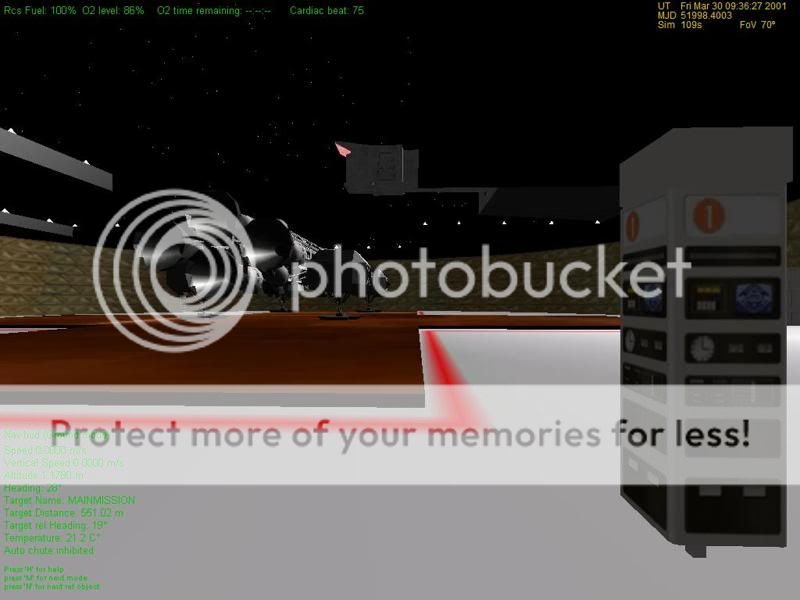
Here is the new Moonbase Alpha.
http://www.4shared.com/file/253597603/de957a1c/NEWMOONBASEALPHA4.html


It is basically like my MarsBAse but uses the MoonBase Alpha structure.

It has the eight anti gravity force field towers.

It uses Displacement booths and a new mesh for displacement booths, so back up the mesh. The new mesh is on the travel car. At each pad, 2 cone stations, Main mission there are Travel tube stations.

The pads have elevator for the pad. They have attachment points.

The pads, cone stations, and main mission all have breathable areas.

Ummu opens all doors. Press Enter when you are near the doors.


The cfg for the base will place the base where the older moonbasealphas are. It uses the same craters.
So you will need the crater meshes.

If you want to use Orulex then you will need to remove the crater lines from the cfg.

The only thing that I am still working on is entering the bases' airlocks. It says too far from airlock.


I also recommend this eagle3. It is Ummu 1.5 but will attach to the pads. It also has 4thRock's VC
http://www.4shared.com/file/253602955/fd878cbc/_2__EAGLE3.html


Thanks to 4thRock and Len for help testing. 4thRock for the main mission mesh.


moonbasealphagtowers.jpg


moonbasealphaconepad2.jpg


moonbasealphaconeairlock.jpg


moonbasealphaEAGLEPAD.jpg
 
Last edited:
Why no orbithangar?
 
Thanks. No Orbithangar because it is still a WIP. I need to fix/figure why the airlocks are too far. Other than that I think no issues.

Here is the base using Orulex
 
Last edited:
A couple of issues I hope someone can help.
1. In the cfg there are 8 LPADS listed but in the scenario editor only 7 are shown. Pad5 on the base is not listed. LPAD#1is center. Then LPAD2-6 are pads 1-5. LPad6 and LPad should be the 2 cone stations.
moonbasecfg.jpg


BEGIN_OBJECTLIST
LPAD1
POS 0 .01 0
SCALE 0 0 0
END
LPAD1
POS 340.096 -.1 -386.65
SCALE 0 0 0
ROT 315
NAV 120
END
LPAD1
POS -289.6579 -1 -286.3708
SCALE 0 0 0
ROT 315
NAV 121
END
LPAD1
POS -387.148 -1 410.456
SCALE 0
ROT 45
NAV 122
END
LPAD1
POS 255.732 -1 405.446
SCALE 0 0 0
ROT 315
NAV 123
END
LPAD1
POS 471.815 -.1 -171.054
SCALE 0 0 0
ROT 315
NAV 124
LPAD1
POS -123.01 -1 -605.77
SCALE 0 0 0
ROT 315
NAV 123
END
LPAD1
POS 3.883 -.1 547.176
SCALE 0 0 0
ROT 315
NAV 124
END


and the airlocks. When I exit the vessel and then trie dto reenter i get too far from airlocks. I have the parameters about 50 meters on each side from the deployment location. Any ideas?

Code:
void MOONBASEALPHA::SetUMMUAirlockPos(void)
{
    int AirlockStatus=Crew.GetAirlockDoorState();
    Crew.SetActiveDockForTransfer(iActiveDockNumber);
    switch(iActiveDockNumber)
    {
    case 0:    //pad1
Crew.DefineAirLockShape(AirlockStatus,400,500,-30,20,400,500);            
        Crew.SetMembersPosRotOnEVA(_V( 445.1403,.76,413.5586),_V(0,3.75,0));    
    
            dockselected=0;
        break;
    case 1:    //pad2
        Crew.DefineAirLockShape(AirlockStatus,300,400,-30,20,-300,-200);        
    Crew.SetMembersPosRotOnEVA(_V( 358.9553,.76,-232.9784),_V(0,4,0));
    dockselected=1;
        break;
    case 2:    //pad3-353.8786 1.223625 -459.5036
Crew.DefineAirLockShape(AirlockStatus,-400,-300,-30,20,-400,-500);            
        Crew.SetMembersPosRotOnEVA(_V(-353.8786,.76,-459.5036),_V(0,5.5,0));    
            dockselected=2;
        break;
            case 3:    //pad4-460.7023 1.223625  182.4097
Crew.DefineAirLockShape(AirlockStatus,-500,-400,-30,20,-230,-130);            
        Crew.SetMembersPosRotOnEVA(_V(-460.7023,.76, 182.4097),_V(0,.5,0));    
    
            dockselected=3;
        break;
            case 4:    //pad5 115.9192 1.21093  398.5226
Crew.DefineAirLockShape(AirlockStatus,100,200,-30,20,350,450);            
        Crew.SetMembersPosRotOnEVA(_V(  115.9192,.76,398.5226),_V(0,.5,0));    
    
            dockselected=4;
        break;
                    case 5:    //cone1
Crew.DefineAirLockShape(AirlockStatus,-600,-500,-30,10,-50,50);            
        Crew.SetMembersPosRotOnEVA(_V( -529.879,.76,-.9938099),_V(0,4.75,0));    
    
            dockselected=5;
        break;
                            case 6:    //cone2
Crew.DefineAirLockShape(AirlockStatus,550,650,-30,20,-200,-100);            
        Crew.SetMembersPosRotOnEVA(_V(  590.1379,.76,-116.0049),_V(0,1.75,0));    
    
            dockselected=6;
        break;
    }
// 590.1379 0.94089 -116.0049

    
    }
 
I'm having trouble in getting the base to run. I get a CTD with a clean orbiter.log but if I remove the UMMU from the .scn it works. Perhaps my Orbiter config, having had several development versions of Moonbase is troublesome, but can someone confirm if the latest version Gattispilot posted runs fine? Are there missing files, or dependencies?
 
I think the moonbasealpha1.cfg is in the config directory rather than the config/moon/base directory

don't know why only 7 lpads show up

On the airlocks. Attached is a drawing from meshwizard of airlock 3. I was able to get airlock 1 and 2 to work. But no others. I even expanded the parameters.

Crew.DefineAirLockShape(AirlockStatus,-500,-200,-50,50,-300,-600);
Crew.SetMembersPosRotOnEVA(_V(-353.8786,.76,-459.5036),_V(0,5.5,0));
 
Last edited:
Code:
Crew.DefineAirLockShape(AirlockStatus,-500,-200,-50,50,[B]-300,-600[/B]);
Just a small error, the maximum values must be after the minimum values -600,-300 should work.


But the Pads look correct, strange that one doesn't work.
 
Thanks. I have this and still too far from airlock:
Crew.DefineAirLockShape(AirlockStatus,-500,-200,-50,50,-600,-300);
Crew.SetMembersPosRotOnEVA(_V(-353.8786,.76,-459.5036),_V(0,5.5,0));

They are for sure in airlock3 as I can see the door markings
 
Thanks. just copy this into the cfg where the LPad info is.

LPAD1
POS 0 .01 0
SCALE 0 0 0
END
LPAD1
POS 340.096 -.1 -386.65
SCALE 0 0 0
ROT 315
NAV 120
END
LPAD1
POS -289.6579 -1 -286.3708
SCALE 0 0 0
ROT 315
NAV 121
END
LPAD1
POS -387.148 -1 410.456
SCALE 0
ROT 45
NAV 122
END
LPAD1
POS 255.732 -1 405.446
SCALE 0 0 0
ROT 315
NAV 123
END
LPAD1
POS 471.815 -.1 -171.054
SCALE 0 0 0
ROT 315
NAV 124
END
LPAD1
POS -123.01 -1 -605.77
SCALE 0 0 0
ROT 315
NAV 123
END
LPAD1
POS 3.883 -.1 547.176
SCALE 0 0 0
ROT 315
NAV 124
END

Now all LPads will be seen. Now just the airlock issue.
 
Thanks. Now if I can figure out why I am too far from airlock. Since 1 and 2 work I can assume the y values are ok. I wish there was a way to check how far off.

I guess I could make 1 big airlock
 
new mesh and module

On the airlocks I think it has to do with the displacement booths? You can enter the base and then exit ok. But if you enter the base and ride the travel car and go back to the airlock it says too far from airlock.
 

Attachments

A couple of new images. Space 1999 recon crew looking in the Main Mission room. in the lower right side you can see the travel car
mainmission5.jpg


The Ummu needs to move in front of the doors and press Enter. The airlock door will open. This will open the door but has nothing to do with the airlocks. The airlocks are always open, unless closed. To enter the base just walk into the airlock area and press E on the Ummu.
opencloseinnerairlock5.jpg
 
Lots of cool stuff, I love the functionality of the booths and doors. The main mission interior is a really great touch.

I do have a few suggestions, though:

-Could the breathable areas be coded into the module instead of being rooted to that location on the moon? The habitable UCGO modules have breathable areas attached to them so you can position them wherever you want. I'd appreciate the ability to put the base at other locations.

-UMMU action areas to lower the elevators for the landing platforms, seems like a natural thing to have.

-The location of the airlock to actually enter the base is a little unclear.

Really, though, it's got a lot of good things going for it. So much better than just having a static surface mesh or a vessel with a couple of simplistic animations. It feels a lot more like a real, functional base.
 
Last edited:
Good call on the Elevator I think I can add that. Although I think the max action areas is 30. The airlock locations to enter the base are located at the end of the hangar area by the pads.

On the breathable areas. I had that set so the whole base basically was breathable. one sphere at the center. But the problem was the Ummu would die at the start of the scenarios if he was un suited.

Here you go. A new module. Now when you are buy the comm post near the green hangar area and press Enter the pad lowers/raises.
The docking tube are still operated from the MBA.

It would nice to be able to transfer crew from the base to an eagle,... But that is not possible because you can't be docked and landed.


Also I add the breathable area code. So it such be breathable where ever you place it. For placement of the vessels you will need to move the base.cfg for the MoonBaseAlpha1. Also make sure you end the scenario with suits ON. else when you start your Ummus die. The reason is it is doesn't have time to make the atmosphere.

http://www.4shared.com/account/file/259727632/1cd7d61d/MOONBASEALPHA.html?sId=35UCaF0V1xk9zsf1

moonbasealphapad.jpg
 
Last edited:
Thanks any changes? additions? I am reworking my Eagle 3 to accomate the std modules. Working on the skid so you can transport cargo,....
 
It's already chock-full of features, I can't come up with any more that are possible within regular Orbiter programming. An ability to store UCGO cargo, maybe, but it's just as easy to leave a couple of XR5 cargo platforms around.

The breathable area does stop short of covering the entire garage space, though. It ends about halfway between the transit tube and the outer door.
 
Back
Top