Project N1-L3 Soviet Lunar Program Development

The image of a LOK interior I was trying to show is on this link:

http://www.astronautix.com/graphics/l/loksmint.jpg

Google translation doens't work after a few pages, so I let's do it the hard way :)

???
tgmoonpage14.jpg


LK
tgmoonpage15.jpg


LK ?
tgmoonpage17.jpg


LOK & LK (similar on both ? makes more sense only on LK)
tgmoonpage18.jpg


LOK
tgmoonpage19.jpg


LOK (top left main(?) SA (?) panel)
tgmoonpage22.jpg


LOK (top center main(?) SA (?) panel)
tgmoonpage23.jpg


LOK (SA ?)
tgmoonpage24.jpg


Zond
tgmoonpage28.jpg


If I understand it correctly, perhaps the left side of the main pannel (left of Vizor) is similar to Zond, and the right part is the LOK panel shown.
 
Last edited:

Caution and Warning lights


Correct


Correct, the other side of what was shown above.

LOK & LK (similar on both ? makes more sense only on LK)

Both.


Correct

LOK (top left main(?) SA (?) panel)

Just a detail common to both vehicles

LOK (top center main(?) SA (?) panel)

Part of the LOK panel

LOK (SA ?)


Correct


Correct

If I understand it correctly, perhaps the left side of the main pannel (left of Vizor) is similar to Zond, and the right part is the LOK panel shown.

Not just that part - also, the LOK has only two seats, one side is filled with life-support and navigation gear.
 
As my attention & focus has been on the U.S. manned spaceflight program all my life (not simply a patriotic choice - though I am proud of what we've accomplished - there just wasn't much info on the Soviet effort available to me until recently), I can't claim any expertise on the subject, but to my old (and admittedly uneducated) eye, this looks EXCELLENT...

Good show so far!
 
Wonderful ! This will be a masterpiece !

For the launchpad, it a little detail, I know, but maybe you should put higher resolution tiles, to fit with baikonur tile addon.

Here a question to 4throck :
Where did you find your LOK panel schema ?

Tanks !
 
I don't have a LOK panel schema! That's what I'm trying to figure out,but not easy.

If you are talking about the latest images I posted, they came from the PDF linked some posts above.
 
For the launchpad, it a little detail, I know, but maybe you should put higher resolution tiles, to fit with baikonur tile addon.

The launchpad actually does have hires tiles but they are built into the mesh (i.e. they are textured onto a mesh that is in the shape of huge flat square surrounding the pads.) This is necessary because in real life the ground around the pads is elevated and to simulate this in Orbiter I need to use a mesh. I tried (with some success) to get the coloring of the textures to match the Baikonur tiles on Orbithangar.

It ended up looking like this (with the baikonur tiles):
picture.php
 
Last edited:
The launchpad actually does have hires tiles but they are built into the mesh (i.e. they are textured onto a mesh that is in the shape of huge flat square surrounding the pads.) This is necessary because in real life the ground around the pads is elevated and to simulate this in Orbiter I need to use a mesh. I tried (with some success) to get the coloring of the textures to match the Baikonur tiles on Orbithangar.

It ended up looking like this (with the baikonur tiles):


Looks good!

You might make it a tiny bit darker, and soften the edges using the alpha channel.
 
Here's my tentative placement for the panels. I'm trying to fit them into a standard Soyuz configuration using just the panels identified as LOK.
I doesn't look right to me and unless some schematic appears, I can't do any better.

locvc.jpg


The center part makes sense there. The right panel looks too long. Nevertheless, the curved left-bottom edge seems to place it next to the vizor.

Any thoughts?
 
Last edited:
What about the window placement? The model of the LOK that I'm using seems only to have one window (the one on the right) and a VZOR. As for the panel length it seems to me that the window in my LOK model is far enough toward the base of the capsule to accommodate it.

---------- Post added at 11:32 PM ---------- Previous post was at 11:30 PM ----------

Looks good!

You might make it a tiny bit darker, and soften the edges using the alpha channel.

I can't soften the edges because as I said, what you are seeing in the picture is a giant square mesh that is textured with a surftile. I may change this in the future and add an actual surftile, though.
 
I can't soften the edges because as I said, what you are seeing in the picture is a giant square mesh that is textured with a surftile. I may change this in the future and add an actual surftile, though.

You should be able to soften it anyway. Doesn't the mesh become invisible?

---------- Post added at 01:11 AM ---------- Previous post was at 12:35 AM ----------

Just did a quick test, and it should work just fine.


It's a textured mesh that I added to Canaveral base. 2 of the edges are "softened".

PS: Don't forget the UNDERSHADOWS line.

Use DDS DXT3 for soft edges.
 
Last edited:
I use DTXBmp, a very useful tool for textures.
dxtbmp.jpg


You can link it to any bmp editor, even Paint.

Personally I use Paint Shop Pro XI, but that one isn't freeware.
 
I see that the original addon for celestia has a crawler ! It will be so cool if your addon as this crawler ! But, this is a sugestion, I know you have so much work to do !

For the tile, it is pretty good !! there's only the cloud's shadow that's annoy, but I know it is possible to erase that cloud, so it's not a big problem.
 
I'm definitely going to implement the crawler in a later version but it is left out for now.

---------- Post added at 05:10 AM ---------- Previous post was at 04:57 AM ----------

Update: I've finished the LK's RCS and now I'm going to start working on the LOK's.
 
What about the window placement? The model of the LOK that I'm using seems only to have one window (the one on the right) and a VZOR. As for the panel length it seems to me that the window in my LOK model is far enough toward the base of the capsule to accommodate it

I didn't change any of the 7K-OK placement. Perhaps the long panel that I put to the right is in fact at left, covering the place were the left window is. It fits better that way.
When in doubt, I prefer to keep on the safe side. As this will be a separate mesh, it doesn't need to match the exterior one exactly.
 
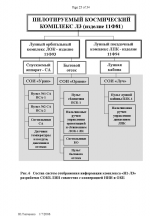
According to this diagram...

L3 cosmonaut control complex.png


... the T-shaped panel that is "common to both LK and LOK" is installed in the orbital module (BO). There are three control systems : Uran in the LOK SA, Orion in the LOK BO and Luch (Ray) in the LK.

Also it isn't the panel that is "common to both LK and LOK". I did a translation error, but since I can't speak Russian at all, I hope anybody can forgive me. It is "Control panel (for) Rendezvous and Docking LOK & LK"
 
Last edited:
Ok, no problem. We know there are 3 panels in the LOK SA from that diagram, two of which we have good images of. I'm back to guessing that the center panel might be similar to the L1 panel.

So this is my current layout best guess:

locvc.jpg


I'm assuming that the large left panel is occupying the place of the left window and seat. Please keep in mind it will not look as distorted when viewed from inside the VC.

What do you think ? Is it worth doing it ?

What about the BO panel? Is the spacecraft coded with a custom .dll that allows two VCs?
 
Back
Top