

-
ORBITER-FORUM will be temporarily closed at 2026-07-23 18:00 UTC while we complete some OF maintenance tasks. The amount of downtime is expected to take up to one hour, but probably less.
You are using an out of date browser. It may not display this or other websites correctly.
You should upgrade or use an alternative browser.
You should upgrade or use an alternative browser.
Discussion Mesh making with Blender
- Thread starter misha.physics
- Start date
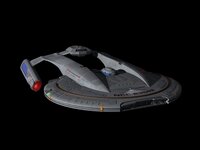


That's right, everything else is polygons.

gamer19
Well-known member
- Joined
- Jul 16, 2016
- Messages
- 372
- Reaction score
- 541
- Points
- 108

what, a girl can dream

don't you love when they put those stupid gigantic, mostly yellow, arrows ??
like in this particular case - you have a vastness of space and - A GIGANTIC SPACE SHIP
if you don't look very carefully you just may miss it
Luke Reichelt
Well-known member
If any of you are interested, here's a collection of surface bases located within the Sol system in the Star Trek universe. For certain building meshes, you will require the Relaxation Dome, STPSP: Andor, and Phoenix 2.0 add-ons.
Attachments
I found a 3D model of "Wholock" on Sketchfab, very well optimized as usual (959 KB).
I had to adapt the textures and rework them for the logos; it's not perfect yet. And a few other minor corrections.
He does fantastic work.
He should be credited. Here is his license: https://creativecommons.org/licenses/by/4.0/
His available 3D models:
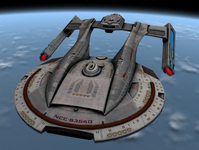
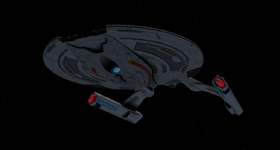
I had to adapt the textures and rework them for the logos; it's not perfect yet. And a few other minor corrections.
He does fantastic work.
He should be credited. Here is his license: https://creativecommons.org/licenses/by/4.0/
His available 3D models:

Luke Reichelt
Well-known member
Even so, I really wanted to use David Metletits' models, because those are the ones Trekkie is using. The screenshots I'm planning to take are intended to resemble what we'll get once he's finished working on them. Some of it is also partially for his benefit as well, since he seemingly doesn't have a lot of time to work on his stuff due to his busy work schedule.I found a 3D model of "Wholock" on Sketchfab, very well optimized as usual (959 KB).
I had to adapt the textures and rework them for the logos; it's not perfect yet. And a few other minor corrections.
He does fantastic work.
He should be credited. Here is his license: https://creativecommons.org/licenses/by/4.0/
His available 3D models:
View attachment 47835View attachment 47836
Yes, I understand better now.
But the textures will take longer. I'm already working on a project.
But the textures will take longer. I'm already working on a project.
Luke Reichelt
Well-known member
Just wondering, but what project would that be?I'm already working on a project.
Pictown II
In this video, I use Spacecraft4 to bring 30-FPS humanoid animations to Orbiter Space Flight Simulator. I cover the entire pipeline: from Mixamo rigging and Blender to generating custom .ini components in a few minutes.
Here are the scripts that I used in the video:
Script for blender to extract each animation frame as a separate object (meshgroup)

In this video, I use Spacecraft4 to bring 30-FPS humanoid animations to Orbiter Space Flight Simulator. I cover the entire pipeline: from Mixamo rigging and Blender to generating custom .ini components in a few minutes.
Here are the scripts that I used in the video:
Script for blender to extract each animation frame as a separate object (meshgroup)
Code:
import bpy

# Ensure the animated mesh is selected
obj = bpy.context.active_object
scene = bpy.context.scene

# Set the start and end frames based on your animation
start_frame = 1
end_frame = 29

# Create a new...


- Joined
- Jun 14, 2008
- Messages
- 813
- Reaction score
- 868
- Points
- 108
- Location
- FRANCE
- Website
- francophone.dansteph.com
Two years ago, I had make this :
- Meshes with anim8or
- animations with Vesselbuilder
I hate to ask but can you share the VB1 code. It might be nice to have on a UACS guy?Two years ago, I had make this :
- Meshes with anim8or
- animations with Vesselbuilder
- Joined
- Jun 14, 2008
- Messages
- 813
- Reaction score
- 868
- Points
- 108
- Location
- FRANCE
- Website
- francophone.dansteph.com
Hi GattispilotI hate to ask but can you share the VB1 code. It might be nice to have on a UACS guy?

Yes, no problem, I'm happy to share my VB file here.
But I need to add some explanations before :
So, here is some explanations...
In my VB file, there are annotations only for helping me - It's easy to get lost - but they're in French.
The main problem with Vessel Builder is that you can't stop a cyclic animation (0-1-0-1-0, etc.) with an EVENT (for example, stopping the leg movement when Tintin is stationary (vel=0)). It is only possible with Shift+key, or Ctrl+Shift+key.
So, I had to create a different configuration for when vel < 0.15 m/s.
So, we have:
if vel=0 or <0.15 => Configuration: 0 (astronaut spacesuit standstill)
if vel>0.15 => Configuration: 1 spacesuit walking)
Same system with Configuration: 3 (static work clothe) and Configuration: 4 (work clothe walking)
You can switch from "Tintin spacesuit" to Tintin in a work clothewith a keystroke.
The switch from "static" to "walking" occurs as soon as vel>0.15 m/s.
There's also a different configuration for Tintin in Space : Configuration: 2 (Spacesuit in Orbit)
Another configuration, "Configuration: 3 (Static spaceSuit)," is planned for when Tintin is attached to a spaceship (otherwise he starts walking!).
And if he dies, I've created two configurations:
Configuration: 5 (Grave or Dead)
Configuration: 6 (Blood Sphere)
So there are 5 meshes for all that...
Note that Configuration: 7 (Civilian, not yet working) is not finished.
(It doesn't work!)
I haven't uploaded this add-on because it's complicated and not very stable... and not really finalized
The goal was to create the rocket with Tintin.
Maybe someday...
Here is the liste of the 8 differents configurations in the VB files :
CONFIGURATION_0
;<-------------------------GENERAL SETTINGS - Configuration: 0 (scaphandre)-----
CONFIGURATION_1
;<-------------------------GENERAL SETTINGS - Configuration: 1 (scaphandre marche)
CONFIGURATION_2
;<-------------------------GENERAL SETTINGS - Configuration: 2 (Scaphandre en Orbite)
CONFIGURATION_3
;<-------------------------GENERAL SETTINGS - Configuration: 3 (Combi statique) ------------------------->
CONFIGURATION_4
;<-------------------------GENERAL SETTINGS - Configuration: 4 (Combi marche) ------------------------->
CONFIGURATION_5
;<-------------------------GENERAL SETTINGS - Configuration: 5 (tombe ou Dead) ------------------------->
CONFIGURATION_6
;<-------------------------GENERAL SETTINGS - Configuration: 6 (Sphere de Sang) ------------------------->
CONFIGURATION_7
;<-------------------------GENERAL SETTINGS - Configuration: 7 (civil pas encore marche)---------------0---------->
The liste of the messhes needed
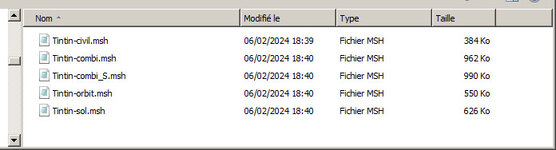
and also "sang.msh" and "tombe.msh"...
Here is the mesh "Tintin in spacesuit and walking"
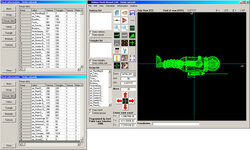
And... the VB CFG file (too big to be writed here)
I'd really appreciate your feedback.
If you want all the files (scn, msh, dds, and cfg), I can prepare a zip file.
(It will just take me a little time.)
Attachments
Last edited:
Luke Reichelt
Well-known member
Now that gattispilot is back from his hiatus, do you think you could continue helping him out with Metletits' 3D models (particularly the Akira and Daedalus)?Yes, I understand better now.
But the textures will take longer. I'm already working on a project.
Thanks. I guess one would need a mesh with arms and feet separated. Yes if you could send the meshes,..... that would be great. I think one could hard code this into a vessel and have them walk around. It would be if they could be UACS. I wonder if they could hop like on the moon?Hi Gattispilot
Yes, no problem, I'm happy to share my VB file here.
But I need to add some explanations before :
So, here is some explanations...
In my VB file, there are annotations only for helping me - It's easy to get lost - but they're in French.
The main problem with Vessel Builder is that you can't stop a cyclic animation (0-1-0-1-0, etc.) with an EVENT (for example, stopping the leg movement when Tintin is stationary (vel=0)). It is only possible with Shift+key, or Ctrl+Shift+key.
So, I had to create a different configuration for when vel < 0.15 m/s.
So, we have:
if vel=0 or <0.15 => Configuration: 0 (astronaut spacesuit standstill)
if vel>0.15 => Configuration: 1 spacesuit walking)
Same system with Configuration: 3 (static work clothe) and Configuration: 4 (work clothe walking)
You can switch from "Tintin spacesuit" to Tintin in a work clothewith a keystroke.
The switch from "static" to "walking" occurs as soon as vel>0.15 m/s.
There's also a different configuration for Tintin in Space : Configuration: 2 (Spacesuit in Orbit)
Another configuration, "Configuration: 3 (Static spaceSuit)," is planned for when Tintin is attached to a spaceship (otherwise he starts walking!).
And if he dies, I've created two configurations:
Configuration: 5 (Grave or Dead)
Configuration: 6 (Blood Sphere)
So there are 5 meshes for all that...
Note that Configuration: 7 (Civilian, not yet working) is not finished.
(It doesn't work!)
I haven't uploaded this add-on because it's complicated and not very stable... and not really finalized
The goal was to create the rocket with Tintin.
Maybe someday...
Here is the liste of the 8 differents configurations in the VB files :
CONFIGURATION_0
;<-------------------------GENERAL SETTINGS - Configuration: 0 (scaphandre)-----
CONFIGURATION_1
;<-------------------------GENERAL SETTINGS - Configuration: 1 (scaphandre marche)
CONFIGURATION_2
;<-------------------------GENERAL SETTINGS - Configuration: 2 (Scaphandre en Orbite)
CONFIGURATION_3
;<-------------------------GENERAL SETTINGS - Configuration: 3 (Combi statique) ------------------------->
CONFIGURATION_4
;<-------------------------GENERAL SETTINGS - Configuration: 4 (Combi marche) ------------------------->
CONFIGURATION_5
;<-------------------------GENERAL SETTINGS - Configuration: 5 (tombe ou Dead) ------------------------->
CONFIGURATION_6
;<-------------------------GENERAL SETTINGS - Configuration: 6 (Sphere de Sang) ------------------------->
CONFIGURATION_7
;<-------------------------GENERAL SETTINGS - Configuration: 7 (civil pas encore marche)---------------0---------->
The liste of the messhes needed
View attachment 47881
and also "sang.msh" and "tombe.msh"...
Here is the mesh "Tintin in spacesuit and walking"
View attachment 47882
And... the VB CFG file (too big to be writed here)
I'd really appreciate your feedback.
If you want all the files (scn, msh, dds, and cfg), I can prepare a zip file.
(It will just take me a little time.)
I can import them into blender. And export to msh. But it is fixing all the inverted parts. I use Anim8or but I can't load this into that to fix the issues.Now that gattispilot is back from his hiatus, do you think you could continue helping him out with Metletits' 3D models (particularly the Akira and Daedalus)?
Luke Reichelt
Well-known member
You think you could maybe find time to do that with the Akira?I can import them into blender. And export to msh. But it is fixing all the inverted parts. I use Anim8or but I can't load this into that to fix the issues.
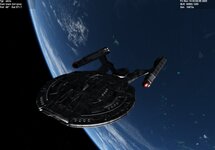
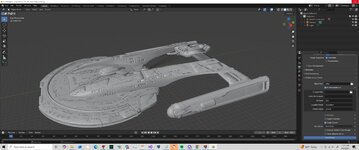
Hi,Now that gattispilot is back from his hiatus, do you think you could continue helping him out with Metletits' 3D models (particularly the Akira and Daedalus)?
I have much less free time since I went back to work, and I'm spending a lot of time on character animations and other things for Pictown II.
But I've been chatting with gatispilot via private message, and I can help him with the little free time I have.
Luke Reichelt
Well-known member
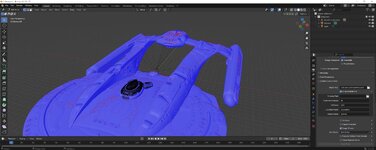
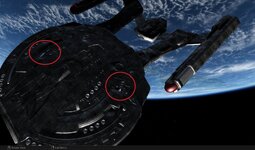
I'm pretty sure the blue parts are supposed to be grey. Hopefully Fast_toche can help you figure it out.So I had it show the face. I think blue is the back? But I know some meshes use front and back together.
But what I was hoping to see is where these holes are in the blender mesh
Similar threads

- Replies
- 103
- Views
- 25K


- Replies
- 175
- Views
- 41K
