
what plugin? where?There is a brilliant plugin that links Blender directly to your Orbiter Mesh and Tex. folders, does all the left/right stuff, and even set msh flags in Blender, and is literally as easy as one click and you have a msh in Orbiter.

ORBITER-FORUM will be temporarily closed at 2026-07-23 18:00 UTC while we complete some OF maintenance tasks. The amount of downtime is expected to take up to one hour, but probably less.
what plugin? where?There is a brilliant plugin that links Blender directly to your Orbiter Mesh and Tex. folders, does all the left/right stuff, and even set msh flags in Blender, and is literally as easy as one click and you have a msh in Orbiter.


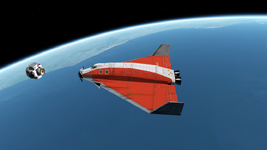
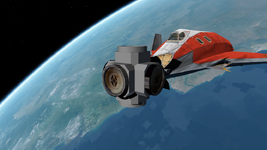

So, there's no way to make a vessel based on "Spacecraft4" which won't fall through the ground and therefore won't be able to land on the surface in OpenOrbiter, isn't it?the touchdown points and attachments don't work in Orb2016+
Yes (but no attachments with any SC in any Orb2016+), but I'd still reccomend VB, if you skip animations and beacons a simple .cfg is enoughThanks.
Sorry for the following stupid questions:
If we want to make a simple space station with working docking ports and maybe with some simple animations, light beacons, and without touchdown points (let's suppose it will fly only in space) and attachments, then the "Spacecraft4" is completely enough for this purpose?
You can use it like a one-use docking port- eg. heatshield jettison, cargo, but one can also make parent/child chains and so has many usesCould you mention some example explaining what are the attachments you mentioned? Is it like the attachment of cargo or something else?
AFAIK I'm afraid so, but VB can do all that SC does and more, It's a little tricky and I preferred the syntax in SC, but they are pretty similar (all share the same Orbiter API).So, there's no way to make a vessel based on "Spacecraft4" which won't fall through the ground, isn't it?
I'd still reccomend VB
Thanks for this. I'm really going to try VB, I just started from SC because there were some tutorials with examples and explanations. For now I don't know how to start learning VB, that is how to understand its commands, options and graphic interface. I haven't seen any detailed documentation for VB yet.VB can do all that SC does and more
Sorry, I'm afraid I might have misunderstood. Which one(s) is right?:if you skip animations and beacons a simple .cfg is enough
Yes, I've already seen Cessna, characters, animations and others. It's a great and big work.If you want to see what incredible stuff can be done with VB checkout the addons from @jacquesmomo
This is exactly the best way to go, especially because there is no doc. for VBThanks for this. I'm really going to try VB, I just started from SC because there were some tutorials with examples and explanations. For now I don't know how to start learning VB that is how to understand its commands, options and graphic interface. I haven't seen any detailed documentation for VB yet.
.cfg= no animation, no lights (and TD points are "broken")Sorry, I'm afraid I might have misunderstood. Which one(s) is right?:
1) The only *.cfg file is enough for making some animations and beacons (without SC and VB).
2) I can make some animations and beacons with SC (without VB).
3) I can't make animations and beacons even with SC, so I need VB for this.
It's a little strange since the TouchdownPoints option is presented in OrbiterConfig.pdf for the 2016 edition:.cfg= no animation, no lights (and TD points are "broken")
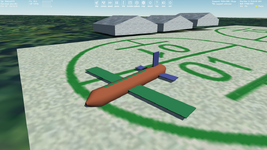
Thanks.the doc. was never updated (it's the old text from 2010)
It might be a good option to be able to set TD points just in a vessel *.cfg file, because it's one of the basic functions.Unfortuneately I have no idea if TD points are supported in .cfg files in Orb2016 and what the syntax would look like, maybe we find out with O24?
Absolutely agreeIt might be a good option to be able to set TD points just in a vessel *.cfg file, because it's one of the basic functions.
This an ok hack/workaround so you can use vessels made in SC4 or compiled for Orb2010 in Orb2016, it's not perfect though, orientation on landing etc., but better than nothing and you can at least still use the few gems that'll never be updated
I did address the problem just recently here, it is also a old known issue I believe, but I think the Devs are pretty busy at the moment.I'm not sure, maybe I had to create a new thread regarding Touchdown Points (for OpenOrbiter).
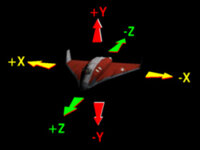
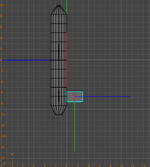

Do you mean these five videos on a started post of the Vessel Builder thread? Or maybe could you link any other VB videos and materials that may help (teach) to understand VB, if they exist?VB just has youtube videos for learning.
It's just a "feature" that the left side of a vessel displayed in Anim8or will be the right side of the vessel in Orbiter. I just didn't expect such behavior, but there's no problem, now I understand.Orbiter X = Anim8or X
Orbiter Y = -Anim8or Z
Orbiter Z = Anim8or Y
Thanks, it's very nice! I noticed earlier that you have several vessel addons made with VB, so I'll try to use them as samples. (I even think I could write some actual tutorials on VB, but first I need to learn something myselfIt is, unfortuneately, partly uncharted terrain, but the best is to get started and if you get stuck, ask, I for one would be happy to assist and look forward to seeing your creations in Orbiter!
 )
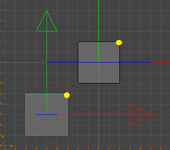
)
This can very tricky/nasty when working with MFDsIt's just a "feature" that the left side of a vessel displayed in Anim8or will be the right side of the vessel in Orbiter. I just didn't expect such behavior, but there's no problem, now I understand.
Oh god, I fight everyday with the forum. No idea, I just copy the name from below the Avatar!What is a syntax to make a reference to a member name without "@"?
Actually the Flash Gordon addon (which in my opinion should recieve the award for "ugliest VC ever implented in Orbiter"- my fisrt, and only) was my VB testbed, VB was new and I had a simple mesh that needed animation and "as proof of concept" managed to include most standard features. As it is not as complicated as the DG it's a good example for learning, swap out the mesh and adjust things.I noticed earlier that you have several vessel addons made with VB
sorely needed, and I'm sure it would be very much appreciated.I even think I could write some actual tutorials on VB
I'm sure it can, wish I could help? If it helps they are often called world coordinates.but maybe it can be done in Anim8or


