
You are using an out of date browser. It may not display this or other websites correctly.
You should upgrade or use an alternative browser.
You should upgrade or use an alternative browser.
Project Mars Design Reference Mission 1
- Thread starter markp
- Start date

Interceptor
Well-known member
Thanks mark,Ive been messing with the newest version of DRM1,and it's very good,but some problems with the UCGO mainly the greenhouse,which BTW is awesome,anyways sometimes when I unpack the green house I cant see the interior like in you scenario DRM1 base its invisible.I know this is probably an orbiter limitation,but could you some how make it so you can see the UMMU people through the glass from outside,and also the telerover is invisible when unpacked,but when you reload the scenario it's back.OK I will do some more messing around tomorow.Thanks again for all your hard work this going to be a great addon.
markp
Active member
Not sure what to do about the greenhouse yet.
The rover is invisible because it normally gets information about its configuration from the scenario file. When it's spawned by UCGO then it doesn't get the info. I've updated the dll so the rover will check to see if it has been spawned by UCGO and so always make an appearance! Also fixed a little animation bug with the camera rotation.
Thanks for giving the addon a go!
New rover dll :
View attachment New rover dll.zip
(Haven't checked the Xspace launch tower yet but will do soon ...)
The rover is invisible because it normally gets information about its configuration from the scenario file. When it's spawned by UCGO then it doesn't get the info. I've updated the dll so the rover will check to see if it has been spawned by UCGO and so always make an appearance! Also fixed a little animation bug with the camera rotation.
Thanks for giving the addon a go!
New rover dll :
View attachment New rover dll.zip
(Haven't checked the Xspace launch tower yet but will do soon ...)

- Joined
- Oct 11, 2009
- Messages
- 3,486
- Reaction score
- 407
- Points
- 123
- Location
- Utrecht
- Website
- www.spaceflightnewsapi.net
What launch tower is that MarkP?I don't remember seeing that in the latest version of the spacex addon.Where did you get it from?Thanks
(Haven't checked the Xspace launch tower yet but will do soon ...)
It is included in the SpaceX add-on

Last edited:
Interceptor
Well-known member
Hi IronRain,I redownloaded the newest version at OH,and I don't see a red.and white launch tower like in the pic I provided,all I see is a skinny silver one, and, one thats a little wider for the heavy models.Thanks:facepalm:It is included in the SpaceX add-on
---------- Post added at 06:38 AM ---------- Previous post was at 06:25 AM ----------
OK I appoligize for that IronRain with little more seaching, I found the tower it seems to be in only one scenario though,thanks for making me look harder.:thumbup:Hi IronRain,I redownloaded the newest version at OH,and I don't see a red.and white launch tower like in the pic I provided,all I see is a skinny silver one, and, one thats a little wider for the heavy models.Thanks:facepalm:
---------- Post added at 06:39 AM ---------- Previous post was at 06:38 AM ----------
Thanks MarkP for the new Rover.dll.

Using the D3D9 client, Orbiter crashes when ejecting the backplate of the DRM1_hab.
Here is the error message from the log, maybe the developers of the D3D9 client can help you fixing it:
Here is the error message from the log, maybe the developers of the D3D9 client can help you fixing it:
Code:
Exception Code=0xC0000005, Address=0x041A5456
EAX=0x042FB301 EBX=0x00000000 ECX=0x00000000 EDX=0x10C63F88 ESI=0x042FB358 EDI=0x7761ED58 EBP=0x009FFEA8 ESP=0x009FFE50 EIP=0x041A5456
D:\Program Files (x86)\orbiter\120121 Orbiter 2010-P1 Shuttle Fleet\Modules\Plugin\D3D9Client.dll EntryPoint=0x041B9ECD, Base=0x04180000, Size=1249280
Exception in clbkRenderScene()
!!! Abnormal Program Termination !!!Crash to Desktop:
Some add-ons are crashing when using with D3D9Client because they are not compatible with graphics clients. CTDs should be reported to the add-on owner. The main reason for the CTDs is the VESSEL::GetMesh() function that will always return a NULL when a graphics client is attached into the Orbiter. GetDevMesh() function should be used instead. Also, it's vital to use DEVMESHHANDLE with GetDevMesh() instead of MESHHANDLE.
markp
Active member
Thanks astrosammy for giving it a go in the D3D9 client. I haven't used that before because have been a little in awe of what it is/does but it was easy to install and working nicely.
Played around with the DRM1 code and it does seems the ctd is caused when the addon tries to load the meshes during the simulation. Fix it soon hopefully.
Played around with the DRM1 code and it does seems the ctd is caused when the addon tries to load the meshes during the simulation. Fix it soon hopefully.
markp
Active member
It turned out to be that I was defining some animations during the simulation rather than during the initialisation of the vessel. The method I'm using for loading the meshes is working fine. I've added a little flutter animation to the parachutes when the first deploy while I was reorganising the code.
Here are the new files:
View attachment New_lander_dll.zip
Landers in the D3D9 client:
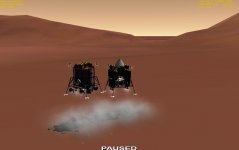
It seems the simulation is running quite a bit more smoothly (higher fps) on my computer in the D3D9 client.
Here are the new files:
View attachment New_lander_dll.zip
Landers in the D3D9 client:
It seems the simulation is running quite a bit more smoothly (higher fps) on my computer in the D3D9 client.
Interceptor
Well-known member
Is that New lander dll file only for the D3d9 clent?
Looking at the changes he made it should (or better, will) work without the D3D9 client.
---------- Post added 22-02-12 at 03:35 ---------- Previous post was 21-02-12 at 23:31 ----------
And thanks for the update, Mark.
The same crash also happens on NTR seperation, so it might be good to take a look at all vessels.
---------- Post added 22-02-12 at 03:35 ---------- Previous post was 21-02-12 at 23:31 ----------
And thanks for the update, Mark.
The same crash also happens on NTR seperation, so it might be good to take a look at all vessels.
markp
Active member
It seems only the cargo lander gives a ctd when released from its NTR. It deals with the meshes a bit differently than the habitat lander because of UCGO. Will take some time to implement a fix for this but it is doable I reckon.
markp
Active member
Well has been a bit slow progress with the DRM.
Have been updating the landing autopilots so the ships can be used on other planets and moons. I thought this would be fun and good way to test stuff.
Also have been looking into autopilot algorithms for the return capsule to Earth. I have realised the guidance program/algorithm can be a lot simpler than I first thought for a bank modulation steering approach.
Have also implemented varying lift and drag coefficients that vary with the velocity as would happen in reality.
Quite slow progress but hope to have something ready to play with eventually.
Have been updating the landing autopilots so the ships can be used on other planets and moons. I thought this would be fun and good way to test stuff.
Also have been looking into autopilot algorithms for the return capsule to Earth. I have realised the guidance program/algorithm can be a lot simpler than I first thought for a bank modulation steering approach.
Have also implemented varying lift and drag coefficients that vary with the velocity as would happen in reality.
Quite slow progress but hope to have something ready to play with eventually.
markp
Active member
Hi,
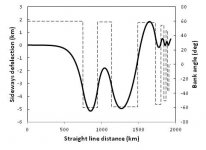
Something a bit technical but a sign of progress!
I have tested the autopilot for guidance during reentry into Earth's atmosphere using an Apollo type capsule (i.e. the capsule that returns the crew from Mars). Using bank modulation the accuracy is not pin-point but seems to be 1 or 2 km. Haven't used the Apollo algorithms. Been developing my own for now to get some insight into the problems involved.
Possible could add a steerable parafoil to the capsule to correct for drift from winds as suggested in NASA's DRM 1 documentation.
The plot below shows the autopilot working to not over shoot a target by reducing the vertical lift (i.e. banking to around 60 degrees). The autopilot then banks left and right to manage the sideways deflection due to the non-vertical lift vector.
The dotted line is the bank (roll) angle and the continuous line is the distance travelled from the entry altitude (the results are from my own flight simulator I use for "fast" prototyping of stuff).
Something a bit technical but a sign of progress!
I have tested the autopilot for guidance during reentry into Earth's atmosphere using an Apollo type capsule (i.e. the capsule that returns the crew from Mars). Using bank modulation the accuracy is not pin-point but seems to be 1 or 2 km. Haven't used the Apollo algorithms. Been developing my own for now to get some insight into the problems involved.
Possible could add a steerable parafoil to the capsule to correct for drift from winds as suggested in NASA's DRM 1 documentation.
The plot below shows the autopilot working to not over shoot a target by reducing the vertical lift (i.e. banking to around 60 degrees). The autopilot then banks left and right to manage the sideways deflection due to the non-vertical lift vector.
The dotted line is the bank (roll) angle and the continuous line is the distance travelled from the entry altitude (the results are from my own flight simulator I use for "fast" prototyping of stuff).
markp
Active member
Hi,
A couple of small things to report on.
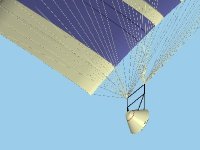
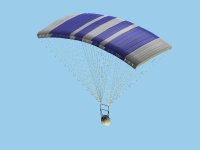
1. Added a parafoil to the capsule (parafoil is an old mesh of mine and seems to fit ok!).
2. Have added to winds to my capsule entry tests to investigate how that all works out (used a rather high wind speed in the test below).
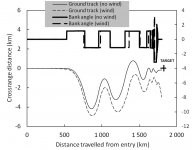
btw watched some movies of the x38 parafoil deployment and it looks rather a precarious process!
A couple of small things to report on.
1. Added a parafoil to the capsule (parafoil is an old mesh of mine and seems to fit ok!).
2. Have added to winds to my capsule entry tests to investigate how that all works out (used a rather high wind speed in the test below).
btw watched some movies of the x38 parafoil deployment and it looks rather a precarious process!
Last edited:
markp
Active member
So still plodding along with this project in the background and just having some fun.
Am using my workhorse Icarus vehicle to test out new techniques and test the autopilots.
Can fly it manually from orbit to a base on Earth using navigation information from the autopilot, although the control part of the autopilot isn't quite working yet. Also trying to develop a slightly better (more realistic) vertical landing autopilot and technique.
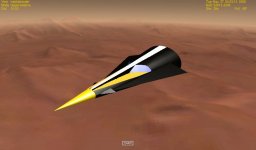
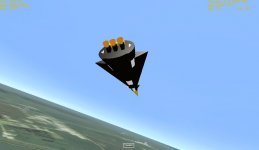
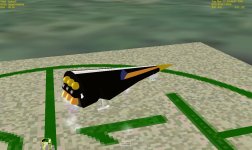
Am using my workhorse Icarus vehicle to test out new techniques and test the autopilots.
Can fly it manually from orbit to a base on Earth using navigation information from the autopilot, although the control part of the autopilot isn't quite working yet. Also trying to develop a slightly better (more realistic) vertical landing autopilot and technique.
- Joined
- Oct 11, 2009
- Messages
- 3,486
- Reaction score
- 407
- Points
- 123
- Location
- Utrecht
- Website
- www.spaceflightnewsapi.net
Great to see that you are still working on the project!
Interceptor
Well-known member
Thanks for the news,glad to see this project is still on going.:thumbup:
markp
Active member
Some more work on development of the autopilot. Tested it on Pluto. Previously only tested it on Mars and Earth. The autopilot seems to pick up all the relevant planetary and atmospheric parameters from Orbiter ok. I set the pressure of Pluto much higher than it really is to register some aerodynamic lift and drag.
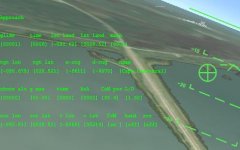
I added the target heading on the atmospheric approach page on the HUD so the pilot can manually locate the target if they want.
Haven't activated all the autopilot functions yet. It can move the centre of mass ok, to adjust the L/D automatically for minimising the target miss distance, but haven't tested it properly yet.
Below are a couple of pics manually locating and dropping in on an old friend, Hermes, who should be on Io but anyway.
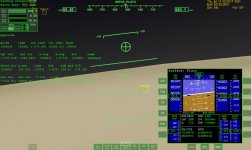
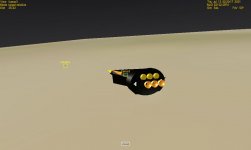
I added the target heading on the atmospheric approach page on the HUD so the pilot can manually locate the target if they want.
Haven't activated all the autopilot functions yet. It can move the centre of mass ok, to adjust the L/D automatically for minimising the target miss distance, but haven't tested it properly yet.
Below are a couple of pics manually locating and dropping in on an old friend, Hermes, who should be on Io but anyway.
markp
Active member
The atmospheric entry part of the autopilot is working properly now. It wasn't working before because I hadn't realised the program to calculate the trajectory didn't take into account the changing L/D with velocity that I had implemented for the actual vehicle (Icarus that I'm using as a testbed).
It works quite nicely down to a velocity of about 1000 m/s and and altitude of about 30 km. After that I lower its aoa and glide to the landing point manually. I've managed to land it on the pads by vectoring the hover thrust manually by tilting the whole vehicle like a helicopter.
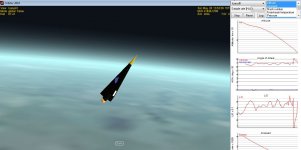
It works quite nicely down to a velocity of about 1000 m/s and and altitude of about 30 km. After that I lower its aoa and glide to the landing point manually. I've managed to land it on the pads by vectoring the hover thrust manually by tilting the whole vehicle like a helicopter.
Similar threads

- Replies
- 0
- Views
- 5K

- Replies
- 2
- Views
- 4K


- Replies
- 12
- Views
- 7K

- Replies
- 3
- Views
- 4K
- Replies
- 2
- Views
- 4K