
You are using an out of date browser. It may not display this or other websites correctly.
You should upgrade or use an alternative browser.
You should upgrade or use an alternative browser.
Request Lunar Electric Rover
- Thread starter Puma
- Start date


LER module
Here is a cfg and module. To rotate the wheels press 7 or 8 and press it again to stop. apply thrust and it should go in the direction the wheels are turning. It is also UMMU.
I think it need a VC or cockpit view to see the rotation of the wheels.
I use the mesh from the earlier posts. You will have to add this LER in the scenario
Here is a cfg and module. To rotate the wheels press 7 or 8 and press it again to stop. apply thrust and it should go in the direction the wheels are turning. It is also UMMU.
I think it need a VC or cockpit view to see the rotation of the wheels.
I use the mesh from the earlier posts. You will have to add this LER in the scenario
Last edited:
LER
I think that is the way it is designed. That all wheels turn in sync and then you change direction by the thrust. So it always face front but you can go sideways and off at an angle.
I think that is the way it is designed. That all wheels turn in sync and then you change direction by the thrust. So it always face front but you can go sideways and off at an angle.
I think that is the way it is designed. That all wheels turn in sync and then you change direction by the thrust. So it always face front but you can go sideways and off at an angle.
It have ability to go sideway but there's no logic that can't turn left or right for exploration vehicle.
Check this video.
Thanks. On my module. if you press 7 and get the wheels to a 90 degree and apply thrust you go sideways. It seems I can't rotate in a tight circle.

- Joined
- Nov 18, 2007
- Messages
- 617
- Reaction score
- 0
- Points
- 16
- Location
- Indianapolis
- Website
- www.orbithangar.com
LER must have ZTR!
Is ZTR Zero Turn Radius?LER must have ZTR!
I wonder how to code that?
what if you turned one side forward at an angle and the other side same angle but backward
This what I have for the thrust direction:
th_main = CreateThruster (_V(0,0,0), dir, MAXMAINTH, TANK, ISP);
CreateThrusterGroup (&th_main, 1, THGROUP_MAIN);
th_retro = CreateThruster (_V(0,0,0), dirR, MAXRETROTH, TANK, ISP);
CreateThrusterGroup (&th_retro, 1, THGROUP_RETRO);
SetThrusterDir (th_main, _V(sin(2*PI*TURN_proc), 0, cos(2*PI*TURN_proc)));
SetThrusterDir (th_retro, _V(-sin(2*PI*TURN_proc), 0, -cos(2*PI*TURN_proc)));
i would think that this would work one side is firing in one direction and the other side is direction in the opposite direction.
SetThrusterLevel(th_main,1);
SetThrusterLevel(th_retro,1);
Update:
I changed the thruster so that they are offset1.5 on the x. Then I have key that fires the left one forward and then fires the fire on backward. now you rotate. I think I will set the wheels to a 45 degrees.
One think I need to get now is both thrust to fire and both retro to fire
Last edited:
- Joined
- Nov 18, 2007
- Messages
- 617
- Reaction score
- 0
- Points
- 16
- Location
- Indianapolis
- Website
- www.orbithangar.com
Right. It's specified for the vehicle and demonstrated with the prototype.Is ZTR Zero Turn Radius?
How to code it? Ya, that's a mess.

new LER module
Try this module:
http://www.4shared.com/file/137637874/c2a72f2c/_6__LER.html
1/3 keypad turn it. One thing I don't like is the vessel turns before the wheels rotate.
Try this module:
http://www.4shared.com/file/137637874/c2a72f2c/_6__LER.html
1/3 keypad turn it. One thing I don't like is the vessel turns before the wheels rotate.
Code:
th_rcs[0] = CreateThruster (_V( 1,0, 1), _V(0,0,1),MAXRCSTH, TANK, ISP);
    //left front tread
    th_rcs[1] = CreateThruster (_V(-1,0, 1), _V(0,0,1), MAXRCSTH, TANK, ISP);
    // right front tread
    th_rcs[2] = CreateThruster (_V( 1,0,-1), _V(0,0,-1), MAXRCSTH, TANK, ISP);
    //left rear tread
    th_rcs[3] = CreateThruster (_V(-1,0,-1), _V(0,0,-1), MAXRCSTH, TANK, ISP);
    // right rear tread
    th_group[0] = th_rcs[0];
    th_group[1] = th_rcs[3];
    CreateThrusterGroup (th_group, 2, THGROUP_ATT_YAWLEFT);

    th_group[0] = th_rcs[1];
    th_group[1] = th_rcs[2];
    CreateThrusterGroup (th_group, 2, THGROUP_ATT_YAWRIGHT);
...


i3 = GetControlSurfaceLevel(AIRCTRL_RUDDER);
if (i3==1){SetThrusterLevel(th_main,0);
            SetThrusterLevel(th_retro,0);
          TURN_proc=.125;}

if (i3==-1){SetThrusterLevel(th_main,0);
            SetThrusterLevel(th_retro,0);
          TURN_proc=.875;}
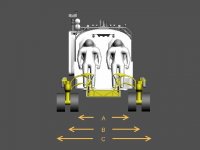
I think this is close to factory size.
Thanks.
When I first looked at it, Orbiter seemed to crash on the LER. When I manually created a new scenario, it worked. Probably something in my car.dll.
On the second attempt I tried to fine-tune my LER.cfg settings. That is when I discovered that the LER model I used was way too big. It makes no sense to tune the LER as long as the mesh is too large.
I also discovered a driving LER really looks fake if its wheels aren't rolling and turning. Sounds like a necessary feature for car.dll. I'm also interested in supporting more than four wheels.
The more advanced features of the LER (like the arbitrary turning of all wheels) are things I'm less interested in. As I understand, gattispilot is also working on a module, so I'll discuss with him how to split the work.
How are we (or the real astronauts) supposed to operate all these degrees of freedom in the wheel system? Is there something like a separate steering wheel for front, middle and rear wheels? Or a combination of linear and rotational steering (like RCS in Orbiter)? Maybe the RCS controls can be re-used for this vehicle!
- Joined
- Nov 18, 2007
- Messages
- 617
- Reaction score
- 0
- Points
- 16
- Location
- Indianapolis
- Website
- www.orbithangar.com
In this NASA spec the wheelbase is given at 4m.
In the picture is that A, B, C, or yet another value not listed?
In the picture is that A, B, C, or yet another value not listed?
Attachments
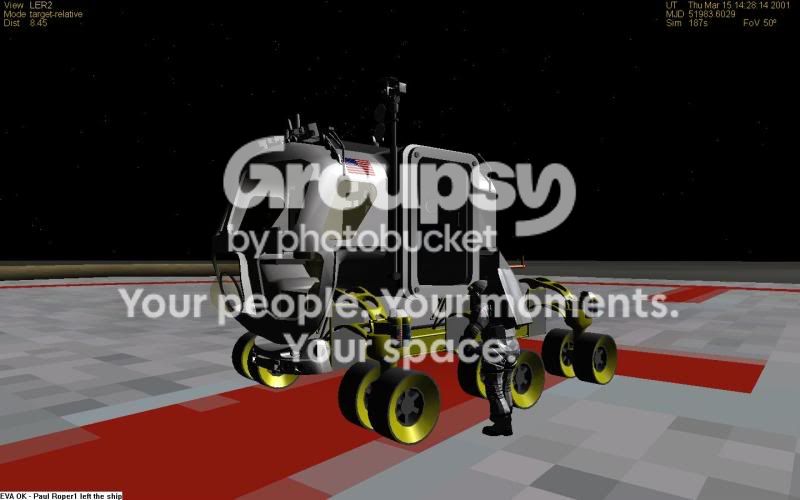
Here is the module and files. http://www.4shared.com/file/139783674/abe80c98/_2__ler2a.html
The one thing I haven't gotten is the timing of the rsc and the wheels
All 6 wheels rotate and roll.

it is Ummu ready with it's own crewmesh. if one exits via the side airlock or the rear airlocks then the suits goes away.
A gauge show wheels direction/rotation

keys: 7/8 rotate the wheels . So press 7 and the wheels rotate to the left and press 7 again when you wish for it to stop, same thing for 8 except opposite direction.
keypad:+/- forward/reverse 1/3 rotate
G changes internal camera. 9/0 changes airlock number N removes Ummu menu
Enjoy
The one thing I haven't gotten is the timing of the rsc and the wheels
All 6 wheels rotate and roll.
it is Ummu ready with it's own crewmesh. if one exits via the side airlock or the rear airlocks then the suits goes away.
A gauge show wheels direction/rotation
keys: 7/8 rotate the wheels . So press 7 and the wheels rotate to the left and press 7 again when you wish for it to stop, same thing for 8 except opposite direction.
keypad:+/- forward/reverse 1/3 rotate
G changes internal camera. 9/0 changes airlock number N removes Ummu menu
Enjoy
Last edited:

- Joined
- Aug 5, 2008
- Messages
- 4,261
- Reaction score
- 1
- Points
- 0
This is looking great!
Could you add an opening/closing sunshade for the suitport, as shown on the latest version of the SPR:
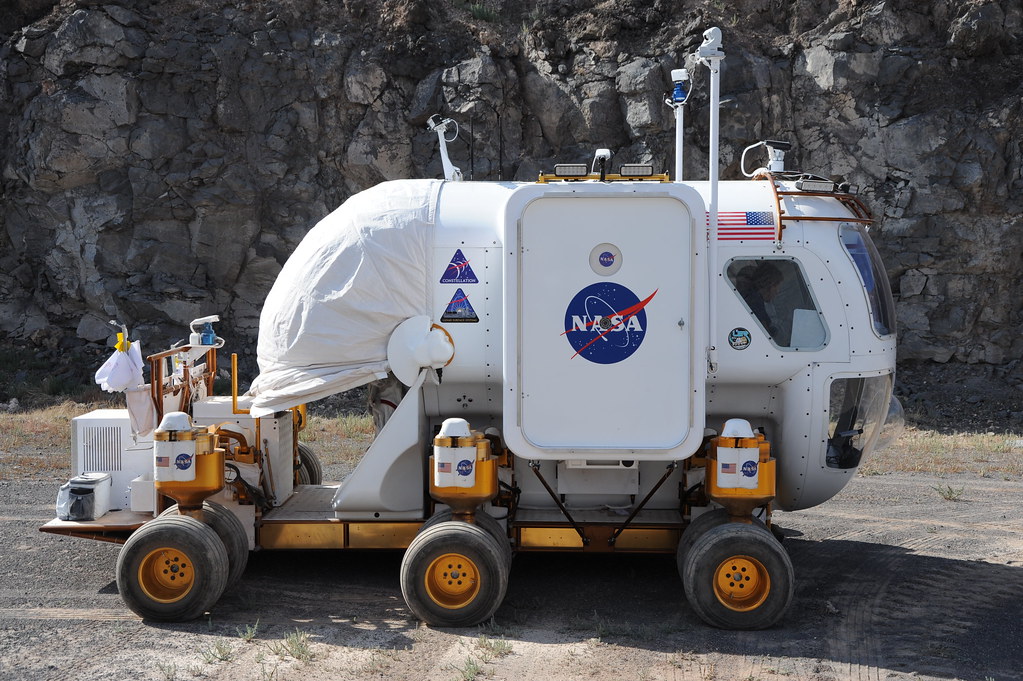
Some useful links:
NASA Desert-RATS Flickr photostream:
www.flickr.com/photos/nasadesertrats/
NASA SPR factsheet (PDF, 3.7 MB):
www.nasa.gov/pdf/284669main_spr_factsheet_web.pdf
Could you add an opening/closing sunshade for the suitport, as shown on the latest version of the SPR:
Some useful links:
NASA Desert-RATS Flickr photostream:
www.flickr.com/photos/nasadesertrats/
NASA SPR factsheet (PDF, 3.7 MB):
www.nasa.gov/pdf/284669main_spr_factsheet_web.pdf
Last edited:
Thanks. What needs to be done on them? Textures or animation?
On the sunshade, not sure how to animate that. The easy way would be to have the shade as a whole and then rotate down. But it would be inside the unit.
On the sunshade, not sure how to animate that. The easy way would be to have the shade as a whole and then rotate down. But it would be inside the unit.
Nicely edit mesh,still more work on wheels?!
- Joined
- Nov 18, 2007
- Messages
- 617
- Reaction score
- 0
- Points
- 16
- Location
- Indianapolis
- Website
- www.orbithangar.com
Nice job gattispilot! The mesh looks really great! Good work on the Ummu also.
Have you encountered some sort of mode where the wheels spin crazy in all directions? They stay in the right place, just spin like a gyroscope. Maybe can we get some brakes?
Mounted in an ACES, delivered by a Jupiter-246.
Have you encountered some sort of mode where the wheels spin crazy in all directions? They stay in the right place, just spin like a gyroscope. Maybe can we get some brakes?
Mounted in an ACES, delivered by a Jupiter-246.
Attachments
No, the only time the wheels spin is when 7 or 8 are press. and when the rudder is pressed. Are we talking about that or rotating as if the LER is driving? The gauge on the interior should reflect the direction of the wheels
On the sunshade. I have thought about just adding pieces of it as a mesh. So you might have 4 meshs to make it complete. The other way is maybe to scale it but I think it might be difficult. Or maybe have the 4 parts and just animate like a elevator door the 1st part would rotate down and then it would take the 2nd,...
Any ideas?
Any ideas?

Similar threads


- Replies
- 10
- Views
- 4K

