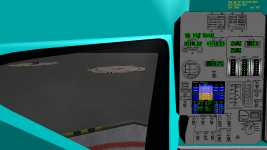
API Question I need help with cockpit redraw events.

oapiVCRegisterArea (AID_LCD_DISPLAY, _R(0,40,144,0), PANEL_REDRAW_ALWAYS, PANEL_MOUSE_IGNORE, PANEL_MAP_BACKGROUND, sh_LCDdisplay);

Your top edge is larger than your bottom edge, you have to switch the y-coordinates around. I can't promise that this is the only thing, but it certainly won't work this way.
 
Thankyouthankyouthankyou

That did it!
:woohoo:

picture.php

View image in gallery

I'll probably have some further questions done the line but for the moment there is coding to be done and textures to be creating.

Thank you again you've been a great help :tiphat:

and I'll be keeping your son in my prayers :hailprobe:

---------- Post added at 05:27 PM ---------- Previous post was at 05:08 PM ----------

Ok next question.

how do I go about adding a buffer to my LCDprint function fo that I can use %f and the like?

I stole the followin HUD code from one of the SDK samples but am unclear on how it actually works.

Code:
#define HUDTextOut_CLR(skp, x, y, colour, text, ...)	
{\
DWORD old_clr = skp->SetTextColor(colour); \
char buf[1024]; \
sprintf_s(buf, 1024, text, __VA_ARGS__); \
skp->Text (x+roxl, y+royl,buf, (int)strlen(buf));\
skp->SetTextColor(old_clr);\
}

All I know is that when I type

Code:
HUDTextOut_CLR(skp, column[ 0], row[ 2], GREEN, "RCS:  %3.1f %%", GetPropellantMass(ph_RCS)/GetPropellantMaxMass(ph_RCS)*100);

I get what I need.
 
how do I go about adding a buffer to my LCDprint function fo that I can use %f and the like?

I stole the followin HUD code from one of the SDK samples but am unclear on how it actually works.

Code:
#define HUDTextOut_CLR(skp, x, y, colour, text, ...)	
{\
DWORD old_clr = skp->SetTextColor(colour); \
char buf[1024]; \
sprintf_s(buf, 1024, text, __VA_ARGS__); \
skp->Text (x+roxl, y+royl,buf, (int)strlen(buf));\
skp->SetTextColor(old_clr);\
}
Using the example you provided, it can be done this way:
Code:
#define LCDFormatPrint(surf, text, ...)	
{\
char buf[1024];\
sprintf_s(buf, 1024, text, __VA_ARGS__);\
LCDPrint(surf, buf, strlen(buf)); \
}
Instead of defining the block with #define, you can of course overload the LCDPrint function to take additional variable arguments parameter.
 
the "skp" variable is a pointer to a oapi::Sketchpad class.

This line sets the Sketchpad to the color you want, and saves the color it is currently set at in the old_clr variable:
DWORD old_clr = skp->SetTextColor(colour);

These lines make a string of text in the "buf" variable;
char buf[1024];
sprintf_s(buf, 1024, text, __VA_ARGS__);


NOTE: the __VA_ARGS__ is kind of like a reference to the "..." you see in this line: HUDTextOut_CLR(skp, x, y, colour, text, ...)
This is a way to pass a variable length argument.


This line draws the text to the Sketchpad :
skp->Text (x+roxl, y+royl,buf, (int)strlen(buf));

from the API documentation:
Text(x, y, str, len)
* \param x reference x position [pixel]
* \param y reference y position [pixel]
* \param str text string
* \param len string length for output


This line sets the Sketchpad color back to the original color
skp->SetTextColor(old_clr);
 
the "skp" variable is a pointer to a oapi::Sketchpad class.

Well, we're not working with sketchpad currently...

Ok next question.

That was fast :lol:

anyways glad to see that it works. Getting the first thing working is always a bit of a task, after that you quickly get the hang of it.

As for your question, this is completely OAPI unrelated. I usually just use sprintf to print everything into a chararray, then pass that on to the print function. The print function doesn't have anythig to do with it, it just prints what it gets.

sprintf can be a bit confusing at first, but it's really quite simple. You have the target string, then the format string, then the variables.

for example,

Code:
sprintf(text, "hello %s, you weight %0.2f kg", name, weight);

will result in text looking something like "hello Dude, you weight 70.37 kg", if the string name was "Dude", and the float weight was 70.379482289875. In case you're wondering what the %0.2f exactly is, it just tells how many digits after the comma of a float should be printed into the string. Very useful.
You can extend this to use as many format identifiers as you like, important is just that every identifier will have a variable to go with it.
Oh, and make sure the string you print to a chararray isn't longer than the array. That leads to all kind of difficult to find bugs, as sprintf will just print beyond the string into memory that you maybe used for something else...

The most common identifiers used are %s (string), %d (integer) and %f (float).

EDIT: ah, I see Orb was a bit more correct in using the secured function that also takes the string name. Probably recommendable...

and I'll be keeping your son in my prayers

Thanks! He had a great surgery and has woken up this afternoon. I saw him yesterday, and he looked still somewhat bloated, but he got most of the water out of his system by now. Looks like he'll be as good as new.

 
Last edited:
Up until this point my challenge has been to display anything at all. Now the challenge is to display something useful. :huh:

LCDPrint is currently a function that blits ASCII characters from a provided bitmap to the surface handle passed to it.

Code:
void Spider::LCDPrint(SURFHANDLE surf, char* text, int _length)
{
int cHeight = 40;	// Character height [pixles]
int cWidth = 24;	// Character width [pixels] 
int cRow, cCol;	// Character's position in bitmap [row / column]
int textwidth = cWidth * _length;

for (int i = 0; i < _length; ++i)
	{
	cRow = (text[i] - 32) / 10;
	cCol = (text[i] - 32) % 10;

	int srcX = cCol * cWidth;
	int srcY = cRow * cHeight;

	int tgtX = i * cWidth; 
	int	tgtY = 0; // for single line displays only, multi-line displays will need an additional function here

	oapiBlt( surf, sh_LCDfont, tgtX, tgtY, srcX, srcY, cWidth, cHeight);
	}

//Note: sh_LCDfont is a 10x6 grid of all ASCII characters between [space] and [Z]. This allows the function to display capitol letters A-Z, numbers, punctuation, and common mathematical operations (multiplication, division, etc...).
}

This is a pretty simple application of what appears in the programming tutorials I've been reading and Jedia's own code posted above. The question now is how do I get it to process variable length strings and other arguments?

Understand that I've essentially been teaching myself C++ from scratch by tearing apart and rebuilding Orbiter vessel Addons so keep the image I linked above about programming languages and rabbits in mind. :rofl:

---------- Post added at 07:07 PM ---------- Previous post was at 06:49 PM ----------

:ninja:'ed

Using the example you provided, it can be done this way:
Code:
#define LCDFormatPrint(surf, text, ...)	
{\
char buf[1024];\
sprintf_s(buf, 1024, text, __VA_ARGS__);\
LCDPrint(surf, buf, strlen(buf)); \
}
Instead of defining the block with #define, you can of course overload the LCDPrint function to take additional variable arguments parameter.

Would this be defined in the clbkVCRedrawEvent or elsewhere?
 
how do I get it to process variable length strings and other arguments?

Why, it already processes variable length strings. after all, you're giving it the length. To get the length of a chararray when you don't know it, you can use strlen(char*). Just pass this as the length argument, and you're done (eg. LCDprint(text, strlen(text),... ) Also, see my last post on arguments, I think I Ninja'd you.
 
Understand that I've essentially been teaching myself C++ from scratch by tearing apart and rebuilding Orbiter vessel Addons
That's a bad idea, believe me. You should learn C++ by writing simple programs so you could fully understand how they work. And then as you build up your knowlege move to more complicated ones.
Would this be defined in the clbkVCRedrawEvent or elsewhere?
Since your vessel will be using it, it's header file will be a good place.
 
That's a bad idea, believe me. You should learn C++ by writing simple programs so you could fully understand how they work. And then as you build up your knowlege move to more complicated ones.

I respectfully disagree. I find that setting yourself a real challenge is the fastest way to start coding, although you might end up not using your first results...
 
I respectfully disagree. I find that setting yourself a real challenge is the fastest way to start coding, although you might end up not using your first results...
A real challenge as a kickstarter yes but after that it's better to put your ambition aside and learn basics untill you have a good understanding of it. That's a more beneficial and apropriate aproach I think and I say that from my own expierience.
 
Is there a way to force the %f function to always use the same number of digits?

Example: "12" would print as "12" but "3" would print as "03".
 
Is there a way to force the %f function to always use the same number of digits?

Example: "12" would print as "12" but "3" would print as "03".

%02f prints out 2, pads with "0"
%03f prints out 3, pads with "0"

EDIT: note, the number printed includes period and numbers after period. Should probably use it with precision. I.e. %02.0f

Should make 3.234234234 into 03
Should make 12.43452342 into 12
 
Last edited:
All my numerical displays are up and running and I just want to bask in thier glow for a moment :lol:


I appreciate all the help, I really do.

The next item on the to-do list are the Engine and T/W gauges. These will be simple "tape" style displays. I'm guessing that the simplest/most efficient way to impliment this would be to have one bitmap that is the backgound/numbers and another which is the needle and then blit the needle onto the background adjusting the Y position depending on the desired indication.

Am I on the right track?
 
I'm guessing that the simplest/most efficient way to impliment this would be to have one bitmap that is the backgound/numbers and another which is the needle and then blit the needle onto the background adjusting the Y position depending on the desired indication.

Am I on the right track?

Pretty much, although it requires some planning. While orbiter seems to support transparent blitting, I never really got it to work, and it isn't supported by graphics clients, so either your needle has to be rectangular, or the display must be designed in a way that the needle doesn't overlap any multi-colored background.
 
Well I've got the engine tape gauges up and running but as you said there seems to be an issue with setting transperancy.

Ive experimented with "oapiSetSurfaceColourKey" and "SURF_PREDEF_CK" but all I ended up doing was making the whole thing tranperant not just the alpha layer. Can any one help?

In the mean time I want to start on the Range/Rate Gauge. I want to do scrolling numbers similar to the altitude/VSI on the right side of Orbiter's Surface MFD but have no idea how to acually go about it.

Seems too complex to blit and sketchpad is unknown territory for me.
 

Attachments

  • SpiderVC3.png
    SpiderVC3.png
    377.7 KB · Views: 13
No need to use sketchpad. you know how to print now, so all you need is another bitmap font (only covering the numbers if you only need the numbers). calculating where to blit them is a bit more involved now, as you have no static position, but it's really no different from your needles.

Talking about needles: you could solve the problem by making two needles, one with green and one with grey background, and the blitting either one or the other depending on where it is. For the transition, you can blit parts of either to combine to a full needle that has the background separation in the right place.

I know this is a bit unweildy, but it'll work and no user will notice the difference.

But oh, you also have a gradient there... it's nice, but it'll have to go, I'm afraid.
 
Last edited:
I always thought the transparency in a blt was done with one color - similar to MS-Paint when you copy/paste with background transparency on. But I haven't experimented with it much.
 
I always thought the transparency in a blt was done with one color

It's certainly supposed to, but I never got it to work in orbiter, and I do have quite some expierience with 2d graphics (as opposed to 3d... :shifty:). Also, the manual says that it won't work in clients, so it might be a good thing to avoid it anyways.
 
No need to use sketchpad. you know how to print now, so all you need is another bitmap font (only covering the numbers if you only need the numbers). calculating where to blit them is a bit more involved now, as you have no static position, but it's really no different from your needles.

Talking about needles: you could solve the problem by making two needles, one with green and one with grey background, and the blitting either one or the other depending on where it is. For the transition, you can blit parts of either to combine to a full needle that has the background separation in the right place.

I know this is a bit unweildy, but it'll work and no user will notice the difference.

But oh, you also have a gradient there... it's nice, but it'll have to go, I'm afraid.

Unfortunatly I created the bitmaps before I knew that transperancy was going to be an issue and I'm feeling a little too lazy to go back and re-do 'em now. I guess that'll be something to fix in version 1.X :rolleyes:

I think I'll just move on to the Range/Rate & Altimeter. (The plan is to have a single gauge that in surface mode it will show altitude and VS, and in docking mode will give range to a target and closure rate)

After that there's the AI and X-pointer but I really have no idea how to do that without sketchpad or transperancy as there are as I'm gonna need a way to do crosshairs.

Alternately I could give the cockpit a rest and go back and work on the Autopilots, that being the only other major obstical to release.
 
Back
Top