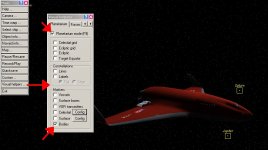
I have that on and selected bodies and etc. But the thing is before i reinstalled orbiter I would see a yellow square indicating a planets position and its name above. It isn't there anymore.
All of the items are checked still nothing
I only need the planets to be labeled and marked with a square and name above that no matter how far i am from the planet.
Using the DGIV shouldn't make any difference. Turn off anti-aliasing if you have it enabled for Orbiter in your video driver settings (e.g., in your NVIDIA Control Panel).
Using the DGIV shouldn't make any difference. Turn off anti-aliasing if you have it enabled for Orbiter in your video driver settings (e.g., in your NVIDIA Control Panel.
This site uses cookies to help personalise content, tailor your experience and to keep you logged in if you register.
By continuing to use this site, you are consenting to our use of cookies.