Fly-By-Wire 0.9 Discussion

Just some quick notes:

HiPotOk1978: As posted in the other thread, the Saitek Rudder Pedal problem is probably due to problems in the underlying SDL library. I'll check if the latest SDL libs cure it.

Robb: Source code release was my intention from the start. I'll probably add the sources to the upcoming bugfix release.

DarkWanderer: They were initially planned, but I've stopped developing FBW.
 
Awesome!

What's the development platform/language you're using?

Robb
 
What's the development platform/language you're using?
The core functionality is written in Delphi 6/Object Pascal. A small Visual Studio/C++ DLL interfaces with Orbiter.
 
The bugfix release 0.9.1 (for the trailing space issue) is up at OrbitHangar; this time, sources are included.

Source documentation is minimal, but I'll try to answer questions ... ;)
 
Awesome! I can't tell you how much the community appreciates your efforts! FBW should be one of those standard additions to Orbiter.

Now that I've buttered you up a bit, what are the odds you could add an additional channel for the SCRAM engine throttle?

Robb
 
Now that I've buttered you up a bit, what are the odds you could add an additional channel for the SCRAM engine throttle?

Robb
There is no way to generically know which engines are a part of a vessel's SCRAM engines.
 
I guess I was thinking mainly of the XR vessels. The SCRAM engines are exposed in the XR API, I believe.

Robb
 
I guess I was thinking mainly of the XR vessels. The SCRAM engines are exposed in the XR API, I believe.

Robb
Rather than have FBW understand XRVesselCtrl, a more generic approach would be to allow assignment of axes to user thruster groups by index. I think this would allow operation of any engines of any vessels.
 
I have the same problem that Puma mentioned.

I have copied a fully working version of Orbiter on my USB stick.
- On my Laptop, FBW works.
- In my desktop PC it does not show up in the Extras-List.

Orbiter does not mention it in its log.

My conclusion: must have something to do with the system; this is not an error of the orbiter or FBW installation.

I will investigate that dll-idea further.

---------- Post added 11-13-09 at 09:26 AM ---------- Previous post was 11-12-09 at 07:38 PM ----------

FBW seems to require MSVCR80.dll.
I've installed MS VC++ to solve the problem. :lol:

Now it works. :tiphat:
 
Rather than have FBW understand XRVesselCtrl, a more generic approach would be to allow assignment of axes to user thruster groups by index. I think this would allow operation of any engines of any vessels.

This would also allow for (example) the Shuttle-A's rotating pods, if users could add their own controls then they could assign the rotation of the Pods to one axis and the thrust produced by another. That would be a good solution.

Also is it just me or does one of the Rotaries on the X52 not work with orbiter. It would be great if the larger of the two rotaries was working, i usually set the smaller of the rotaries to trim, and I would like the larger one for hover thrust.
 
This would also allow for (example) the Shuttle-A's rotating pods, if users could add their own controls then they could assign the rotation of the Pods to one axis and the thrust produced by another. That would be a good solution.
In order to tie the pod rotation to an axis you'd need access to the "pod_rotation_request" array in the ShuttleA code, which isn't something you could do from a generic addon :(

Also is it just me or does one of the Rotaries on the X52 not work with orbiter. It would be great if the larger of the two rotaries was working, i usually set the smaller of the rotaries to trim, and I would like the larger one for hover thrust.
Both rotaries on the X45 work for me.
 
ProfileStandard.ini can not be written

Hi Everyone. I am using 0.9.1b2 and when I try and save the config it informs me that ProfileStandard.ini can not be written. I changed all the security details for all the files so they can write but no joy. Any help is appreciated.

MachJok

Edit: Saitek X52 standard
 
Last edited:
Hi Redburne,

I updated You Fly-By-Wire for Orbiter 2016.
Now is working with SDL2 and most probably is compatible with all game controllers.
Tested: Saitek Pro Flight Rudder Pedals, Saitek PRO Flight Yoke System, Saitek PRO Flight,Throttle Quadrant, Thrustmaster T-Rudder, Thrustmaster T.Flight Hotas 4
All axis and buttons working.
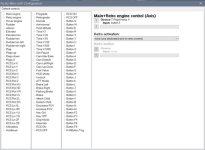
Currently you can operate more then 100 orbiter function. Specially for VR user Right Mouse Button toggle.
I would like to upload FBW in Orbit Hangar Mods and I need your permitting.
I will indicate that you are author, I only ab dated FBW.

FlyByWire.jpg
 
Hi Redburne,

I updated You Fly-By-Wire for Orbiter 2016.
Now is working with SDL2 and most probably is compatible with all game controllers.
Tested: Saitek Pro Flight Rudder Pedals, Saitek PRO Flight Yoke System, Saitek PRO Flight,Throttle Quadrant, Thrustmaster T-Rudder, Thrustmaster T.Flight Hotas 4
All axis and buttons working.
Currently you can operate more then 100 orbiter function. Specially for VR user Right Mouse Button toggle.
I would like to upload FBW in Orbit Hangar Mods and I need your permitting.
I will indicate that you are author, I only ab dated FBW.
Hi GB,

thanks for updating Fly-By-Wire!
You have my permission to upload your version to Orbit Hangar Mods and do whatever you want with the source code and the binaries.

Oliver
 
I try to upload my file but I can not ( 0 bytes), but I put address to my One drive.
Because it is my first upload in Orbit Hangar Mods awaiting staff approval before it goes live.
I am Seamen and tomorrow I will fly to my vessel. My connection to internet will be hardly ever.
Please to be patient for answer.
 
Still I can not upload FBW in Orbit Hangar Mods, but You can find Fly-By-Wire 2016 in AVSIM Library.
 
Back
Top