Software Fix for Orbiter2010 in Windows8

9th Planet

New member
Joined
May 31, 2014
Messages
8
Reaction score
0
Points
0
I discovered a solution for improving Orbiter 2010 functionality on Windows 8.

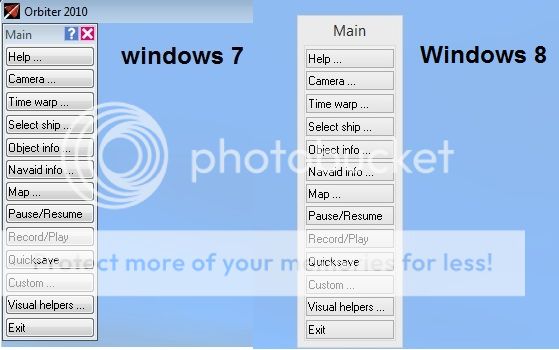
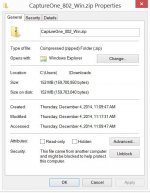
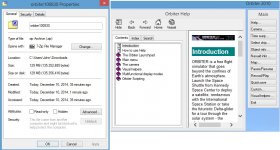
Issues that I have experienced ranged from nonworking buttons on the Logitech Extreme 3D Pro joystick with the D3D9 client, failure to display any of the help menus, the missing upper right minimize/maximize and close buttons on windows and some random CTDs. I discovered that these can be easily fixed by "unblocking" in the Properties Window the help files and several blocked DLLs in the Orbiter folder (unfortunately, file by file) and then by running Orbiter_ng as an administrator.

I have not discovered all the blocked files yet, but unblocking these few already makes everything work much better. Windows 8 does not trust files downloaded from the internet and blocks them by default. Often nothing adverse happens, but strange behavior occassionally pops up with any downloaded program.
 
I ran into these same problems when I tried to run my Lunar Station Construction Scenarios on my Father's Windows 8.1 machine. Various dialog boxes refused to show close buttons and several MFDs caused CTDs. I'd be very interested to know the complete list of files that need to be tweaked (and a step-by-step process to tweak them) to get this to work.

Thanks!
Dantassii
HUMONGOUS IMS shipbuilder.
 
Perhaps this is what's causing my Win7 problems.
 
Do you have Orbiter installed in your Program Files directory? If so, install it elsewhere.
 
As to a complete list of files, I suggest checking everything in the Orbiter 100830 Html folder for blocked files. Unblocking these should fix the Help dialog windows. I also checked for and unblocked any blocked files in the D3D9Client and D3D9Client20 folders in the Modules folder.

I found that some DLLs are also blocked by Windows 8. So, eventually I will check all of them.

I also checked Orbiter.exe and Orbiter_ng.exe and although they were not blocked in the main Orbiter folder, I found an instance of one of them in another Orbiter subfolder that was blocked.

I am sure that I will need to check for more blocked files in the rest of the Orbiter folder and fix them as well. I have not even yet started to address any of my installed addons.

I have only done this with my Windows 8 installation, next week I will attack the Windows 8.1. I am not running Orbiter on my Windows 7 but I have had the similar security issues with other downloaded programs on Windows 7, so I suspect that this fix will work there also.

No Hielor, I do not have Orbiter installed in the Program Files directory. I agree that it does not belong there. I thank Martin for having given us the option of zip installs. I have Orbiter in the Documents folder on one computer and in Videos on another. And, I have taken advantage of the ease of removing and reinstalling everything when things really go awry. I save a clean copy on a DVD for quick restorations without having to reinstall, ie., unzip, and without having to remember which sequence worked best. It does make a large difference, the order in which everything is installed.
 
So far I have unblocked all of the .chm files in the HTML folder (and its subfolders) in the orbiter100830 folder by right clicking and in the properties dialog box clicking "unblock."

I also checked for and similarly unblocked all blocked files in the D3D9client and D3D9client20 folders in the Modules folder.

I have been looking in other folders in the orbiter100830 and have found many more blocked files, but so far have not unblocked any others.

I have not installed Orbiter on any of my Windows 7 machines, but suspect that Windows 7 behaves similarly. There may be a way to change the default behavior of either OS, but I would not recommend doing so for security reasons.

Hielor, I agree with you. My Orbiter installations were done with the zip method and the orbiter folder is located in the Documents folder on one machine and in Videos folder on another.
 
Ok. I got a new PC desktop with Windows 8. I used the msi but get this issue. Not sure what to block/unblock?
windows8image_zps5a96390f.jpg
 
Not sure what to block/unblock?
windows8image_zps5a96390f.jpg
If the problem is with missing close button, then click where it supposed to be, around top right corner of the dialog box.

I don't know what compatibility settings there are for launching applications in Windows 8, but if there is such setting to use classic theme then set it in the properties of "orbiter.exe" and "Modules\Server\orbiter.exe".
 
I told my son yesterday I could click the box you don't see. Only because I know where it is. I will check the setting later.
 
Are there any plans yet to provide a OS-Independent UI Framework for menus and dialogs in a future version of Orbiter?
 
Unblock the original download folder

Block.jpg
What needs to be unblocked is the original download folder.
picture.php
 
Last edited:
I cannot get the image to work

Sorry, I cannot get the image to work. But right clicking and opening the attachment in my last post works.
It shows the download folder (for another program not Orbiter) which was blocked by Windows 8. At the bottom right of the window is the button to click to unblock the folder.
picture.php
 
Last edited:
I did that. Unblocked. But still the F4 window does not load properly

---------- Post added 12-10-14 at 06:01 AM ---------- Previous post was 12-09-14 at 05:32 PM ----------

I tried running it in windows 7 compatibility mode and still no luck
 
Last edited:
Also, to run Orbiter, do not double click on the icon. Instead, right click and choose "run as administrator."
 
I removed and reinstalled. Unblocked and ran as administrator. But get this:
 

Attachments

  • windows8a.jpg
    windows8a.jpg
    155.3 KB · Views: 27
Weird. In d3d9 version 14 no issues but in the naive version issues

---------- Post added at 06:31 PM ---------- Previous post was at 04:55 PM ----------

In d3d9 I can not open the dialogue box for rms,....
 
Orbiter and Windows are Galaxies Apart

My suggestion is that whatever configuration works, save it and be happy. For example, I think this machine is running something like Direct X12 (or 12 million for all I know) while orbiter is still barely struggling with 9.

I have also noted that many add-ons are written with different compatibilities and have many issues; i.e., with just about everything. Also, the more add-ons one has installed the more likely that problems will crop up.

For this and other reasons, I do not use the MSI installation and prefer to use the zip version, creating several folders with different configurations for different add-ons; keeping my favorite add-ons installed on a sacred clean installation, and using additional new clean installations and folders for experimentation. Thus, reserving the right to cleanly delete any malfunctioning Frankenstein. So far this has mostly worked, as in "Mostly Harmless."
 
Last edited:
Back
Top