
General Question Docking Port Configuration

EaslMar

New member
Joined
May 31, 2010
Messages
41
Reaction score
0
Points
0
Location
Grand Rapids
There is a mplm available with the standard Orbiter installation, but when docked to anything it looks like this:
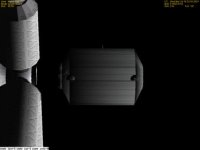
mystery_mplm.jpg

What I think is happening is that the docking port location in the cfg file does not match the port on the mesh? I was wondering if it would be possible to correct this, but vessels curiously are not included in Chapter 22 of the Orbiter manual, and I don't know where to start.

Any help on this would be appreciated!
 
I belive the Orbiter SDK is included with the Oriter install, check your Orbiter folder for an "OrbiterSDK/Docs" folder, and check the docks in that for more info. From the screenshot, it simply looks like part of the MPLM is in shadow, so not visible (not much ambient light in space, so anything in a shadow is basically invisible).
 
In the Leonardo_mplm.cfg you have :

Code:
; === Configuration file for Leonardo mplm ===

Meshname = Leonardo_mplm
ImageBmp = Images\Vessels\Default\Leonardo.bmp
Mass = 1.8e3
Size = 6.0
Inertia = 7.7 7.7 2.3
EnableFocus = TRUE
EnableXPDR = TRUE
XPDR = 477

[B]; === Docking ports ===
BEGIN_DOCKLIST
0.07 -0.2  -3.2   0 0  -1    0 1 0
END_DOCKLIST[/B]

; === Attachment specs ===
BEGIN_ATTACHMENT
P 0 -0.4 0  0 -1 0  0 0 1  XS
P 0.1 2.0 0.1  0 1 0  0 0 -1  GS
END_ATTACHMENT
The first set of three numbers sets the position (left-handed coords X, Y, Z) of the docking port (the reference is the center of the mesh). By playing with those parameters, you should be able to adjust the airlock. Try "-1.2" instead of "-3.2" and see what happens.
 
Actually this is different. It's not the Leonardo - the file is called mplm.cfg, and contains:

Code:
; === Configuration file for the International Space Station ===
 
Meshname = mplm
Mass = 1.8e3
Size = 6.0
Inertia = 7.7 7.7 2.3
 
; === Docking ports ===
BEGIN_DOCKLIST
0 0  5   0 0  1    0 1 0
0 0 -5   0 0 -1    0 1 0
END_DOCKLIST

And there most definitely is not anything between the docking ports. Also, although the mesh contains Canadarm attachment points, these are not programmed in the file.

Also, is there a way to adjust the docking port coordinates other than trial and error?
 
Last edited:
the other alternative would be to use my GetVectorTool script for 3dsMax... but i -think- that's more trouble than it's worth :rolleyes:

go by hand... orbiter loads up fast after the first time :thumbup:
 
Back
Top