Question Custom Planet Elevation Maps for Orbiter 2016?

There is also (at least for me) the technical question of how to add the neccessary "padding" for each tile specifically when starting from a single source image.
 
There is also (at least for me) the technical question of how to add the neccessary "padding" for each tile specifically when starting from a single source image.
Use astrogull's Elv Tile Splitter V2

Based on the manual and the one time that I had tried to do it a few years back, the process is like this:
(assuming that we start with a single grayscale png file, dimensions 4096x2048).

A 4096x2048 image is the size for a Level 7 map, which will be 16 tiles wide by 8 tiles high.
[I think you may need to resize this to 4099x2051 to fit the 256 n + 3 format that is written on the manual, but I can't recall if I had done it].

First, set up the tool. Go to Options and set your Orbiter Folder and a new, empty Elev Folder for your project. Make sure you're on the Elev layer (View > Layer > Elev).

Next, you need to create a metafile. In the same folder as your 4096x2048 PNG, create a new text file.
If your image is MyPlanet.png, you must name this text file MyPlanet.png.meta.
Open it in Notepad and paste this exact string onto a single line:

vmin=-4000 vmax=8000 scale=1 offset=0 type=-16 padding=1x1 colormap=0 smin=0 emin=0 smean=0 emean=0 smax=0 emax=0 latmin=0 latmax=0 lngmin=0 lngmax=0.

You must change the vmin and vmax values to your planet's lowest and highest elevation in meters. Save and close it.

Now, import your map. In the tool, go to File > Import PNG. Check the box for Export - Import Metafile before selecting your 4096x2048 PNG. It will load into the centre.

Finally, split the map. Check the Split box and the Write box.
In the Tile Calculator on the left, check B and and enter Level: 7, Band: 0, and Tile: 0.
In the X/Y fields on the top right, set WxH to 16 and 8.
Click the Start button.
The tool will process your map, automatically handle all the overlaps (padding), and save all 128 Level 7 tiles into the correct folder structure.
You can then copy this Elev folder into your planet's Textures directory in Orbiter.
Don't forget to add TileFormat = 2 in your planet's config file.

I hope I got the steps correct because it's been a while. There is a full manual accompanying this tool that you can refer to.


See the post #67 for a more "correct" quick guide
 
Last edited:
Thanks so much @dgatsoulis A comprehensive walk-through is very much appreciated:)
I got as far as importing but but failed due to incorrect file size. Didn't understand how/why the full map would need padding? Simply magnifying the image is the solution? I was expecting pixel repeat, or matt colour or no padding for the full map?
Very keen on seeing Elev maps for Europa and the like.:cheers:
 
Thanks so much @dgatsoulis A comprehensive walk-through is very much appreciated:)
I got as far as importing but but failed due to incorrect file size. Didn't understand how/why the full map would need padding? Simply magnifying the image is the solution? I was expecting pixel repeat, or matt colour or no padding for the full map?
Very keen on seeing Elev maps for Europa and the like.:cheers:
Yeah, like I mentioned in the post:
A 4096x2048 image is the size for a Level 7 map, which will be 16 tiles wide by 8 tiles high.
[I think you may need to resize this to 4099x2051 to fit the 256 n + 3 format that is written on the manual, but I can't recall if I had done it].
I don't know why the padding is needed in the initial file. Perhaps to conform to the format of the subsequent tiles?
Simply resizing it to 256n+3 format should be enough. If there is a visible seam at 180° we'll redo the map with proper padding (transferring a column of pixels from one "edge" to the "other"? Not quite sure, I'll have to read the manual a bit more carefully on this part).
I'll try to make a quick Europa heightmap and follow the process I had done those years back. I'll record the steps and post them here. Even if it doesn't work out too well, others will have a guide on what to do (or not do).
 
I'll try to make a quick Europa heightmap and follow the process I had done those years back. I'll record the steps and post them here. Even if it doesn't work out too well, others will have a guide on what to do (or not do).
Yes, please, do it whenever you can, and I will try to repeat/check your method.
 
Hi all. I did have some experience with making tiles for my Uranus and Neptune moons addons. From memory the tiles need to be 256x256, with 2px padding on top and right sides, and 1px padding on the bottom and left sides. The padding row/s should be taken directly from the adjacent tile, so that it acts like an overlap. This will be the case for every row of every tile, except for the bottom row and the top row of tiles (southmost and northmost). Since there are no adjacent tiles here, these buffer rows should be duplicates of the last line/s of pixels at the respective edge of the tile (stretch the top row of pixels up 2 more pixel rows for north-pole tiles, stretch the bottom row 1 more pixel rows row for south-pole tiles).

Ensure that the for the every tile, #FFFFFF is the highest point on the planet, and #000000 is the lowest point (some tiles will not have that whole range, ie flat areas). This means that the metadata file for each tile needs only the same elevation info. To create a wider range of elevations you can vary the tiles to have more info, but the metadata file will need to account for that, so the easiest way to get started is to take all tiles from one base map, unaltered.

About to head to work so I’ll weigh in more when I return this evening. Hope this makes sense.
 
1762721631095.png
ok, making a global heightmap with Elv Tile Splitter V2 is not that complicated.

1. Create a 16bit grayscale png file with dimensions (2*256n+3) x (256n+3) That's (515x259,1027x515,2051x1027,4099x2051,8195x4099,16387x8195) for levels (4,5,6,7,8,9). Since it's a global texture the sides ratio must be 2:1. -Save it in the textures folder of the body you want to create the elev tiles. (i.e: Textures\Europa)
2. Run Elv Tile Splitter V2. From the top bar press Options and Orbiter folder. Browse to your Orbiter installation folder.
3. Options (again) and press the Elev folder. Browse to the textures folder of the body you want to create the elev tiles. (i.e: Textures\Europa)
4. In the View tab, make sure that the Elev option is checked.
5. Check the Stretch - Unstretch box in the mid/lower part of the main window. Above it, there will be two boxes emin and emax. In those boxes enter the values that correspond to the minimum and maximum height of your map.
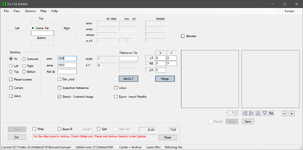
1762723223853.png
6. Now you are ready to import your png from step1. Press File->Import PNG.
7. Navigate to the folder where you saved it. As soon as you select it a new window will open asking you to save the .elv file for your image. The folder to save it should be the one you selected in step 3. Press Save.
8. The elv file will be loaded and you should see its name in the Centre Tile and also in the tool's display.
9. Check the boxes Write and Split.
10. You can press Start now but you will get an error. The error text will tell you what level to enter in the Level box, according to your image size.
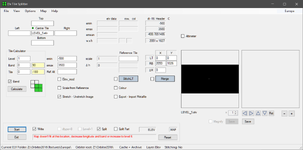
1762723678215.png
11. Enter the correct level and press start again. The tiles will be created directly in your planetary body Elev folder. (ie Textures\Europe\Elev)

(you can skip the error by entering the correct level before pressing Start at step 10.)

That's it. You will get global coverage for your planet, for the level that you created the tiles for.

Keep in mind that this is how I used this tool, and I am not very experienced with it. Perhaps other members of the forum can give a more comprehensive guide and/or correct mistakes that they see here.

Also, this quick quide only covers the process of how to convert a single global png file that represents the planet's heightmap to an Elev quadtree.
It does not cover how to make a good heightmap using either real data (for real planetary bodies) or a fictional interpretation of a custom planet.

 
Okay so just for some clarification, for now I will develop a more streamlined method for creating planetary elev maps, not local tiles. Although the initial process is simillar, the key difference is blending the localised high-resolution tiles with the surrounding tiles, lest there be unsightly seams. I know that this is something that Elev Tile Splitter is designed to handle. After we've all managed to quickly and easily create whole-planet projects, I'll try move onto tiles, as I want to tackle this at some point for my long-term Pegasus V3 addon.

A while back @misha.physics very kindly supplied me with a .bat script that cuts images up into surface tiles for use in Orbiter. I am currently playing around with editing this to develop it for use with elevation maps.

There are some strange quirks at lower level resolutions in the requirements for the elevation png files when compared with the visual surface tiles. Rather than explaining, take a look a Bennu in @BrianJ's OSIRIS-REx addon. I will try to get a .bat script working that can break a global map down like that.

In the meantime, below is the contents of a meta file from the OSIRIS-REx addon:
Code:
vmin=-37 vmax=38 scale=1 offset=0 type=-16 padding=1x1  colormap=0 smin=0 emin=0 smean=0 emean=0 smax=0 emax=0  latmin=0 latmax=0 lngmin=0 lngmax=0

Does anyone know what all these parameters mean: I know that vmin and vmax should be the min and max elevation, scale of 1 I imagine would not need to be changed, and I imagine -16 reffers to a 16-bit depth for the png image. The padding value of 1x1 confuses me (see my previous post in this thread), as do all other values...

Thanks all!
 
While we're still on the subject of custom heightmaps, I found some specialized Photoshop brushes available for download that should make the whole process a lot easier: https://www.dropbox.com/scl/fi/srd4....abr?rlkey=k21jxzxyc3d5yyf33nx34ayfh&e=1&dl=0
...are they compatible with Orbiters License (MIT License and/or LGPL)?
In short:
  • Are they allowed to be used in non-comercial products?
  • Can they be re-distributed by "us"?
I asked the original uploader if I could use these textures, and he said yes.
 
In the meantime, below is the contents of a meta file from the OSIRIS-REx addon:
Code:
vmin=-37 vmax=38 scale=1 offset=0 type=-16 padding=1x1  colormap=0 smin=0 emin=0 smean=0 emean=0 smax=0 emax=0  latmin=0 latmax=0 lngmin=0 lngmax=0

Does anyone know what all these parameters mean: I know that vmin and vmax should be the min and max elevation, scale of 1 I imagine would not need to be changed, and I imagine -16 reffers to a 16-bit depth for the png image. The padding value of 1x1 confuses me (see my previous post in this thread), as do all other values...

Thanks all!
Hi,
@Face is the man to really explain all this, but his post here might clarify things for you:
Good luck!
BrianJ
 
A while back @misha.physics very kindly supplied me with a .bat script that cuts images up into surface tiles for use in Orbiter. I am currently playing around with editing this to develop it for use with elevation maps.
That would be great!:)
 
Thanks @dgatsoulis and @Mr Martian
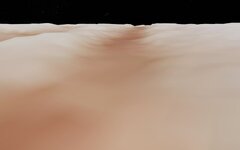
Following dgatsoulis instructions I made a quick (and very dirty) attempt at global level9 elv for Europa. And it looks like it works!:)
0761.jpg
Only issue, ground detection is off, maybe the missing lower levels? Will need more experimentation and a good Europa would need a lot work, will have to put that on the back-burner till other projects have progressed.
After we've all managed to quickly and easily create whole-planet projects, I'll try move onto tiles, as I want to tackle this at some point for my long-term Pegasus V3 addon.
Very much appreciated.:)
 
Just wanted to mention that I am quiet busy right now, but I will return and read all the recent posts (instructions) in this thread and try all the methods. I hope we will understand how to make (global) elevation tiles soon.
 
Following dgatsoulis instructions I made a quick (and very dirty) attempt at global level9 elv for Europa. And it looks like it works!:)
Congrats @Buck Rogers that’s great! Regarding the issue of the ground detection, I do remember having this issue when developing Umbriel I think. I can’t remember exactly what caused it, and I can’t remember exactly how I resolved it, but first thing to try is just ensure that Europe’s config file declares the same resolution level. I think this is also where the metadata files come into play in ele2png. If you’ve used Elev Tile Splitter I think there are some parameters in there you can try play with too. From memory I messed around with the actual shading of the source png files, raising and lowering brightness. But that was when I was still getting my head around the process…

Sorry I don’t have anything more concrete on that issue at the moment. I’ll be messing around with tile generation while trying to optimise this process so I’ll let you know if I encounter that same issue.
 
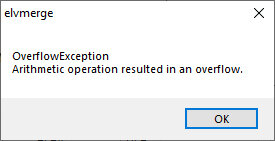
Okay, so I created a level 7 heightmap for Ferenginar, but whenever I import the .png, I get the following error:

OverflowError.jpg
 
Last edited:
Congrats @Buck Rogers that’s great! Regarding the issue of the ground detection, I do remember having this issue when developing Umbriel I think. I can’t remember exactly what caused it, and I can’t remember exactly how I resolved it, but first thing to try is just ensure that Europe’s config file declares the same resolution level
Thanks, got it figured out. I set the maxpatch to 9 which made no difference, but when I set it to 19 it works! Also added ElevationResolution = 0.5.

A few notes on use:
Elev_mod re-activates after every import, this is for safety
You have to input Emin/Emax before importing
Level 1-3 can all be made with the same 259x259 map
A little confusing but global Surf maps of level 4 are 1024x512 but a global Elev map of level 4 is 512(+3)x256(+3).
Would be good later to compile the instructions and make a sticky.

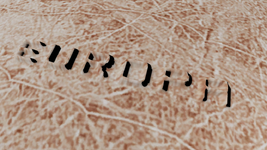
It doesn't actually look too bad (for a hack-job) so I made the other levels, and it's certainly better than a flat world.
Europa Elev (levels 1-9) and .cfg attached.
I had to split and rename the zip to get it uploaded. Rename the zip files to: Europa_Elev.zip.001 and Europa_Elev.zip.002

And add this to your config/MicroTex.cfg for microtextures!

BODY Europa
NORMALS 1
LEVEL 0 D3D9Mars_A.dds 20.0
LEVEL 1 D3D9Mars_B.dds 5.0
LEVEL 2 D3D9Mars_B.dds 0.5
0762.jpg
And thanks to @astrogull for making Tilesplitter:)
 

Attachments

Last edited:
Your .png needs to be 16bit and greyscale.
It's in greyscale, but I have no idea how to set it specifically to 16-bit using Photoshop. The only options I'm given are it either being interlaced or not, whatever that means.
 
Last edited:
Both settings in Photoshop are under: Image/Mode. Save as non-interlaced (default).
I did just that, and yet I still keep getting that error. What exactly am I doing wrong?

For the record, here's a link to the actual heightmap. The intended EMIN and EMAX values are 0 and 800, respectively.
 

Attachments

Back
Top