ok, making a global heightmap with Elv Tile Splitter V2 is not that complicated.
1. Create a 16bit grayscale png file with dimensions (2*256n+3) x (256n+3) That's (515x259,1027x515,2051x1027,4099x2051,8195x4099,16387x8195) for levels (4,5,6,7,8,9). Since it's a global texture the sides ratio must be 2:1. -Save it in the textures folder of the body you want to create the elev tiles. (i.e: Textures\Europa)
2. Run Elv Tile Splitter V2. From the top bar press Options and Orbiter folder. Browse to your Orbiter installation folder.
3. Options (again) and press the Elev folder. Browse to the textures folder of the body you want to create the elev tiles. (i.e: Textures\Europa)
4. In the View tab, make sure that the Elev option is checked.
5. Check the Stretch - Unstretch box in the mid/lower part of the main window. Above it, there will be two boxes emin and emax. In those boxes enter the values that correspond to the minimum and maximum height of your map.
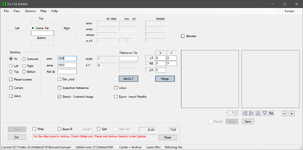
6. Now you are ready to import your png from step1. Press File->Import PNG.
7. Navigate to the folder where you saved it. As soon as you select it a new window will open asking you to save the .elv file for your image. The folder to save it should be the one you selected in step 3. Press Save.
8. The elv file will be loaded and you should see its name in the Centre Tile and also in the tool's display.
9. Check the boxes Write and Split.
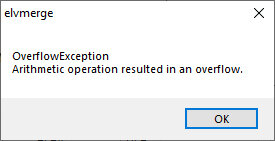
10. You can press Start now but you will get an error. The error text will tell you what level to enter in the Level box, according to your image size.
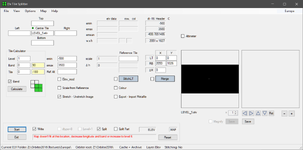
11. Enter the correct level and press start again. The tiles will be created directly in your planetary body Elev folder. (ie Textures\Europe\Elev)
(you can skip the error by entering the correct level before pressing Start at step 10.)
That's it. You will get global coverage for your planet, for the level that you created the tiles for.
Keep in mind that this is how I used this tool, and I am not very experienced with it. Perhaps other members of the forum can give a more comprehensive guide and/or correct mistakes that they see here.
Also, this quick quide only covers the process of how to convert a single global png file that represents the planet's heightmap to an Elev quadtree.
It does not cover how to make a good heightmap using either real data (for real planetary bodies) or a fictional interpretation of a custom planet.