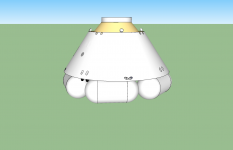
Project CST-100

Found that cool pic :
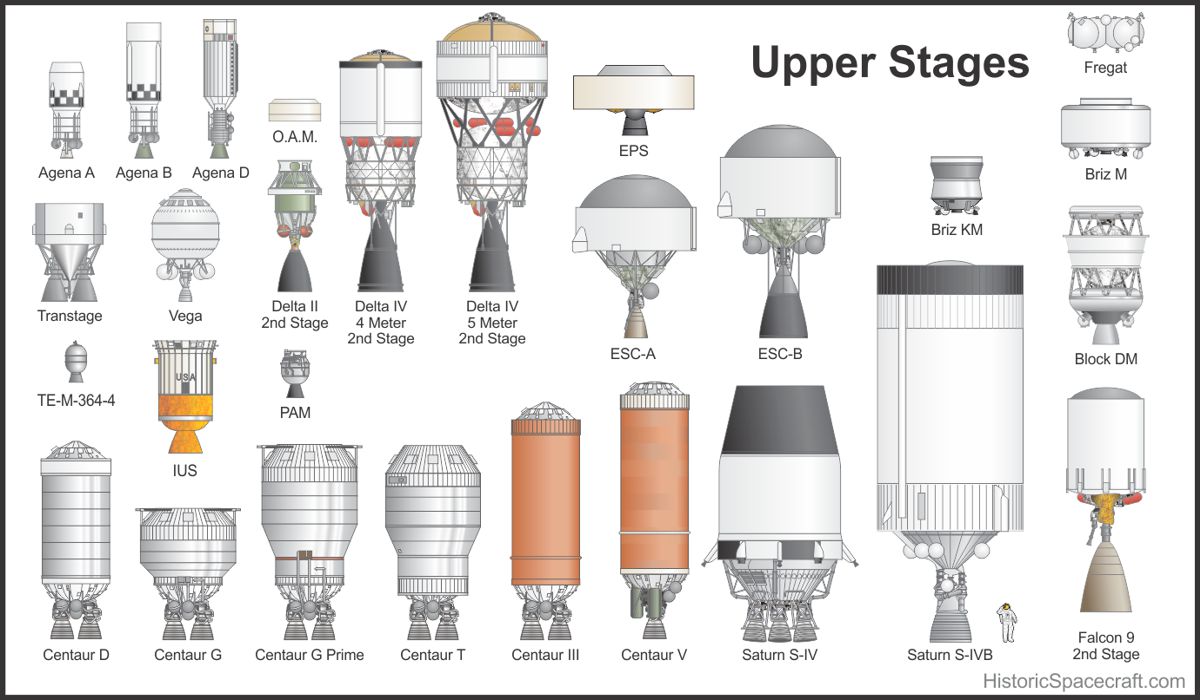
Upper_Stages_RK2013_1200x700.jpg


Ours it the Centaur V (DEC for the CST-100). It never flown, so it is of course impossible to find any picture only. I can only speculate from the Centaur V SEC or Centaur IIIA pics...
 
Last edited:
Did you already look at this file?

http://www.ulalaunch.com/site/docs/publications/TheCentaurUpperStageVehicleHistory.pdf

It is about the old version of the Centaur, without the lengthed tanks, but it has a lot of nice detail information, what was improved already compared to the other versions.

---------- Post added at 10:21 PM ---------- Previous post was at 10:17 PM ----------

And here is more about the upgrades to the Centaur stage... using hydrogen/LOX for RCS instead of hydrazine.

http://www.ulalaunch.com/site/docs/publications/ULA-Innovation-March-2010.pdf
 
Adding some cabling mess (the thin red and blue lines) :P

V4Ga0YQ.jpg
 
Was playing a bit with the capsule, here are some pics... Ballistic re-entry (I went out of fuel, so I let the atmosphere decay my orbit, and with the RCS dry it was a completely ballistic re-entry, I took 9-10 Gs... Notice on the last pic that the parachute sequence is buggy...

lpqvFSc.jpg


nl2BGKQ.jpg


BtR3jXc.jpg


Gq8Nm1p.jpg


dAowDcO.jpg


8zcs1gX.jpg


sHU5Q25.jpg
 
Was playing a bit with the capsule, here are some pics... Ballistic re-entry (I went out of fuel, so I let the atmosphere decay my orbit, and with the RCS dry it was a completely ballistic re-entry, I took 9-10 Gs... Notice on the last pic that the parachute sequence is buggy...

lpqvFSc.jpg


nl2BGKQ.jpg


BtR3jXc.jpg


Gq8Nm1p.jpg


dAowDcO.jpg


8zcs1gX.jpg


sHU5Q25.jpg
The heast shield is supposed to detach after reentry, right? I can start making the airbags that it will land on.
 
Yes, the heatshield is jettisoned and then the landing bags are inflated. I don't know where there are stored exactly ; on the droptest pics I sent you, we can see 6 landing bags in an hexagonal pattern. Maybe they are right under the heat shield or maybe there are some hatches (like parachute hatches) on the base of the capsule.

I also found that quote from Boeing PR on Parabolic Arc (2011) :

After reentering the atmosphere, the CST-100′s three main parachutes open at an altitude of approximately 12,000 feet. When the capsule reaches about 5,000 feet, the base heat shield drops away and six air bags inflate with a mixture of air and nitrogen two minutes before landing to cushion the passengers from the impact.

And there is also that very good pic on Wikipedia :

CST-100_at_Delamar%2C_2012.jpg


Seems there are some compartements for the bags.
 
Last edited:
Yes, the heatshield is jettisoned and then the landing bags are inflated. I don't know where there are stored exactly ; on the droptest pics I sent you, we can see 6 landing bags in an hexagonal pattern. Maybe they are right under the heat shield or maybe there are some hatches (like parachute hatches) on the base of the capsule.

I also found that quote from Boeing PR on Parabolic Arc (2011) :
I wonder if there are any dimensions on the size of each landing bag, because Id hate to estimate it.
 
Nothing like that, info about the CST-100 is really scarce. But the pic with people around gives a good idea. Like 1 meter in diameter, and 2 meters in length. Don't worry too much about scale, I can rescale rather easily if needed.

My advice would be that you model only 1 bag, as a separate mesh. Through the code, it will be easily to duplicate it and make those appear at the right locations. I can even try a scaling animation, so you could be able to see the inflation (in fact, the mesh begins scaled down, and gets its true size over time). That should go quickly however, that's a high-pressure inflation. But nothing as reactive as a car airbag is needed - that would only add risks to rupture a bag.

Maybe you could also make one mesh or more of semi-deflated bags, like we see on the pictures above. Makes pretty recovery scenes ;)
 
Last edited:
Ok, even though I started with the six bags. I'll delete some and improve the bags.
 

Attachments

  • Command Module Landing Config 8-19-12.png
    Command Module Landing Config 8-19-12.png
    55.8 KB · Views: 36
Nice, definitively something like that. :thumbup:

Also, could you make separate meshes for the capsule and the shield ? Thanks. It will allow not only to feature the shield dropping but also I'll make a set of differently textured shields, to show the heating during re-entry.

---------- Post added at 05:04 PM ---------- Previous post was at 11:01 AM ----------

Right after separation :

SppDrg6.jpg


---------- Post added 07-10-13 at 09:35 AM ---------- Previous post was 07-09-13 at 05:04 PM ----------

New drogue chutes that look much more the ones used for the droptests :

VKx3sYA.jpg


s3UxplR.jpg


By the way, the yellow nose cap should be jettisonned at this point :embarrassed:
 
Last edited:
Note on the deployment of the airbags: It sounds like the deployment will be similar to the deployment of landing bags for helicopters in emergency. Also, it looks like the landing bags will be a bit to the outside of the capsule and bigger as meshed and not just below it.
 
Right now theres a problem with my net (stupid at&t) so I cant do much atm
 
Well, on my side I'm writing the sequence of the spacecraft "configuration steps" :

0 : Launchpad config (CM w/ SM & nosecone)
1 : Nosecone jettisoned
...
8 - ABORT : SM jettisoned, CM w/ nosecone
etc...

Also, I worked on the Centaur engines meshes to fix the "inversion". I also want to enable the possibility to select a Centaur SE configuration (to launch satellites or probes on high orbits).

It should work pretty well : by typing "CONFIGURATION 431" in the scenario file, you will get the Atlas-V 431 configuration (4 meters fairing, 3 SRMs, Centaur with 1 engine).
 
Main chutes deployed :

LX2tfaU.jpg


ywXFsE9.jpg


L36OcgF.jpg


F1YwbAq.jpg


Of course with some textures it will look better or less "plastic".
 
Where did you find that picture, Kyle ? Sources about the CST-100 are so scarce that any information is valuable.
 
I loaded the new meshes in Orbiter. I had to open them with MeshWizard and rotate them by X+90°.

It also seem we have a texture problem. The meshes all appear perfect black. I converted the capsule mesh in Anim8tor format to have a look into the materials, interestingly Anim8tor sends me a warning "Texture 0!.bmp can't be found". Also, the D3D9 client seems puzzled, the debug shows that line when loading the mesh, though it does not consider this as an error :

Code:
Applying custom configuration to a mesh (???)

Did you test the mesh on your computer (you can try replace the Carina mesh by yours for example) ? Do the textures display correctly ?

On my side I can still edit the mesh in Anim8tor and try to apply textures "manually", but for that I'll need a bitmap. Or you can send me pictures of your texturing work, maybe some files you used, and I'll do my best to reproduce it as closely as possible (that's a last resort solution).

Else, from what I can see, the new meshes look cool. Notice that the window on the capsule is still missing (but I noticed you've made a hatch ;)).

Edit : I first tried the meshes without the MeshWizard rotation trick, so the problem is unrelated.
 
Back
Top