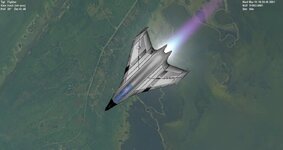
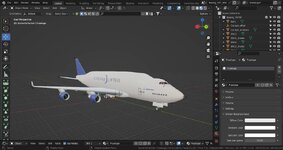
Project Boeing 747 Development Thread

Well, I finally have an alpha/beta release ready so you can test it and tell me what you think, what I need to improve, and so on.

For now I have this and more:
Code:
Known bugs:

Thrust configuration is not realistic.

747-SOFIA sinks in the ground, press G two times to correct it.

Fuel configuration and ISP is not realistic.

Engines sounds are too loud and annoying.

TO-DO

Improve beacons.

Save/restore engines status from scenario file.

Fix ISP, fuel consumption and thrust configurations.

Make a mesh for the rear APU engine.

Etc.


You can find the test releases on my GitHub page.
https://github.com/MatiasSaibene/Boeing747_orbiter_addon/releases
 
I guess it should work in Orbiter 2016 too. Could you try it at Orbiter 2016? As far as I know the programming (the API, the SDK) is practically the same (correct me if I'm wrong).
I tried it for a tiny bit on 2016 yesterday evening and everything seemed to work fine. I encountered no issues.
 
you can test it and tell me what you think
Thanks. I've tried every scenario, and tried to take off. I've tested it with OpenOrbiter 240315 on Windows.

I can't change a livery by pressing "V" in any plane, but maybe I should create them myself.

I can't switch between those 9 cameras in cockpit, only the first three are available. And after switching to the back camera in the cockpit I can't swith between the cameras anymore.

The plane in the scenario "Boeing 747-YAL1" falls through the ground immediately when starting movement.

Some plane have desabled aerodynamic surfaces, so I had to activate them by pressing Alt+/.

The gear animation can be improved to make the gears not to move through textures.
 
Thanks. I've tried every scenario, and tried to take off. I've tested it with OpenOrbiter 240315 on Windows.

I can't change a livery by pressing "V" in any plane, but maybe I should create them myself.

I can't switch between those 9 cameras in cockpit, only the first three are available. And after switching to the back camera in the cockpit I can't swith between the cameras anymore.

The plane in the scenario "Boeing 747-YAL1" falls through the ground immediately when starting movement.

Some plane have desabled aerodynamic surfaces, so I had to activate them by pressing Alt+/.

The gear animation can be improved to make the gears not to move through textures.
Oh, I thought I already had those bugs fixed.
I'm going to test the scenarios back in Windows and debug them.
I will do everything I can to solve them.

Thanks for the feedback. :cheers: :hailprobe:

BTW, I have to update my OpenOrbiter.
 
Thanks. I've tried every scenario, and tried to take off. I've tested it with OpenOrbiter 240315 on Windows.

I can't change a livery by pressing "V" in any plane, but maybe I should create them myself.

I can't switch between those 9 cameras in cockpit, only the first three are available. And after switching to the back camera in the cockpit I can't swith between the cameras anymore.

The plane in the scenario "Boeing 747-YAL1" falls through the ground immediately when starting movement.

Some plane have desabled aerodynamic surfaces, so I had to activate them by pressing Alt+/.

The gear animation can be improved to make the gears not to move through textures.
I've been coding the order of the landing gear animations and I fixed some bugs. Unfortunately, I could not reproduce the errors in the change of liveries and the change of cameras.

In summary here is a list of my results:

I can't change a livery by pressing "V" in any plane, but maybe I should create them myself. - Cannot reproduce

I can't switch between those 9 cameras in cockpit, only the first three are available. And after switching to the back camera in the cockpit I can't swith between the cameras anymore. - Cannot reproduce

The plane in the scenario "Boeing 747-YAL1" falls through the ground immediately when starting movement. - FIXED

Some plane have desabled aerodynamic surfaces, so I had to activate them by pressing Alt+/. - FIXED

The gear animation can be improved to make the gears not to move through textures. - FIXED


So now I'm going to continue with these errors that I have to fix:

TO-DO

Improve beacons.

Save/restore engines status from scenario file.

Fix ISP, fuel consumption and thrust configurations.

Make a mesh for the rear APU engine.

Fix thrust configuration is not realistic.

Fix 747-SOFIA that sinks in the ground.

Fix fuel configuration and ISP.

Fix engines sounds that are too loud and annoying.

Attached are the DLL modules with the fixes.

 

Attachments

Last edited:
@Matias Saibene, by the way, you can just select using your mouse a part of the text you want to reply/quote in order not to write manually the text you want to reply/quote.
Unfortunately, I could not reproduce the errors in the change of liveries and the change of cameras.
Have you tried this on Windows or just Linux? Maybe it happens only on Windows. Maybe someone else could try (reproduce) these two features on Windows.
 
@Matias Saibene, by the way, you can just select using your mouse a part of the text you want to reply/quote in order not to write manually the text you want to reply/quote.

Have you tried this on Windows or just Linux? Maybe it happens only on Windows. Maybe someone else could try (reproduce) these two features on Windows.
I tested it on OpenOrbiter on Windows and on Linux.
 
Just tested the 747-8 (O2016), Lots of details! Skin swap and camera positions work.
Gear animation still needs some work, ailerons are on the wrong axis and rudder is a little off. The other things you've caught in the to-do list.
A very promising (and big!) project, looking forward to your progress. :)
I can't change a livery by pressing "V" in any plane
did you put the livery .txt files in the Orbiter core directory?
 
Just tested the 747-8 (O2016), Lots of details! Skin swap and camera positions work.
Gear animation still needs some work, ailerons are on the wrong axis and rudder is a little off. The other things you've caught in the to-do list.
A very promising (and big!) project, looking forward to your progress. :)

did you put the livery .txt files in the Orbiter core directory?
Thank you very much for your feedback!
Indeed the ailerons and rudder are wrong, and I'm having a hard time setting the rotation axes and their values correctly. Currently they seem to break when I activate them.
And I'm slowly fixing the landing gear.

It turns out that I've been very busy in real life and I haven't had time to spend on the project.

Thank you all for your comments, suggestions and help. Stay tuned for updates.
 
Thanks, it was my fault. I haven't put those *.txt files. Now it works, namely the liveries change.
I'm glad to know that it works!
Putting the .txt files in the main Orbiter directory is not a very elegant solution but I couldn't fix it any other way. When I code it to look for the .txt files in the Textures\Boeing_747\ folder it doesn't find them.
 
Back
Top