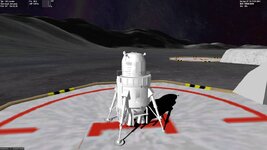
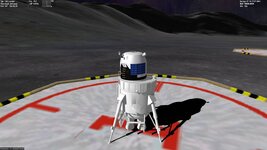
Request Artemis landers

ok, that looks like each mesh is centered individually, which is good.
Then maybe the easiest way could be to change the offset vector, so that the ascent mesh appears centered to the descent mesh.

For example, if the ascent is displaced by 5 m in +y direction, change the offset vector to
VECTOR3 ofs = { 0, -5, 0 }
 
Thanks.
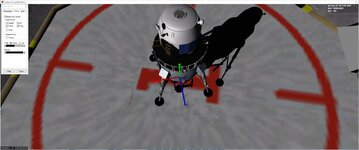
This lines them up.
case 4: // Asc ready for launch ofs = _V(0, -11, 6.5); AddMesh(MAVmeshup, &ofs);
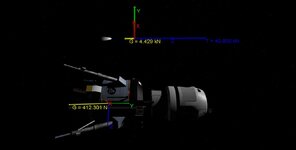
But when I separate the main thruster should be along the z axis, right

but do I need to change the thrust values to match the mesh?
 

Attachments

  • lmtest1b.jpg
    lmtest1b.jpg
    24.1 KB · Views: 8
  • lmtest1a.jpg
    lmtest1a.jpg
    50 KB · Views: 8
Try modifying the offset vector before the transformation.
This should offset the origin properly. Then it is not necessary to offset the mesh separately.

VECTOR3 ofs = { 0,-11, 6.5 }; Local2Rel(ofs, vs.rpos); VECTOR3 vel = _V(0, 0, -0.1); VECTOR3 rofs, rvel = { vs.rvel.x, vs.rvel.y, vs.rvel.z }; Local2Rel(ofs, vs.rpos); GlobalRot(vel, rofs);
 
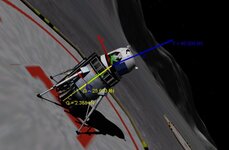
Thanks. That seems to work. I wonder why it is tilted and not straight up though
 

Attachments

  • lmlandeascent.jpg
    lmlandeascent.jpg
    59.8 KB · Views: 8
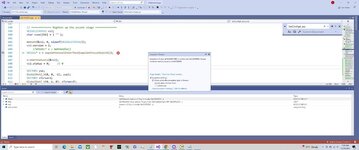
I am confused. I still get a CTD on reload.
It is in the void CEV::SetConfig4_asc(void)

I also added.
void CEV::clbkPostCreation() { if (mode == 4) SetConfig4_asc(); }

it breaks here:
VESSEL* v = oapiGetVesselInterface(oapiGetFocusObject());
 

Attachments

  • lmlanderbreaks.jpg
    lmlanderbreaks.jpg
    60 KB · Views: 2
B.t.w., maybe a silly question, but what is auto vessel?
Shouldn't that be OBJHANDLE* vessel (if you split the inquiry of the focus object)?
Yes it is a OBJHANDLE*,
auto is just the lazy way to say: "please compiler, you know what that function returns; figure out the type for me".
So this:
C++:
auto a = true;
auto b = 42;
auto c = 1.23f;
is excatly the same as
C++:
bool a = true;
int b = 42;
float c = 1.23f;
...for those simple things it makes no difference, but for mor complicated types it is just "nice to have" ;)
And as I wrote that comment just here in the forums -and I did not look up the exact return type- I went for the save way and used "auto". Otherwise I might have guessed/chosen the wrong type; which I don't like to post ;)

For details see: reference
 
Last edited:
Not sure how to get around this:

When it reloads it needs to rotate the mesh? although not sure if on reload it needs to if the mesh is already rotated
 
What happens is when the whole mesh is separated. The ascent part now changes orientation.

But I wonder if on reload the orientation could be set already?
 
It is only necessary to do the transformation once.
After the transformation, the vessel has a new vesselstate, which is also written to the scenario file.
So actually, it is not necessary to repeat the transfomation after reload.

Would your lander be already so far progressed, that you could publish an alpha-test version, including the source code?
Maybe that would help to understand the behavior of the addon.
 
Sure. Thanks. Still lots to add animation. But need to get the separation down.
Code for main vessel included
 

Attachments

A very nice mesh!
By shifting the meshes upward, so the COG is about 12 m above ground (and adjusting the touchdown points accordingly) I could get quite a good separation. The ground is not quite level, so the ascent stage slides a little to the left, before settling down.

(I had to temporarily remove the textures, because my modelling program is a little sensitive if bitmap-textures have no U-V mapping.)

For the CTD on re-start, I still have to look after.

0361.jpg
0362.jpg
 
Ok, made some adjustments on the meshes and on the code.
Separation works now, though experiences sometimes side-slips or surface bumps.
No CTD after restart. The transformation code is now only executed once, when Ctrl-J is pressed, never later on.

Please try the attached version. A Changelog-file is included, which describes the changes more in details.
 

Attachments

Thanks. Trying to get the textures back on.
I see the textures should go in.
LMLander/LMLANDER/

I moved the textures to
D:\Orbiter2016\Textures\LMLander\LMLANDER

I saw I was missing some textures. I moved them.

But still no textures? nothing in the log

I guess I can move my meshes to your location/origin

Weird. Now when I separate the Descent stage is orbiting the moon?

BEGIN_SHIPS
LMLander:LMLander/LMLander
STATUS Landed Moon
BASE Brighton Beach:1
POS -33.4373499 41.1180246
HEADING 167.20
ALT 11.966
AROT 124.292 -41.344 -23.194
AFCMODE 7
PRPLEVEL 0:1.000000
NAVFREQ 0 0
MODE 4
END
LMLander-DS:LMLander/LMDesc
STATUS Orbiting Moon
RPOS 16.708 0.538 1911742.378
RVEL 1.3929 0.0453 -12.8314
AROT 18.486 -7.624 45.464
AFCMODE 7
NAVFREQ 0 0
END

I tried on vanilla and the same thing.
 
Last edited:
On the textures.
I think it is easier to take your meshes in your 3D modellig program, move them to the marked positions and re-export them.
Reason is I have replace all materials with a plain white material.
The problem were not the textures, but errors I get when a mesh has a bitmap-texture, but no U-V mapping.


On the descent stage orbiting the Moon:
Do you see this always or sometimes?

I have experienced it sometimes, but when it happened, it was exactly at 173.7 km above the surface. :unsure:
 
Thanks. BTW what modelling program?

I ran it 3 times and the descent stage is 173.7. I wonder if It needs more mass. I can try with my dll descent stage
 
Still does that where the descent stage is moved
I want the main to fire when sep.
I have this:
void LML::SetThrusters2_Asc()
{
ClearThrusterDefinitions();
ClearPropellantResources();
ph_CM = CreatePropellantResource(LMAsc_FUELMASS);
SetDefaultPropellantResource(ph_CM);
THRUSTER_HANDLE th_att_lin[1];
th_att_lin[0] = CreateThruster(_V(0, 0, -4), _V(0, 0, 1), 2 * MAIN_THRUST, ph_CM, MAIN_ISP);
CreateThrusterGroup(th_att_lin, 1, THGROUP_MAIN);
//AddExhaust(th_att_lin[0], MAIN_ENGSIZE, _V(0, 8.9, 0), _V(0, -1, 0));
AddExhaust(th_att_lin[0], MAIN_ENGSIZE, tex_main);

//rcs
THRUSTER_HANDLE th_rcs[50], th_group[4];
SetThrusterLevel(th_att_lin[0], 1.0);
 
If I slow down it seems to work. I wonder if it has to do with moonbounce?
 
With the modeling program I mean the one you use to make the meshes, e.g. Blender, 3DS Max, Gmax or so. (I use Gmax)
_____
On the moonbounce:
I think giving it some mass is may help, as you suspected.
Go to the LMDesc.cfg and add a mass line:

ClassName = LMDesc MeshName = LMLander/LMDesc Mass = 4000 TouchdownPoints = 8 -11.9 -4 0 -11.9 8 -8 -11.9 -4 Size 14
If this does not help, you could slow down the simulation before the separation with
oapiSetTimeAcceleration(0.1);
and speed it up again after the separation with
oapiSetTimeAcceleration(1);

Note, you have to wait at least one simulation frame before speeding up again.
_____

To fire the thrusters right after separation is ok.
Though I suggest to fire the thruster_group, not a single thruster.
SetThrusterGroupLevel (THGROUP_MAIN, 1.0);
 
Back
Top