3D Orbiter images?

george7378

DON'T PANIC
Addon Developer
Donator
Joined
Jun 26, 2009
Messages
1,045
Reaction score
0
Points
36
Hi all,

Is it possible to make 3D images of Orbiter scenes? I know a 3D image is just a stereo of a single image, but I don't have the skill in photo editing to try it myself.

Thanks.
 
You just need actually two slightly different camera positions and then change the colors of each screenshot a bit, before merging them.
 
3D images
Define 3D images.
For any kind you'll need two pictures - if doing it manually, just take a screenshot, move camera right/left a little, take second screenshot.

Now, if you want a anaglyph (red-blue) image, you need to merge the images putting one into the red channel, and another into the blue/blue&green channel/s, which can be done easily with gimp/photoshop and online lessons.

If you want some other sort - what is it?
 
Greetings George 7378,

Here is a link to some 3d photoshop that I've done way in the past.

http://www.stillmixtup.com/3DPage.html

These images require the viewer to cross their eyes.

It takes a bit of paitence and some fairly hefty photoshop know-how. Basically you put two identical pics side by side. One of them, you leave unaltered. Any elements that you want to shift in 3d have to be lifted from one of the images and placed on a separate layer. The hard part is that you must now go in and doctor that image so that when you shift the 3d layers there is something in the image where that layer used to be. then you simply shift the layers left or right depening on if you want them to move forward or backward. The more you shift the further back/forward they appear to go. Quite challenging and addictive once you get the hang of it. I'm quite proud of my 3-d image of the Seven Sisters. Tried to get actual distance info to make it as acurate as possible. Coulnd't find much but did apply the data that I was able to find.

There is a link to my email on my website if you have any questions.

Good Luck!
 
Wow, that site is awesome!
What advantage would 3D images bring to Orbiter?
 
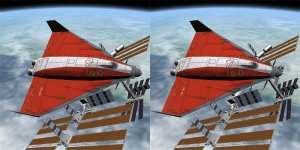
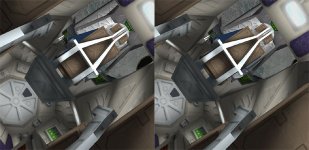
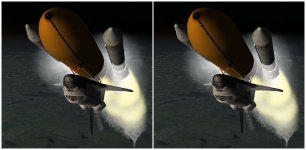
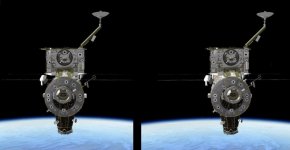
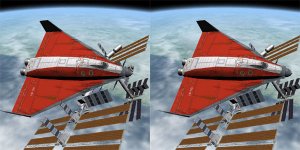
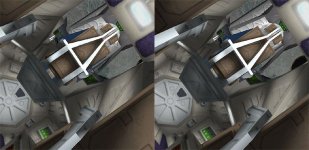
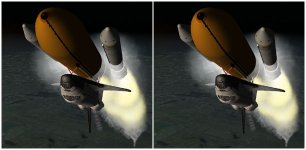
The same trick works for stereoscopic Orbiter images. (note: these are for parallel vision)
 

Attachments

  • orbiter_stereo.jpg
    orbiter_stereo.jpg
    57.1 KB · Views: 185
  • orbiter_stereo2.jpg
    orbiter_stereo2.jpg
    47.9 KB · Views: 115
  • orbiter_stereo3.jpg
    orbiter_stereo3.jpg
    32.9 KB · Views: 91
Very cool, Crybaby!

You could do that in Orbiter by freezing the sim, taking a screensnap, and then then moving the camera left or right a bit and taking another screensnap. Then put them side-by-side for that cross-eyed effect.

I've seen this done with real life photographs.
 
This is easy !!
 

Attachments

  • 92_3D.jpg
    92_3D.jpg
    37.3 KB · Views: 149
Ah, I notice that I am using the opposite technique to yours. In my pictures, you have to uncross your eyes - use the left image for the left eye, the right image for the right eye (i.e. essentially focus at infinity). I find that easier than the cross-eyed view. (tip: if you have problems, put a piece of paper between the two images to force your eyes to focus on the correct one).
 
Yeah, Doc S., I made that mistake too on my first try. This one is a cross-eyed 3D pic, which I find easier myself:

picture.php


---------- Post added at 10:51 PM ---------- Previous post was at 10:48 PM ----------

The funny thing is that if you look at my pic, you notice there are buildings and a solar farm on the lunar surface in the distance behind the spacecraft, and when you try to look at them your eyes try to adjust focus for distance, but of course it's an illusion since they come from a 2D screen in which everything is in focus regardless of distance.

Hehe, I see a new trend for screensnaps and add-on release pics!
 
This is easy !!
Yours was to hard, the pictures were to far apart
Yeah, Doc S., I made that mistake too on my first try. This one is a cross-eyed 3D pic, which I find easier myself:

picture.php


---------- Post added at 10:51 PM ---------- Previous post was at 10:48 PM ----------

The funny thing is that if you look at my pic, you notice there are buildings and a solar farm on the lunar surface in the distance behind the spacecraft, and when you try to look at them your eyes try to adjust focus for distance, but of course it's an illusion since they come from a 2D screen in which everything is in focus regardless of distance.

Hehe, I see a new trend for screensnaps and add-on release pics!
This one was NICE!
 
Yeah, you only want to change the viewing angle a little bit. Remember, human eyes are only 2 or 3 inches apart, and that's the effect you're trying to simulate, especially for short range objects.

Also, make sure you only move the camera sideways, not up and down, because the veiwer's eyes are arranged side by side, not vertically. Up and down will give you a headache.
 
Ah, I notice that I am using the opposite technique to yours. In my pictures, you have to uncross your eyes - use the left image for the left eye, the right image for the right eye (i.e. essentially focus at infinity). I find that easier than the cross-eyed view. (tip: if you have problems, put a piece of paper between the two images to force your eyes to focus on the correct one).
Thanks for the tip Martin. Because of defects with my eyes, I have never been able to do the cross-eyed version and I had been told I never would be able to. I had never seen the focus-at-infinity type and your two worked just fine, especially with the paper between them. Interestingly, I found the one with the DG in front of the ISS easier than the cockpit shot though. :cheers:
 
Thanks for the tip Martin. Because of defects with my eyes, I have never been able to do the cross-eyed version and I had been told I never would be able to. I had never seen the focus-at-infinity type and your two worked just fine, especially with the paper between them. Interestingly, I found the one with the DG in front of the ISS easier than the cockpit shot though. :cheers:


Another problem people may have is: if two points in each image are not at the same width as the distance between you're eyes try opening the image in a new window and zooming in or out until focusing is possible. then, while keeping focus, zoom in one step at a time until the desired magnification is reached.
 
Too cool guys! I've got to stick with the cross-eyed method for it to work for me... Did anyone else give Elizabeth Taylor the "up-down"? Donamy, your submission was awesome!
 
I find the "cross-eyes" method significantly easier--just cross your eyes a bit, and you see the whole image twice (so, four of the thing)...then gradually uncross them until the two inner ones overlap, and then focus on that image. I tried for a good five minutes to get martin's ones to work the proper way, and sat there holding a piece of paper to my nose to no avail. Using his pictures I can still get a 3d effect using the crossing method, and with that I can very quickly turn any of these pictures into the right image.

I guess the obvious next step is a graphics client that renders stereoscopically in real time?
 
I was waiting for someone to say that, Heilor!:lol:

I have seen a commercial application that uses 3D using glasses with each lens polarized 90 deg off from the other, and a polarizer screen in front of the moniter which switches angles every other frame. It made for a fantastic effect, really smooth, but of course it required special hardware and was clumsy since only one person at a time could see it.
 
I guess different people have different preferences for both methods. It takes me ages to get the cross-eyed vision to work. The cross-eyed method has the advantage that it can work with larger images, while the parallel version is essentially limited to images the width of the eye-distance (unless you can get your eyes to actually diverge).

Here are some more viewing tips for both methods: http://www.angelfire.com/ca/erker/freeview.html

Interestingly, I found the one with the DG in front of the ISS easier than the cockpit shot though.
The camera distance may have been a bit wide for this one. Tip: If the first one is easier, start with this one and just click the "next" button without moving your eyes (make sure that both images are in the cache so they switch immediately). The second image should snap into place without effort.

Edit: And in case anybody is interested, here are my previous images, this time prepared for our cross-eyed viewers:
 

Attachments

  • orbiter_stereo_cross.jpg
    orbiter_stereo_cross.jpg
    56.2 KB · Views: 42
  • orbiter_stereo2_cross.jpg
    orbiter_stereo2_cross.jpg
    47.3 KB · Views: 37
  • orbiter_stereo3_cross.jpg
    orbiter_stereo3_cross.jpg
    32.9 KB · Views: 39
Back
Top