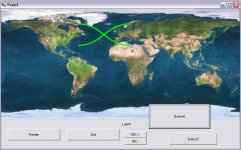
Mission Control for Orbiter v1

I don't know if this equation is entirely correct because if I was orbiting from north to south pole, this equation assumes a constant progression along the x-axis which clearly isn't the case in a high inclination orbit.

I think there is more to it then just plotting a sin graph as well because if you look at a high inclination orbit you will see the peaks and troughs of the sine-wave are skewed to fit the bottom of the earth.
 
If the sim is running non-spherical gravity sources, you also need to take into account the regression of the LAN. There is some info in Orbiter\Doc\Technotes\gravity.pdf on how to calculate the rate of regression.
 
Alpha

Ok everyone.
I'm releasing an initial alpha because I want to make sure the program is working on other peoples computers.

You will need to download the OrbConnect Mod from: [ame="http://www.orbithangar.com/searchid.php?ID=3395"]Orb:Connect v1.0[/ame]

And you can download the Zip which you just extract anywhere to your computer ensuring to maintain directory structure:
eg.
c:\orbiterMC.exe
c:\images\EarthLO.jpg

You will also need to install the two fonts supplied with the program to make it work properly.
In windows you can access your fonts directory by going into your control panel and selecting the fonts icon. Then just drag and drop the two fonts into this window

Download This file: View attachment MCFO.zip

You need to ensure you have enabled the OrbConnect mod in the orbiter panel and that you have allowed permissions for your firewall if using XP.

I would like to hear feedback in regards to speed, response, crashes and also if you are able to do an internet test rather then just a local test.

Have Fun!!

*I hold no responsibility for any damage caused by this program, its got no viruses on it as far as i'm aware but run at your own risk*

p.s. you will also need the latest .NET framework installed on your computer available from microsofts website
 
Last edited:
Update:
Ok I have just finished reprogramming the network code. Now its super stable.

Upcoming features:
* Attitude Display
* Ascent Profile
* Autoswitching maps based on current major body of influence


The new code produces the highest possible frame rate of information and its all based on the orbiter clients frame rate.
 
New Website

Hi all,
Well its official. Mission Control for Orbiter has a homepage.
You can go there now by following this link.

http://new-frontiers.sourceforge.net/index.htm

The program also has a place on sourceforge so avid coders can help out if they like or just keep tabs.

All further downloads and screenshots will be posted on this website so as to ease the burdern on Orbiter-Forum.com servers.

Cheers!!
 
I get an error when attempting to connect to my local orbiter session:

"Value cannot be null
parameter name: image"

I'm using my local IP address and OrbConnect is obviously running the background of Orbiter. Orbiter runs fine until I attempt to connect. When connecting, Orbiter CTDs with one of XP's generic-looking memory errors and MCOF crashes with what I posted above.
 
I get an error when attempting to connect to my local orbiter session:

"Value cannot be null
parameter name: image"

I'm using my local IP address and OrbConnect is obviously running the background of Orbiter. Orbiter runs fine until I attempt to connect. When connecting, Orbiter CTDs with one of XP's generic-looking memory errors and MCOF crashes with what I posted above.

Are you sure you have maintained the directory structure of the zip:
e.g.:

c:\orbiterMC.exe
c:\images\EarthLo.jpg
c:\images\Moon.jpg

you must make sure the images are present in that relative location.

Also have you made sure that you select the correct Port number in
Config\OrbConnect.cfg
The default is 37777
make sure you set this port in orbiterMC because clicking on connect.
Also make sure you have entered the correct IP Address

and finally make sure you are using the program I have put up on my website: http://new-frontiers.sourceforge.net/download.html
The one I posted on the forums here is old and wouldn't work
 
Are you sure you have maintained the directory structure of the zip:
e.g.:

c:orbiterMC.exe
c:imagesEarthLo.jpg
c:imagesMoon.jpg

you must make sure the images are present in that relative location.

Also have you made sure that you select the correct Port number in
ConfigOrbConnect.cfg
The default is 37777
make sure you set this port in orbiterMC because clicking on connect.
Also make sure you have entered the correct IP Address

and finally make sure you are using the program I have put up on my website: http://new-frontiers.sourceforge.net/download.html
The one I posted on the forums here is old and wouldn't work

Yes to all three. I grabbed the latest version off the website, extracted with directory names (keeping intact the structure), and left the port setting to the default. Still not sure what's up with it...
 
Yes to all three. I grabbed the latest version off the website, extracted with directory names (keeping intact the structure), and left the port setting to the default. Still not sure what's up with it...


please post a screenshot and list some details about your OS

The only thing I can think of is that you need the latest .NET framework version
 
I've been unable to find anything on the web about that error and I am unable to duplicate that error on 3 computers here at my place so I think it would have something to do with your operating system setup.
Maybe you need the latest .NET framework because that error is a Visual Basic error but I can't replicate the error even when I go in and change the code to try sabotage it and get a similar result.
 
Ive just completed the following test:

Running orbiterMC on three computers at the same time.
One of those computers was the orbiter.exe host.
Ran absoultly perfectly with great framerate.
Each computer has different OS installation, version and hardware and I have had no problems running it through my router.

The next thing to test is a web test.
Anyone running a client in the next hour please post your IP Address
 
I know you have a map application in this thing. If are interested in more info on satellite propagation and pass predictions you might want to have a look at:

C++ implementation of NORAD SGP4/SDP4 models:
http://www.zeptomoby.com/satellites/

Some good articles here on how to use it:
http://celestrak.com/columns/


Hi.
Its ok. Martin replied to my email and gave me an idea of how to go about it which is actually not so straight forward.
Here is the part of the email:

"
- sample the equator with a closed polygon at a resolution of your choice.
- build a rotation matrix from the two orbital elements that decide the orientation of the orbital plane: inclination and longitude of ascending node (in orbiter, the inclination defines the rotation around the x-axis, and the longitude of the ascending node the rotation around the y-axis. Of course, the order of the two rotations is important)
- apply the rotation to all points of your sampled equator
- map the rotated points into spherical polar coordinates.
- Draw the curve as a function of longitude and latitude (wrapping at the and of the map as required) Done!
"

See where we go from here
 
You probably spotted this already, but just to make sure: I didn't mention that you also have to take into account the planet rotation (this is the reason why the cross section of the orbital plane is moving across the map).

One way to do this would be to obtain the planet's rotation matrix and add it to your transformation pipeline. However, the rotation matrix is for transformation to/from the ecliptic frame, which may not be what you want in this case.

If you just want the rotation in the equatorial frame, then it's easier to set up that rotation component yourself. It is again a rotation around the y-axis, so you could simply subtract the planet rotation angle from the LAN value before constructing the matrix. The rotation angle would be the date (e.g. MJD) modulus the length of a siderial day (in the same units) times 2Pi, plus an offset you may have to evaluate experimentally (but which may come out as the SidRotOffset value in the config file).
 
You probably spotted this already, but just to make sure: I didn't mention that you also have to take into account the planet rotation (this is the reason why the cross section of the orbital plane is moving across the map).

One way to do this would be to obtain the planet's rotation matrix and add it to your transformation pipeline. However, the rotation matrix is for transformation to/from the ecliptic frame, which may not be what you want in this case.

If you just want the rotation in the equatorial frame, then it's easier to set up that rotation component yourself. It is again a rotation around the y-axis, so you could simply subtract the planet rotation angle from the LAN value before constructing the matrix. The rotation angle would be the date (e.g. MJD) modulus the length of a siderial day (in the same units) times 2Pi, plus an offset you may have to evaluate experimentally (but which may come out as the SidRotOffset value in the config file).

Ok martin.
I had to write my own Matrix code because the visual basic .net is too unreliable and you can't look at all the elements.

So I applied the rotations.
A few things I did different to your instructions.
1) Phi seems to be Y axis and Theta, X axis
2) in this example inclination = 52.31 degrees and LAN = 180
I hate working in radians in coding so i always convert everything to degrees. will this affect it anywhere?
When I tried doing the sampling i used this:

a = 0 to ImageWidth-1 (so basically every pixel along the horizontal direction)
phi = a / (360 * imgWidth)
Pts(a) = [cos(phi),0,sin(phi)]

This is how I sampled to begin with
I think this is wrong, please correct.

The result is something like this (but I have offset the coords to the right.) how do I scale this to fit the map?
map.jpg

Please help, im so close, i know the rotation works but its displaying weird data
 
Ok martin.
I had to write my own Matrix code because the visual basic .net is too unreliable and you can't look at all the elements.
Unreliable? I can't say I am familiar with VB, so I take your word for it. In any case, the methods defined in OrbiterAPI.h for MATRIX3 and VECTOR3 objects should be sufficient for your purposes.
So I applied the rotations.
A few things I did different to your instructions.
1) Phi seems to be Y axis and Theta, X axis
2) in this example inclination = 52.31 degrees and LAN = 180
I hate working in radians in coding so i always convert everything to degrees. will this affect it anywhere?
You can use whatever units you like, as long as they are consistent, and parameters passed to functions are in the correct format. I would be very surprised if VB supports trig functions that accept arguments in degrees, so you need to make sure to convert arguments back to radians.

When I tried doing the sampling i used this:

a = 0 to ImageWidth-1 (so basically every pixel along the horizontal direction)
phi = a / (360 * imgWidth)
Pts(a) = [cos(phi),0,sin(phi)]
This looks wrong by a factor 2Pi/360. Compare with the pseudocode snippet I sent in the email. Also, sampling the circle at the resolution of your image is unnecessarily wasteful (you need to rotate every single sampling point). Just use sufficient points for the curve to look smooth, without obvious polygon segments. Depending on the size of the map, you probably don't need more than around 100 points. If you really want to transform a very large number of points, you should probably do it on the GPU.

This is how I sampled to begin with
I think this is wrong, please correct.

The result is something like this (but I have offset the coords to the right.) how do I scale this to fit the map?
View attachment 702
I am afraid I don't follow this. The image looks like just a sine and cosine plotted over half a period randomly at the image. What am I looking at here? How did you actually calculate the transformation matrix, and how did you apply it to your sampled circle?

Maybe somebody else could assist you in writing the code. Also, I would strongly recommend picking up a textbook on linear algebra.
 
Don't be afraid of radians. While they are maybe strange to work with on the paper (where I would prefer degrees too), they are less hard to use inside software. After all, you only need to do the calculations once... and the computer does the rest. ;)

You can limit degrees for the input/output then.

Why don't you render the orbit ground track by splitting the orbit into segments, with the number of sample points and their positions depending on eccentricity or other selection conditions.

Let's say, I want to write a application, which shows me two things:
- A history of the last orbit in the past, created from real orbit data.
- A prediction of the orbit calculated iteratively by concatenating segments of osculating orbits.

The first task would be simple - just a watered FIFO structure, where I take one data point out for each new data point added after being full.

The second task would propagate the state vector into time. The important factor is the right distribution of sample points. If I choose the distribution to sparse, I get stronger errors making my predictions inaccurate. If I choose too many sampling points, I can't calculate the data in real time.

My personal experience from university was, that choosing constant 5° steps is working perfectly for most low earth orbits.

But when you want to support also orbits with higher eccentricity or other strange parameters relative to Earth (for example geostationary orbits), a more flexible way to propagate the state vector would be good - you could for example exploit the knowledge that the spacecraft spends more time around apogee - the higher the eccentricity, the higher is the difference between time spent at the region around apogee and time spent around perigee.

 
value cannot be null: image means this error must occur at a point where you set the image in a picturebox. Check thru the code and see if there's any way for the value in .Image = xxx to be Null or not set.

Alternatively:
if xxx <> Nothing Then
kafjaksjdf.Image = xxx
End If

it's always good to see another remote orbiter app coming out. I've done a few myself :-)
 
value cannot be null: image means this error must occur at a point where you set the image in a picturebox. Check thru the code and see if there's any way for the value in .Image = xxx to be Null or not set.

Alternatively:
if xxx <> Nothing Then
kafjaksjdf.Image = xxx
End If

it's always good to see another remote orbiter app coming out. I've done a few myself :-)

No, this is the first thing i've checked. Problem is I have run my program on three separate computers and have been unable to replicate this problem.
I even put in the code a "Image=Nothing" but couldn't get this error. Sorry, will keep trying
 
Maybe somebody else could assist you in writing the code. Also, I would strongly recommend picking up a textbook on linear algebra.

No offence but I have two degrees in Applied Science and Medical Imaging. My maths is not the weak point here.

I have printed here the code I have used. Its visual basic so you should be able to follow it pretty easily and I have comments (Note i have cut out all the graphic code and left just the math code):
Also my coding practise is good but indenting doesn't appear here

'Convert to radians
inclination = 52.31 * (PI / 180)
lan = 180 * (PI / 180)

'Declare my X rotation matrix and Y rotation matrix based on the above values: Format: (a1,a2,a3,b1,b2,b3,c1,c2,c3)
Dim rotateX AsNew Matrix3D(1, 0, 0, 0, Cos(inclination), -1 * Sin(inclination), 0, Sin(inclination), Cos(inclination))
Dim rotateY AsNew Matrix3D(Cos(lan), 0, -1 * (Sin(lan)), 0, 1, 0, Sin(lan), 0, Cos(lan))

'array pts() contains three properties: PHI,THETA,R
Dim pts(100) As Matrix3D.sphericalCoords
Dim phi AsDouble = 0

'Sample equator in spherical coords
For a As Integer = 0 To 100
phi = a / (100 * PI * 2)
pts(a).phi = phi
pts(a).theta = 0
pts(a).r = 1
Next a

'Array ptsC() contains three properties: X,Y,Z
Dim ptsC(100) As Matrix3D.cartesianCoords
For a As Integer = 0 To 100
ptsC(a).x = pts(a).r * Cos(pts(a).theta) * Sin(pts(a).phi)
ptsC(a).y = pts(a).r * Sin(pts(a).theta) * Sin(pts(a).phi)
ptsC(a).z = pts(a).r * Cos(pts(a).phi)
Next a

'This now goes through every point and runs them through the rotation matrices
For a As Integer = 0 To 100
ptsC(a) = rotateX.multiply(ptsC(a))
ptsC(a) = rotateY.multiply(ptsC(a))
Next a

'We are converting back to spherical coordinates, so a new array just to be safe
Dim ptsMAP(100) As Matrix3D.sphericalCoords
For a As Integer = 0 To 100
'R always equals 1 so we can just assign this value to the structure directly
ptsMAP(a).r = 1
ptsMAP(a).phi = Acos(ptsC(a).z / ptsMAP(a).r)
ptsMAP(a).theta = Atan(ptsC(a).y / ptsC(a).x)
Next a

Now at this point, according to your email I'm ready to plot phi,theta on a map. Problem is I get nonsense and nothing.
Questions:
1) Everything above is using radians because a function like Acos or Cos calculate in radians, do I need to convert to degrees at any stage?
2) Do I need to scale those sampled points to fit an image, if so, where do I do the scaling, what X,Y values do I multiply.

I think that for even the beginner programmer, the above code is straight forward.
Hope you can help me out again Martin.
Regards.

Also In reply to a previous post, it is very simple for me to track the history of an orbit, i just store the long and lat values as I go. But I'm trying to show the intersection of two planes here which is not 100% accurate way of showing trajectory but gives a visual impression of inclination and LAN. Usefull for aligning to tranquility base and things during AMSO missions!!!
 
Back
Top