

You are using an out of date browser. It may not display this or other websites correctly.
You should upgrade or use an alternative browser.
You should upgrade or use an alternative browser.
Discussion Mesh making with Blender
- Thread starter misha.physics
- Start date

Buck Rogers
Major Spacecadet
- Joined
- Feb 26, 2013
- Messages
- 1,226
- Reaction score
- 1,640
- Points
- 128
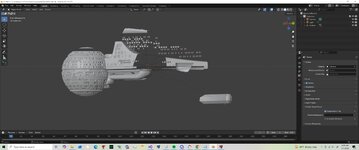
You will get clipping in Blender if the object is too big. Either adjust the clipping settings, or simply apply a (tempory) scale factor in the layout screen.this is what I see in this ship. almost like clipping
Thanks. Yes I set it to way out. At least I can see the ship. it is still a meshYou will get clipping in Blender if the object is too big. Either adjust the clipping settings, or simply apply a (tempory) scale factor in the layout screen.
Buck Rogers
Major Spacecadet
- Joined
- Feb 26, 2013
- Messages
- 1,226
- Reaction score
- 1,640
- Points
- 128
I usually set the scale to 0.01 for really big vessels, and only enlarge to 100% for the export.Thanks. Yes I set it to way out. At least I can see the ship. it is still a mesh

Okay, let's get serious 
I've solved a lot of problems with this mesh, which was a complete mess.
I tried everything: "merge vertices," "separate selection," "split mesh by selection," and it worked.
I just ruined my day.
And for the textures, you just need to replace this:
MATERIAL Material.005
0.800 0.800 0.800 1.000
1.000 1.000 1.000 1.000
1.000 1.000 1.000 1.000 10.000
0.000 0.000 0.000 0.000
with this:
MATERIAL Material.005
1.0 1.0 1.0 1.0
1.0 1.0 1.0 1.0
0.0 0.0 0.0 1.0 0.0
0.0 0.0 0.0 1.0
in the mesh materials.
Envoyer des commentaires
I've solved a lot of problems with this mesh, which was a complete mess.
I tried everything: "merge vertices," "separate selection," "split mesh by selection," and it worked.
I just ruined my day.
And for the textures, you just need to replace this:
MATERIAL Material.005
0.800 0.800 0.800 1.000
1.000 1.000 1.000 1.000
1.000 1.000 1.000 1.000 10.000
0.000 0.000 0.000 0.000
with this:
MATERIAL Material.005
1.0 1.0 1.0 1.0
1.0 1.0 1.0 1.0
0.0 0.0 0.0 1.0 0.0
0.0 0.0 0.0 1.0
in the mesh materials.
Envoyer des commentaires
Attachments
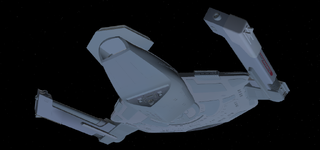
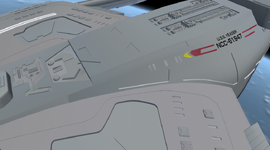
looks great
Yes, it's great, but there are still many things to correct, but separating things and analyzing each part of a 3D object helps to isolate the problem.
Luke Reichelt
Well-known member
Aside from the lack of textures, the Saber is indeed looking pretty good so far. That being said, the model needs to be resized, as the vessel in question is supposed to be 223 meters long.Yes, it's great, but there are still many things to correct, but separating things and analyzing each part of a 3D object helps to isolate the problem.
These are very complex models and do not easily convert. what is wrong with the size of the saber?Aside from the lack of textures, the Saber is indeed looking pretty good so far. That being said, the model needs to be resized, as the vessel in question is supposed to be 223 meters long.
Luke Reichelt
Well-known member
As I said, the vessel is supposed to be 223 meters long. In its current state, it appears to be much larger, possibly by a factor of five or more.These are very complex models and do not easily convert. what is wrong with the size of the saber?
the model I am working on is 223 meters long
Luke Reichelt
Well-known member
I was referring to the mesh that Fast_toche included in the download link.the model I am working on is 223 meters long
Luke Reichelt
Well-known member
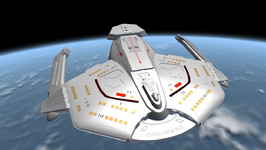
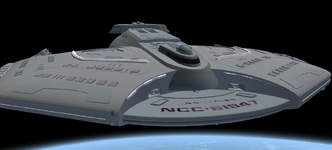
In the meantime, here's the Starfleet Academy trainer craft. The original 3D model is by Hangar.b.productions. Shown below is a screenshot of the craft in orbit above Titan, similar to how it appeared in the ST:TNG episode "The First Duty":
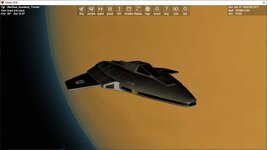
One of the included scenarios requires the Spacedock 2010 add-on.
One of the included scenarios requires the Spacedock 2010 add-on.
Attachments
Last edited:
@Fast_toche were u able to export the mesh using which version of blender?
I wonder if one can import orbiter .msh into blender
I wonder if one can import orbiter .msh into blender

You can. Select File > Import > Orbiter Mesh Import (.msh)@Fast_toche were u able to export the mesh using which version of blender?
I wonder if one can import orbiter .msh into blender
A quick update on my testing of the Orbiter Mesh Tools addon. With the latest release I note that the Import selection is greyed out and not active in Blender 5.1.1 but it is available and not greyed out in Blender 4.5.9 and 5.0.1
Is there any message in the Blender console window? It's blender doing that for whatever reason.A quick update on my testing of the Orbiter Mesh Tools addon. With the latest release I note that the Import selection is greyed out and not active in Blender 5.1.1 but it is available and not greyed out in Blender 4.5.9 and 5.0.1
Installation of addon indicates version 2.3 is installed. No other particular message here. When import selection is attempted, message is "unknown operator encountered". Blender system console indicates quite a bit of information but I am unable to copy it. Too much information to show on one prntscreen copy. I will try to make a set of screen prints but there's a hockey playoff game right now. Sorry ... priorities.
And now I am really confused. I exited Blender and came back to it 5 minutes later and the import selection is no longer greyed out. Don't know what to think.
And now I am really confused. I exited Blender and came back to it 5 minutes later and the import selection is no longer greyed out. Don't know what to think.
Last edited:
So I am using 4.2LTS and tried to import that sabre mesh
And got this
And got this
bpy.context.space_data.system_bookmarks_active = 3bpy.context.space_data.system_bookmarks_active = 3bpy.context.space_data.system_bookmarks_active = 2bpy.context.space_data.system_bookmarks_active = 2bpy.context.space_data.system_bookmarks_active = 3bpy.context.space_data.system_bookmarks_active = 3Python: Traceback (most recent call last): File "C:\Program Files\Blender Foundation\Blender 4.2\4.2\scripts\addons_core\orbiter-blender-2\__init__.py", line 225, in execute import_tools.import_mesh(config, path) File "C:\Program Files\Blender Foundation\Blender 4.2\4.2\scripts\addons_core\orbiter-blender-2\import_tools.py", line 440, in import_mesh msh_index = up.index('meshes') ^^^^^^^^^^^^^^^^^^ValueError: 'meshes' is not in listbpy.ops.object.delete(use_global=False, confirm=False)Deleted 1 object(s)Python: Traceback (most recent call last): File "C:\Program Files\Blender Foundation\Blender 4.2\4.2\scripts\addons_core\orbiter-blender-2\__init__.py", line 225, in execute import_tools.import_mesh(config, path) File "C:\Program Files\Blender Foundation\Blender 4.2\4.2\scripts\addons_core\orbiter-blender-2\import_tools.py", line 440, in import_mesh msh_index = up.index('meshes') ^^^^^^^^^^^^^^^^^^ValueError: 'meshes' is not in listAttachments
Is the sabre mesh someplace I can try it?So I am using 4.2LTS and tried to import that sabre mesh
And got this
bpy.context.space_data.system_bookmarks_active = 3
bpy.context.space_data.system_bookmarks_active = 3
bpy.context.space_data.system_bookmarks_active = 2
bpy.context.space_data.system_bookmarks_active = 2
bpy.context.space_data.system_bookmarks_active = 3
bpy.context.space_data.system_bookmarks_active = 3
Python: Traceback (most recent call last):
File "C:\Program Files\Blender Foundation\Blender 4.2\4.2\scripts\addons_core\orbiter-blender-2\__init__.py", line 225, in execute
import_tools.import_mesh(config, path)
File "C:\Program Files\Blender Foundation\Blender 4.2\4.2\scripts\addons_core\orbiter-blender-2\import_tools.py", line 440, in import_mesh
msh_index = up.index('meshes')
^^^^^^^^^^^^^^^^^^
ValueError: 'meshes' is not in list
bpy.ops.object.delete(use_global=False, confirm=False)
Deleted 1 object(s)
Python: Traceback (most recent call last):
File "C:\Program Files\Blender Foundation\Blender 4.2\4.2\scripts\addons_core\orbiter-blender-2\__init__.py", line 225, in execute
import_tools.import_mesh(config, path)
File "C:\Program Files\Blender Foundation\Blender 4.2\4.2\scripts\addons_core\orbiter-blender-2\import_tools.py", line 440, in import_mesh
msh_index = up.index('meshes')
^^^^^^^^^^^^^^^^^^
ValueError: 'meshes' is not in list
Similar threads

- Replies
- 103
- Views
- 25K


- Replies
- 175
- Views
- 41K
