Project Space Shuttle Vessel

That rendezvous profile is not correct... retrograde OMS-2, massive dVz at the TI burn (the massive dVy at the NPC burn is pretty much expected, as SSV doesn't target an orbital plane, just the inclination). The Mir is probably not in the right place and/or the constraints are not what they should be for that rendezvous.


I've used it several times and I don't think it matters..., right @indy91 ?
BTW: You can minimize the ExternalMFD dialog (or other Orbiter dialogs) by double clicking in the top bar, and it will minimize to there, so you don't have to open it again and again.
I will carry out the mission without external MFD as usual tomorrow and it should work better this is the first time I have had this problem so I don't see where else it could come from
 
I will carry out the mission without external MFD as usual tomorrow and it should work better this is the first time I have had this problem so I don't see where else it could come from
I'm not sure the ExternalMFD is the problem... AFAIK it is another MFD location.
On the other hand, I'm 99% sure you have to delete the maneuvers as you perform them, and update the following ones so they are calculated with the current vessel state, instead of doing something based on the previous maneuvers, that actually weren't "perfect" as it expects (they never are). Maybe that "raw" profile works sometimes...
 
Two things I've noticed with the aft flightdeck VC positions:

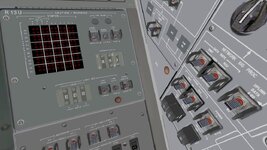
*On the orbiters that have guards inbetween the C&W Parameter Select wheels, the last digit is very hard to see. I've included a screenshot showing the issue on Discovery.
*The right overhead window view isn't centered which makes it a bit difficult to align the orbiter with the ET for the MS photo taking task.
 

Attachments

  • R13U_CW_paramter wheels_hard_to_see.jpg
    R13U_CW_paramter wheels_hard_to_see.jpg
    97.3 KB · Views: 8
*On the orbiters that have guards inbetween the C&W Parameter Select wheels, the last digit is very hard to see. I've included a screenshot showing the issue on Discovery.
I remember that I tried to get a better view, but if I shove the camera further in, the aft panel becomes clipped.... not pretty.

*The right overhead window view isn't centered which makes it a bit difficult to align the orbiter with the ET for the MS photo taking task.
The issue there might be more due to the fact that, in that view, the camera is looking straight up, and so the elevation/azimuth control becomes limited: left/right don't pan as much as they rotate the view, which is frustrating.
I've actually done some work in managing the vc positions in a different way: Ascent/Entry will be limited to seats positions, while in orbit the usual work stations would be available. I don't think I considered the ET photo task, but it makes sense to have one MS-1 lean position for that. No idea when this will be ready.
 
Release Tuesday! :hailprobe:

Space Shuttle Vessel v1.13 is out! https://github.com/GLS-SSV/SSV/releases/tag/v1.13

This release is a bit of a stop-gap, featuring pretty much just a rework of the Mission Editor and a sizable update to the manual. As far as the vessels are concerned, the only work there, was addition of a manual on/off control to the Xenon Lights, and a (maybe) better light beam.

Mission Editor is now a bit different behind the scenes, and that will hopefully allow for easier change of the controls, so the user can edit a mission with more ease. There is a big change to the Payloads tab, which now presents the payloads in a different way: instead of showing a ton of controls, only a list of payloads is displayed, and the controls for each payload type are located in a popup window. The table will eventually also show the mass of each payload.
There is also the addition of the payload diagram, an evolution of the latches diagram previously used for Active and Passive payloads. This provides a quick-and-dirty preview of the PLB, showing what payload is where, in addition to Upper Stages, Airlocks, etc.

Another major development happened in the manual, which went thru a bit of a reorganization, and should now have a better description of how to create a mission using the Mission Editor. Also added information on how to operate controls in the VC... redundant for the experienced used, but a good help for the newbie.


Ongoing work for v2.0: the Control Segment work is turning out to be a bit of a nightmare, but I think it will start producing results soon, so that I can finally start closing out that mega branch and resume work on the other mega branch that is the OMS/RCS upgrade.
As for the next release, I still don't have anything solid yet... maybe the GAS canisters, which should be easier (but not easy) to manage with the new Mission Editor. The Hitchhiker seems a bit "too configurable", with control boxes and cables, so I might not support that natively, but the basic GAS should be doable.
 
Thanks. I have been slowly trying to get the GAS,.... into the SSV. Sometimes it is just a mesh attached to the payload area. Sometimes the lids open,.... But that I have them as a vessel so you need to focus on them and press a key,......
I suspect in real life it was controlled inside the shuttle? Should I continue with where the GAS and other payloads are vessels and where you focus on the vessel to control it?
 
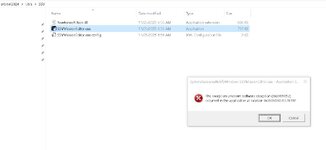
I am trying the new mission editor, but looks like it doesn´t start up. Looks like there is a missing file:

Code:
Aplicación: SSVMissionEditor.exe
Versión de Framework: v4.0.30319
Descripción: el proceso terminó debido a una excepción no controlada.
Información de la excepción: System.IO.FileNotFoundException
   en SSVMissionEditor.ViewModel.MainWindowViewModel..ctor(SSVMissionEditor.Model.Mission, SSVMissionEditor.DataAccess.LandingSite)
   en SSVMissionEditor.MainWindow..ctor()

Información de la excepción: System.Windows.Markup.XamlParseException
   en System.Windows.Markup.WpfXamlLoader.Load(System.Xaml.XamlReader, System.Xaml.IXamlObjectWriterFactory, Boolean, System.Object, System.Xaml.XamlObjectWriterSettings, System.Uri)
   en System.Windows.Markup.WpfXamlLoader.LoadBaml(System.Xaml.XamlReader, Boolean, System.Object, System.Xaml.Permissions.XamlAccessLevel, System.Uri)
   en System.Windows.Markup.XamlReader.LoadBaml(System.IO.Stream, System.Windows.Markup.ParserContext, System.Object, Boolean)
   en System.Windows.Application.LoadBamlStreamWithSyncInfo(System.IO.Stream, System.Windows.Markup.ParserContext)
   en System.Windows.Application.LoadComponent(System.Uri, Boolean)
   en System.Windows.Application.DoStartup()
   en System.Windows.Application.<.ctor>b__1_0(System.Object)
   en System.Windows.Threading.ExceptionWrapper.InternalRealCall(System.Delegate, System.Object, Int32)
   en System.Windows.Threading.ExceptionWrapper.TryCatchWhen(System.Object, System.Delegate, System.Object, Int32, System.Delegate)
   en System.Windows.Threading.DispatcherOperation.InvokeImpl()
   en System.Windows.Threading.DispatcherOperation.InvokeInSecurityContext(System.Object)
   en MS.Internal.CulturePreservingExecutionContext.CallbackWrapper(System.Object)
   en System.Threading.ExecutionContext.RunInternal(System.Threading.ExecutionContext, System.Threading.ContextCallback, System.Object, Boolean)
   en System.Threading.ExecutionContext.Run(System.Threading.ExecutionContext, System.Threading.ContextCallback, System.Object, Boolean)
   en System.Threading.ExecutionContext.Run(System.Threading.ExecutionContext, System.Threading.ContextCallback, System.Object)
   en MS.Internal.CulturePreservingExecutionContext.Run(MS.Internal.CulturePreservingExecutionContext, System.Threading.ContextCallback, System.Object)
   en System.Windows.Threading.DispatcherOperation.Invoke()
   en System.Windows.Threading.Dispatcher.ProcessQueue()
   en System.Windows.Threading.Dispatcher.WndProcHook(IntPtr, Int32, IntPtr, IntPtr, Boolean ByRef)
   en MS.Win32.HwndWrapper.WndProc(IntPtr, Int32, IntPtr, IntPtr, Boolean ByRef)
   en MS.Win32.HwndSubclass.DispatcherCallbackOperation(System.Object)
   en System.Windows.Threading.ExceptionWrapper.InternalRealCall(System.Delegate, System.Object, Int32)
   en System.Windows.Threading.ExceptionWrapper.TryCatchWhen(System.Object, System.Delegate, System.Object, Int32, System.Delegate)
   en System.Windows.Threading.Dispatcher.LegacyInvokeImpl(System.Windows.Threading.DispatcherPriority, System.TimeSpan, System.Delegate, System.Object, Int32)
   en MS.Win32.HwndSubclass.SubclassWndProc(IntPtr, Int32, IntPtr, IntPtr)
   en MS.Win32.UnsafeNativeMethods.DispatchMessage(System.Windows.Interop.MSG ByRef)
   en System.Windows.Threading.Dispatcher.PushFrameImpl(System.Windows.Threading.DispatcherFrame)
   en System.Windows.Threading.Dispatcher.PushFrame(System.Windows.Threading.DispatcherFrame)
   en System.Windows.Application.RunDispatcher(System.Object)
   en System.Windows.Application.RunInternal(System.Windows.Window)
   en System.Windows.Application.Run(System.Windows.Window)
   en SSVMissionEditor.App.Main()

Sorry for the Spanish there.

Best regards,
 
Thanks. I have been slowly trying to get the GAS,.... into the SSV. Sometimes it is just a mesh attached to the payload area. Sometimes the lids open,.... But that I have them as a vessel so you need to focus on them and press a key,......
I suspect in real life it was controlled inside the shuttle? Should I continue with where the GAS and other payloads are vessels and where you focus on the vessel to control it?
SSV will have everything except the payload (something to see inside the canister visible when the lid is open, so only needed in those canisters with lids) or deployable payloads, and the textures for any logos to be placed.

I am trying the new mission editor, but looks like it doesn´t start up. Looks like there is a missing file:

Code:
Aplicación: SSVMissionEditor.exe
Versión de Framework: v4.0.30319
Descripción: el proceso terminó debido a una excepción no controlada.
Información de la excepción: System.IO.FileNotFoundException
   en SSVMissionEditor.ViewModel.MainWindowViewModel..ctor(SSVMissionEditor.Model.Mission, SSVMissionEditor.DataAccess.LandingSite)
   en SSVMissionEditor.MainWindow..ctor()

Información de la excepción: System.Windows.Markup.XamlParseException
   en System.Windows.Markup.WpfXamlLoader.Load(System.Xaml.XamlReader, System.Xaml.IXamlObjectWriterFactory, Boolean, System.Object, System.Xaml.XamlObjectWriterSettings, System.Uri)
   en System.Windows.Markup.WpfXamlLoader.LoadBaml(System.Xaml.XamlReader, Boolean, System.Object, System.Xaml.Permissions.XamlAccessLevel, System.Uri)
   en System.Windows.Markup.XamlReader.LoadBaml(System.IO.Stream, System.Windows.Markup.ParserContext, System.Object, Boolean)
   en System.Windows.Application.LoadBamlStreamWithSyncInfo(System.IO.Stream, System.Windows.Markup.ParserContext)
   en System.Windows.Application.LoadComponent(System.Uri, Boolean)
   en System.Windows.Application.DoStartup()
   en System.Windows.Application.<.ctor>b__1_0(System.Object)
   en System.Windows.Threading.ExceptionWrapper.InternalRealCall(System.Delegate, System.Object, Int32)
   en System.Windows.Threading.ExceptionWrapper.TryCatchWhen(System.Object, System.Delegate, System.Object, Int32, System.Delegate)
   en System.Windows.Threading.DispatcherOperation.InvokeImpl()
   en System.Windows.Threading.DispatcherOperation.InvokeInSecurityContext(System.Object)
   en MS.Internal.CulturePreservingExecutionContext.CallbackWrapper(System.Object)
   en System.Threading.ExecutionContext.RunInternal(System.Threading.ExecutionContext, System.Threading.ContextCallback, System.Object, Boolean)
   en System.Threading.ExecutionContext.Run(System.Threading.ExecutionContext, System.Threading.ContextCallback, System.Object, Boolean)
   en System.Threading.ExecutionContext.Run(System.Threading.ExecutionContext, System.Threading.ContextCallback, System.Object)
   en MS.Internal.CulturePreservingExecutionContext.Run(MS.Internal.CulturePreservingExecutionContext, System.Threading.ContextCallback, System.Object)
   en System.Windows.Threading.DispatcherOperation.Invoke()
   en System.Windows.Threading.Dispatcher.ProcessQueue()
   en System.Windows.Threading.Dispatcher.WndProcHook(IntPtr, Int32, IntPtr, IntPtr, Boolean ByRef)
   en MS.Win32.HwndWrapper.WndProc(IntPtr, Int32, IntPtr, IntPtr, Boolean ByRef)
   en MS.Win32.HwndSubclass.DispatcherCallbackOperation(System.Object)
   en System.Windows.Threading.ExceptionWrapper.InternalRealCall(System.Delegate, System.Object, Int32)
   en System.Windows.Threading.ExceptionWrapper.TryCatchWhen(System.Object, System.Delegate, System.Object, Int32, System.Delegate)
   en System.Windows.Threading.Dispatcher.LegacyInvokeImpl(System.Windows.Threading.DispatcherPriority, System.TimeSpan, System.Delegate, System.Object, Int32)
   en MS.Win32.HwndSubclass.SubclassWndProc(IntPtr, Int32, IntPtr, IntPtr)
   en MS.Win32.UnsafeNativeMethods.DispatchMessage(System.Windows.Interop.MSG ByRef)
   en System.Windows.Threading.Dispatcher.PushFrameImpl(System.Windows.Threading.DispatcherFrame)
   en System.Windows.Threading.Dispatcher.PushFrame(System.Windows.Threading.DispatcherFrame)
   en System.Windows.Application.RunDispatcher(System.Object)
   en System.Windows.Application.RunInternal(System.Windows.Window)
   en System.Windows.Application.Run(System.Windows.Window)
   en SSVMissionEditor.App.Main()

Sorry for the Spanish there.

Best regards,
Oh boy... 🤦‍♂️ I did upgrade some dependencies, so hope I'm not missing anything.

0bec11a8-dfd1-4d12-bbf9-0c4618921638_text.gif
 
SSV will have everything except the payload (something to see inside the canister visible when the lid is open, so only needed in those canisters with lids) or deployable payloads, and the textures for any logos to be placed.
WOW!!!!! seems like a lot of work. Let me know if you need help
 
WOW!!!!! seems like a lot of work. Let me know if you need help
The complex part is managing the addition, editing and deletion of each GAS canister in the Mission Editor. The vessels and attachment stuff is more of the same.
 
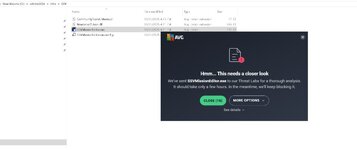
Looks good. except my antivirus kept scanning it. I told it to ignore it
 

Attachments

  • scan1.jpg
    scan1.jpg
    29.1 KB · Views: 6
Looks good. except my antivirus kept scanning it. I told it to ignore it
Lose it, unless you're visiting some really sketchy sites, Windows Defender is more enough to keep you safe. Never had an in issue with it in the 17 years I've been using it.
 
Lose it, unless you're visiting some really sketchy sites, Windows Defender is more enough to keep you safe. Never had an in issue with it in the 17 years I've been using it.

I had a case when WIndows Defender didn't catch it, because I caught a bad file from an official download mirror. Since then, I take security a bit more serious at home, even though the financial damage was insignificant compared to the damage to my pride.
 
Back
Top