Question Custom Planet Elevation Maps for Orbiter 2016?

Wierd things happen at the poles, there be anomolies.
Hanging out at the S pole I noticed that Orbiter never stops rendering, it keeps going round in circles redefining the "singularity" and the hole gets smaller and smaller. After a few minutes it's actually quite small, the gfx card max out, but maybe eventually it would close?
This is after a few minutes (not that there's much to see anyway!).
0714.jpg
You can't place a .flt directly over the pole, Orbiter even breaks if you set 0 Long, you'd have to place many .flts all around the pole and then you'd probably still get a hole in the middle. I'm guessing this would be similar with elev mod tiles.
 
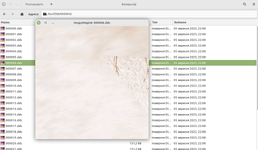
@Buck Rogers, that's strange. I just downloaded my archive and successfully opened the DDS (I'm under Linux for now):

Знімок екрана з 2025-09-07 22-14-10.png
 
that's strange. I just downloaded my archive and successfully opened the DDS (I'm under Linux for now):
I tried several programs and they all throw an error. BUT! Peazip lets you "keep a file" even if it's broken. And I can open it so problem solved.:)
 
I find that if I fly over a pole at speed, Orbiter many times crashes, I guess it can’t keep up with the Long/lat calculations, but if I am landed and I ‘drive’ through the pole slowly, it does fine, and can even park at the pole.
 
Does anyone know how to get Texpack to work? Whenever I try to open it, it just blinks and then disappears. Is this a file location issue?

By the way, I've only just upgraded to Orbiter 2016, so I'm fairly new to this sort of thing.
 
Last edited:
I suppose you should run it from your Windows terminal with some command like:
Thanks. I made some tests, and I'm satisfied with results:

texpack C:\Orbiter2024\Textures\Mimas Surf packs tiles of all available levels into one archive.
texpack C:\Orbiter2024\Textures\Mimas Surf -L8 packs tiles from level 01 to level 08 into one archive.

texpack C:\Orbiter2024\Textures\Mimas Surf -e unpacks an archive into tiles of all available levels.
texpack C:\Orbiter2024\Textures\Mimas Surf -e -L8 unpacks an archive into tiles from level 01 to level 08.

So, it seems the flag -e means unpacking.
 
Bingo! Thanks @misha.physics :) Got it figured out. It's just been so long since I used DOS!

So on windows: Open the Command line Console. Then type:
C:\games\orbiter2016\Utils\texpack.exe C:\games\orbiter2016\Utils\plsplit64test\Weytahn surf
Change directory and texture folder as required.

If you type:
C:\games\orbiter2016\Utils\texpack.exe
it lists function and options.
 
Does anyone here know how to create new elevation tiles entirely from scratch? I assume it begins with a greyscale bitmap, but I don't know enough about the procedure to say for certain.

Specifically, I'm thinking of creating heightmaps for some of my STPSP worlds, starting with Andor and Weytahn. The surface tiles for the latter are linked below.
 

Attachments

Last edited:
I think you need Elv Tile Splitter (dont think you can do whole planets with Tileedit). I had taken a look at it before but didn't get very far, it's a bit more "involved". If you have the time...
I got as far as making a greyscale 16bit .png, imported and exported as .elv. I then tried to get it split up for the individual levels but failed, it requested borders but I'm using a full map?. There's a step I've missed or not understood. Maybe you can get further. It has a discussion thread here.
 
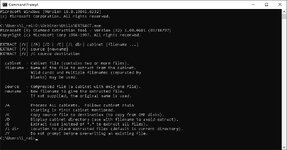
By the way, does anyone here know what the purpose of EXTRACT.exe is? Does it have anything to do with planetary surface textures? This is what I get when I use Command Prompt:

CommandPrompt2.jpg
 
Searches on Internet make me think it looks like a backward compatibility CLI tool from the past (apparently from mid-1990s) "just-in-case" somebody uses that .cab format of Microsoft, kind of a proprietary alternative to .zip. Apparently with no use in modern Orbiter releases.
 
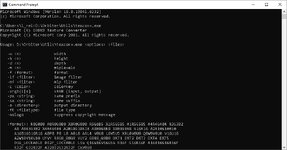
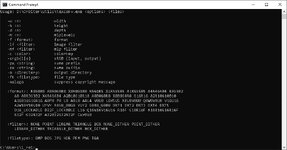
I think I might have found something that might allow me to convert old-style planetary textures to the quadtree format, specifically texconv.exe, which can be found in this forum post. This is what I get when I use Command Prompt:

CommandPrompt3.jpg

CommandPrompt4.jpg
 
...are they compatible with Orbiters License (MIT License and/or LGPL)?
In short:
  • Are they allowed to be used in non-comercial products?
  • Can they be re-distributed by "us"?
 
I don't know (and I don't know anyone who knows) how just to simply (directly) convert textures for Orbiter 2010 into textures for Orbiter 2016-2024, but some time ago I make textures of Negishima Space Center to be compatible with Orbiter 2016-2024. It is here: Negishima Space Center (Orbiter 2016/OpenOrbiter compatible). I just took all original textures (pictures) and merged them into one big picture (using Photoshop). Then I used a script that automatically makes DDS textures compatible with Orbiter 2016-2024. If you can provide a single JPG texture, then I can simply make surface textures of different levels for Orbiter 2016-2024. Also, I made 8 global textures that cover the entire celestial body. It is here: Global Textures.
 
I don't know (and I don't know anyone who knows) how just to simply (directly) convert textures for Orbiter 2010 into textures for Orbiter 2016-2024, but some time ago I make textures of Negishima Space Center to be compatible with Orbiter 2016-2024. It is here: Negishima Space Center (Orbiter 2016/OpenOrbiter compatible). I just took all original textures (pictures) and merged them into one big picture (using Photoshop). Then I used a script that automatically makes DDS textures compatible with Orbiter 2016-2024. If you can provide a single JPG texture, then I can simply make surface textures of different levels for Orbiter 2016-2024. Also, I made 8 global textures that cover the entire celestial body. It is here: Global Textures.
Actually, I've now figured out how to do it. There's an add-on called Tune Your Planet that can extract the textures from the .tex files.

Now that that's out of the way, do you know how to produce heightmaps from an existing image?
 
Last edited:
Sadly, I haven’t understood elevation (ELV) tiles enough yet to know how to make them, although I’ve made some elevation tiles some time ago somehow, but I don’t remember how… I mentioned it above in this thread.
 
In that case, is there anyone here who does know how to produce heightmaps from existing images? Specifically, I'm hoping someone can produce some for Andor and Weytahn from the original bitmaps for said planets.

I'm aiming for level 5 or 6 here, as anything higher would likely take up too much storage space.
 

Attachments

In that case, is there anyone here who does know how to produce heightmaps from existing images? Specifically, I'm hoping someone can produce some for Andor and Weytahn from the original bitmaps for said planets.

I'm aiming for level 5 or 6 here, as anything higher would likely take up too much storage space.
A heightmap is essentially a grayscale image where every pixel represents the height of the terrain within a certain range. Based on your post, I think there might be a slight misunderstanding about how heightmaps are actually made.

For real planetary bodies you'd need a set of data from actual scientific instruments that measure the elevation directly (radar or laser altimetry) or indirectly (like stereophotogrammetry, which uses two or more overlapping images taken from different angles to calculate 3D surface geometry.) In all these cases, the elevation data is a completely separate dataset from the surface color photos.

For fictional planets, creating a heightmap isn't a matter of conversion; it's an artistic and manual process. Someone has to essentially "paint" the elevation from scratch using an image editor like GIMP or Photoshop. They would use your original texture as a visual guide to decide where to place mountains (painting with white/light grays) and oceans (painting with black/dark grays).

The core issue is that you can't automatically convert a planet's color texture (the bitmap) into a heightmap. The texture file only stores color data (what the surface looks like), not elevation data (what its shape is). You can't tell if a green patch on your texture is a low-lying jungle or a 2,000-meter-high plateau.

So, you're not looking for someone who knows a technical "how-to" for conversion, but rather an artist or developer willing to take on the creative task of building that planet's 3D terrain by hand.
 
Back
Top