Project Space Shuttle Vessel

Quick question, when entering landing site (item 41, then 01 for KSC) it shows primary and secondary runways as 33.
Hmm, did you setup the landing site table youself in Mission Editor?

If I enter Edward’s it shows different rwys for pro and sec. What am I missing? How do I select 15? I’m still in Orbiter 2016 btw if that makes a difference
The "landing site" in SPEC51 is a set of 2 runway ends, labeled primary and secondary. Usually, they are the ends of the same physical runway, but not necessarily.
For Edwards, there are usually 3, 4...? (anyway, the landing site table is configurable), several sites to list the available runways there.
 
Nice. Just asking if the satellites were mine?

Maybe I just release some payloads for SSV? I may need help in testing.
 
  • Like
Reactions: GLS
Nice. Just asking if the satellites were mine?

Maybe I just release some payloads for SSV? I may need help in testing.
In fact, these are your satellites; I had to make some small adaptations to them to be able to use them on SSV.
If you want to release loads that are perfectly compatible with SSVs, that would make a lot of people happy, me first.
And if you need help testing them I'm available if you want
 
In fact, these are your satellites; I had to make some small adaptations to them to be able to use them on SSV.
If you want to release loads that are perfectly compatible with SSVs, that would make a lot of people happy, me first.
And if you need help testing them I'm available if you want
Sure not sure if up to the SSV standards. What adjustments? Like attachments,. ..
 
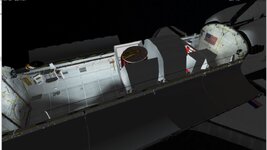
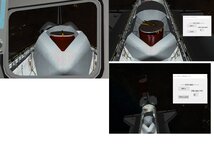
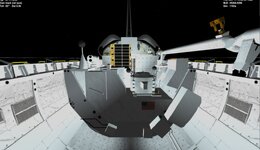
Here are 2 sts 2 and STs 5. On STS 5 the Satellite launched is controlled by a dialogue box. Then you can switch focus to the satellite while still in control of the ASE. For this one the ASE spin table will spin to 50 rpm.

Some were rebuilt for the 2016STS. but it uses some of the textures form STSpayloads. I hate to tell people to download it, because they install it and let the earth.cfg get overwritten.
 

Attachments

  • ssvssts5payload.jpg
    ssvssts5payload.jpg
    60.1 KB · Views: 10
  • ssvssts5payload1.jpg
    ssvssts5payload1.jpg
    61.2 KB · Views: 10
  • ssvsts2payload.jpg
    ssvsts2payload.jpg
    51.7 KB · Views: 10
Here are 2 sts 2 and STs 5. On STS 5 the Satellite launched is controlled by a dialogue box. Then you can switch focus to the satellite while still in control of the ASE. For this one the ASE spin table will spin to 50 rpm.

Some were rebuilt for the 2016STS. but it uses some of the textures form STSpayloads. I hate to tell people to download it, because they install it and let the earth.cfg get overwritten.
the main problem with STSPayloads is that most of the modules do not work with SSV so I use Spacecarft 3 which gives a lot of limits. I also often have to modify the attachment points, for textures it is always possible to create new ones
 
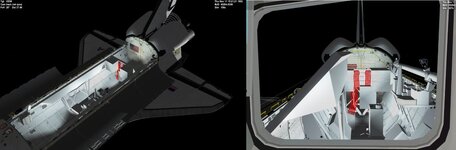
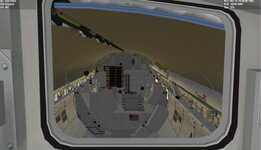
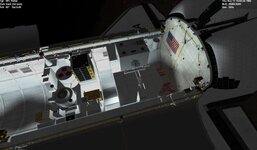
STS3 payload

Yes the STS payloads only work with STS. For STS2016 I needed to re-code and redo. If someone wants to help on the textures that would be great
 

Attachments

  • STS3SSVPAYLOAD.jpg
    STS3SSVPAYLOAD.jpg
    63.2 KB · Views: 12
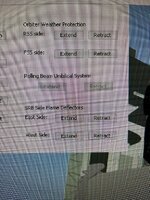
Quick question, on the launch pad controls..what is the “rolling beam umbilical system “ and why is it greyed out?
 

Attachments

  • IMG_5188.jpeg
    IMG_5188.jpeg
    200.1 KB · Views: 10
Quick question, on the launch pad controls..what is the “rolling beam umbilical system “ and why is it greyed out?
The RBUS is the arm with the umbilical for the Centaur in the PLB. It is only present in the 1985 and 1986 versions of the pad.
Open the launch scenario for STS-61G, 61F or 81I to see it in action.

Bottom left of the image:
 
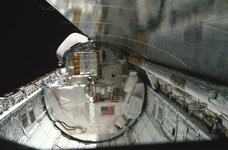
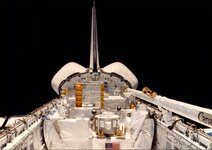
Maybe we need a thread for SSV payloads?
As far as textures go. Alot of white foil and white. In the real images the front of the Pallet seems more white or white pading?
 

Attachments

  • ssvsts3orbit.jpg
    ssvsts3orbit.jpg
    80.3 KB · Views: 24
  • C5QfatsUkAAxGmK.jpg
    C5QfatsUkAAxGmK.jpg
    99.4 KB · Views: 24
  • sts-3_orbit.jpg
    sts-3_orbit.jpg
    66.8 KB · Views: 20
  • sts3payload.jpg
    sts3payload.jpg
    77.1 KB · Views: 21
Small update!
It took while, being in the back-burner, but I finally added to the Mission Editor a simple "calculator" for the IUS propellant loads.
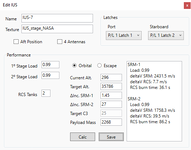
ius_prop_calc.PNG
This makes the IUS much easier to configure, allowing it to effecting reach a target orbit. Remember that a solid propellant rocket can't be stopped, thus its impulse depends on the propellant it carries.
The 2-stage IUS probably allows for several orbit types to be reached, but I kept things simple and focused on the typical usage cases: circular orbit (usually GEO) or escape trajectory.
Some assumptions are made: (1) instantaneous burns, (2) accurate burn timing and pointing, (3) a certain percentage of the RCS is used at certain segments of the flight (something I still need to properly document). I'd like to improve the 2º point, and provide an angle from the velocity vector to point the vehicle at during a burn with a plane change, but that might have to wait a while.
Other issues: payload mass needs to be input manually, as I can't get the payload mass for dll (= most) vessels (maybe adding the mass should be mandatory for each payload, so it can be used for this and other calculations?), and the input parameters are not saved (for now).
Results: it seems to work properly to target an orbit, but it seems to under-perform in the escape scenarios... I probably messed up somewhere. 😒


At the Vandenberg, the Access Tower should be done, the Launch Mount is almost done, with actual flame tunnels. The MST and SAB will be easier to "massage" as they don't interface with the vehicle, and then there is the source of this all, the PCR, most of which will probably come from the LC39 work.

 
STS3 payload

Yes the STS payloads only work with STS. For STS2016 I needed to re-code and redo. If someone wants to help on the textures that would be great
i would be down to help, i know we started and i just stopped responding, sorry about that. Its the end of the semester so im busy with that, but i got 2 weeks left then im home free
 
Hey GLS…
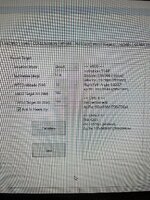
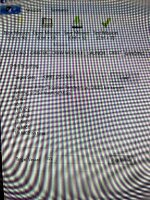
Quick question on the mission editor.. under the launch tab, if I select me I altitude, that determines the overall altitude of the preliminary orbiter correct? Also, in the box in the right, it seems to calculate the OMS2 burn rig and delta V, am I right in assuming this? So final question…what’s the difference between MECO Altitude and MECO Target altitude? One says 52nm and the other is 160 along with pm’s 2 at 160…what do I need to change to get the proper altitude to match the ISS? Which one actually determines how I I am in orbit?
 
I also see orbit targeting on the next orbit tab…now I’m real confused lol..in short what needs to be set for a mission to the ISS?
 

Attachments

  • IMG_5245.jpeg
    IMG_5245.jpeg
    179.9 KB · Views: 7
  • IMG_5246.jpeg
    IMG_5246.jpeg
    196.5 KB · Views: 7
Hey GLS…
Quick question on the mission editor.. under the launch tab, if I select me I altitude, that determines the overall altitude of the preliminary orbiter correct? Also, in the box in the right, it seems to calculate the OMS2 burn rig and delta V, am I right in assuming this? So final question…what’s the difference between MECO Altitude and MECO Target altitude? One says 52nm and the other is 160 along with pm’s 2 at 160…what do I need to change to get the proper altitude to match the ISS? Which one actually determines how I I am in orbit?
MECO altitude is altitude where MECO occurs, MECO Target Altitude is the target altitude of OMS-2.
 
If your MECO altitude was less than your OMS2 altitude wouldn’t you have an eccentric orbit instead of a circular orbit?

In any case, so I would set target altitude for the same as the ISS (whatever that is) ?
 
Back
Top