Corekgaxid
New member
Does anyone tested amso2016 with space orb 2024 ?

ORBITER-FORUM will be temporarily closed at 2026-07-23 18:00 UTC while we complete some OF maintenance tasks. The amount of downtime is expected to take up to one hour, but probably less.

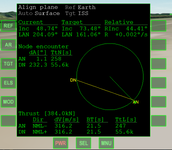

Yes, several MFDs got upgraded. Check the MFD section of the Orbiter User Manual for info on how they work.


Hello. It's possible translate Orbiter 2024 to other languages?

Only thing I know is that to Linux-based filesystems a capital letter is different from its lower-case counterpart.To get Orbital Reef to show up in 2024 Scenario Editor > New > Vessel Type... Had to change the file name from ORBITALREEF.CFG to OrbitalReef.cfg... I don't get it but it worked... Yay... ^^^
I think the vessel in-focus gets the "best" shadows, with the other vessels getting a simpler version.Should I write here or not I don't know, but I experience some old issues with graphical client - no shadows. I created STS-9 mission on the launch pad with GLS's SSV. Scenario starts with external ground camera focused on Columbia. Orbiter, ET or SRB'S do not cast shadows onto each other and on MLP.
When I switch, using "F3" key, control to pad LC39A, shadows appear. Switching back - they disappear...
EDIT: It's not so bad, I had Focus+Payload in "shadows" combo box options. Switched to "All Visible Objects" and they appeared. They are still quite low-res though... Just experimenting with these Dither, 27samples... option things.

As Urwumpe already mentioned, i18n was never a "high priority" goal during development.Hello. It's possible translate Orbiter 2024 to other languages?

HiDoes anyone tested amso2016 with space orb 2024 ?
HelloHello. It's possible translate Orbiter 2024 to other languages?

Hello. It's possible translate Orbiter 2024 to other languages?
Orbiter 2024 Japanese localization file (for default scenarios) has been released.
I really like new BEGIN_URLDESC tag. (A big thanks to someone who implemented this feature!) Making Japanese localization files became a lot easier now.
View attachment 41898

Differences between Orbiter 2024 and Orbiter 2016 may be smaller than between Orbiter 2016 and Orbiter 2010. Maybe it could be easier to get AMSO for Orbiter 2024? In any case, I think tests and investigations of incompatibility are needed. Maybe it makes sense to ask.Unfortunately I am sure that he will never have the courage to update AMSO for Orbiter 2024.
In my opinionit doesn't matter, we just have to keep a version of Orbiter 2016 to be able to use this amazing add-on which is one of my favorites.
Same issue with an xbox controller not recognized, while a crappy Saitek joystick is.Not getting Orbiter 2024 to recognize joystick... Option only offers disabled... Any ideas ???
m_pDI->EnumDevices (DI8DEVTYPE_JOYSTICK, EnumJoysticksCallback,m_pDI->EnumDevices (DI8DEVCLASS_GAMECTRL, EnumJoysticksCallback,Same issue with an xbox controller not recognized, while a crappy Saitek joystick is.
I did mention before the release that those scenarios shouldn't be in the release, as it did not contain the Antelope addon...I thought the Antelope region integrated in Orbiter2024 would be in high definition.


