
Problem UNABLE to get off the pad using Orbiter 2024 - ???

CurlSnout

Well-known member
Joined
Feb 22, 2011
Messages
136
Reaction score
301
Points
78
Location
Pacific NW
Hello Citizens,

Have been running Orbiter 2016 (and Orbiter 2010 before that and Orbiter 2006 before that) for years without issue. Downloaded/installed Orbiter 2024 and I can't get a single scenario to run. This is 100% vanilla; I haven't attempted to load any addons. The Launchpad comes up (using Orbiter_ng.exe), and I choose D3D9Client for my graphics engine. It recognizes my video card (Nvidia GeForce RTX 3060 Ti) and my resolution is set to 2560 x 1440 (native for my monitor). On the video tab I choose Advanced and ask it to Create symbolic links. I have enabled the XRSound module. I can choose a scenario - say, for example, 'Welcome to Orbiter 2024' in the 2024 directory. When I attempt to run this, the Open Orbiter splash screen comes up, says it's loading (I can see things - Building Shader Programs, Loading Celestial Sphere, Sol:Earth, etc. scrolling by at the bottom left as if they are, in fact, loading), and then I get a CTD. Any/all scenarios give similar result.

Afterwards, Orbiter.log looks like this:

**** Orbiter.log
000000.005: Build Dec 31 2024 [v.602931718]
000000.005: Timer precision: 1e-07 sec
000000.038: Found 0 joystick(s)
000000.236: Module XRSound.dll ........... [Build 241231, API 241231]
000000.239: Loading module XRSound
000000.243: ---------------------------------------------------------------
000000.247: BaseDir : C:\applications\simulations\ORBITER(s)\Orbiter-2024\
000000.250: ConfigDir : C:\applications\simulations\ORBITER(s)\Orbiter-2024\Config\
000000.253: MeshDir : C:\applications\simulations\ORBITER(s)\Orbiter-2024\Meshes\
000000.256: TextureDir : C:\applications\simulations\ORBITER(s)\Orbiter-2024\Textures\
000000.259: HightexDir : C:\applications\simulations\ORBITER(s)\Orbiter-2024\Textures2\
000000.263: ScenarioDir: C:\applications\simulations\ORBITER(s)\Orbiter-2024\Scenarios\
000000.266: ---------------------------------------------------------------
000000.269: D3D9 DLLs : C:\Windows\SYSTEM32\d3d9.dll [v 10.0.22621.4541]
000000.272: : C:\Windows\SYSTEM32\d3dx9_43.dll [v 9.29.952.3111]
000000.277: ---------------------------------------------------------------
000000.281: Module D3D9Client.dll ........ [Build 241231, API 241231]
000000.318: [D3D9] Native Interface
000000.323: [D3D9] DirectX9 Created...
000000.328: [D3D9] Initialize VideoTab...
000000.355: Loading module D3D9Client
000000.361: Module AtlantisConfig.dll .... [Build 241231, API 241231]
000000.365: Loading module AtlantisConfig (legacy interface)
000000.369: Module AtmConfig.dll ......... [Build 241231, API 241231]
000000.373: Loading module AtmConfig (legacy interface)
000000.378: Module DGConfigurator.dll .... [Build 241231, API 241231]
000000.382: Loading module DGConfigurator (legacy interface)
000006.719: Module DX9ExtMFD.dll ......... [Build 241231, API 241231]
000006.726: Loading module DX9ExtMFD (legacy interface)
000011.648:
000011.658: **** Creating simulation session
000011.671: D3D9: [DirectX 9 Initialized]
000011.678: D3D9: 3D-Adapter.............. : NVIDIA GeForce RTX 3060 Ti
000011.683: D3D9: MaxTextureWidth......... : 16384
000011.688: D3D9: MaxTextureHeight........ : 16384
000011.694: D3D9: MaxTextureRepeat........ : 8192
000011.698: D3D9: VolTexAddressCaps....... : 0x3F
000011.703: D3D9: NumSimultaneousRTs...... : 4
000011.708: D3D9: VertexDeclCaps.......... : 0x30F
000011.712: D3D9: MiscCaps................ : 0x2FCEF2
000011.717: D3D9: Separate AlphaBlend..... : Yes
000011.721: D3D9: Shadow Mapping.......... : Yes
000011.725: D3D9: D3DFMT_A16B16G16R16F.... : Yes
000011.729: D3D9: Vertex_A16B16G16R16F.... : Yes
000011.733: D3D9: Vertex_A32B32G32R32F.... : Yes
000011.737: D3D9: Vertex_R16F............. : Yes
000011.742: D3D9: Vertex_R32F............. : Yes
000011.746: D3D9: D3DFMT_A32B32G32R32F.... : Yes
000011.750: D3D9: D3DFMT_D32F_LOCKABLE.... : Yes
000011.754: D3D9: D3DFMT_A2R10G10B10...... : Yes
000011.758: D3D9: D3DFMT_L8............... : Yes
000011.761: D3D9: D3DDTCAPS_DEC3N......... : No
000011.766: D3D9: D3DDTCAPS_FLOAT16_2..... : Yes
000011.770: D3D9: D3DDTCAPS_FLOAT16_4..... : Yes
000011.774: D3D9: Runs under WINE......... : No
000011.777: D3D9: D3D9Build Date.......... : 0
000011.839: D3D9: Available Texture Memory : 4069 MB
000011.845: D3D9: [3DDevice Initialized]
000017.380: Loaded 41057 records from star database
000018.330: D3D9: [D3D9Client Initialized]
000018.427: Module Sun.dll ............... [Build 241231, API 241231]
000018.443: VSOP87(E) Sun: Precision 1.0e-06, Terms 554/6634
000018.457: Module Mercury.dll ........... [Build 241231, API 241231]
000018.464: GRAVITY MODEL: GravityModels\jgmess_160a_sha.tab LOADED, Terms 65/13040
000018.481: VSOP87(B) Mercury: Precision 1.0e-05, Terms 167/7123
000018.507: Module Venus.dll ............. [Build 241231, API 241231]
000018.512: GRAVITY MODEL: GravityModels\mod_shgj120p.a01 LOADED, Terms 65/7380
000018.517: Module VenusAtm2006.dll ...... [Build 241231, API 241231]
000018.520: Loading module VenusAtm2006 (legacy interface)
000018.525: VSOP87(B) Venus: Precision 1.0e-05, Terms 79/1710
000018.548: Module Earth.dll ............. [Build 241231, API 241231]
000018.579: GRAVITY MODEL: GravityModels\egm96_to360.tab LOADED, Terms 65/65340
000018.584: Module EarthAtmJ71G.dll ...... [Build 241231, API 241231]
000018.589: Loading module EarthAtmJ71G (legacy interface)
000018.595: VSOP87(B) Earth: Precision 1.0e-08, Terms 2564/2564

Is it pulling D3D9 DLLs out of C:\Windows\SYSTEM32 (there for Orbiter 2016)? Is that problematic? I do have Orbiter 2016 on this machine (in a completely separate directory) and it is running smoothly.

I have read through the readme.txt file that lives in the root directory. I haven't read the entire User Manual, but I've looked through the first bits to see if I need to download any dependencies. Unsure what I'm missing or what I'm doing wrong or not doing correctly. Any/all help/advice/suggestions appreciated.

Thank you, and good evening,

Sam

Other machine specs:

Desktop PC running Windows 11
intel i7 - 12700K @ 3.6 GHz
32 GB RAM
Nvidia GeForce RTX 3060 Ti (8 GB)
display = Dell U2715H @ 2560 x 1440 (native)
 
Last edited:
There should be no issue with the D3D9 DLL location. It's in the same place for me.

What jumps out immediately to me is that the log seems to have cut off earlier than what I'd expect.

This is more or less what it should look like (I have a few settings that are different):

Code:
**** Orbiter.log
000000.008: Build Dec 31 2024 [v.602931718]
000000.015: Timer precision: 1e-07 sec
000000.298: Found 0 joystick(s)
000003.218: ---------------------------------------------------------------
000003.225: BaseDir    : C:\Orbiter\Orbiter2024\
000003.233: ConfigDir  : C:\Orbiter\Orbiter2024\Config\
000003.239: MeshDir    : C:\Orbiter\Orbiter2024\Meshes\
000003.247: TextureDir : C:\Orbiter\Orbiter2024\Textures\
000003.253: HightexDir : C:\Orbiter\Orbiter2024\Textures2\
000003.260: ScenarioDir: C:\Orbiter\Orbiter2024\Scenarios\
000003.266: ---------------------------------------------------------------
000003.273: D3D9 DLLs  : C:\Windows\SYSTEM32\d3dx9_43.dll [v 9.29.952.3111]
000003.280:            : C:\Windows\SYSTEM32\d3d9.dll [v 10.0.19041.5198]
000003.287: ---------------------------------------------------------------
000003.294: Module D3D9Client.dll ........ [Build 241231, API 241231]
000003.421: [D3D9] Native Interface
000003.428: [D3D9] DirectX9 Created...
000003.436: [D3D9] Initialize VideoTab...
000003.638: Loading module D3D9Client
000003.844: Module XRSound.dll ........... [Build 241231, API 241231]
000003.853: Loading module XRSound
000003.894: Module FlightData.dll ........ [Build 241231, API 241231]
000003.903: Loading module FlightData
000003.944: Module Framerate.dll ......... [Build 241231, API 241231]
000003.953: Loading module Framerate
000003.961: Module ScnEditor.dll ......... [Build 241231, API 241231]
000003.971: Loading module ScnEditor (legacy interface)
000004.056: Module AtlantisConfig.dll .... [Build 241231, API 241231]
000004.065: Loading module AtlantisConfig (legacy interface)
000004.147: Module AtmConfig.dll ......... [Build 241231, API 241231]
000004.155: Loading module AtmConfig (legacy interface)
000004.230: Module DGConfigurator.dll .... [Build 241231, API 241231]
000004.239: Loading module DGConfigurator (legacy interface)
000017.049:
000017.058: **** Creating simulation session
000017.079: D3D9: [DirectX 9 Initialized]
000017.089: D3D9: 3D-Adapter.............. : NVIDIA GeForce GTX 1050 Ti
000017.098: D3D9: MaxTextureWidth......... : 16384
000017.108: D3D9: MaxTextureHeight........ : 16384
000017.116: D3D9: MaxTextureRepeat........ : 8192
000017.125: D3D9: VolTexAddressCaps....... : 0x3F
000017.135: D3D9: NumSimultaneousRTs...... : 4
000017.144: D3D9: VertexDeclCaps.......... : 0x30F
000017.154: D3D9: MiscCaps................ : 0x2FCEF2
000017.162: D3D9: Separate AlphaBlend..... : Yes
000017.171: D3D9: Shadow Mapping.......... : Yes
000017.180: D3D9: D3DFMT_A16B16G16R16F.... : Yes
000017.188: D3D9: Vertex_A16B16G16R16F.... : Yes
000017.196: D3D9: Vertex_A32B32G32R32F.... : Yes
000017.205: D3D9: Vertex_R16F............. : Yes
000017.214: D3D9: Vertex_R32F............. : Yes
000017.221: D3D9: D3DFMT_A32B32G32R32F.... : Yes
000017.230: D3D9: D3DFMT_D32F_LOCKABLE.... : Yes
000017.238: D3D9: D3DFMT_A2R10G10B10...... : Yes
000017.247: D3D9: D3DFMT_L8............... : Yes
000017.255: D3D9: D3DDTCAPS_DEC3N......... : No
000017.264: D3D9: D3DDTCAPS_FLOAT16_2..... : Yes
000017.272: D3D9: D3DDTCAPS_FLOAT16_4..... : Yes
000017.280: D3D9: Runs under WINE......... : No
000017.289: D3D9: D3D9Build Date.......... : 0
000017.421: D3D9: Available Texture Memory : 4075 MB
000017.440: D3D9: [3DDevice Initialized]
000022.544: Loaded 41057 records from star database
000023.257: D3D9: [D3D9Client Initialized]
000024.058: Module Sun.dll ............... [Build 241231, API 241231]
000024.099: VSOP87(E) Sun: Precision 1.0e-06, Terms 554/6634
000024.164: Module Mercury.dll ........... [Build 241231, API 241231]
000024.185: GRAVITY MODEL: GravityModels\jgmess_160a_sha.tab LOADED, Terms 65/13040
000024.229: VSOP87(B) Mercury: Precision 1.0e-05, Terms 167/7123
000024.318: Module Venus.dll ............. [Build 241231, API 241231]
000024.333: GRAVITY MODEL: GravityModels\mod_shgj120p.a01 LOADED, Terms 65/7380
000024.415: Module VenusAtm2006.dll ...... [Build 241231, API 241231]
000024.425: Loading module VenusAtm2006 (legacy interface)
000024.443: VSOP87(B) Venus: Precision 1.0e-05, Terms 79/1710
000024.696: Module Earth.dll ............. [Build 241231, API 241231]
000024.828: GRAVITY MODEL: GravityModels\egm96_to360.tab LOADED, Terms 7380/65340
000024.930: Module EarthAtmNRLMSISE00.dll  [Build 241231, API 241231]
000024.940: Loading module EarthAtmNRLMSISE00 (legacy interface)
000024.962: VSOP87(B) Earth: Precision 1.0e-08, Terms 2564/2564
000026.276: Module Moon.dll .............. [Build 241231, API 241231]
000026.298: GRAVITY MODEL: GravityModels\jgl165p1.sha LOADED, Terms 65/13860
000026.321: ELP82: Precision 1.0e-05, Terms 116/829
000026.398: Module Mars.dll .............. [Build 241231, API 241231]
000026.414: GRAVITY MODEL: GravityModels\jgmro_120f_sha.tab LOADED, Terms 65/7380
000026.499: Module MarsAtm2006.dll ....... [Build 241231, API 241231]
000026.509: Loading module MarsAtm2006 (legacy interface)
000026.552: VSOP87(B) Mars: Precision 1.0e-05, Terms 405/6400
000026.692: Module Phobos.dll ............ [Build ******, API 060425]
000026.816: Module Deimos.dll ............ [Build ******, API 060425]
000026.880: GRAVITY MODEL: GravityModels\JGDWN_VES20H_SHA.TAB LOADED, Terms 65/230
000027.067: Module Galsat.dll ............ [Build 241231, API 241231]
000027.080: Module Jupiter.dll ........... [Build 241231, API 241231]
000027.107: VSOP87(B) Jupiter: Precision 1.0e-06, Terms 1624/3625
000027.175: Module Io.dll ................ [Build 241231, API 241231]
000027.315: Module Europa.dll ............ [Build 241231, API 241231]
000027.442: Module Ganymede.dll .......... [Build 241231, API 241231]
000027.554: Module Callisto.dll .......... [Build 241231, API 241231]
000027.754: Module Satsat.dll ............ [Build 241231, API 241231]
000027.774: Module Saturn.dll ............ [Build 241231, API 241231]
000027.816: VSOP87(B) Saturn: Precision 1.0e-06, Terms 2904/6365
000027.858: Module Mimas.dll ............. [Build 241231, API 241231]
000027.868: SATSAT Mimas: Terms 113
000027.912: Module Enceladus.dll ......... [Build 241231, API 241231]
000027.922: SATSAT Enceladus: Terms 33
000027.974: Module Tethys.dll ............ [Build 241231, API 241231]
000027.984: SATSAT Tethys: Terms 101
000028.058: Module Dione.dll ............. [Build 241231, API 241231]
000028.067: SATSAT Dione: Terms 59
000028.109: Module Rhea.dll .............. [Build 241231, API 241231]
000028.118: SATSAT Rhea: Terms 68
000028.177: Module Titan.dll ............. [Build 241231, API 241231]
000028.187: SATSAT Titan: Terms 100
000028.252: Module Iapetus.dll ........... [Build 241231, API 241231]
000028.262: SATSAT Iapetus: Terms 605
000028.308: Module Uranus.dll ............ [Build 241231, API 241231]
000028.346: VSOP87(B) Uranus: Precision 1.0e-06, Terms 1827/5269
000028.392: Module Miranda.dll ........... [Build ******, API 060425]
000028.461: Module Ariel.dll ............. [Build ******, API 060425]
000028.530: Module Umbriel.dll ........... [Build ******, API 060425]
000028.591: Module Titania.dll ........... [Build ******, API 060425]
000028.666: Module Oberon.dll ............ [Build ******, API 060425]
000028.714: Module Neptune.dll ........... [Build 241231, API 241231]
000028.734: VSOP87(B) Neptune: Precision 1.0e-06, Terms 391/2024
000028.799: Finished initialising world
000030.093: Module ShuttlePB.dll ......... [Build 241231, API 241231]
000030.227: Module DeltaGlider.dll ....... [Build 241231, API 241231]
000030.356: Module LuaInline.dll ......... [Build 241231, API 241231]
000030.366: Loading module LuaInline
000031.811: Module ShuttleA.dll .......... [Build 241231, API 241231]
000032.515: Finished initialising status
000032.525: Finished initialising camera
000032.701: Finished setting up render state
000032.710: D3D9: [Scene Initialized]
000033.063: Finished initialising panels
000033.230: XRSound 3.00 RC2 [32-bit Release], Build Date : Dec 31 2024 initialized using sound driver DirectSound8; irrKlang version = 1.6.0.  XRSound UpdateInterval = 0.050 (20.0 updates per second)
000036.714: D3D9: NewShader [DG\deltaglider_ns]=4
000036.723: D3D9: NewShader [DG\deltaglider_ns]=4
000036.731: D3D9: NewShader [DG\deltaglider_ns]=4
000162.889: D3D9: [Session Closed. Scene deleted.]
000162.900: Unloading module VenusAtm2006
000162.910: Unloading module EarthAtmNRLMSISE00
000162.918: Unloading module MarsAtm2006
000162.927: D3D9: [Destroy Render Window Called]
000163.143: XRSound 3.00 RC2 [32-bit Release], Build Date : Dec 31 2024 terminating.
000163.164: **** Closing simulation session
000164.569: Unloading module D3D9Client
000164.583: Unloading module XRSound
000164.593: Unloading module FlightData
000164.603: Unloading module Framerate
000164.612: Unloading module ScnEditor
000164.621: Unloading module AtlantisConfig
000164.630: Unloading module AtmConfig
000164.639: Unloading module DGConfigurator
000164.648: Unloading module LuaInline

It looks like the next module would be moon.dll. If Orbiter couldn't find it, it would be throwing an error though.

If you have Orbiter installed under Program Files, I would try moving it to something like C:\Orbiter\
Do you have any kind of antivirus that could be killing it?
Check the Windows Event Viewer. It may give more detail on exactly why Orbiter crashed.
 
Thanks for your speedy reply. I do NOT have Orbiter installed under Program Files. It resides here:

C:\applications\simulations\ORBITERs\Orbiter-2024

I moved it so that it is here:

C:\Orbiter-2024

Same result - any/every scenario gets me to the splash screen and then CTD. I am not running antivirus aside from what is built into Windows. The Windows Event Viewer informs me that I am experiencing, "Application Crashing Events."

?
 
As it still CTDs without graphics, that should not be the issue. Still, we may try the D3D9 log for any extra information there. Go to "Video > D3D9Client > Advanced > Debug level" and set that to 4. Run a scenario and then go to "Modules\D3D9Client", compress the "D3D9ClientLog.html" file and attach it here.
 
If I load in console-mode only it still crashes. I get the window below and then CTD.

View attachment 41676

?

The very next thing it is going to try to load is moon.dll. If you remove the moon from your sol.cfg do you still get the crash?
 
As it still CTDs without graphics, that should not be the issue. Still, we may try the D3D9 log for any extra information there. Go to "Video > D3D9Client > Advanced > Debug level" and set that to 4. Run a scenario and then go to "Modules\D3D9Client", compress the "D3D9ClientLog.html" file and attach it here.

Done. Here (below) is the D3D9ClientLog - it highlights a couple of issues:

(191: 37.5s 06.20ms)(0x3034) [WARNING] File csphere\milkyway_2020.tex not found
(192: 37.5s 02.06ms)(0x3034) [WARNING] File csphere\hiptyc_2020.tex not found
 
The very next thing it is going to try to load is moon.dll. If you remove the moon from your sol.cfg do you still get the crash?

There is no moon in the Sol.cfg. Sol.cfg contains a 'Marker' directory. That is all. The Marker directory contains these files:

Apollo AGC navigation stars.mkr
Common star names.mkr
Galactic.mkr
Messier objects.mkr

EDIT: Sorry, I see now that you are referencing sol.cfg that lives inside the Config root directory. I will try deleting the moon and see what happens.
 
Last edited:
The very next thing it is going to try to load is moon.dll. If you remove the moon from your sol.cfg do you still get the crash?

OK, I removed the moon from sol.cfg and I still get the crach.
 
(191: 37.5s 06.20ms)(0x3034) [WARNING] File csphere\milkyway_2020.tex not found
(192: 37.5s 02.06ms)(0x3034) [WARNING] File csphere\hiptyc_2020.tex not found
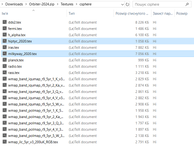
Do you have these files inside the Textures folder?
 
Do you have these files inside the Textures folder?

No - these files do not exist anywhere inside Orbiter 2024.

By the way, I have already downloaded Orbiter 2024 multiple times, thinking initially that somehow I ended up with a corrupt install. I have also unzipped/replaced the archive multiple times.
 
Last edited:
could you post the log?

After removing the moon from sol.cfg the log (following CTD) looks like this:

**** Orbiter.log
000000.000: Build Dec 31 2024 [v.602931718]
000000.007: Timer precision: 1e-07 sec
000000.039: Found 0 joystick(s)
000000.233: ---------------------------------------------------------------
000000.237: BaseDir : C:\applications\simulations\ORBITER(s)\ORBITER 2024\
000000.241: ConfigDir : C:\applications\simulations\ORBITER(s)\ORBITER 2024\Config\
000000.244: MeshDir : C:\applications\simulations\ORBITER(s)\ORBITER 2024\Meshes\
000000.247: TextureDir : C:\applications\simulations\ORBITER(s)\ORBITER 2024\Textures\
000000.250: HightexDir : C:\applications\simulations\ORBITER(s)\ORBITER 2024\Textures2\
000000.253: ScenarioDir: C:\applications\simulations\ORBITER(s)\ORBITER 2024\Scenarios\
000000.260: ---------------------------------------------------------------
000000.263: D3D9 DLLs : C:\Windows\SYSTEM32\d3dx9_43.dll [v 9.29.952.3111]
000000.267: : C:\Windows\SYSTEM32\d3d9.dll [v 10.0.22621.4541]
000000.270: ---------------------------------------------------------------
000000.274: Module D3D9Client.dll ........ [Build 241231, API 241231]
000000.311: [D3D9] Native Interface
000000.316: [D3D9] DirectX9 Created...
000000.320: [D3D9] Initialize VideoTab...
000000.344: Loading module D3D9Client
000000.349: Module AtlantisConfig.dll .... [Build 241231, API 241231]
000000.353: Loading module AtlantisConfig (legacy interface)
000000.357: Module AtmConfig.dll ......... [Build 241231, API 241231]
000000.361: Loading module AtmConfig (legacy interface)
000000.365: Module DGConfigurator.dll .... [Build 241231, API 241231]
000000.369: Loading module DGConfigurator (legacy interface)
000005.160:
000005.171: **** Creating simulation session
000005.184: D3D9: [DirectX 9 Initialized]
000005.192: D3D9: 3D-Adapter.............. : NVIDIA GeForce RTX 3060 Ti
000005.197: D3D9: MaxTextureWidth......... : 16384
000005.202: D3D9: MaxTextureHeight........ : 16384
000005.207: D3D9: MaxTextureRepeat........ : 8192
000005.211: D3D9: VolTexAddressCaps....... : 0x3F
000005.215: D3D9: NumSimultaneousRTs...... : 4
000005.219: D3D9: VertexDeclCaps.......... : 0x30F
000005.223: D3D9: MiscCaps................ : 0x2FCEF2
000005.227: D3D9: Separate AlphaBlend..... : Yes
000005.231: D3D9: Shadow Mapping.......... : Yes
000005.235: D3D9: D3DFMT_A16B16G16R16F.... : Yes
000005.239: D3D9: Vertex_A16B16G16R16F.... : Yes
000005.243: D3D9: Vertex_A32B32G32R32F.... : Yes
000005.246: D3D9: Vertex_R16F............. : Yes
000005.250: D3D9: Vertex_R32F............. : Yes
000005.254: D3D9: D3DFMT_A32B32G32R32F.... : Yes
000005.257: D3D9: D3DFMT_D32F_LOCKABLE.... : Yes
000005.261: D3D9: D3DFMT_A2R10G10B10...... : Yes
000005.265: D3D9: D3DFMT_L8............... : Yes
000005.270: D3D9: D3DDTCAPS_DEC3N......... : No
000005.274: D3D9: D3DDTCAPS_FLOAT16_2..... : Yes
000005.277: D3D9: D3DDTCAPS_FLOAT16_4..... : Yes
000005.282: D3D9: Runs under WINE......... : No
000005.285: D3D9: D3D9Build Date.......... : 0
000005.355: D3D9: Available Texture Memory : 4069 MB
000005.360: D3D9: [3DDevice Initialized]
000010.927: Loaded 41057 records from star database
000010.960: D3D9Info: File csphere\milkyway_2020.tex not found
000010.975: D3D9Info: File csphere\hiptyc_2020.tex not found
000010.980: ============================ ERROR: ===========================
000010.984: Failed to load texture gridlabel.dds
000010.989: [D3D9CelestialSphere::D3D9CelestialSphere | D:\a\orbiter\orbiter\OVP\D3D9Client\CelSphere.cpp | 59]
000010.993: ===============================================================
000011.881: D3D9: [D3D9Client Initialized]
000012.075: Module Sun.dll ............... [Build 241231, API 241231]
000012.095: VSOP87(E) Sun: Precision 1.0e-06, Terms 554/6634
000012.128: Module Mercury.dll ........... [Build 241231, API 241231]
000012.139: GRAVITY MODEL: GravityModels\jgmess_160a_sha.tab LOADED, Terms 65/13040
000012.159: VSOP87(B) Mercury: Precision 1.0e-05, Terms 167/7123
000012.193: Module Venus.dll ............. [Build 241231, API 241231]
000012.201: GRAVITY MODEL: GravityModels\mod_shgj120p.a01 LOADED, Terms 65/7380
000012.217: Module VenusAtm2006.dll ...... [Build 241231, API 241231]
000012.222: Loading module VenusAtm2006 (legacy interface)
000012.231: VSOP87(B) Venus: Precision 1.0e-05, Terms 79/1710
000012.337: Module Earth.dll ............. [Build 241231, API 241231]
000012.372: GRAVITY MODEL: GravityModels\egm96_to360.tab LOADED, Terms 65/65340
000012.391: Module EarthAtmJ71G.dll ...... [Build 241231, API 241231]
000012.395: Loading module EarthAtmJ71G (legacy interface)
000012.406: VSOP87(B) Earth: Precision 1.0e-08, Terms 2564/2564
 
No - these files do not exist anywhere inside Orbiter 2024.
It's very strange. I have both the files in the unpacked Orbiter 2024 archive. You could look if they are in the Orbiter-2024.zip you downloaded, and if yes, then just try to copy them into your unpacked archive:

Без імені.png
 
No - these files do not exist anywhere inside Orbiter 2024.

By the way, I have already downloaded Orbiter 2024 multiple times, thinking initially that somehow I ended up with a corrupt install. I have also unzipped/replaced the archive multiple times.
What is the size of the Textures folder? Should be 2,759,463,477 bytes.
 
Did you enable the DirectX Wrapper?

First line in D3D9Client.cfg (Orbiter root directory). Set it to 1.

EnableDX12Wrapper = 1.

This allows the D3D9 Client to run "on top of" Direct X 12, without requiring DX9 to be installed.
 
It's very strange. I have both the files in the unpacked Orbiter 2024 archive. You could look if they are in the Orbiter-2024.zip you downloaded, and if yes, then just try to copy them into your unpacked archive:

View attachment 41680

OK - I tried (again) downloading a new zipped Orbiter 2024, unzipped it, and NOW I HAVE those textures. BUT still experiencing the same CTD. Crazy.
 
Did you enable the DirectX Wrapper?

First line in D3D9Client.cfg (Orbiter root directory). Set it to 1.

EnableDX12Wrapper = 1.

This allows the D3D9 Client to run "on top of" Direct X 12, without requiring DX9 to be installed.

Yes, I enabled the DirectX Wrapper in the D3D9Client.cfg. CTD persists.

Still, thanks.
 
Back
Top