
Project Mirage IV

N_Molson

Addon Developer
Addon Developer
Donator
Joined
Mar 5, 2010
Messages
10,002
Reaction score
4,418
Points
203
Location
Toulouse
I began playing with this on Blender and now that I got the rough shape, I'll try to make a decent addon of it.

So the Mirage IV is quite unlike the I, II and III, or 2000. It's a tactical bomber, mostly designed to carry a nuclear bomb while France had nuclear warheads but no (reliable) rockets. It is a much heavier airplane featuring two turbofans with afterburner. It was able to hit Mach 2. The bottom fuselage is hollowed so that the warhead creates minimal drag at such speeds. 62 were built.

The improvements in french rocketry rendered the Mirage IV quite useless as a tactical bomber. Problem is that it wasn't really suited for anything else. So it was refurbished for recon missions and renamed Mirage IV P ("P" for "Photo"). It was retired in 2005 after many years of service in that role over the Balkans or Middle East.
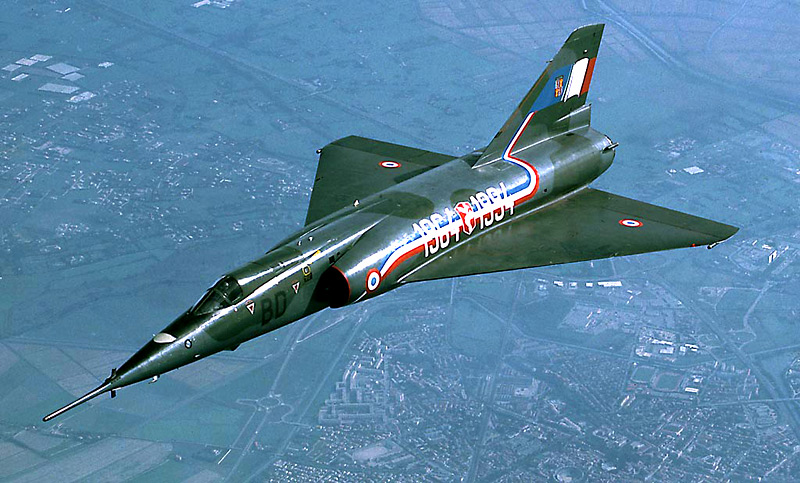
MIRAGE-IV-11.jpg


Max speed : 2340 km/h (Mach 2.2)
Cruising speed : 958 km/h (subsonic)
Cruising altitude : 13,125 m
Range : 1240 km, up to 4000 km with external tanks.
Engines : 2x SNECMA Atar 9K (68.65 kN each)
Max takeoff weight : 33,475 kg ; empty 14,500 kg
Ceiling : 18,000 m
Wing area : 78 m²
Crew : 2

Mirage_IV_02.jpg
 
Not area-ruled. If it can hit Mach 2, it won't be for very long.
 
Tell that to the French. It easily made it to Mach 2 and could hold it until fuel depletion.
 
Not area-ruled. If it can hit Mach 2, it won't be for very long.

Metric Area Rule. :lol:

Remember, it has pretty strong engines for its era, it does not need much area ruling.
 
Metric Area Rule. :lol:

Remember, it has pretty strong engines for its era, it does not need much area ruling.

Also, the area ruling may not be as blatant as the American "coke bottle" style. Look at modern aircraft like the Su-27 and the F-15. They don't have that style either, yet both are area ruled.
 
I'll give you that, given the power of the engines, the fact they were designed in the 60's, and the limited size of the internal tank, it probably runs dry fast. The idea was to get a boost to penetrate enemy air defenses, drop the bomb and luckily have enough fuel left for another run in order to get back to a safe airspace (and get away from the bomb effects !). It worked for photo-recon too, though it had to dive and fly low, slow and steady to get good intel. Dangerous stuff.

---------- Post added 11-01-17 at 12:29 AM ---------- Previous post was 10-31-17 at 05:46 PM ----------

Mirage_IV_03.jpg


Put most work on the tail section today. Still a lot to do there. Actually would have simpler to extrude it from the fuselage, same for the wings. You learn everyday ! Blender doesn't love triangles too much, the best is to stick with quads.
 
Last edited:
Beautiful model, the modeling process is very fun, and Blender is very interesting. I've been interested in Blender, and I wanted to ask you:
What tool will you use to export it to Orbiter?
How do you find the coordinates of a point on the mesh?
 
Hello, someone here wrote a Python Script (a plugin) for Blender that does the import/export in a few clicks. I found it the other day google-ing "Blender Orbiter mesh" or something alike.

Blender is a powerful tool which is a bit intimidating at first. The interface is... weird, especially if you come from Windows. Tutorials and Practice. This serie is very good :

[ame="https://www.youtube.com/watch?v=JYj6e-72RDs"]https://www.youtube.com/watch?v=JYj6e-72RDs[/ame]

Just remember it aims at rendering stuff for artwork. But it explains very well the basics you need, even for getting the coordinate of a point (there is a global/local trick). That guy is a professional, a good teacher and made architecture studies so good stuff.
 
Last edited:
Hello, someone here wrote a Python Script (a plugin) for Blender that does the import/export in a few clicks. I found it the other day google-ing "Blender Orbiter mesh" or something alike.

Blender is a powerful tool which is a bit intimidating at first. The interface is... weird, especially if you come from Windows. Tutorials and Practice. This serie is very good :

https://www.youtube.com/watch?v=JYj6e-72RDs

Just remember it aims at rendering stuff for artwork. But it explains very well the basics you need, even for getting the coordinate of a point (there is a global/local trick). That guy is a professional, a good teacher and made architecture studies so good stuff.

Oh my god, I followed the whole series and got my CG donut, but I had not noticed the Transform option on the properties panel. Thanks for your notice. I also recommend the Blender Anvil Modelling Tutorial Series, it is very useful to see the use of the powerful modifiers.

I recently make a UCGO cargo, and I tried the script you mentioned. I also found the Blender Mesh Tools add-on very useful, it exports the .msh and the textures to their corresponding Orbiter folders quickly, and is well documented.
 
Back
Top