

Hi,
So I've been working on a scenario generator from TLE elements; and I have a bug I can't seem to find the source of.
Basically, it goes like this:
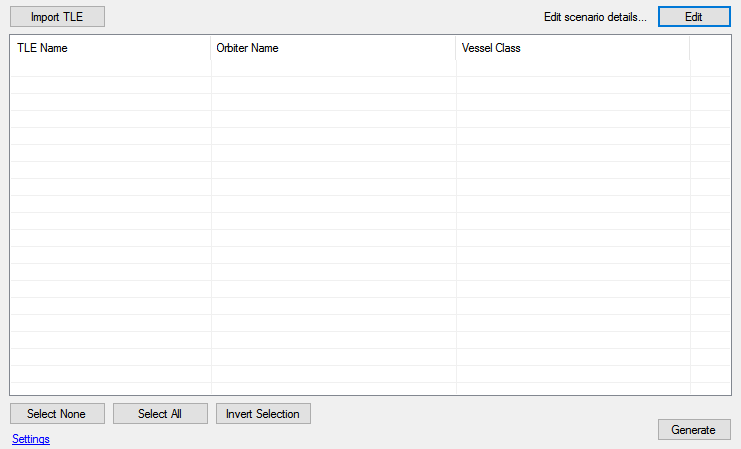
Once on the main window, the 'scenario properties' such as the name, description and date can be found on the top right button.
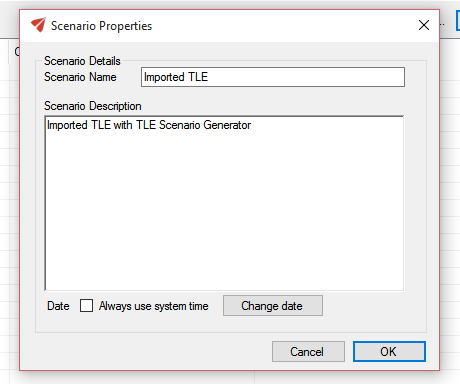
Uncheck "Always use system time" to be able to change the date, then change the date.
Change the date to whatever you want, and press OK.
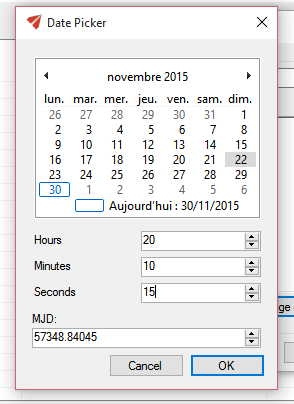
Then, the date picker closes, but so does the scenario properties, and the date isn't changed. (You can check it by opening the scenario properties again, and seeing that the 'Always use system time' checkbox is still checked)
I've been trying for days to track this down, but has not been able to so far. Can anyone help me on this? It'd be awesome
I've made the code available here: https://github.com/SolarLiner/TLEOrbiter
Executables are on the Release tab.
So I've been working on a scenario generator from TLE elements; and I have a bug I can't seem to find the source of.
Basically, it goes like this:
Once on the main window, the 'scenario properties' such as the name, description and date can be found on the top right button.
Uncheck "Always use system time" to be able to change the date, then change the date.
Change the date to whatever you want, and press OK.
Then, the date picker closes, but so does the scenario properties, and the date isn't changed. (You can check it by opening the scenario properties again, and seeing that the 'Always use system time' checkbox is still checked)
I've been trying for days to track this down, but has not been able to so far. Can anyone help me on this? It'd be awesome
I've made the code available here: https://github.com/SolarLiner/TLEOrbiter
Executables are on the Release tab.


