Project WIN Ascension Ultra BETA test thread

Ok folks, let me chime in a bit with the performance testing...

I've used the following scenario to have 5 bases scattered around the earth:
Code:
BEGIN_DESC
Contains the latest simulation state.
END_DESC

BEGIN_ENVIRONMENT
  System Sol
  Date MJD 51982.1331332737
END_ENVIRONMENT

BEGIN_FOCUS
  Ship Wideawake_Int(AU)
END_FOCUS

BEGIN_CAMERA
  TARGET Wideawake_Int(AU)
  MODE Extern
  POS 1.90 25.07 -34.81
  TRACKMODE TargetRelative
  FOV 50.00
END_CAMERA

BEGIN_HUD
  TYPE Docking
  NAV 0
END_HUD

BEGIN_MFD Left
  TYPE Docking
  NAV 0
END_MFD

BEGIN_MFD Right
  TYPE Map
  REF Earth
  BTARGET Woomera
  POS 0.00 0.00
END_MFD

BEGIN_SHIPS
Wideawake_Int(AU):AscensionUltra
  STATUS Landed Earth
  POS -14.4050000 -7.9550000
  HEADING 220.00
  AFCMODE 7
  NAVFREQ 0 0 0 0
  XPDR 0
END
test1:AscensionUltra
  STATUS Landed Earth
  POS 63.3300000 45.9200000
  HEADING 66.56
  AFCMODE 7
  NAVFREQ 0 0 0 0
  XPDR 0
END
test2:AscensionUltra
  STATUS Landed Earth
  POS -80.6758960 28.5227640
  HEADING 66.56
  AFCMODE 7
  NAVFREQ 0 0 0 0
  XPDR 0
END
test3:AscensionUltra
  STATUS Landed Earth
  POS -117.6900000 35.6900000
  HEADING 66.56
  AFCMODE 7
  NAVFREQ 0 0 0 0
  XPDR 0
END
test4:AscensionUltra
  STATUS Landed Earth
  POS 136.8000000 -31.1000000
  HEADING 66.56
  AFCMODE 7
  NAVFREQ 0 0 0 0
  XPDR 0
END
END_SHIPS
Locations are:

  1. test1 at Baikonur
  2. test2 at China Lake
  3. test3 at Cape Canaveral
  4. test4 at Woomera
  5. Wideawake_Int(AU) at Ascension
The view to all 5 bases is external camera with full base in view.


I've followed the following procedure:
A. Start scenario with all 5 bases. Camera/focus is on Base 1, switched to 1. No noticeable change in FPS here, so I left it there.
B. Disable mesh rendering for base 1.
C. Switch to 2.
D. Disable mesh rendering for base 2.
E. Switch to 3.
F. Disable mesh rendering for base 3.
G. Switch to 4.
H. Disable mesh rendering for base 4.
I. Switch to 5.
J. Disable mesh rendering for base 5.
K. Switch to 1.
L. Enable mesh rendering for base 1.
M. Switch to 2.
N. Enable mesh rendering for base 2.
O. Switch to 3.
P. Enable mesh rendering for base 3.
Q. Switch to 4.
R. Enable mesh rendering for base 4.
S. Switch to 5.
T. Enable mesh rendering for base 5.
attachment.php


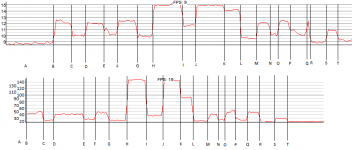
This procedure I've followed twice, one with beacons on, one with beacons off. The result you can see below, with beacons on on top and beacons off at the bottom.


My interpretation is as follows:

  • As long as bases are the size parameter apart (around 1500km in this case), multiple instances do not affect performance much. Meshes may be loaded, but not rendered due to Orbiter's own LoD mechanism of rendering a blob instead of all the meshes. This can be best seen in the chart at intervals C-D, E-F, G-H .
  • For some reason, bases in the northern hemisphere put more strain on the system than the one in the southern hemisphere. This can be seen in the chart at intervals H-L vs. rest. I suspect it has something to do with surface tiles, but I'm not sure.
  • Beacons are TEH EVIL! :) Seems like rendering too much of them is no good idea performance-wise.
  • Disabling rendering of beacons/meshes with distance to base will dramatically enhance performance of the system.
As a note: my rig manages a FPS of around 42 with one base at Ascension and full beacons and meshes in the setup I've run the procedure in.


regards,
Face
 

Attachments

  • performance.png
    performance.png
    22.3 KB · Views: 244
Cheers Nuke, and cheers for PM.

And thanks for clarification, Screamer7. So, no ctds or fps drop with multiple vessels aside, was the fps acceptable on your rig?

What is a acceptable FPS?:)
Some people claim 30 + fps is sufficient.
Other say that 30 fps is to slow and they noticed frame drops!!!!
I am not convinced about that one.
In Orbiter 20 t0 30 fps is OK.
As long as it stay there and do not occasionally drop to 10 fps, I am happy.
Another issue.... and that is the enabling of labels. (F9)
The D3D 7 client suffer a lot when it is enabled.
Not so much for the D3D 9 client.
To sum it up.....
With the low end specs of my rig I am more than satisfied with AU performance.
 
Last edited:
What fps do you normally get/expect from Orbiter on average, and how does AU compare with that?
Around 35fps with stock DG at Cape Canaveral in my AU beta install after removing WIN from scenario, around 20fps at WIN.
I'm not that familiar with woo's addon, but the TA crane will offer cargo management options. Are you asking for the ability to spawn cargos directly into the hangar? or?
Woo482's warehouse seems to work similar to the basic UCGO cargo bay in that it can spawn, grapple, and release cargo. It also removes grappled cargo from the scenario vessel list. Not sure about the code, but it should be in the snippets section of Dan's SDK. Just a suggestion to de-clutter an active session and probably improve framerates. The problem is that UCGO only allows up to 40 cargos per vessel, so maybe a single "loading dock" would be better than having cargo management in each hangar.
 
face, very interesting. I'll message you about this.

What is a acceptable FPS?:)
With the low end specs of my rig I am more than satisfied with AU performance.
Good to hear. And wrt labels, I have no idea about that, so can't comment unfortunately.

Around 35fps with stock DG at Cape Canaveral in my AU beta install after removing WIN from scenario, around 20fps at WIN.

Woo482's warehouse seems to work similar to the basic UCGO cargo bay in that it can spawn, grapple, and release cargo. It also removes grappled cargo from the scenario vessel list. Not sure about the code, but it should be in the snippets section of Dan's SDK. Just a suggestion to de-clutter an active session and probably improve framerates. The problem is that UCGO only allows up to 40 cargos per vessel, so maybe a single "loading dock" would be better than having cargo management in each hangar.
Thanks for the info. I know face has some stuff in mind wrt the cargo management, so I'm leaving it in his capable hands to wow me(us) some time in the future! ;)
 
Found a new glitch. Perhaps it is just my rig - maybe others can reproduce this. Using the scenario provided with the addon, I'm seeing what appears to be clipping, causing just the Lease Hangar doors to disappear. The video moves the viewpoint down one side of the Turn Around and Lease Hangars:

http://youtu.be/KaI3YQFWoEw

This can also be seen from a viewpoint from in front of the Lease Hangar by rotating the view until the door is at the edge of the screen. Zooming in and out causes the same behavior.

IMO, if it was just the normal clipping, the rest of the hangar mesh would disappear too.
 
Found a new glitch. Perhaps it is just my rig - maybe others can reproduce this. Using the scenario provided with the addon, I'm seeing what appears to be clipping, causing just the Lease Hangar doors to disappear. The video moves the viewpoint down one side of the Turn Around and Lease Hangars:

http://youtu.be/KaI3YQFWoEw

This can also be seen from a viewpoint from in front of the Lease Hangar by rotating the view until the door is at the edge of the screen. Zooming in and out causes the same behavior.

IMO, if it was just the normal clipping, the rest of the hangar mesh would disappear too.
Thanks for another vid, very effective illustration. Funnily enough I discovered this issue myself when inside the hangar after adding the ummu door control consoles. Face said it was an unavoidable engine problem, so I left it at that. But, I don't understand why it only effects the large lease hangars and not the TA hangars, given that their meshes are very similar in parts and loading is done in the same way. So I may get face to look at this again, especially after seeing your video.
 
I can also reproduce the clipping effect like NukeET does.
But it happen only at the last three hangers, where the doors disappear.
When rotating the view they re-appear, and in external view the doors are safe and sound.

---------- Post added at 07:43 PM ---------- Previous post was at 07:38 PM ----------

Good to hear. And wrt labels, I have no idea about that, so can't comment unfortunately.

By labels I meant the marker (F9) function where the names of vehicles and bases appear in a box on the screen.
F9
Visual helpers
Markers
 
Thanks for another vid, very effective illustration. Funnily enough I discovered this issue myself when inside the hangar after adding the ummu door control consoles. Face said it was an unavoidable engine problem, so I left it at that. But, I don't understand why it only effects the large lease hangars and not the TA hangars, given that their meshes are very similar in parts and loading is done in the same way. So I may get face to look at this again, especially after seeing your video.

Yes, thanks NukeET, your video really demonstrates the "huh?!?" moment. I originally thought WHAP was talking about usual clipping if you come close enough to objects, but that is really strange, especially because it seems to happen with the heavy lease hangars only. I'm not doing something special in code there w.r.t. e.g. the turn-around hangars.

Maybe a problem with normals? Did you do something with that mesh in contrast to the others, WHAP?

Can anyone see this kind of problem with other building types, too?
 
By labels I meant the marker (F9) function where the names of vehicles and bases appear in a box on the screen.
Yeah sorry, I meant I know what the function is, but I have no idea why or how it might effect performance.

Maybe a problem with normals? Did you do something with that mesh in contrast to the others, WHAP?
There shouldn't be any difference, the heavy lease are a rip and change of the TAs... the doors are the same mesh even... it's a strange one for sure and I only think it started to happen after I added those little ummu terminals by the doors. So I will have a look at the mesh groups and make sure there isn't some anomaly which could be causing it.
 
Wow, this project look really exciting ! :cheers:

What is a acceptable FPS?:)
Some people claim 30 + fps is sufficient.
Other say that 30 fps is to slow and they noticed frame drops!!!!

Well, about that it's all about anim smoothness and computer FPS is not at all like movies FPS which have movement blur built in to please the eyes & brain.

Anim motion start at 12 minimum, for computer a FPS under 60 it's not enough to have smooth animation. You notice "jump" with fast object or move. One can deal with 25-30 but it's really not the ideal.

In brief in movie a fast rocket travelling screen will look like a blurred line if you pause the image (and this is how eyes see movements) , in computer with low FPS you'll have a clear rocket image on the far left and another one on the far right the next image. Not really an animation.
 
Last edited:
Cheers for kudos Dan.

WRT the ILS range:
I can edit the VOR range in the base cfg file, but can't find the means to increase ILS, it seems locked at 30km in the engine? Anyone know if I'm missing something?
 
Just for chuckles, I installed AU in my "fun" Orbiter setup. With 2 pages of MFDs in a scenario running a modified version of Petr Cizek's Nearest Systems (with all planets including Pluto and moons), RTF stargates, several orbiting stations and vessels, and other assorted fps-killers, I actually saw slightly higher framerates at AU. In a clean install, I'm running between 15-20fps. With the aforementioned scenario, fps spiked as high as 28. Still not great, but haven't run into any compatibility problems.
 
I apologize for not posting more feedback but so far I haven't encountered any issues that other haven't already reported and my rig (a HP Pavillion DV6 quad-core laptop) has been able to run it with out any major issues.

That said I am interested in the proposed SDK.

Is it going to take the form of UMMU/UCCGO with a library and header file or are you going to simply leave the code open for people to copy/paste from?

If the the prior what kind of functionality are you planning to include?

I'm also interested in now you rigged AU to spawn in every scenario. It seems to me that this function in particular would be a major boon to those trying to impliment persistent universes and the like. (or simply placing the ISS at it's current real worl position)

Finally, are you still accepting inputs for the billboards?

I've got some material from the near term sci-fi universe I've been designing if you're interested.
 
I apologize for not posting more feedback but so far I haven't encountered any issues that other haven't already reported and my rig (a HP Pavillion DV6 quad-core laptop) has been able to run it with out any major issues.

That said I am interested in the proposed SDK.

Is it going to take the form of UMMU/UCCGO with a library and header file or are you going to simply leave the code open for people to copy/paste from?

If the the prior what kind of functionality are you planning to include?

I'm also interested in now you rigged AU to spawn in every scenario. It seems to me that this function in particular would be a major boon to those trying to impliment persistent universes and the like. (or simply placing the ISS at it's current real worl position)

Finally, are you still accepting inputs for the billboards?

I've got some material from the near term sci-fi universe I've been designing if you're interested.
Glad to hear it's running smoothly. And yes, I'll still take more billboards. Send me a PM about it.
I'll leave face to answer the SDK stuff.


On another tack. Not much feedback on the base itself, as a working base. Some great kudos received about the look of it, and the mfd stuff, but how are you guys finding the layout and design of the base itself? Does it seem to function in a logical/usable way? etc etc. Any thoughts appreciated.

Also, just to let you know I've started work on a smaller second VLC, and am getting through the bug list slowly. From my standpoint, all the reported bugs and the second smaller VLC should be done for the next release. I'll let face share his code progress here... or not. ;P
 
I think the design works pretty good. The layout makes sense.
 
Regarding the lay out of the base you have a winner here.
I think that nobody comment on the lay out of AU is because there is no problems with the design.
The only real "annoyance" to me is the heading of the runways. They are 130 and 310 degrees respectively.
I would preferred 90, 270 degree runway headings.
But that is just my opinion.
 
Last edited:
That said I am interested in the proposed SDK.

Is it going to take the form of UMMU/UCCGO with a library and header file or are you going to simply leave the code open for people to copy/paste from?

If the the prior what kind of functionality are you planning to include?

Both kinds of SDK are planned. There is a UMMU-like library called OrbiterExtensions that is used for things like ground docking (used for direct UMMU transfer) and recorder event hooking (not used here at all, but in OMP). Not that much functionality, but it is necessary for AU's UMMU feature. Maybe I'll also push the crane direct key hook there, will see...

Then there is the idea of having the classes re-usable. You can either inherit new classes for buildings, or you can take one particular class and make it its own vessel (like e.g. Woo482 did with the doppler radar class). Also the MFD class will be re-usable, as I'm currently refactoring the page rendering in a subclassing scheme. In addition, I plan to have some settings in INI files, like the beacons already. I.e. it will resemble a SC3 kind of way of designing a base layout.

I'm also interested in now you rigged AU to spawn in every scenario. It seems to me that this function in particular would be a major boon to those trying to impliment persistent universes and the like. (or simply placing the ISS at it's current real worl position)

Oh, that's really a simple trick: the configurator plugin is doing this by means of registering a Module object that just creates an AU at the proper position (if not there already) at simulation start-up. Code is in the /Orbitersdk/samples/AscensionUltra/AscensionUltraSpawner.cpp file.

If you are interested in a configurable spawner plugin, check out Woo482's work in CSSC.

Also, just to let you know I've started work on a smaller second VLC, and am getting through the bug list slowly. From my standpoint, all the reported bugs and the second smaller VLC should be done for the next release. I'll let face share his code progress here... or not. ;P

I can second that. All the reported bugs are closed from my POV, except for 1 compromise (the transparency issue got fixed as good as possible and a key-stroke implemented to show/hide windows) and 2 open enhancements (auto-off taxiway and tracker AU-focus issue). For the latter 2, I'd have to code more pages/functions in the MFD, and this I'll do only after the page infrastructure has been refactored. Refactoring (inheritance instead of switch-casing) is well underway. I hope this to be finished for the next round (first Tuesday in August). This work will also be the foundation for e.g. dialog- or text-based interfaces instead of MFD modes.

BTW, WHAP: do not wonder about the lack of commits recently, I'm doing most work in a parallel branch ATM ;) . Refactoring can get ugly at times, that's why I prefer to have those changesets private until I have it ready.

regards,
Face

---------- Post added at 09:58 ---------- Previous post was at 09:18 ----------

The only real "annoyance" to me is the heading of the runways. They are 130 and 310 degrees respectively.
I would preferred 90, 270 degree runway headings.

I could add some massive RCS thrusters, so you could turn it with 1 and 3 to your liking :rofl:.

Now seriously, my own first impression was that it looked more "narrow" on approach in contrast to the old version. Where the old layout made you feel like heading towards a square of runways, the new one feels more like an actual airport.
 
BTW, WHAP: do not wonder about the lack of commits recently, I'm doing most work in a parallel branch ATM ;) . Refactoring can get ugly at times, that's why I prefer to have those changesets private until I have it ready.
nw, much the same here, except on my HD. I'll push when finished. The new smaller VLC will need a few animation tweaks, as it will have 4, not 6 grapple arms, everything else should stay the same though, as it's essentially just a cut down version. But it will need its own code entry now for anims and beacons and so forth, separate from the other VLC.

Regarding thew lay out of the base you have a winner here.
I think that nobody comment on the lay out of AU is because there is no problems with the design.
The only real "annoyance" to me is the heading of the runways. They are 130 and 310 degrees respectively.
I would preferred 90, 270 degree runway headings.
But that is just my opinion.
Now seriously, my own first impression was that it looked more "narrow" on approach in contrast to the old version. Where the old layout made you feel like heading towards a square of runways, the new one feels more like an actual airport.
Thanks gents. Both the length/width ratio and the orientation are effectively dictated by RL in this release. The runways use the headings of the RL Wideawake, and when you see the RL topography, you understand why. It's a hilly place... And the AU island mesh was built from a RL contour map of the island, so space was limited. I took some creative liberties with the topography obviously, but didn't want to remove the major hills. So it still proved quite a challenge to fit the base in the available space. But I think it helps create a more 'realistic' setting. So glad it has gone down well...

Besides... after a dangerous and challenging trip into space, as if landing on an island in the middle of the ocean wasn't challenging enough, who doesn't want to land on lucky 13!? :rofl:
 
nw, much the same here, except on my HD. I'll push when finished. The new smaller VLC will need a few animation tweaks, as it will have 4, not 6 grapple arms, everything else should stay the same though, as it's essentially just a cut down version. But it will need its own code entry now for anims and beacons and so forth, separate from the other VLC.

Roger that. Now just drop me those mesh group information and I'll give you a version for beacon tweaking.

Any new names for that building? I guess my intuitive "Vertical launch facility small" and "Vertical launch facility big" won't cut it :rofl:.
 
Roger that. Now just drop me those mesh group information and I'll give you a version for beacon tweaking.

Any new names for that building? I guess my intuitive "Vertical launch facility small" and "Vertical launch facility big" won't cut it :rofl:.
Will do.
And lol... I was thinking just to follow our scheme so far and go with Light and Heavy VLC... but that's not certain... maybe just A and B... I'll confirm it when I send you the numbers.
 
Back
Top