
You are using an out of date browser. It may not display this or other websites correctly.
You should upgrade or use an alternative browser.
You should upgrade or use an alternative browser.
General Question How do you transfer fuel?
- Thread starter Chub777
- Start date


- Joined
- May 14, 2008
- Messages
- 10,547
- Reaction score
- 347
- Points
- 158
- Location
- East Sussex
- Website
- blog.gdwnet.com
- Preferred Pronouns
- He/Him
lower panel, cross feed between the two tanks
lower panel, cross feed between the two tanks
How do you do that?
- Joined
- May 14, 2008
- Messages
- 10,547
- Reaction score
- 347
- Points
- 158
- Location
- East Sussex
- Website
- blog.gdwnet.com
- Preferred Pronouns
- He/Him
In the DG-IV go to the lower panel, click on the X-FEED switch and point it to MAIN. This will drain fuel from RCS and pump it to MAIN.
Make sure that the ENGINE breaker on the main panel is ON.
Make sure that the ENGINE breaker on the main panel is ON.
In the DG-IV go to the lower panel, click on the X-FEED switch and point it to MAIN. This will drain fuel from RCS and pump it to MAIN.
Make sure that the ENGINE breaker on the main panel is ON.
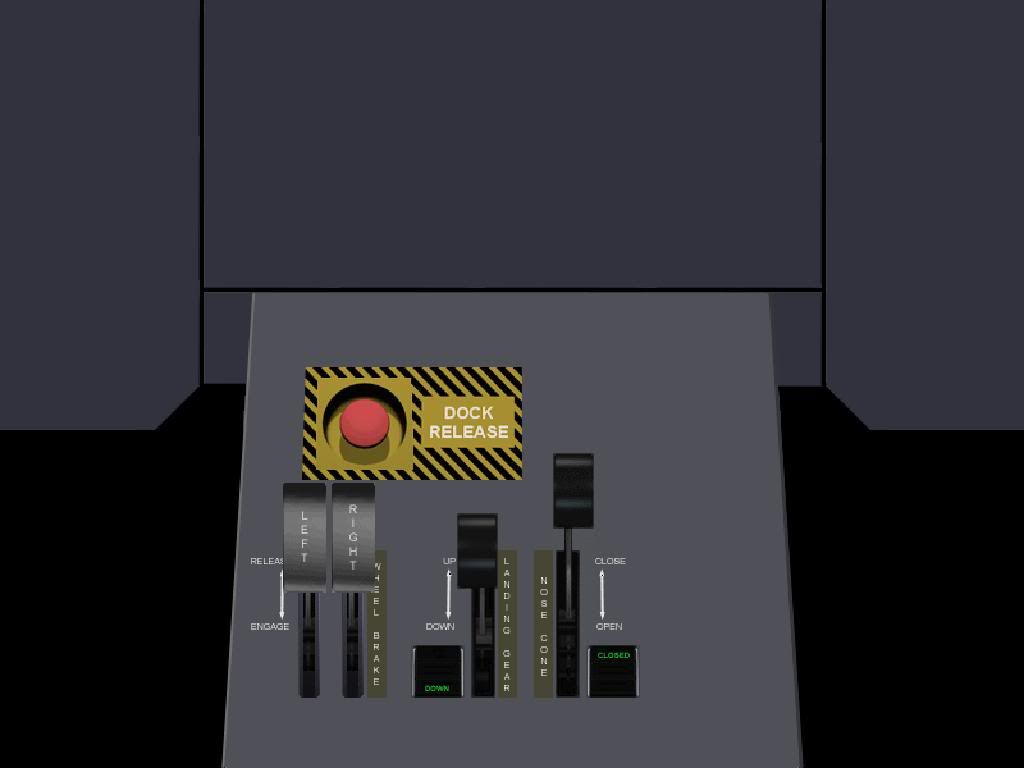
There is no X-FEED switch:
- Joined
- May 14, 2008
- Messages
- 10,547
- Reaction score
- 347
- Points
- 158
- Location
- East Sussex
- Website
- blog.gdwnet.com
- Preferred Pronouns
- He/Him
Firstly that lower panel isn't from a DGIV and secondly it looks like it's missing a lot of panel options.
Can you post your scenario file and tell me which vehicle has this panel ?
Can you post your scenario file and tell me which vehicle has this panel ?
Firstly that lower panel isn't from a DGIV and secondly it looks like it's missing a lot of panel options.
Can you post your scenario file and tell me which vehicle has this panel ?
It's the non-scramjet DG-IV. It came with the original Orbiter pack. Scenario file? Where can I find it (Yes, I'm kinda a noob at Orbiter...)
- Joined
- May 14, 2008
- Messages
- 10,547
- Reaction score
- 347
- Points
- 158
- Location
- East Sussex
- Website
- blog.gdwnet.com
- Preferred Pronouns
- He/Him
Then it is not a DGIV, it's a standard DG.
The DG:IV is an addon made by Dan Steph and seperate from the core orbiter installation.
You can't transfer fuel in the default DG unless you install an addon. I'd recommend something like this -> [ame="http://www.orbithangar.com/searchid.php?ID=3320"]Fuel MFD[/ame]
We all were at one point and some of the things I didn't get at the start.... :blush:
The DG:IV is an addon made by Dan Steph and seperate from the core orbiter installation.
You can't transfer fuel in the default DG unless you install an addon. I'd recommend something like this -> [ame="http://www.orbithangar.com/searchid.php?ID=3320"]Fuel MFD[/ame]
(Yes, I'm kinda a noob at Orbiter...)
We all were at one point and some of the things I didn't get at the start.... :blush:
- Joined
- Jul 7, 2009
- Messages
- 286
- Reaction score
- 0
- Points
- 0
The Delta Glider IV is an add-on for Orbiter by DanSteph. What you're flying is the standard Delta Glider, which lacks many features of the DGIV, among them the crossfeed controls.
However, Fuel MFD allows you to transfer fuel between the various tanks on a vessel and can be found here: [ame="http://orbithangar.com/searchid.php?ID=3320"]Fuel MFD[/ame]
However, Fuel MFD allows you to transfer fuel between the various tanks on a vessel and can be found here: [ame="http://orbithangar.com/searchid.php?ID=3320"]Fuel MFD[/ame]
- Joined
- May 14, 2008
- Messages
- 10,547
- Reaction score
- 347
- Points
- 158
- Location
- East Sussex
- Website
- blog.gdwnet.com
- Preferred Pronouns
- He/Him
The exact same way you installed orbiter.
Unzip the addon into the orbiter folder.
Unzip the addon into the orbiter folder.


In the Orbiter Launchpad, at Modules tab select FuelMFD, or how it's named (I don't have Orbiter on current machine) from Inactive modules, and click on 'Activate selected'.
There's no "Fuel MFD" on the list...


1 - Copy-Paste the .zip file to "X:\YourOrbiterFolder\"
2 - Unzip the file
3 - Check you have "fuelMFD.dll" in the X:\YourOrbiterFolder\modules\Plugin" directory
4 - Open the "Orbiter Launchpad" (double-click on Orbiter.exe)
5 - Click on the "Modules" tab or button (depends of the version of Orbiter you are using)
6 - You have two columns : "active modules" and "inactive modules". You should see "fuelMFD" in the "inactive modules" column.
7 - Select "fuelMFD" then click on the "Activate" button.
8 - Launch any Orbiter scenario.
9 - On the MFDs selection menu, you should now have the "Fuel MFD" entry. There is probably more than 1 page in the selection menu, so if you don't see it, don't forget to click again on "SEL" to get the next pages.
Works for me, hope it will work for you
2 - Unzip the file
3 - Check you have "fuelMFD.dll" in the X:\YourOrbiterFolder\modules\Plugin" directory
4 - Open the "Orbiter Launchpad" (double-click on Orbiter.exe)
5 - Click on the "Modules" tab or button (depends of the version of Orbiter you are using)
6 - You have two columns : "active modules" and "inactive modules". You should see "fuelMFD" in the "inactive modules" column.
7 - Select "fuelMFD" then click on the "Activate" button.
8 - Launch any Orbiter scenario.
9 - On the MFDs selection menu, you should now have the "Fuel MFD" entry. There is probably more than 1 page in the selection menu, so if you don't see it, don't forget to click again on "SEL" to get the next pages.
Works for me, hope it will work for you
1 - Copy-Paste the .zip file to "X:\YourOrbiterFolder\"
2 - Unzip the file
3 - Check you have "fuelMFD.dll" in the X:\YourOrbiterFolder\modules\Plugin" directory
4 - Open the "Orbiter Launchpad" (double-click on Orbiter.exe)
5 - Click on the "Modules" tab or button (depends of the version of Orbiter you are using)
6 - You have two columns : "active modules" and "inactive modules". You should see "fuelMFD" in the "inactive modules" column.
7 - Select "fuelMFD" then click on the "Activate" button.
8 - Launch any Orbiter scenario.
9 - On the MFDs selection menu, you should now have the "Fuel MFD" entry. There is probably more than 1 page in the selection menu, so if you don't see it, don't forget to click again on "SEL" to get the next pages.
Works for me, hope it will work for you
Ok, it now works. Thanks.:thumbup:

How is it that you installed the MFD?
If it's confusing, unzip it to your desktop, and then move the "Modules" folder (and any other folders that came in the installation) into your Orbiter install. You will be asked to merge those folders: click YES for all of them. It should then appear in the list of modules as FuelMFD or something similar.
(I'm just going to extrapolate your future question)
If that works, enter Orbiter, and click on SEL for either of your MFDs. FuelMFD should be an option there now. If not, and the list is full, click SEL again for the next page and it should be there instead.
And don't worry. Orbiter is a hugely complex simulator. We all have to do this at some point (I'm still new too.) :thumbup:
EDIT: Whoops! Looks like I'm a bit late! :embarrassed:
If it's confusing, unzip it to your desktop, and then move the "Modules" folder (and any other folders that came in the installation) into your Orbiter install. You will be asked to merge those folders: click YES for all of them. It should then appear in the list of modules as FuelMFD or something similar.
(I'm just going to extrapolate your future question)
If that works, enter Orbiter, and click on SEL for either of your MFDs. FuelMFD should be an option there now. If not, and the list is full, click SEL again for the next page and it should be there instead.
And don't worry. Orbiter is a hugely complex simulator. We all have to do this at some point (I'm still new too.) :thumbup:
EDIT: Whoops! Looks like I'm a bit late! :embarrassed:
Similar threads

- Replies
- 6
- Views
- 1K


