Space Shuttle Ultra development thread

Well, two reasons i could imagine:
- licensing (We're GPL, Slat is freeware)
- Scale
Well, you listed the two main reasons why I wouldn't use Slat's work. I wouldn't want to see it get pulled just because we didn't ask for permission first. And I have tried to contact him several times in the past, without no success.

Donamy: this is for Orbiter but there's several past instances where authors have decided to remove their elements for no particular reason and this is what I want to avoid.
 
Donamy: this is for Orbiter but there's several past instances where authors have decided to remove their elements for no particular reason and this is what I want to avoid.

You have a point there.
 
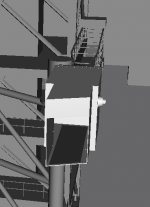
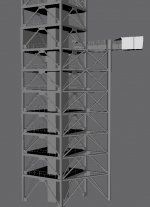
Today's FSS work has mainly focused on getting basic interior of the White Room and finishing up the RSS hinge column. Screenshots are attached to this post.

I'm right now contemplating whether to start work on the RSS or to continue working on the FSS and finish it before starting on the RSS.
 

Attachments

  • SSU_FSS_8A.jpg
    SSU_FSS_8A.jpg
    49.1 KB · Views: 560
  • SSU_FSS_8B.jpg
    SSU_FSS_8B.jpg
    120.2 KB · Views: 614
What would be the best way to handle rotary switches (user-interface)?

1. Mouse click on label = new position (Bad, because it either does not do the transition or has to do that implicitly, which is also bad - but easier to understand for most users)

2. Mouse click relative to current position. We calculate the angular position of the mouse click and compare it the to position of the dial. Is the new click is with in +/- x degrees of the current position, ignore it(deadband). If the new click is clockwise, rotate the dial one position further clockwise, etc.

3. Mouse click absolute: Left "half" of the switch rotates counter-clockwise, right "half" clockwise, center gets used as deadband.

What is your opinion?
 
How about this:

4: Click and holddown left mousebutton and you move mouse left/right to rotate the knob. Rate of movement is dependant on how far you move the mouse away from knob center.

Is this implementable? If not, I would go for option 2.
 
How about this:

4: Click and holddown left mousebutton and you move mouse left/right to rotate the knob. Rate of movement is dependant on how far you move the mouse away from knob center.

Is this implementable? If not, I would go for option 2.

Is possible, I am sure. Could just be a bit harder as we have a VC and no 2D panel (projection makes mouse movement harder and we can only deal with events outside the "switch box" inside the same panel).

So add this as option 4, but I am not sure if it's useable in-game. Did somebody already test, if its possible to change the mouse arrow from inside Orbiter?
 
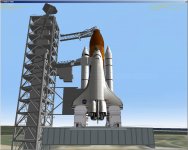
Here's the FSS in Orbiter with the Orbiter Access Arm, GOX Vent Arm, the -Y Orbiter Weather Protection(OWP) system panels extended.

Also connected to the vehicle is the LH2 vent line, it can be seen in the background running from the FSS to the -Z side of the intertank area of the External Tank.

Lots of small things to work on to make everything line up properly in Orbiter.

Currently the FSS is implemented through the use of Spacecraft3.dll.
 

Attachments

  • STS-106_on_pad_1.jpg
    STS-106_on_pad_1.jpg
    162.2 KB · Views: 605
Here's the FSS in Orbiter with the Orbiter Access Arm, GOX Vent Arm, the -Y Orbiter Weather Protection(OWP) system panels extended.

Looks already pretty good. Just five days on my side, and I will have some more time for coding again.

(Except that I might need more time for our new dog, we got our second dog today, a 6 month old, hungry and very confident Collie)
 
Looks already pretty good. Just five days on my side, and I will have some more time for coding again.
Great! Could you then make a quick module for the FSS? I'm getting mightly sick of needing to edit the meshgroup numbers every time I add something to the mesh!

I'm not talking about something complex, just basic animations specified with a meshres.h file and vessel properties.
 
Great! Could you then make a quick module for the FSS? I'm getting mightly sick of needing to edit the meshgroup numbers every time I add something to the mesh!

I'm not talking about something complex, just basic animations specified with a meshres.h file and vessel properties.

Null problemo! Do you also need basic code for light beacons? I have never really worked with them, I would like to see how well this works and if we can animate them, too. And how the performance changes with the number of light beacons...
 
Null problemo! Do you also need basic code for light beacons? I have never really worked with them, I would like to see how well this works and if we can animate them, too. And how the performance changes with the number of light beacons...
Sure! I can check in the latest FSS dev stuff so you can play with it. so far only the OAA and GVA animations are complete. The FSS OWP animation is nearly complete, I have some problems getting the back struts animationg properly.
 
FSS scenario, mesh and texture have been checked in.

Here's the Spacecraft3.dll INI code:

Code:
[CONFIG]
MESHNAME="Atlantis\FixedServiceStructure"
SIZE=60
EMPTY_MASS=8000000
FUEL_MASS=10000000
MAIN_THRUST=0.00001
RETRO_THRUST=0
HOVER_THRUST=0
ATTITUDE_THRUST=0
ISP=99999999
TRIM=0
PMI=(15.5,22.1,7.7)
CW_Z_POS=0.09
CW_Z_NEG=0.09
CW_X=2.
CW_Y=1.4
CROSS_SECTION=(53.0,186.9,25.9)
COG=0.001
PITCH_MOMENT_SCALE=0.00005
BANK_MOMENT_SCALE=0.00005
ROT_DRAG=(1.5,1.5,1.5)
 
[ANIM_SEQ_0]
; GOX vent arm
KEY=G
DURATION=135
 
[ANIM_SEQ_1]
; Orbiter Access Arm
KEY=K
DURATION=135
 
[ANIM_SEQ_2]
; -Y Orbiter Weather Protecton system panels and brackets
KEY=1
DURATION=135
 
[ANIM_COMP_0] ; GOX vent arm assembly
SEQ=0
GROUPS=108,109,110,111,112,113,114,115,116,117,118,119,120,121,122
RANGE=(0,1)
TYPE=ROTATE
ROT_PNT=(4.117,81,22)
ROT_AXIS=(0,-1,0)
ANGLE=74
 
[ANIM_COMP_1] ; Orbiter Access Arm+White Room
SEQ=1
GROUPS=167,168,169,170
RANGE=(0,1)
TYPE=ROTATE
ROT_PNT=(-3.877,58.73,22)
ROT_AXIS=(0,-1,0)
ANGLE=73
 
[ANIM_COMP_2] ; Orbiter Weather Protection system(OWP) -Y panels and brackets
SEQ=2
GROUPS=186,187,188,189
RANGE=(0,0.5)
TYPE=ROTATE
ROT_PNT=(-7.126,39.576,22.3)
ROT_AXIS=(0,1,0)
ANGLE=90
 
[ANIM_COMP_3] ; Orbiter Weather Protection system(OWP) -Y panels and brackets
SEQ=2
GROUPS=185
RANGE=(0,0.5)
TYPE=TRANSLATE
SHIFT=(0,0,0);z:-18
PARENT=2
 
[ANIM_COMP_4] ; Orbiter Weather Protection system(OWP) -Y panel
SEQ=2
GROUPS=187,188
RANGE=(0.7,1)
TYPE=TRANSLATE
SHIFT=(0,0,-9)

 
Is that the new scaled down version of the Orbiter?
 
Is that the new scaled down version of the Orbiter?
No. It hasn't been checked in yet, so I'm still stuck with older mesh.
 
Is that the new scaled down version of the Orbiter?

I will check the new version in, once I have found the time going over all animations. I will not commit a deliberate broken version. I can check in the renamed new meshes, but these will not be useful at all except for letting other developers fix their own animations.
 
, but these will not be useful at all except for letting other developers fix their own animations.
Would be really usefull to me!
 
Would be really usefull to me!

Not without breaking all animations. I can put priority on fixing this, but I have two problems:

- Lack of time currently.
- I can't make the new mesh optional. It would be a lot of work for a short transition phase.
 
That's a shame. I believe someone(it might have been ar81) wrote a tool specialized in offset calculations following a scale down or scale up operation.

I'll see if I can't find it.
 
Found it: [ame="http://www.orbithangar.com/searchid.php?ID=2875"]INI/CFG scaling beta 1.0.1[/ame]

Only works for Spacecraft3.dll INI files and regular .cfg files. You could specify all the required animation offsets as ROT_PNTs in Spacecraft3.dll INI file format and it could maybe work.

Then all you have to do is to transfer the scaled down numbers over to source code.
 
Back
Top