Space Shuttle Ultra development thread

Got a chance to try it. Ended in miserable failure. Now Orbiter complains that it cannot load the MG_Atlantis.dll module anymore.

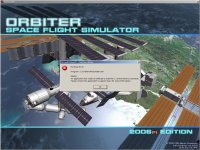
It compiles fine, but when I try to run a SSU scenario, it get a MSVC++ Runtime Error message. A screenshot of the error mssage is attached to this message.

Orbiter.log after the failure:

Code:
**** Orbiter.log
Build Sep 29 2006 [v.060929]
Devices enumerated: 2
Devices accepted: 2
==> RGB Emulation
==> Direct3D HAL
Found 1 joystick(s)
Module DGConfig.dll [API v.060425]
Module AtlantisConfig.dll [API v.060425]
Module CRT.dll [API v.060425]
Module ScnEditor.dll [API v.060425]
Module CamControl.dll [API v.050206]
**** Creating simulation session
DirectDraw interface OK
Direct3D interface OK
Zbuffer: 32 bit
Stencil buffer: 8 bit
Render device: Window 1274 x 999
Device has no hardware T&L capability
Joystick throttle: Z-AXIS
Joystick throttle control detected
Module Sun.dll [API v.050206]
VSOP87(E) Sun: Precision 1e-006, Terms 554/6634
Module Mercury.dll [API v.050206]
VSOP87(B) Mercury: Precision 1e-005, Terms 167/7123
Module Venus.dll [API v.050206]
VSOP87(B) Venus: Precision 1e-005, Terms 79/1710
Module Earth.dll [API v.050206]
VSOP87(B) Earth: Precision 1e-008, Terms 2564/2564
Module Moon.dll [API v.041022]
ELP82: Precision 1e-005, Terms 116/829
Module Mars.dll [API v.060425]
VSOP87(B) Mars: Precision 1e-005, Terms 405/6400
Module Phobos.dll [API v.060425]
Module Deimos.dll [API v.060425]
Module Galsat.dll [API v.041022]
Module Jupiter.dll [API v.050206]
VSOP87(B) Jupiter: Precision 1e-006, Terms 1624/3625
Module Io.dll [API v.041022]
Module Europa.dll [API v.041022]
Module Ganymede.dll [API v.041022]
Module Callisto.dll [API v.041022]
Module Satsat.dll [API v.050206]
Module Saturn.dll [API v.060425]
VSOP87(B) Saturn: Precision 1e-006, Terms 2904/6365
Module Mimas.dll [API v.050206]
SATSAT Mimas: Terms 113
Module Enceladus.dll [API v.050206]
SATSAT Enceladus: Terms 33
Module Tethys.dll [API v.050206]
SATSAT Tethys: Terms 101
Module Dione.dll [API v.050206]
SATSAT Dione: Terms 59
Module Rhea.dll [API v.050206]
SATSAT Rhea: Terms 68
Module Titan.dll [API v.050206]
SATSAT Titan: Terms 100
Module Hyperion.dll [API v.050206]
SATSAT Hyperion: Terms 595
Module Iapetus.dll [API v.050206]
SATSAT Iapetus: Terms 605
Module Uranus.dll [API v.050206]
VSOP87(B) Uranus: Precision 1e-006, Terms 1827/5269
Module Miranda.dll [API v.060425]
Module Ariel.dll [API v.060425]
Module Umbriel.dll [API v.060425]
Module Titania.dll [API v.060425]
Module Oberon.dll [API v.060425]
Module Neptune.dll [API v.050206]
VSOP87(B) Neptune: Precision 1e-006, Terms 391/2024
Module Triton.dll [API v.060425]
Finished initialising world
>>> ERROR: Could not load vessel module:
>>>        [C:\Source\Orbiter\Vessel.cpp / 4982]
>>> ERROR: MG_Atlantis
>>>        [C:\Source\Orbiter\Vessel.cpp / 4983]
Module Spacecraft3.dll [API v.060425]
Finished initialising status
Finished initialising camera
Finished initialising panels
Finished setting up render state
**** WARNING: Mesh not found: .\Meshes\.msh
ERROR: DDraw object is still referenced: 3161
>>> ERROR: Destroy framework objects failed
>>>        [C:\Source\Orbiter\D3d7app.cpp / 613]
 

Attachments

  • C++_errormessage.jpg
    C++_errormessage.jpg
    179.4 KB · Views: 865
Looks like your compiler settings are broken by it... What about the following: I make the MLP code standard, but we include a warning message into all MLP scenarios, that this feature is still experimental. Could be more robust as the currrent approach, so it will be painful to check.

I nominate myself as candidate for maintaining the ground interface code for the next while until we have a stable version.


Or we create a code_options.h where we can enable/disable optional code by editing it, instead of using project settings.
 
Or we create a code_options.h where we can enable/disable optional code by editing it, instead of using project settings.
I vote for this approach.
 
I vote for this approach.

I see a problem - if you commit this file in the SVN, it will get merged with the settings of other people.

In that case, we get some sort of standard... Let's make it really standard. When the shuttle is attached to a MLP, use this code. That is a good way to switch the code on.
 
In that case, we get some sort of standard... Let's make it really standard. When the shuttle is attached to a MLP, use this code. That is a good way to switch the code on.
Even better! Simple and easy. You don't want the MLP? Don't attach the shuttle to the MLP.
 
Even better! Simple and easy. You don't want the MLP? Don't attach the shuttle to the MLP.

Well, he could still have the MLP or even have the Sound suppression system... its just the automatic launch sequence which would be impossible.

But the GLS would abort anyway when the two Ground Interface buses are not working. :rofl:
 
Well, he could still have the MLP or even have the Sound suppression system... its just the automatic launch sequence which would be impossible.

But the GLS would abort anyway when the two Ground Interface buses are not working. :rofl:
Indeed. So we're going with the "attach to activate" method?
 
Indeed. So we're going with the "attach to activate" method?

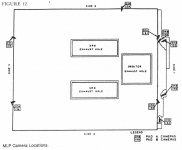
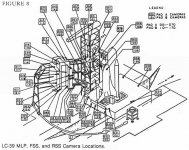
I'd say yes. It makes more sense. When I rework the MLP code, I will also start defining MLP VC, keyboard commands and camera positions. Do you have a list of where I should place cameras?

I want to make the primary initial camera position just a few steps away from the deck access door, with some freedom, just like you would be a human observer. Maybe unrealistic during launch, but unless you can tell me a better camera position, it might look more impressive this way.
 
I'd say yes. It makes more sense. When I rework the MLP code, I will also start defining MLP VC, keyboard commands and camera positions. Do you have a list of where I should place cameras?
Here's a two documents from the Roger's Commission on the Challenger Accident final report of the various OTV cameras which is still valid today.

Edit:
Just to mention it: The 0xx cameras are for 39A, while the 1xx cameras are for 39B.
 

Attachments

  • LC39%20OTV%20fig12.jpg
    LC39%20OTV%20fig12.jpg
    37.6 KB · Views: 523
  • LC-39_FSSRSS_MLP_OTV.jpg
    LC-39_FSSRSS_MLP_OTV.jpg
    138.9 KB · Views: 604
OK... 39A is the only pad currently in use right?

I think until we have the FSS in-game, we assume PAD-39A. When the FSS exists and the MLP is attached to it, it looks at the name of the FSS to tell which launch site it is (So, the FSS+RSS complex would get named "LC-39A" or "LC-39B")
 
OK... 39A is the only pad currently in use right?
Yes. STS-116 was the last planned launch off 39B, however, it will be used for STS-400(the LON mission for STS-125). Once Atlantis has gotten the TPS all cleared, STS-400 will be Rolled-around from 39B to 39A for pre-launch processing for STS-126.

I think until we have the FSS in-game, we assume PAD-39A. When the FSS exists and the MLP is attached to it, it looks at the name of the FSS to tell which launch site it is (So, the FSS+RSS complex would get named "LC-39A" or "LC-39B")
Sounds like a good solution.

Any way to make the camera annotation text look like the real OTV annotation text? Example: http://science.ksc.nasa.gov/shuttle/countdown/video/chan3large.jpg
 
Well, I don't know if I can change the font and I want to avoid painting directly on the rendering window. So call it a No-Go from me. Just a standard annotation at the top center. I can give it a white color, but that would be hard to read.

But I can label the view "OTV-097".
OK. But please aware that 097 is mounted on top of the VAB, not exactly sure where.
 
I just tried to include the GNC SYS SUMM 1 display (DISP 18) in the CRT MFD, but I just noticed that its only possible to change the Major Mode, but not the SPEC or DISP.

Any idea how to fix this? I also wrote two functions already, for painting the MFD in a common style and based on the text mode coordinates from the Shuttle documents (CRTTextOut() and CRTLine()).

EDIT: Never mind, found out how to do this. The keyboard code is very hard to read and very hard to extend like that, a code clean up might make sense. I have now added a hack to support SPEC and DISP displays in any MM, not only MM201. I will now only have to fix that any number for SPEC and DISP is valid.
 
Donamy: I want to be able to get the points around which the switches rotate when clicked. As things stand, I have to load the old VC mesh in MeshWizard to do this, and once we start working with the properly sized mesh this method won't work.
Urwumpe: The keyboard code is written to prevent the user from selecting a display or item that does not exist or has not been coded. It is fairly confusing and should probably be cleaned up.
 
Urwumpe: The keyboard code is written to prevent the user from selecting a display or item that does not exist or has not been coded. It is fairly confusing and should probably be cleaned up.

Well, we will get to take a look at it. I think about making a speed up of the drawing code of the CRT MFD. I get 15 fps when I have all CRTs activated and at 10 Hz refresh rate. At 5 Hz, the frame rate is almost 4 times higher in the same test, but I think we could improve it.

In an older Shuttle project, I had the same problem with the drawing code and the fps made a big jump forward, when I used oapiBlt and a special font bitmap to draw all text outputs, instead of the general purpose windows functions. This way, we could also include the special symbols of the shuttle DEU (greek characters, arrows...see the self-test page, we have not implemented yet)
 
I just found out some nice information during researching the Shuttle DEUs and the IPL software.

The DEUs seem to be plain, but advanced terminals displaying text data from the shuttle. All static line art is stored inside the DEU software and can be displayed during the self-test.

Numbers of the Critical formats I have found:

1 FAULT
2 HORIZ SIT
3 VERT SIT
4 MNVR
5 ASCENT TRAJ/RTLS TRAJ
6 GNC SYS SUMM 1
7 ENTRY TRAJ
8 GPC MEMORY
9-11 SPARE
12 S TRK/COAS CNTL
13 IMU ALIGN
14 OVERRIDE
15 CONT ABORT
16 RCS
17-30 SPARE

This background image list contains many pages, which only have some lines used for headers or tables.


No much news on the Fonts needed. It seems like the DEU has some capabilities, a windows PC could drive mad - like rotating characters.

I do some more research, my plan is to have the initial operating system included for testing.

Also interesting for the keyboard handling: The keys are internally numbered from 0 to 31, counting left to right, top to bottom. There is a self-test page for displaying the last pressed key number for each connected keyboard.

And the MEDS seems to have a second footer line above the soft button labels, which contains the name of the soft button menu in bright blue.

EDIT: And Donamy: Can you include the Orbiter Jettison T-Handle right over Panel C3? It gets used in emergency for jettisoning one of the overhead windows, so I doubt it will be useful in-play, but it's a very prominent part, so large that it even obstructs the CRT3 and made it impossible to exchange it in flight.
 
EDIT: And Donamy: Can you include the Orbiter Jettison T-Handle right over Panel C3? It gets used in emergency for jettisoning one of the overhead windows, so I doubt it will be useful in-play, but it's a very prominent part, so large that it even obstructs the CRT3 and made it impossible to exchange it in flight.


I can do that pretty easy, will try to use an existing texture for it.
 
1: HUD glass is green while it supposed to be white transparent glass.

In the version I have here, the HUD is only very slightly green, more a clear glass like material. But the HUD position should get fixed.
 
Back
Top