Space Shuttle Ultra development thread

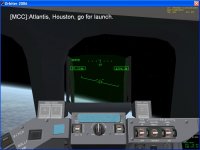
In the version I have here, the HUD is only very slightly green, more a clear glass like material. But the HUD position should get fixed.
Mine is very green. It stands out alot especially when pointed towards the blackness of space.

Edit:
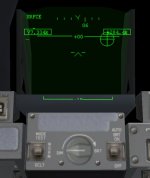
Also the Orbiter HUD size should be reduced. Currently Orbiter is painting the HUD graphics outside the VC HUD glass, not very realistic.
 

Attachments

  • SSU_HUDglass_error.jpg
    SSU_HUDglass_error.jpg
    32.6 KB · Views: 629
Mine is very green. It stands out alot especially when pointed towards the blackness of space.

OK, still not much less green, but during landing it looks very realistic like it is currently.

Also the Orbiter HUD size should be reduced. Currently Orbiter is painting the HUD graphics outside the VC HUD glass, not very realistic.

ACK, but for that, the HUD plane meshgroup would need to be reduced in size.
 

Attachments

  • SSU_CDRHUD.jpg
    SSU_CDRHUD.jpg
    78.8 KB · Views: 666
What's happenning with the mesh resizing? We should decide on what to do about this before we make any other changes involving meshes.
 
What's happenning with the mesh resizing? We should decide on what to do about this before we make any other changes involving meshes.

Count me as PRO resizing.

I can offer making spreadsheet files as template for documenting animations and include them into the SVN. If Donamy still has problems with accessing the SVN, we can solve this as well.

But until Mesh Wizard likes our meshes again, I can't fill the data into the tables.
 
David or anybody else, do you know a document which shows the exact locations of the payload bay lights (sources), where they are located and where they point to a.s.o. Thanks a bunch!
 
Does somebody have a SCOM 2.13 section where the chapter about the IMU is not corrupted with pages from the EVA section?

I have used the limitation that I had to prepare a presentation this weekend in emergency more for printing the whole communication chapter, I think i have an idea what to do with it after I finished working with Donamy's rescaled meshes.

Next output from me will be a XLS table with ALL current animation reference data. Will be a major project and would come in a few versions, but I think it will pay out.
 
I'm also in favour of mesh resizing. I think I found a way to get around the MeshWizard problem: create two copies of the mesh and remove some of the groups from each mesh. You can open these meshes in MeshWizard.
 
I'm also in favour of mesh resizing. I think I found a way to get around the MeshWizard problem: create two copies of the mesh and remove some of the groups from each mesh. You can open these meshes in MeshWizard.

Donamy already remove some groups by merging them, so we are under 500 in the new VC mesh. Will not work for long though. If the bug does not get fixed soon, we might have to consider splitting the VC mesh into two meshes.
 
Donamy already remove some groups by merging them, so we are under 500 in the new VC mesh. Will not work for long though. If the bug does not get fixed soon, we might have to consider splitting the VC mesh into two meshes.
Have you alerted ar81 about this? He cannot fix bugs that he doesn't know exist.
 
I wrote a detailed bug report in OH.
I have found that most bugs reported on Orbit Hangar goes unanswered as I guess most have e-mail notification turned off, or the e-mail isn't valid anymore.

So I would try sending a PM to him on Dan's forum where he now hangs out. I have a feeling that would be much more fruitfull.
 
So I would try sending a PM to him on Dan's forum where he now hangs out. I have a feeling that would be much more fruitfull.

OK, I'll give it a try.
 
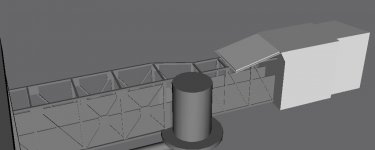
Today's work has centered on researching and working on the Orbiter Access Arm and the White Room.

Right now I'm almost done with the part of the White Room that is attached to the Orbiter Access Arm. I'm right now researching the part that interfaces the Orbiter.

Edit:
Speaking of te White Room, since I'm going to make an interior for it, would it be usefull to add a side hatch animation?

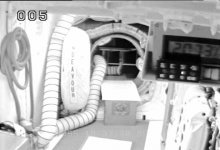
Here's a recent screengrab off OTV-005 in the White Room at 39A. The side hatch cover for Endeavour can be clearly seen.
 

Attachments

  • SSU_FSS_7A.jpg
    SSU_FSS_7A.jpg
    67.4 KB · Views: 592
  • White_Room_interior.jpg
    White_Room_interior.jpg
    27.6 KB · Views: 611
Last edited:
Donamy: Could you make a basic concrete hardstand for me? I always had problems getting the shape right and good-looking.

Here's page that has good line-drawings of both the 39A and 39B concrete hardstands: http://www.capcomespace.net/dossiers/espace_US/shuttle/ksc/LC39.htm

You don't have to do any mesh detailing work, I'll take of that once the FSS/RSS and MLP is done. Jus the basic hardstand textured will do it nicely!
 
Donamy: Could you make a basic concrete hardstand for me? I always had problems getting the shape right and good-looking.

Here's page that has good line-drawings of both the 39A and 39B concrete hardstands: http://www.capcomespace.net/dossiers/espace_US/shuttle/ksc/LC39.htm

You don't have to do any mesh detailing work, I'll take of that once the FSS/RSS and MLP is done. Jus the basic hardstand textured will do it nicely!

Why not use Slat's pads ?
 
Back
Top