

You are using an out of date browser. It may not display this or other websites correctly.
You should upgrade or use an alternative browser.
You should upgrade or use an alternative browser.
Working with Matlab and tileedit
- Thread starter JMW
- Start date
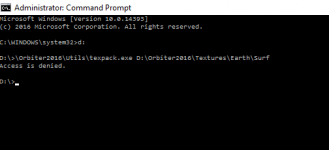

Same messages.
It's still wrong. Mind the space character between Earth and Surf instead of the backslash. Also there is no "-e" as it seems.
You need to be exact with command-line interaction.

jangofett287
Heat shield 'tester'
- Joined
- Oct 14, 2010
- Messages
- 1,148
- Reaction score
- 13
- Points
- 53
On the command line every character matters. These 2 (linux) commands have 1 character difference, but one removes a directory in the root directory called 'tmp', the other removes every file and folder on the entire system. (if logged in as root)
Code:
rm -rf /tmp/
Code:
rm -rf / tmp/JMW
Aspiring Addon Developer
Same messages.
Don't forget I'm still getting pop-up message "This app can't run on your PC".
Screenshot is just what appears on the command line when I close that.
Also what is the significance of brackets in " [<Flags>]" ?
Thanks for your patience :tiphat:
Don't forget I'm still getting pop-up message "This app can't run on your PC".
Screenshot is just what appears on the command line when I close that.
Also what is the significance of brackets in " [<Flags>]" ?
Thanks for your patience :tiphat:
Last edited:
JMW
Aspiring Addon Developer
They are read only.
When I attempt to change through the properties tab it allows, but when I check again it is back to read only................?
When I attempt to change through the properties tab it allows, but when I check again it is back to read only................?
- Joined
- Feb 4, 2008
- Messages
- 9,758
- Reaction score
- 1,028
- Points
- 203
Check that you're logged in as the administrator of the computer. I think that only administrators are allowed to change folder properties so if you're logged in on an account that doesn't have administrator privileges it will reset back. Also try setting the properties on your Orbiter folder as a whole.They are read only.
When I attempt to change through the properties tab it allows, but when I check again it is back to read only................?
jangofett287
Heat shield 'tester'
- Joined
- Oct 14, 2010
- Messages
- 1,148
- Reaction score
- 13
- Points
- 53
You need to put the '.' at the start. Without the dot cmd is literally looking for the path "\Orbiter2016\Utils\texpack.exe", which cannot exist on any Windows system as it has no drive letter. ".\" translates to the current working directory, which is "D:\" in this case, so it'll look for "D:\Orbiter2016\Utils\texpack.exe". Like I said every single character matters.
JMW
Aspiring Addon Developer
You need to put the '.' at the start. Without the dot cmd is literally looking for the path "\Orbiter2016\Utils\texpack.exe", which cannot exist on any Windows system as it has no drive letter. ".\" translates to the current working directory, which is "D:\" in this case, so it'll look for "D:\Orbiter2016\Utils\texpack.exe"
D:\Orbiter2016\Utils\texpack.exe is where it is. (rightly or wrongly)
Message:
Code:
D:\>.\Orbiter2016\Utils\texpack.exe D:\Orbiter2016\Textures\Earth Surf -e
Access is denied.
Check that you're logged in as the administrator of the computer.
I am.
Additionally, treeman.exe works fine in the same folder ............ ?
---------- Post added at 07:03 PM ---------- Previous post was at 05:44 PM ----------
Trying to run texpack.exe I get error message pop-up "This app can't run on your PC"
and "Access is denied" in command line.......
Any ideas ?
Sorry everybody - problem solved - was a "texpack" with zero bytes ! (bad download) :compbash2::compbash2:
Last edited:

So How hard is to make a flat/level base? I have been asked this from someone else. We want to put a level base in a mountain.

- Joined
- Oct 16, 2007
- Messages
- 1,034
- Reaction score
- 93
- Points
- 63
- Location
- UT_SLC
- Website
- sites.google.com
So How hard is to make a flat/level base? I have been asked this from someone else. We want to put a level base in a mountain.
Not hard...just tedious, IMO. I've leveled the sites for Niven and Heinlein.

- Joined
- Feb 18, 2008
- Messages
- 420
- Reaction score
- 45
- Points
- 28
So, I'm a complete novice. Following the .pdf created by mxk found here [ame="http://www.orbithangar.com/searchid.php?ID=7008"]Bulgaria airports 2016[/ame] with Face's help, I was able to create the tiles with elevations for a new base. I need to flatten a portion of the tiles to place buildings and a Launchpad. I've installed the MATLAB R2015a runtime package but I need the commands to run tileedit.
Thanks,
Ben:tiphat:
Thanks,
Ben:tiphat:
I've installed the MATLAB R2015a runtime package but I need the commands to run tileedit.
"tileedit" is a GUI tool, so you just double-click it in windows explorer AFAIK.
- Joined
- Jan 5, 2009
- Messages
- 216
- Reaction score
- 0
- Points
- 16
- Location
- Near Verona
- Website
- orbiteritalia.forumotion.com
You can associate files .elv with tileedit.
- Joined
- Feb 18, 2008
- Messages
- 420
- Reaction score
- 45
- Points
- 28
D'oh, for some reason, the first time I opened the program I got a blank black cmd window with C:\Orbiter\Utils\tileedit.exe as its header, then after a few seconds the GUI opened :facepalm:
Thanks guys! :embarrassed:
---------- Post added at 04:28 PM ---------- Previous post was at 03:45 PM ----------
This is not getting any easier. I tried selecting C:\Orbiter160828\Textures\Earth\Archive and C:\Orbiter160828\Textures\Earth\Surf but I keep getting the error cited here http://orbiter-forum.com/showthread.php?p=542458&postcount=3
Thanks guys! :embarrassed:
---------- Post added at 04:28 PM ---------- Previous post was at 03:45 PM ----------
This is not getting any easier. I tried selecting C:\Orbiter160828\Textures\Earth\Archive and C:\Orbiter160828\Textures\Earth\Surf but I keep getting the error cited here http://orbiter-forum.com/showthread.php?p=542458&postcount=3
- Joined
- Feb 4, 2008
- Messages
- 9,758
- Reaction score
- 1,028
- Points
- 203
The answer listed here: http://orbiter-forum.com/showthread.php?p=544246&postcount=5D'oh, for some reason, the first time I opened the program I got a blank black cmd window with C:\Orbiter\Utils\tileedit.exe as its header, then after a few seconds the GUI opened :facepalm:
Thanks guys! :embarrassed:
---------- Post added at 04:28 PM ---------- Previous post was at 03:45 PM ----------
This is not getting any easier. I tried selecting C:\Orbiter160828\Textures\Earth\Archive and C:\Orbiter160828\Textures\Earth\Surf but I keep getting the error cited here http://orbiter-forum.com/showthread.php?p=542458&postcount=3
- Joined
- Jan 5, 2009
- Messages
- 216
- Reaction score
- 0
- Points
- 16
- Location
- Near Verona
- Website
- orbiteritalia.forumotion.com
D'oh, for some reason, the first time I opened the program I got a blank black cmd window with C:\Orbiter\Utils\tileedit.exe as its header, then after a few seconds the GUI opened :facepalm:
Thanks guys! :embarrassed:
---------- Post added at 04:28 PM ---------- Previous post was at 03:45 PM ----------
This is not getting any easier. I tried selecting C:\Orbiter160828\Textures\Earth\Archive and C:\Orbiter160828\Textures\Earth\Surf but I keep getting the error cited here http://orbiter-forum.com/showthread.php?p=542458&postcount=3
Must select Textures\Earth.
Sorry, there isn't much documentation (yet).
Essentially, select 'Open' from the file menu, then pick the directory root of the texture tree you want to inspect (e.g. Textures\Earth).
This should then load the lowest resolution Earth tile (global coverage, 128x128 pixels for the surface texture). In addition, other layers of the same tile can be displayed beside it (elevation, water mask, night lights, if applicable).
Make sure that "Pan and zoom" is selected for mouse action. Move the mouse into one of the tile displays. The tile should then be surrounded by a red square. Click on it, and this should load the child of the root tile (level 2, still global coverage, 256x256).
Keep clicking, and at some point you'll see that the rectangle only covers half of the map (western or eastern hemisphere). This is the start of the quadtree. At the deeper levels, each tile will have 4 children. You can descend into the tree by moving the mouse into one of the quadrants (will be indicated by a red square) and click.
You can move up to the parent level by moving the mouse to the centre of the image until a red X appears, and click.
You can shift the view to a neighbour tile by moving the mouse towards the centre of one of the edges, until an arrow appears, and click.
You can visit any part of the quadtree even if no texture or elevation file exists for that tile. tileedit then interpolates from a subrange of an ancestor tile, just like Orbiter.
You can see the 'logical' designation of the tile in the info block at the top left. The 'physical' address of a tile is shown below the tile display. When these differ, you know that you see an interpolated, synthesized tile.
By picking a different mouse action, you can edit elevation data (no other layers currently allow editing). If you edit an elevation tile, the modifications will not be written to the original elevation tile, but to a new file under 'Elev_mod' in the directory tree. The mod tiles will contain the differences to the original tile. By deleting a mod tile, you undo all modifications to that tile.
That's all I can think of at the moment. Most should be fairly self-explanatory. Let me know if anything doesn't make sense.
Note that currently there is no support for creating a new elevation tile that isn't yet present in the tree. I have a matlab script that generates a new tile by interpolating the parent, but that hasn't been incorporated into tileedit yet. You could always just copy an arbitrary tile file, and then use the mod function to completely replace it.
Edit: I should also mention that the elevation mod tiles only get written to disk when you navigate away from the edited tile.
Also, tileedit automatically propagates the edits to all the ancestor tiles (and the neighbour siblings for edits in the overlap areas), but not to the children. You should always make the edits on the tiles in the leaf nodes of the quadtree.
Ok I used treeman -e to extract the files. But I still get:

I tried texpax but it just opens a windows and closes
got texpax to work:
Quadtree data extracted from C:\Orbiter2016\Textures\Moon\Archive\Surf.tree
2743 nodes
But no tileedit
I tried texpax but it just opens a windows and closes
got texpax to work:
Quadtree data extracted from C:\Orbiter2016\Textures\Moon\Archive\Surf.tree
2743 nodes
But no tileedit
Last edited:
So I have extracted both the elevation and surf files for the moon.
Ran the runtime. but still it doesn't work
Ran the runtime. but still it doesn't work
What's the problem?
Similar threads

- Replies
- 12
- Views
- 4K


- Replies
- 5
- Views
- 2K

- Replies
- 1
- Views
- 9K
