Programming Question What IDE do you use?

Mr Martian

Orbinaut/Addon dev/Donator
Addon Developer
Donator
Joined
Jun 6, 2012
Messages
382
Reaction score
254
Points
78
Location
Sydney, Australia, Earth, Sol
Website
www.orbithangar.com
Hi all,

Just wondering whjat IDE people like to use for developing orbiter addons? I am still using Microsoft Visual C++ 2010, just becuase it's just familliar to me, but are people mostly using Visual Studio 2022 now? From memory I tried it before but struggled to set up the right working environment and subsequently lost interest...

Thanks all!
MrMartian
 
Visual Studio 2022 Community right now.
Thanks Urwumpe. Were there any additional C++ components you had to install to get it set up properly? I have the latest MSVC v143 - VS 2022 C++. To your knowledge should also install any of the older packages like v140 or v141?
 
When installing VC 2022 Community (as Urwumpe said) make sure to include the Desktop Development with C++. That should include everything you need. You should not need older version of MSVC unless you are building some add-in that requires it.

What I then do is open the ShuttlePB.sln from the OrbiterSDK/Samples/ShuttlePB folder. That will go through a conversion. It should then build. If you want to run that in the debugger there are a few more folders to setup, but you should have the C++ environment you need.
 
Thanks Urwumpe. Were there any additional C++ components you had to install to get it set up properly? I have the latest MSVC v143 - VS 2022 C++. To your knowledge should also install any of the older packages like v140 or v141?

Like Blake said, just the right Windows SDK and tools. On the optional plugin side, I included doxygen support and sonarlint on my installations for some years now.
 
Okay done! I have converted the default ShuttlePB.sln and have it working. That being said, when I try to create a blank project from scratch I get all kinds of build errors, like 'error C2440: 'return': cannot convert from 'const char [12]' to 'char *'' in OrbiterAPI.h. I can just use the shuttlepb template, but I'd rather not do that every time I develop something for Orbiter. Has anyone found a better way to set up the right environment?
 
Okay done! I have converted the default ShuttlePB.sln and have it working. That being said, when I try to create a blank project from scratch I get all kinds of build errors, like 'error C2440: 'return': cannot convert from 'const char [12]' to 'char *'' in OrbiterAPI.h. I can just use the shuttlepb template, but I'd rather not do that every time I develop something for Orbiter. Has anyone found a better way to set up the right environment?

Yes, you need to change some default settings in the project settings since OrbiterSDK as originally developed to a much older VC++ version and C++ language standard. You should look for "/permissive"

 
When installing VC 2022 Community (as Urwumpe said) make sure to include the Desktop Development with C++. That should include everything you need. You should not need older version of MSVC unless you are building some add-in that requires it.

is MSVC related to the runtime? I've been facing the problem of not having the runtime recognized, hence the user needs to have VS(2019) installed (which is a pitty for non-dev users). Am I missing some setup at compilation stage?
 
is MSVC related to the runtime? I've been facing the problem of not having the runtime recognized, hence the user needs to have VS(2019) installed (which is a pitty for non-dev users). Am I missing some setup at compilation stage?

In the project properties, 'Code Generation/Runtime Libarary', pick one of the /MT (not /MD) options. That should compile the runtime into the DLL and avoid the need for the user to install the runtime libraries independently. For Orbiter add ons /MT (static library) is generally safe. For large programs with lots of interdependencies /MD is generally preferred, but those programs will also likely have an installer that includes the appropriate runtime DLLs.

At least this sounds like the issue you have.
 
When installing VC 2022 Community (as Urwumpe said) make sure to include the Desktop Development with C++. That should include everything you need. You should not need older version of MSVC unless you are building some add-in that requires it.

What I then do is open the ShuttlePB.sln from the OrbiterSDK/Samples/ShuttlePB folder. That will go through a conversion. It should then build. If you want to run that in the debugger there are a few more folders to setup, but you should have the C++ environment you need.

Maybe I'm completely insane but the ShuttlePB sample is absent from the 'official' Orbiter 2024 package ? o_O

I downloaded the package here : https://www.orbiter-forum.com/resources/orbiter-2024.5634/

1762799182072.png
 
Last edited:
That is correct, the sources are missing in that distribution. Only the ScriptPB.cfg is included.
 
Ah OK, thanks for the clarification. So I just copy the sample from Orbiter 2016 ?

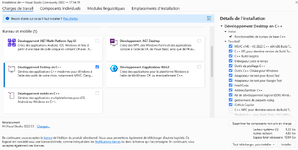
And for the VS 2022 installation options, I just check this one, right (sorry for Microsoft Frenglish mashup) ?

1762804817694.png
 
Yes, that should be enough for the start.
 
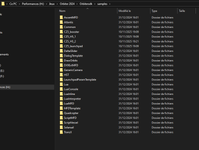
Thanks @Urwumpe. So after a clean re-install of VS 2022 CE with the option showed above checked, I copied the Orbiter 2016 Shuttle PB SDK sample into the Orbiter 2024 'SDK/samples' directory.

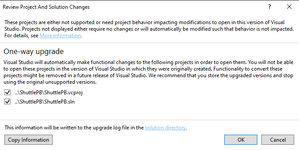
Then I tried to open the ShuttlePB.sln with VS 2022. What I get is this popup :

1762813944528.png

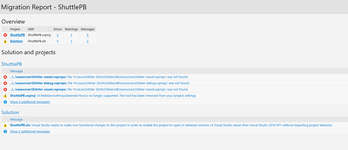
I pressed 'OK', then after some processing I get the 'Migration Report', and obviously things are not going too well. What am I doing wrong ?

1762814051667.png

And of course I get something like this, where VS 2022 is unfamiliar with most of the code :

1762814318313.png

Back in the days I remember I had to 'manually set up the development environnement'. I used this video :


...as a guide and it worked everytime (being very careful). But obviously Visual Studio is now very different.
 

Attachments

  • 1762814264540.png
    1762814264540.png
    185.8 KB · Views: 2
...as a guide and it worked everytime (being very careful). But obviously Visual Studio is now very different.

You need to manually correct the paths and maybe some settings, yes, Visual Studio saw a few updates.

But most of the procedure should still work, you just need to use the context menu to navigation to it.
 
I must say, I like the dark mode. Better for the eyes. That's one thing they improved over the years 😀

OK, found my way back, now on more familiar territory 👍

1762819480555.png
 
Still no luck though. This is the best I get :unsure:

1>------ Build started: Project: ShuttlePB, Configuration: Debug Win32 ------
1>cl : command line warning D9035: option 'Gm' has been deprecated and will be removed in a future release
1>ShuttlePB.cpp
1>H:\Visual Studio 2022 CE\MSBuild\Microsoft\VC\v170\Microsoft.CppBuild.targets(1402,5): warning MSB8012: TargetPath(H:\Jeux\Orbiter 2024\Orbitersdk\samples\ShuttlePB\Debug\ShuttlePB.dll) does not match the Linker's OutputFile property value (H:\Jeux\Orbiter 2024\Modules\ShuttlePB.dll). This may cause your project to build incorrectly. To correct this, please make sure that $(OutDir), $(TargetName) and $(TargetExt) property values match the value specified in %(Link.OutputFile).
1>Orbitersdk.lib(Orbitersdk.cpp.obj) : error LNK2038: mismatch detected for '_ITERATOR_DEBUG_LEVEL': value '0' doesn't match value '2' in ShuttlePB.obj
1>Orbitersdk.lib(Orbitersdk.cpp.obj) : error LNK2038: mismatch detected for 'RuntimeLibrary': value 'MD_DynamicRelease' doesn't match value 'MTd_StaticDebug' in ShuttlePB.obj
1> Creating library H:\Jeux\Orbiter 2024\Orbitersdk\samples\ShuttlePB\Debug\ShuttlePB.lib and object H:\Jeux\Orbiter 2024\Orbitersdk\samples\ShuttlePB\Debug\ShuttlePB.exp
1>..\..\..\Modules\ShuttlePB.dll : fatal error LNK1319: 2 mismatches detected
1>Done building project "ShuttlePB.vcxproj" -- FAILED.
========== Build: 0 succeeded, 1 failed, 0 up-to-date, 0 skipped ==========

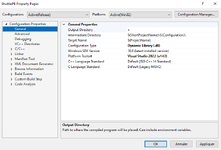
and my properties are :

/ifcOutput "ShuttlePB\Debug\" /GS /analyze- /W3 /Gy /Zc:wchar_t /I"..\..\include" /ZI /Gm /Od /Fd"ShuttlePB\Debug\vc143.pdb" /Zc:inline /fp:precise /D "WIN32" /D "_DEBUG" /D "_WINDOWS" /D "_WINDLL" /fp:except- /errorReport:prompt /GF- /WX- /Zc:forScope /RTC1 /Gd /Oy- /MT /FC /Fa"ShuttlePB\Debug\" /EHsc /nologo /Fo"ShuttlePB\Debug\" /diagnostics:column

/OUT:"..\..\..\Modules\ShuttlePB.dll" /MANIFEST /PDB:"H:\Jeux\Orbiter 2024\Orbitersdk\samples\ShuttlePB\Debug\ShuttlePB.pdb" /DYNAMICBASE:NO "kernel32.lib" "user32.lib" "gdi32.lib" "winspool.lib" "comdlg32.lib" "advapi32.lib" "shell32.lib" "ole32.lib" "oleaut32.lib" "uuid.lib" "odbc32.lib" "odbccp32.lib" /IMPLIB:"H:\Jeux\Orbiter 2024\Orbitersdk\samples\ShuttlePB\Debug\ShuttlePB.lib" /DEBUG:FULL /DLL /MACHINE:X86 /NODEFAULTLIB:"msvcirt.lib" /NODEFAULTLIB:"msvcrt.lib" /SAFESEH:NO /PGD:"H:\Jeux\Orbiter 2024\Orbitersdk\samples\ShuttlePB\Debug\ShuttlePB.pgd" /SUBSYSTEM:WINDOWS /MANIFESTUAC:"level='asInvoker' uiAccess='false'" /ManifestFile:"ShuttlePB\Debug\ShuttlePB.dll.intermediate.manifest" /LTCGOUT:"ShuttlePB\Debug\ShuttlePB.iobj" /ERRORREPORT:PROMPT /ILK:"ShuttlePB\Debug\ShuttlePB.ilk" /NOLOGO /LIBPATH:"..\..\lib" /TLBID:1

 
You need to make sure your output is generated equal to what Orbiters libraries are set up for, MS C++ does still not like mixed runtime libraries. Also, you should set the C++ language validation to /permissive.
 
Back
Top