
Project VesselBuilder for Orbiter

This is a debug alert in latest dll ?
Code:
WARNING: VesselBuilder1: VBVector Exception! called a vec position <0! (typestruct ANIM_DEF idx:-1 size:2)

Config (looks ok to me):
Code:
ClassName = VesselBuilder1
Module = VesselBuilder1
 
;CONFIGURATION FILE FOR Swift_VB
 
NOEDITOR = FALSE
 
CONFIGURATIONS = 1
 
;<-------------------------GENERAL SETTINGS - Configuration: 0------------------------->
 
EMPTY_MASS = 840
VSIZE = 5
PMI = 15 25 7
CSECTIONS = 2 17 1
GRAVITYGDAMP = 0
ROTDRAG = 0.5 0.5 0.2
 
;<-------------------------MESHES DEFINITIONS------------------------->
 
MESH_0_NAME = burchismo\S11
MESH_0_POS = 0 0 0
MESH_0_DIR = 0 0 1
MESH_0_ROT = 0 1 0
MESH_0_VIS = 5
 
 
;<-------------------------DOCKS DEFINITIONS------------------------->
 
 
;<-------------------------ATTACHMENTS DEFINITIONS------------------------->
 
 
;<-------------------------ANIMATIONS DEFINITIONS------------------------->
 
ANIM_0_ID = 0
ANIM_0_NAME = Canopy
ANIM_0_DEFSTATE = 0
ANIM_0_DURATION = 4.5
ANIM_0_KEY = 2
ANIM_0_CYCLE = 0
 
ANIM_1_ID = 1
ANIM_1_NAME = Landing_gear
ANIM_1_DEFSTATE = 0
ANIM_1_DURATION = 4.5
ANIM_1_KEY = 34
ANIM_1_CYCLE = 0
 
ANIMCOMP_0_ID = 0
ANIMCOMP_0_SEQ = 0
ANIMCOMP_0_NAME = Canopy_slide
ANIMCOMP_0_STATE0 = 0
ANIMCOMP_0_STATE1 = 0.5
ANIMCOMP_0_ARMTIP = FALSE
ANIMCOMP_0_MESH = 0
ANIMCOMP_0_TYPE = 2
ANIMCOMP_0_SHIFT = 0 0.23375 0.26125
ANIMCOMP_0_NGRPS = 2
ANIMCOMP_0_GRPS = 6, 72
ANIMCOMP_0_PARENT = -1
 
ANIMCOMP_1_ID = 1
ANIMCOMP_1_SEQ = 0
ANIMCOMP_1_NAME = Canopy_pivot
ANIMCOMP_1_STATE0 = 0.55
ANIMCOMP_1_STATE1 = 1
ANIMCOMP_1_ARMTIP = FALSE
ANIMCOMP_1_MESH = 0
ANIMCOMP_1_TYPE = 1
ANIMCOMP_1_REF = 0 0.3223 0.627
ANIMCOMP_1_AXIS = 1 0 0
ANIMCOMP_1_ANGLE = -90
ANIMCOMP_1_NGRPS = 2
ANIMCOMP_1_GRPS = 6, 72
ANIMCOMP_1_PARENT = -1
 
ANIMCOMP_2_ID = 2
ANIMCOMP_2_SEQ = 1
ANIMCOMP_2_NAME = NoseWheelFrontDoor
ANIMCOMP_2_STATE0 = 0
ANIMCOMP_2_STATE1 = 0.5
ANIMCOMP_2_ARMTIP = FALSE
ANIMCOMP_2_MESH = 0
ANIMCOMP_2_TYPE = 1
ANIMCOMP_2_REF = 0.041195 -0.48785 0.54725
ANIMCOMP_2_AXIS = 0 0 1
ANIMCOMP_2_ANGLE = 90
ANIMCOMP_2_NGRPS = 2
ANIMCOMP_2_GRPS = 25, 26
ANIMCOMP_2_PARENT = -1
 
ANIMCOMP_3_ID = 3
ANIMCOMP_3_SEQ = 1
ANIMCOMP_3_NAME = NoseWheelRearDoor
ANIMCOMP_3_STATE0 = 0
ANIMCOMP_3_STATE1 = 0.3
ANIMCOMP_3_ARMTIP = FALSE
ANIMCOMP_3_MESH = 0
ANIMCOMP_3_TYPE = 1
ANIMCOMP_3_REF = -0.087945 -0.48565 0.30415
ANIMCOMP_3_AXIS = 0 0 1
ANIMCOMP_3_ANGLE = -90
ANIMCOMP_3_NGRPS = 2
ANIMCOMP_3_GRPS = 27, 28
ANIMCOMP_3_PARENT = -1
 
ANIMCOMP_4_ID = 4
ANIMCOMP_4_SEQ = 1
ANIMCOMP_4_NAME = NoseWheel
ANIMCOMP_4_STATE0 = 0.2
ANIMCOMP_4_STATE1 = 1
ANIMCOMP_4_ARMTIP = FALSE
ANIMCOMP_4_MESH = 0
ANIMCOMP_4_TYPE = 1
ANIMCOMP_4_REF = 0 -0.45974 0.593182
ANIMCOMP_4_AXIS = 1 0 0
ANIMCOMP_4_ANGLE = -100
ANIMCOMP_4_NGRPS = 2
ANIMCOMP_4_GRPS = 29, 30
ANIMCOMP_4_PARENT = -1
 
;<-------------------------PROPELLANT DEFINITIONS------------------------->
 
PRP_0_ID = 0
PRP_0_MAXMASS = 800
PRP_0_EFFICIENCY = 1
PRP_0_PRIMARY = TRUE
PRP_0_NAME = MainTank
 
 
;<-------------------------THRUSTERS DEFINITIONS------------------------->
 
THR_0_ID = 0
THR_0_NAME = Main_1
THR_0_POS = -0.25 -0.1 -1.8
THR_0_DIR = 0 0 1
THR_0_MAX0 = 8000
THR_0_ISP0 = 60000
THR_0_ISPREF = 0
THR_0_PREF = 101400
THR_0_TANK = 0
THR_0_HASEXHAUST = FALSE
THR_0_HASPARTICLES = FALSE
 
THR_1_ID = 1
THR_1_NAME = Main_2
THR_1_POS = 0.25 -0.1 -1.8
THR_1_DIR = 0 0 1
THR_1_MAX0 = 8000
THR_1_ISP0 = 60000
THR_1_ISPREF = 0
THR_1_PREF = 101400
THR_1_TANK = 0
THR_1_HASEXHAUST = FALSE
THR_1_HASPARTICLES = FALSE
 
;<-------------------------THRUSTER GROUPS DEFINITIONS------------------------->
 
THGROUP_MAIN = TRUE
THGROUP_MAIN_THRUSTERS = 0, 1
 
;<-------------------------TOUCHDOWNPOINTS DEFINITIONS------------------------->
 
TDP_1_0_POS = 0 -1 3.3
TDP_1_0_STIFFNESS = 10725.6
TDP_1_0_DAMPING = 7549.27
TDP_1_0_MU = 0.1
TDP_1_0_MULNG = 0.2
 
TDP_1_1_POS = -2.59808 -1 -1.5
TDP_1_1_STIFFNESS = 10725.6
TDP_1_1_DAMPING = 7549.27
TDP_1_1_MU = 3
TDP_1_1_MULNG = 0.2
 
TDP_1_2_POS = 2.59808 -1 -1.5
TDP_1_2_STIFFNESS = 10725.6
TDP_1_2_DAMPING = 7549.27
TDP_1_2_MU = 3
TDP_1_2_MULNG = 0.2
 
TDP_1_3_POS = 0 3 0
TDP_1_3_STIFFNESS = 10725.6
TDP_1_3_DAMPING = 7549.27
TDP_1_3_MU = 3
TDP_1_3_MULNG = 0.2
 
TDP_SECONDSET_ENABLED = TRUE
TDP_CHANGEOVER_ANIM = 1
TDP_2_0_POS = 0 -1.35 3.3
TDP_2_0_STIFFNESS = 10725.6
TDP_2_0_DAMPING = 7549.27
TDP_2_0_MU = 0.1
TDP_2_0_MULNG = 0.2
 
TDP_2_1_POS = -2.59808 -1.35 -1.5
TDP_2_1_STIFFNESS = 10725.6
TDP_2_1_DAMPING = 7549.27
TDP_2_1_MU = 3
TDP_2_1_MULNG = 0.2
 
TDP_2_2_POS = 2.59808 -1.35 -1.5
TDP_2_2_STIFFNESS = 10725.6
TDP_2_2_DAMPING = 7549.27
TDP_2_2_MU = 3
TDP_2_2_MULNG = 0.2
 
TDP_2_3_POS = 0 3 0
TDP_2_3_STIFFNESS = 10725.6
TDP_2_3_DAMPING = 7549.27
TDP_2_3_MU = 3
TDP_2_3_MULNG = 0.2
 
 
;<-------------------------AIRFOILS DEFINITIONS------------------------->
 
AIRFOIL_0_ID = 0
AIRFOIL_0_NAME = V_Airfoil_0
AIRFOIL_0_ORIENTATION = 0
AIRFOIL_0_REF = 0 0 -0.2
AIRFOIL_0_C = 2.76
AIRFOIL_0_S = 9
AIRFOIL_0_A = 2.8
AIRFOIL_0_POINT_0_AOA = -180
AIRFOIL_0_POINT_0_CL = 0
AIRFOIL_0_POINT_0_CM = 0
AIRFOIL_0_POINT_1_AOA = -60
AIRFOIL_0_POINT_1_CL = 0
AIRFOIL_0_POINT_1_CM = 0
AIRFOIL_0_POINT_2_AOA = -30
AIRFOIL_0_POINT_2_CL = -0.4
AIRFOIL_0_POINT_2_CM = 0.014
AIRFOIL_0_POINT_3_AOA = -2
AIRFOIL_0_POINT_3_CL = 0
AIRFOIL_0_POINT_3_CM = 0.0039
AIRFOIL_0_POINT_4_AOA = 15
AIRFOIL_0_POINT_4_CL = 0.7
AIRFOIL_0_POINT_4_CM = -0.006
AIRFOIL_0_POINT_5_AOA = 20
AIRFOIL_0_POINT_5_CL = 1
AIRFOIL_0_POINT_5_CM = -0.008
AIRFOIL_0_POINT_6_AOA = 25
AIRFOIL_0_POINT_6_CL = 0.8
AIRFOIL_0_POINT_6_CM = -0.01
AIRFOIL_0_POINT_7_AOA = 60
AIRFOIL_0_POINT_7_CL = 0
AIRFOIL_0_POINT_7_CM = 0
AIRFOIL_0_POINT_8_AOA = 180
AIRFOIL_0_POINT_8_CL = 0
AIRFOIL_0_POINT_8_CM = 0
 
AIRFOIL_1_ID = 1
AIRFOIL_1_NAME = H_Airfoil_1
AIRFOIL_1_ORIENTATION = 1
AIRFOIL_1_REF = 0 0 0
AIRFOIL_1_C = 0.5
AIRFOIL_1_S = 2
AIRFOIL_1_A = 1
AIRFOIL_1_POINT_0_AOA = -180
AIRFOIL_1_POINT_0_CL = 0
AIRFOIL_1_POINT_0_CM = 0
AIRFOIL_1_POINT_1_AOA = -135
AIRFOIL_1_POINT_1_CL = 0.3
AIRFOIL_1_POINT_1_CM = 0
AIRFOIL_1_POINT_2_AOA = -90
AIRFOIL_1_POINT_2_CL = 0
AIRFOIL_1_POINT_2_CM = 0
AIRFOIL_1_POINT_3_AOA = -45
AIRFOIL_1_POINT_3_CL = -0.3
AIRFOIL_1_POINT_3_CM = 0
AIRFOIL_1_POINT_4_AOA = 45
AIRFOIL_1_POINT_4_CL = 0.3
AIRFOIL_1_POINT_4_CM = 0
AIRFOIL_1_POINT_5_AOA = 90
AIRFOIL_1_POINT_5_CL = 0
AIRFOIL_1_POINT_5_CM = 0
AIRFOIL_1_POINT_6_AOA = 135
AIRFOIL_1_POINT_6_CL = -0.3
AIRFOIL_1_POINT_6_CM = 0
AIRFOIL_1_POINT_7_AOA = 180
AIRFOIL_1_POINT_7_CL = 0
AIRFOIL_1_POINT_7_CM = 0
 
 
;<-------------------------CONTROL SURFACES DEFINITIONS------------------------->
 
CTRL_SURFACES_0_ID = 0
CTRL_SURFACES_0_NAME = Elevator
CTRL_SURFACES_0_TYPE = 0
CTRL_SURFACES_0_AREA = 3
CTRL_SURFACES_0_DCL = 1.25
CTRL_SURFACES_0_REF = 0 0 -2
CTRL_SURFACES_0_AXIS = 3
CTRL_SURFACES_0_DELAY = 1
CTRL_SURFACES_0_ANIM = -1
 
CTRL_SURFACES_1_ID = 1
CTRL_SURFACES_1_NAME = Rudders
CTRL_SURFACES_1_TYPE = 1
CTRL_SURFACES_1_AREA = 1
CTRL_SURFACES_1_DCL = 1
CTRL_SURFACES_1_REF = 0 0 -2.5
CTRL_SURFACES_1_AXIS = 1
CTRL_SURFACES_1_DELAY = 1
CTRL_SURFACES_1_ANIM = -1
 
CTRL_SURFACES_2_ID = 2
CTRL_SURFACES_2_NAME = Aileron1
CTRL_SURFACES_2_TYPE = 2
CTRL_SURFACES_2_AREA = 1
CTRL_SURFACES_2_DCL = 1.5
CTRL_SURFACES_2_REF = 2.8 0 -0.5
CTRL_SURFACES_2_AXIS = 3
CTRL_SURFACES_2_DELAY = 1
CTRL_SURFACES_2_ANIM = -1
 
CTRL_SURFACES_3_ID = 3
CTRL_SURFACES_3_NAME = Aileron2
CTRL_SURFACES_3_TYPE = 2
CTRL_SURFACES_3_AREA = 1
CTRL_SURFACES_3_DCL = 1.5
CTRL_SURFACES_3_REF = -2.8 0 0.5
CTRL_SURFACES_3_AXIS = 4
CTRL_SURFACES_3_DELAY = 1
CTRL_SURFACES_3_ANIM = -1
 
CTRL_SURFACES_4_ID = 4
CTRL_SURFACES_4_NAME = Trim
CTRL_SURFACES_4_TYPE = 4
CTRL_SURFACES_4_AREA = 0.3
CTRL_SURFACES_4_DCL = 1.7
CTRL_SURFACES_4_REF = 0 0 -7.2
CTRL_SURFACES_4_AXIS = 0
CTRL_SURFACES_4_DELAY = 1
CTRL_SURFACES_4_ANIM = 2
 
 
;<-------------------------CAMERA DEFINITIONS------------------------->
 
 
;<-------------------------VIRTUAL COCKPIT DEFINITIONS------------------------->
 
VC_POS_0_ID = 0
VC_POS_0_NAME = vc_position_0
VC_POS_0_OFS = 0 0.352 0.7
VC_POS_0_DIR = 0 0 1
 
VC_HUD = TRUE
VC_HUD_MESH = 0
VC_HUD_GROUP = 0
VC_HUD_CNT = 0 0.352 3
VC_HUD_SIZE = 1.5
 
 
;<-------------------------LIGHTS: BEACONS DEFINITIONS------------------------->
 
 
;<-------------------------LIGHTS: LIGHT EMITTERS DEFINITIONS------------------------->
 
 
;<-------------------------VARIABLE DRAG ITEMS DEFINITIONS------------------------->
 
 
;<-------------------------EVENTS DEFINITIONS------------------------->
 
 
;<-------------------------EXHAUST TEXTURES DEFINITIONS------------------------->
 
EXTEX_0_ID = 0
EXTEX_0_TEXNAME = exhaust_atrcs
 
 
;<-------------------------PARTICLES DEFINITIONS------------------------->
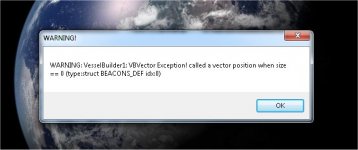
 
This is a debug alert in latest dll ?

Hi cris, yes, as said HERE I implemented a new system that alerts instead of crashing, so users know that there is an issue but can try to solve it.

Config (looks ok to me):

I think it's about those lines:
Code:
CTRL_SURFACES_0_ANIM = -1
 
CTRL_SURFACES_1_ANIM = -1
 
CTRL_SURFACES_2_ANIM = -1
 
CTRL_SURFACES_3_ANIM = -1

I need to check but if I remember correctly Contrl Surfaces need to have an animation defined.
 
I need to check but if I remember correctly Contrl Surfaces need to have an animation defined.

I confirm. I have exactly 4 alerts and after that control surfaces animation used some default association with other animations :lol:

Excellent work in catching possible errors :thumbup:
 
I'm trying to spawn a new VB vessel. I renamed the template, started the sim. I get an error message below.
 

Attachments

  • error mess.jpg
    error mess.jpg
    31.3 KB · Views: 20
I'm trying to spawn a new VB vessel. I renamed the template, started the sim. I get an error message below.

I'm also have a similar problem as Don ^

How come it's happening to you both but it's not happening to me? :hmm::hmm:

just for confirmation the template just contains the following, right?

Code:
ClassName = VesselBuilder1
Module = VesselBuilder1


---------- Post added at 23:38 ---------- Previous post was at 23:25 ----------

Wait a second, how are you trying to spawn it? via scenario editor or are you editing a scn file? The best way is through scenario editor directly (this is NOT sc3, it's much easier to spawn vessels through scenario editor), buf if you are doing it editing the scn manually take out every line but the essential default ones, which I think are: status, rpos, rvel, arot, vrot, afcmode, navfreq
 
Yup, that's the template I'm using. And I'm trying to spawn via scenario editor.
 
Last edited:
Yup, that's the template I'm using. And I'm trying to spawn via scenario editor.

I have tried in many ways but it's just not happening, this is quite strange... could you post the VesselBuilder1.log content file (it's in orbiter root)
 
That did it. Never made a scenario with the scenario editor in 18 years.
 
That did it. Never made a scenario with the scenario editor in 18 years.
a new era is coming :lol: it's much easier through scenario editor, just the attachment info are missing, but that can be resolved.

So you don't have the issue anymore right?
 
No, but I have a new one. Strange gyrations when in the follow me tool. But only with the new mesh.
 
No, but I have a new one. Strange gyrations when in the follow me tool. But only with the new mesh.
Confirmed, trying to understand what I touched that triggered this...
 
I have tried in many ways but it's just not happening, this is quite strange... could you post the VesselBuilder1.log content file (it's in orbiter root)

Sure thing.

Template .cfg

Code:
ClassName = VesselBuilder1
Module = VesselBuilder1

.log file
Code:
17.926 - VB1: D3D9 Active
17.926 - VB1: Orbiter dirs: C:\Orbiter 2016\Config C:\Orbiter 2016\Meshes C:\Orbiter 2016\Textures C:\Orbiter 2016\Textures2 C:\Orbiter 2016\Scenarios
17.926 - VB1: Class Initialized
17.926 - VB1: Set Class Caps Started
17.926 - VB1: Parsing Exhaust Textures Section
17.926 - VB1: Parsing Exhaust Textures Section Completed, found 0 definitions
17.926 - VB1: Parsing Particles Section
17.926 - VB1: Parsing Particles Section Completed, found 2 definitions
17.926 - VB1: Adding Configuration n:0
17.926 - VB1: General Settings Section included
17.926 - VB1: Mesh Section included
17.926 - VB1: Dock Section included
17.926 - VB1: Attachments Section included
17.926 - VB1: Animations Section included
17.926 - VB1: Propellants Section included
17.926 - VB1: Thrusters Section included
17.926 - VB1: ThrusterGroup Section included
17.926 - VB1: Touchdown Points Section included
17.926 - VB1: Airfoils Section included
17.926 - VB1: Control Surfaces Section included
17.926 - VB1: Camera Section included
17.926 - VB1: Virtual Cockpit Section included
17.926 - VB1: Lights Section included
17.926 - VB1: Variable Drag Section included
17.926 - VB1: Events Section included
17.926 - VB1: Clearing VC Defs
17.926 - VB1: Clearing VC Defs Completed
17.926 - VB1: Clearing Cameras
17.926 - VB1: Clearing Cameras Completed
17.926 - VB1: Clearing CtrlSurfaces
17.926 - VB1: Clearing CtrlSurfaces Completed
17.926 - VB1: Clearing Airfoils
17.926 - VB1: Clearing Airfoils Completed
17.926 - VB1: Clearing TDP
17.926 - VB1: Clearing TDP Completed
17.926 - VB1: Clearing Thrusters Section
17.926 - VB1: Clearing Thrusters Section Completed
17.926 - VB1: Clearing Tank Section
17.926 - VB1: Clearing Tank Section Completed
17.926 - VB1: Clearing Animation Section
17.926 - VB1: Clearing Animation Section Completed
17.926 - VB1: Clearing Attachments
17.926 - VB1: Clearing Attachments Completed
17.926 - VB1: Clearing Docks Section
17.926 - VB1: Clearing Docks Section Completed
17.926 - VB1: Clearing Mesh Section
17.926 - VB1: Clearing Mesh Section Completed
17.926 - VB1: Load Meshes Started
17.926 - VB1: WARNING: No Mesh Definitions found
17.926 - VB1: Set Class Caps Completed
17.926 - VB1: VisualCreated

I suspect the problem is on my end, to be honest. My orbiter installation is pretty wonky.

I was able to get it working fine by adding this into my .cfg file. Works fine now.

Code:
ClassName = VesselBuilder1
Module = VesselBuilder1
 
;CONFIGURATION FILE FOR Test
 
NOEDITOR = FALSE
 
CONFIGURATIONS = 1
 
;<-------------------------GENERAL SETTINGS - Configuration: 0------------------------->
 
EMPTY_MASS = 1
VSIZE = 10
PMI = 20 20 10
CSECTIONS = 20 20 20
GRAVITYGDAMP = 0
ROTDRAG = 0.01 0.01 0.01
 
;<-------------------------MESHES DEFINITIONS------------------------->
 
 
;<-------------------------DOCKS DEFINITIONS------------------------->
 
 
;<-------------------------ATTACHMENTS DEFINITIONS------------------------->
 
 
;<-------------------------ANIMATIONS DEFINITIONS------------------------->
 
;<-------------------------PROPELLANT DEFINITIONS------------------------->
 
 
;<-------------------------THRUSTERS DEFINITIONS------------------------->
 
;<-------------------------THRUSTER GROUPS DEFINITIONS------------------------->
 
 
;<-------------------------TOUCHDOWNPOINTS DEFINITIONS------------------------->
 
 
;<-------------------------AIRFOILS DEFINITIONS------------------------->
 
 
;<-------------------------CONTROL SURFACES DEFINITIONS------------------------->
 
 
;<-------------------------CAMERA DEFINITIONS------------------------->
 
 
;<-------------------------VIRTUAL COCKPIT DEFINITIONS------------------------->
 
 
;<-------------------------LIGHTS: BEACONS DEFINITIONS------------------------->
 
 
;<-------------------------LIGHTS: LIGHT EMITTERS DEFINITIONS------------------------->
 
 
;<-------------------------VARIABLE DRAG ITEMS DEFINITIONS------------------------->
 
 
;<-------------------------EVENTS DEFINITIONS------------------------->
 
 
;<-------------------------EXHAUST TEXTURES DEFINITIONS------------------------->
 
 
;<-------------------------PARTICLES DEFINITIONS------------------------->
 
mmmm
Code:
c:\Orbiter 2016

does everything work with that space in the folder name?
 
Is there a way to only show a single mesh in the VB vessel that has more than one mesh in it ? Trying to set up the mfds, but I can't see through the other mesh.

---------- Post added at 11:29 PM ---------- Previous post was at 11:27 PM ----------

Wait, a minute I think I figured it out. Set the other meshes to no visibility. :facepalm:
 
Wait, a minute I think I figured it out. Set the other meshes to no visibility. :facepalm:

yep, you just :ninja: me :thumbup:

---------- Post added at 00:47 ---------- Previous post was at 00:30 ----------

No, but I have a new one. Strange gyrations when in the follow me tool. But only with the new mesh.

ok, I just figured it out: you probably still haven't set any number in the principal moment of inertia in the general settings section. If you still don't know the numbers just put 1 1 1 there and prepare to use the scenario editor to kill the rotation because as soon as you'll set it the ship will start turning crazily but that's ok. If you set the PMI then the follow me tool should work fine.

I'll add default parameters for that so new vessels won't have this issue
 
Hey Fred,

Any thought to custom panels ? :rolleyes:

---------- Post added at 03:48 AM ---------- Previous post was at 02:38 AM ----------

How do you set the size of the MFD screen ?

---------- Post added at 06:14 AM ---------- Previous post was at 03:48 AM ----------

Spot light assignment (external, internal, always) not being saved.
 
Hey Fred,

Any thought to custom panels ? :rolleyes:

if you mean for the 2d VC I never did them so I have no confidence with them. I don't know if it's easy or difficult to approach them.

How do you set the size of the MFD screen ?

Aren't they set by the mesh group dimension and the group texture coordinates? There is no MFD size command that I know about.

Spot light assignment (external, internal, always) not being saved.

ok, thanks, will look at it
 
Been playing a bit more with VB :)

The visual thruster indicator (green line show location) seems to be reversed.
It's a problem because the line goes from the engine location towards the inside of the vessel mesh.... becoming invisible.
For me it would be better if the line showed the actual thrust (and exhaust) direction.

____________

As for 2D panels, I too have no experience. But you can do much with 3D and animation (and doesn't require any extra functionality).
I made an experimental one for the Buran on top of SC3 and it works.
In theory LUA can power such a thing, using animations defined on VB.
Yet this is something better discussed on another thread I think.
 
Last edited:
Back
Top