Project VesselBuilder for Orbiter

Could it be accomplished with the event configurations, you are working on ?

---------- Post added at 11:19 PM ---------- Previous post was at 11:00 PM ----------

We need a way for two attached vessels, to combine or switch their thrust easily. Or a way to move a docking attachment.
 
Could it be accomplished with the event configurations, you are working on ?

From first sight I'd say no, for many reasons, but the first that comes to my mind is that events are thought to be instantaneous while thrust vectoring control should be continous throughout the sim...

I know everybody loves thrust vectoring, and I am a big fan too, but I really find it difficult to make it fit in a generic module.

We need a way for two attached vessels, to combine or switch their thrust easily. Or a way to move a docking attachment.

could you elaborate this a bit so I can think about it?
 
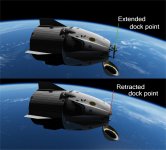
If we could move docking points, like attachment points. Retracting docking meshes would be easy. One vessel is used for the docking mechanism, and the other one for the maneuvering. As it is now, you cannot fire thrusters of an attached vessel. :(

What I did was, make a docking mesh with the thrusters and moving attachment point. While it is attached to vessel mesh, it moves the attached vessel, while retracting the docking mechanism. Looks nice, but there are problems. For instance the visual thrusters, don't move with the other vessel as well as the VC. Of course this could be fixed with a remote control, that supported key presses.

Hard to explain.
 
Here's what I mean, by moveable docking point.
 

Attachments

  • movable_docking_point.jpg
    movable_docking_point.jpg
    116 KB · Views: 37
Donamy's suggestions are important.

I think the joint RCS system could be handled by multiple configs.
You have a second config with extra thruster groups, belonging to the second vessel. The configs switch on a docking event.

Animated docking ports can be faked by mesh animation, but that's not ideal. It's best for the port to really move, even if it's not smooth visually. Conceptually it's the right solution.
 
If we could move docking points, like attachment points. Retracting docking meshes would be easy. One vessel is used for the docking mechanism, and the other one for the maneuvering. As it is now, you cannot fire thrusters of an attached vessel. :(

What I did was, make a docking mesh with the thrusters and moving attachment point. While it is attached to vessel mesh, it moves the attached vessel, while retracting the docking mechanism. Looks nice, but there are problems. For instance the visual thrusters, don't move with the other vessel as well as the VC. Of course this could be fixed with a remote control, that supported key presses.

Hard to explain.

I think I understood and I have ideas but they are all vessel specific. I mean not for a VB vessel, since they require some play around that would be impossible to implement in a generic module.

for example my first idea would be to simulate docking and instead of hard docking just keep the vessels in place by vessel status updating. I used it sometimes and it works very well, for example the FollowMe tool is a vessel that stays in place relevant to the VB vessel through this procedure and as you see it stays in place very well. Then you could "retract" the probe and once in the right position the two docking ports would dock and the vessel status update would cease. I think this would really work, but I don't think I can put it in VB. If I have to make a specific vessel then yes, but with such a generic module... :hmm:

Donamy's suggestions are important.

I think the joint RCS system could be handled by multiple configs.
You have a second config with extra thruster groups, belonging to the second vessel. The configs switch on a docking event.

yep, that would be my first idea as well

Animated docking ports can be faked by mesh animation, but that's not ideal. It's best for the port to really move, even if it's not smooth visually. Conceptually it's the right solution.

The issue is that IIRC docking ports cannot be moved with something docked to it, so even moving or reconfiguring them would not work
 
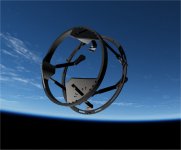
Made this generic docking mechanism, that has default thruster groups, that can be modified in VB. It has a movable attachment point,that pulls or pushes the attached vessel.
I works well, but is not ideal when you have to switch between, the two vessels to use it. Could someone make a "remote control/W key press" ? That would be great.
 

Attachments

  • generic docking mech.jpg
    generic docking mech.jpg
    60.3 KB · Views: 34
nice. So what if I made it so a window with key to extend/retract?
 
I'm greatfull for the offer, but a full remote control is needed. Able to control all the thrusters and anything else a vessel has. There is one available, on OH, but it will not work with 2016. :(
 
I'm greatfull for the offer, but a full remote control is needed. Able to control all the thrusters and anything else a vessel has. There is one available, on OH, but it will not work with 2016. :(

so you want basically a onscreen keyboard that is capable of sending keypresses to a vessel right?
 
Not to derail the subject. But there was remote vessel. I thought the code was available to recompile for 2016.
 
so you want basically a onscreen keyboard that is capable of sending keypresses to a vessel right?


Yes basically, but it would also need to control the thrusters, because only the docked vessel has access to the maneuvering.


Not to derail the subject. But there was remote vessel. I thought the code was available to recompile for 2016.


Is it available for recompile ? Also it is limited to single key presses. It will not do "Lshift + N" e.g.

---------- Post added at 06:23 PM ---------- Previous post was at 06:18 PM ----------

Donamy's suggestions are important.

I think the joint RCS system could be handled by multiple configs.
You have a second config with extra thruster groups, belonging to the second vessel. The configs switch on a docking event.

Animated docking ports can be faked by mesh animation, but that's not ideal. It's best for the port to really move, even if it's not smooth visually. Conceptually it's the right solution.


Two configs, may be the way to go, I suppose. After all, the thrusters would never be firing, while the docking mech was retracting.
 
source code here:
[ame="https://www.orbithangar.com/searchid.php?ID=4778"]Remote Control with Send Key function[/ame]

This might be too much to ask for a basic vessel but sun tracking might be nice?
 
It is available via docking attachment hack.

---------- Post added at 07:44 PM ---------- Previous post was at 07:19 PM ----------

source code here:
Remote Control with Send Key function

This might be too much to ask for a basic vessel but sun tracking might be nice?


Can you recompile that and add multi-key function ?
 
well well... i was almost completing the events part (which meant to be close to the finish line), and this request rang my bell...

So, this is just an experiment, I'm still not sure if I'll be able to implement it in the final version, and even if I do it will be marked as "experimental" for sure.

Anyway the idea could be to add in the dock section a "soft dock" option with a defined distance and an animation to choose. The animation status will define the distance of the soft dock, so if you retract the docking mechanism the distance will decrease until the vessel docks...

I made a test linking the distance to the gear in the DG... I think it works... but here I was setting everything myself (that's why I say that I could do it in a specific vessel easily), I still don't know if that will be possible to be implemented in the final version of VB, so I can't make any promise right now...

 
Soft docking looks really nice and is a feature worth having.

As for joint vessel control, it does make sense to send key presses to a docked vessel.
You'd need to invert some directions for rotation (ex: I press "up" but the docked vessel should receive a "down" press).
I don't know if this is even possible and I guess it's something for another tool.
Anyway, the concept has it's merits.
 
so maybe I did it.

Here's some parameters for the usage:
1) by default the system is off, I think it's better, it's experimental...
1b) at the moment just one docking port per vessel can use this mechanism
2) the user activates the system when he is in docking procedure
3) when the docking ports of the ship gets within the soft docking range to the other port the vessel behaves exactly like for docking and it stays there. The tolerance are 0.5 meters for lateral distance (as in orbiter) and 5 degrees for rotational errors. so if you get there really perfectly you see no jump, otherwise a small jump in behaviour
4) the user will activate the animation he previously set in order to retract the mechanism and hte ships will hard dock
5) in order to undock the user must: trigger the animation backward and then undock. if he doesn't trigger the animation the soft dock distance will remain 0 and the ships will redock just after a few instants.
6) once at soft dock distance again the user can deactivate the soft dock system and the ships will float free
7) if the user doesn't want to do the procedure backwards he can just deactivate the soft dock system when still docked and then undocks normally, as it was happening before
8) nothing of this gets saved to the scenario file, since saving restoring would be quite messy, and this is still an experimental feature, which means: if a ships is soft-docked and the scenario is closed on reopening the user will have to activate the system again manually or the ships will drift away AND if a ship is docked and the system was on, if the scenario is closed and reopened the system will be off and shall be reactivated manually.

---------- Post added at 01:32 ---------- Previous post was at 01:10 ----------

I also have some doubts on how to implement the dialog interface for this. I was wondering if being this experimental could just be a couple of parameter in the cfg that have to be handwritten

---------- Post added at 02:50 ---------- Previous post was at 01:32 ----------

Just to inform that I tested the SoftDock procedure with the DG around the ISS and it really seems to work... all 5 docks established first Soft and then hardened both when docking and when undocking. I think that someone here will be very happy about this... ;)
 
Who would that be ? :hmm:

can't wait to try it !!!!!


:hail::bananadance::banana::woohoo::sweet::bighug::jawdrops::thankyou:
 
Last edited:
There you go, this is just for experiment anyway.

Here's how to use it:
1) prepare your vessel so it has an animation that represents the docking mechanism. It doesn't matter if the animation is manual or automatic.
2) Got to the dock section and choose the relevant dock, now in the lower part of the window there is a soft dock section. Enable the tickbox, set the soft dock distance (which is the distance between the soft dock point and the docking port, basically the length of the docking mechanism), choose the animation and click the "SET" button.
NOTE: the animation must be with status 1 when the mechanism is extended and 0 when retracted.
You are now good to go.
In simulation:
1) Extend the docking mechanism and align for docking (or the other way around, doesn't matter).
2) when you are aligned with the docking mechanism extended press ALT + D so you activate the soft dock system, a message shall appear in the lower left corner saying that the system is active
3) just proceed for docking ,remember that rotation tolerance for soft docking is 5 degrees.
4) once you get to the soft dock point the vessel will just stop and stay there, just like docking. the message "SOFT DOCK" will appear in the lower left corner
5) activate the animation for retracting the docking mechanism and you'll see it working up to hard dock, the message will now become HARD DOCK
6) once hard dock happened just deactivate the soft dock system by pressing again ALT + D
this is it for docking.

The undocking procedure is a bit less nice for now, I will try to make it better.
Anyway:
1) While still docked activate the Soft Dock System with ALT+D
2) if the animation controlling the mechanism is manual extend it just a bit and then undock. it should get back from hard dock to soft dock. you can now fully extend the mechanism. once extended just deactivate the soft dock system with ALT+D and the vessel will be free to float.
if the animation is not manual, in order to go back from hard dock to soft dock you need to trigger the animation backward and then rapidly undock.
NOTE: the soft dock release does not give any velocity to the vessel, which means that once you deactivate the SoftDock System the vessel will not have any relative velocity with respect to the other vessel, and it will just stay there. At the beginning it will seems like it is still soft docked, but if you try to move away it will just go.

Other notes:
- more than one dock can have soft dock functionality now, but it is an untested feature
- if you try to dock 2 vessels with their soft docks the behaviour will be undefined, so one vessel shall be with the classic docking port, while the other can have soft dock
- No soft dock information will be saved in the scenario, so if you are "soft docked" and you close the sim, when you reopen it you will just be there floating. If you reactivate the system with ALT+D it's highly probable that the ship will soft dock again.

That's it, let me know if that works because now I'm curious!!
 

Attachments

Last edited:
Events seems to be working... So we see the light at the end of the tunnel here... Reconfiguration and Events were a massive work: 5900 lines of code for reconfigs and 2600 lines for events... I'll start working on an example finally...
 
Back
Top